- Events
-
Partners
- Government
- Customer Portal
- Contact Us
- Contact Sales
-
English
SolarWinds® Server & Application Monitor's HP server management software lets you monitor the availability and performance of your HP servers. Receive proactive alerts and troubleshoot issues faster before end users and business services are impacted.
Tracks key server health check metrics to alert and report on performance problems.
Server & Application Monitor (SAM) supports multi-vendor servers, including HP, Dell, IBM, and VMware ESX hosts.
Server & Application Monitor’s HP server monitoring software allows you to monitor the health of hardware components in your HP servers. Using SNMP polling, monitor temperature, CMC, fan speed, power supply, blade chassis, and more. Receive server hardware monitoring alerts when components are in warning or critical states, and monitor these metrics over time to analyze trends.
The HP server management tool in SAM provides quick remediation actions to remotely troubleshoot server issues. These include:
Server & Application Monitor allows you to monitor resource utilization on the server. You can track currently used CPU, memory, disk, network resources, and monitor resource utilization trends. This actionable insight helps in hardware procurement planning and budgeting because you know exactly when you will run out of capacity.
SAM automatically discovers hardware and software asset information associated with your servers and workstations, providing you with a centralized inventory for IT asset tracking and management.
Receive performance metrics for more than 200 applications in a single pane of glass. SolarWinds Server & Application Monitor delivers deep monitoring of applications, such as Microsoft Exchange, IIS, Oracle, Linux, Citrix, VMware, and more. You can easily extend monitoring to any custom and homegrown applications.
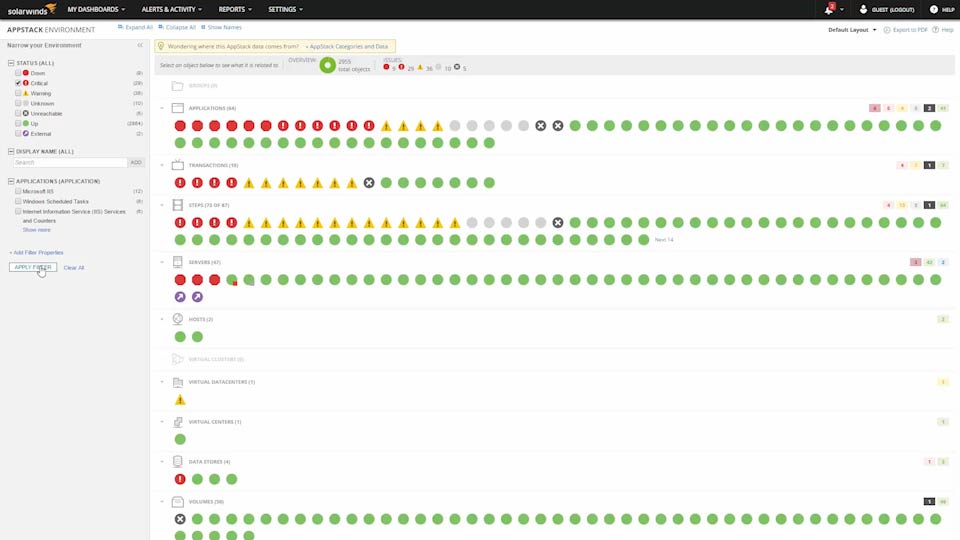
See your entire IT stack with the built-in AppStack™ dashboard, which helps you map dependencies between applications and underlying IT infrastructure components. Quickly pinpoint the source of application issues and speed up troubleshooting.
HP server monitor software is designed to help you easily monitor key performance metrics, diagnose server hardware health issues, track resource utilization for capacity planning purposes, and more quickly troubleshoot problems when they arise.
HP server monitor software can help you keep servers running at optimal performance levels. Software can track key server performance metrics in real time and help you detect server issues resulting from packet loss, response time, and latency, as they arise.
HP server monitoring software is also designed to track key server performance metrics across hardware components, with insights into CPU, power supply, memory, battery, and fan speed. With these insights, the right software can also help you diagnose hardware health issues
Another purpose of HP server monitoring software is to help you stay on top of resource utilization for capacity planning purposes. You can better understand the actual utilization of server resources and access visuals to see resource utilization trends over time. With actionable insights, users can improve their procurement planning and budgeting process.
In addition, a tool may enable rapid remediation actions to remotely troubleshoot server issues. You may be able to remotely reboot the server or start/stop/restart processes and services.
HP server health monitoring is a critical process for gathering insight into real-time and historical hardware and performance issues on your network.
Failure to effectively monitor your HP server health can jeopardize your entire business operation. The consequences deriving from network applications issues or server breakdowns can include lost revenue, resources, and customers.
Monitoring server health becomes a fundamental business endeavor, since the right HP server hardware monitoring software stands to save your business money, energy, time, and additional resources. Detecting and resolving issues today helps prevent server malfunctions from arising in the future—sparing your business opportunity costs.
Server health monitoring software not only equips you with the necessary insight to optimize performance, but keeps you prepared for future server modifications and expansions.
Overall, by compiling server hard drive health data, HP server health monitors can enhance your ability to evaluate the health of your IT infrastructure. With the right data, you can be empowered to expedite problem-solving efforts and proactively prepare for similar problems in the future.
SolarWinds Server & Application Monitor (SAM) is designed to comprehensively monitor server hardware health. HP server hardware monitoring, as well as multi-vendor server hardware monitoring, can be seamless when using SAM. A core feature of SAM is its ability to proactively provide you alerts, so you can act before critical server components such as availability, bandwidth, and response time negatively impact performance.
SAM contains a server health monitor that tracks fan speed, blade chassis, CMC, CPU, battery, temperature, hard drive status, and power supply. This way, with SAM, you can uncover and resolve hardware issues in real time to get ahead of problems that may compromise functionality.
SAM also serves as a centralized inventory center for all IT asset tracking and management needs. SAM automatically identifies all HP hardware and software asset information related to your HP servers and workstations. In addition to monitoring resource utilization trends, you can stay on top of currently used memory, CPU utilization, disk, and network resources. Use HP server SNMP monitoring to easily check if processes are running.
SAM monitors the health and availability of 200+ applications across HP servers. Better yet, performance metrics for all 200+ applications can be easily consumed in a single visual using SAM.
SAM is built to also perform deep monitoring for applications including Linux Server, Windows Server Microsoft Exchange, Oracle, IIS, Citrix, VMware, to name a few, and can be seamlessly extended to monitor any additional custom or homegrown applications. In fact, your entire IT stack can be viewed within the built-in AppStack dashboard, where you can chart dependencies between applications and underlying IT infrastructure components. SAM empowers you to rapidly pinpoint the source of application issues and expedite your troubleshooting efforts at once, for HP devices and beyond.
Other SolarWinds tools to help improve your HP environment:
Other features:
HP server monitor software is designed to help you easily monitor key performance metrics, diagnose server hardware health issues, track resource utilization for capacity planning purposes, and more quickly troubleshoot problems when they arise.
HP server monitor software can help you keep servers running at optimal performance levels. Software can track key server performance metrics in real time and help you detect server issues resulting from packet loss, response time, and latency, as they arise.
HP server monitoring software is also designed to track key server performance metrics across hardware components, with insights into CPU, power supply, memory, battery, and fan speed. With these insights, the right software can also help you diagnose hardware health issues
Another purpose of HP server monitoring software is to help you stay on top of resource utilization for capacity planning purposes. You can better understand the actual utilization of server resources and access visuals to see resource utilization trends over time. With actionable insights, users can improve their procurement planning and budgeting process.
In addition, a tool may enable rapid remediation actions to remotely troubleshoot server issues. You may be able to remotely reboot the server or start/stop/restart processes and services.
HP server health monitoring is a critical process for gathering insight into real-time and historical hardware and performance issues on your network.
Failure to effectively monitor your HP server health can jeopardize your entire business operation. The consequences deriving from network applications issues or server breakdowns can include lost revenue, resources, and customers.
Monitoring server health becomes a fundamental business endeavor, since the right HP server hardware monitoring software stands to save your business money, energy, time, and additional resources. Detecting and resolving issues today helps prevent server malfunctions from arising in the future—sparing your business opportunity costs.
Server health monitoring software not only equips you with the necessary insight to optimize performance, but keeps you prepared for future server modifications and expansions.
Overall, by compiling server hard drive health data, HP server health monitors can enhance your ability to evaluate the health of your IT infrastructure. With the right data, you can be empowered to expedite problem-solving efforts and proactively prepare for similar problems in the future.
SolarWinds Server & Application Monitor (SAM) is designed to comprehensively monitor server hardware health. HP server hardware monitoring, as well as multi-vendor server hardware monitoring, can be seamless when using SAM. A core feature of SAM is its ability to proactively provide you alerts, so you can act before critical server components such as availability, bandwidth, and response time negatively impact performance.
SAM contains a server health monitor that tracks fan speed, blade chassis, CMC, CPU, battery, temperature, hard drive status, and power supply. This way, with SAM, you can uncover and resolve hardware issues in real time to get ahead of problems that may compromise functionality.
SAM also serves as a centralized inventory center for all IT asset tracking and management needs. SAM automatically identifies all HP hardware and software asset information related to your HP servers and workstations. In addition to monitoring resource utilization trends, you can stay on top of currently used memory, CPU utilization, disk, and network resources. Use HP server SNMP monitoring to easily check if processes are running.
SAM monitors the health and availability of 200+ applications across HP servers. Better yet, performance metrics for all 200+ applications can be easily consumed in a single visual using SAM.
SAM is built to also perform deep monitoring for applications including Linux Server, Windows Server Microsoft Exchange, Oracle, IIS, Citrix, VMware, to name a few, and can be seamlessly extended to monitor any additional custom or homegrown applications. In fact, your entire IT stack can be viewed within the built-in AppStack dashboard, where you can chart dependencies between applications and underlying IT infrastructure components. SAM empowers you to rapidly pinpoint the source of application issues and expedite your troubleshooting efforts at once, for HP devices and beyond.
Other SolarWinds tools to help improve your HP environment:
Other features:
Server & Application Monitor
Automatic application discovery and server monitoring.
Quickly monitor the performance and availability of Microsoft Azure and Amazon AWS services.
Built-in templates provide best practices.