- Events
-
Partners
- Government
- Customer Portal
- Contact Us
- Contact Sales
-
English
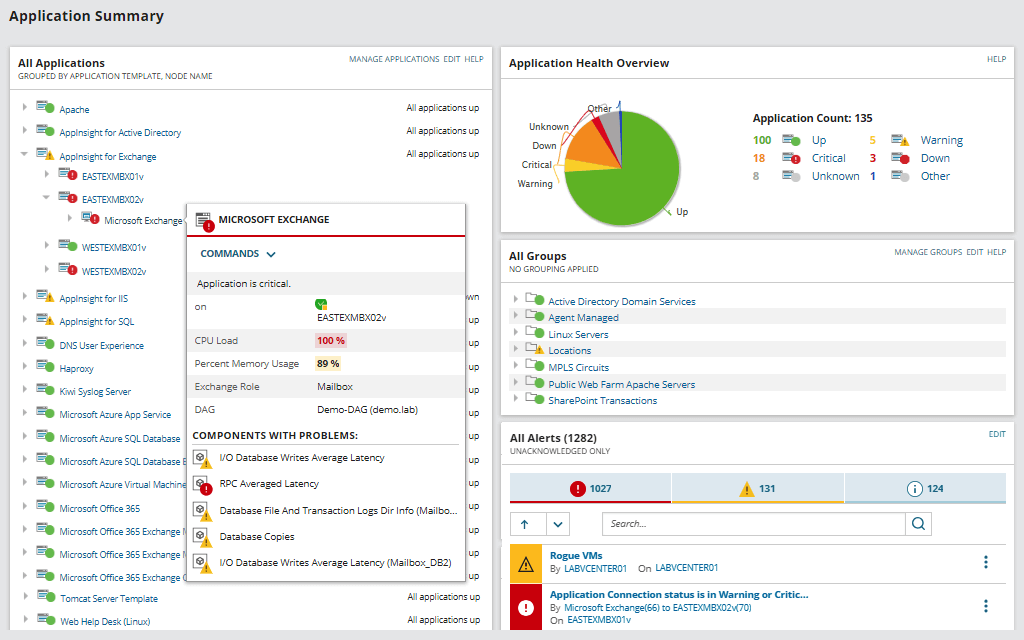
Server monitoring software is an automated tool to allow users to track key performance and health metrics for servers and applications, helping them more easily diagnose, resolve, and even prevent downtime and bottlenecks.
With effective server and application monitoring software, you can answer questions like:
To better understand the importance of server monitoring software, you should have a clear understanding of server monitoring as a strategy.
What is server monitoring? Server monitoring is the IT process of tracking states and changes for system resources associated with relevant servers. Monitoring server performance can enable you to understand how server resources are used, so you can better optimize server and application configurations. By monitoring and optimizing your use of server resources, or the underlying hardware and processes necessary for server functioning (particularly CPU and memory), you can work towards having both more efficient systems and improving end-user experience.
However, improving server performance using manual monitoring strategies can be difficult to do, since this can involve tracking server and application performance with a device-by-device approach. To more effectively monitor server performance across your entire infrastructure, it can be better to choose a server monitor system specifically designed for both professional usability and scalability.

Server monitoring software is critical to business productivity because it can help you ensure systems stay functional. To ensure optimal performance and availability, it’s vital to monitor server stats. Your server monitoring software should monitor resources like CPU, memory, disk usage, disk I/O, networking, processes, services, and hardware.
It’s also critical to monitor application performance, as apps can affect server load and utilization. Applications can also be critical for many business functions. IT functions and end users depend on fast, responsive applications. That means you need to monitor key utilization and traffic metrics for everything from Microsoft Office 365 to Skype to SQL Server.
Servers and applications are the backbones of your business. Without server monitoring software, you may lack the visibility you need to be able to quickly resolve or better avoid performance issues and downtime. With server monitoring software, you can quickly fix active issues and help prevent future ones by tracking and trending server performance over time. If a server, application, or other process goes down, you’ll have the insights and tools you need to respond right away and head off or lessen potentially larger consequences throughout your business operations.

Not all server monitoring software is created equal. The following features should be on your checklist when looking for a server and application monitoring solution:
Automatic app and server discovery. Look for capabilities that let you automatically discover multi-vendor applications and servers throughout your environment to help ensure monitoring can start more quickly. Additionally, this multi-vendor compatibility means you can track metrics even for virtual hosts and guests through Microsoft Hyper-V and VMware ESX.
Compatibility with Amazon AWS and Microsoft Azure. Can you integrate the server monitoring system with popular services? Ensure you can monitor IaaS, PaaS, and SaaS services through both agent-based and agentless technologies.
Built-in templates to ensure best practices. Server monitoring tools should have monitoring and troubleshooting templates for the hundreds or even thousands of applications, systems, and infrastructure components your business uses, including popular choices like Active Directory, Java, XenApp, IBM WebSphere, Skype for Business, Office 365, Microsoft IIS, and SQL Server. The software should enable you to track code-level application performance detail.
Extensive customizability to enable you to monitor what and how you want. It’s useful to be able to create custom monitors, modify built-in templates, and import your existing custom scripts. Every IT environment is different, so your monitor should be adaptable enough to help you in various scenarios, including both commercial and custom applications.
Infrastructure dependency mapping. Use server monitoring software to quickly see infrastructure dependencies and pinpoint the root cause of application issues within physical and virtual server environments. With the right kind of tool, it can be possible to identify where application issues originate in just a few seconds.
Automatic discovery of network-based relationships. A server monitoring system can help you automatically discover and visualize network-based relationships between applications and servers. Examine and monitor inbound and outbound network connections and analyze metrics, including latency and packet loss. Visualize individual application or server connections or view a complete map of application dependencies of multiple application, server, and infrastructure connections to determine if network communication issues are affecting business-critical applications.
Pre-packaged and customizable alerts and reports. Reduce alert fatigue with custom alert thresholds, or use the dynamic baselines feature to set alert thresholds and define what’s “normal.” Create server monitoring alerts based on simple or complex nested trigger conditions, defined parent/child dependencies, and more. Use one of the hundreds of built-in reports or create your own using the web-based interface to fit your business needs.
Server volume monitoring and capacity planning. Server monitors should help you plan ahead. Monitor server storage volumes, disk usage, and capacity metrics out of the box. You may also be able to troubleshoot storage issues in SAN and NAS environments.
Cross-stack IT data correlation. Best-in-class server monitoring tools may allow you to overlay performance metrics from your systems data and multiple sources (such as network, virtualization, or storage), and view data types on a single chart.

Server monitoring tools offer insights into servers and applications, which means they track key metrics over time for these components and display them for IT teams to leverage. A server monitor system helps prevent server and application outages and maximize performance by monitoring, tracking, and reporting on statuses, capacity, application, and server performance. Typically, server monitoring tools work by providing many of the following features and capabilities:
Compatibility across vendors and environments. Which servers can be monitored? Typically, you can monitor servers on-premises, in the cloud, or both, including Amazon EC2, Microsoft Azure, Rackspace, and more, along with remote locations like DMZ, behind NAT/firewall, or over a satellite connection or WAN. Common server types include application servers, client servers, FTP servers, mail servers, web servers, and proxy servers.
Key metrics for servers and applications. Server monitors can connect to devices through either an agent or agentless connection, typically via Windows Management Instrumentation (WMI) or Simple Network Management Protocol (SNMP) protocols. These metrics are gathered at set intervals, depending on what’s appropriate for the component. Metrics typically include CPU utilization and disk utilization, which paint a picture of server memory use, as well as traffic and packet levels, which convey network server load.
Wondering how to measure application performance? To gather performance data, application monitoring tools can use templates focused on certain metrics relevant to the server or application. For instance, for Active Directory, the program will measure and report on relevant metrics like LDAP client service or DNS client service to indicate performance quality. That’s why it’s important to have built-in templates compatible with a wide range of applications.
In-depth analytics tools for understanding metrics. Server monitoring tools work not just by providing real-time metrics, but by offering ways to more easily understand these metrics in context. This facilitates tracking performance over time, allowing for the establishment of a historical baseline, which in turn makes it easier to plan for resource allocation and load distribution. Baselines and thresholds are critical because they provide insight into anomalies. Using dynamic baselines helps you define what's "normal" and offers better proactive server monitoring by setting change threshold values accordingly. If thresholds are crossed, the tool can also send an automatic alert to admins.
Remote server monitoring. With companies having multiple offices, data centers, and private and public clouds, remote server monitoring is vital. Using agent and agentless data collection methodologies simplifies remote server monitoring and gives you complete control over a server as if it were on-premises, regardless of where it resides.
Real-time processes. The software should monitor current processes running in your server for memory, virtual memory, CPU, and disk I/O. Avoid logging in to a machine physically or remotely to retrieve its vital statistics. Get real-time performance monitoring for metrics such as CPU load, memory load, response time, disk queue, and network throughput.

There are dozens of server monitoring solutions on the market, but not all products are created equal. When choosing a server monitoring software, you should ask the following key questions:

When server performance suffers, the effects can be felt throughout an entire organization. To ensure you can proactively protect your system, you need to gather key metrics on servers and applications across local, remote, and cloud environments. Without the right server monitoring tools, it can be difficult to access the comprehensive, in-depth, real-time system overview you need to perform effective troubleshooting.
SolarWinds® Server & Application Monitor is a comprehensive server monitoring solution built to deliver all the features you need to effectively track the performance of servers, applications, and more. SAM can also integrate with other Orion® Platform products to provide unified server monitoring and deeper insight into web performance, storage, network, database, and virtualized resources. Server & Application Monitor is designed to be an all-in-one software for server and application monitoring, with the ability to support environments of all sizes.

A complete monitoring solution: SolarWinds SAM is designed to deliver agentless server monitoring for Windows and Linux applications and operating systems, as well as for IT infrastructure located on-premises, in data centers, in remote locations, or in the cloud. Monitor, alert, and correlate across Microsoft applications, hypervisors, and Azure and AWS IaaS, PaaS, and SaaS services.
Custom features for application and server monitoring: Enjoy monitoring reports, alerts, and templates for 1,200-plus vendor applications, servers, databases, and infrastructures, all in a single, easy-to-use, configurable web interface. Customizable server monitoring can allow you to monitor processes, services, or applications in just a few clicks.
Be proactive about performance: Don’t wait until an issue damages business productivity. By using SAM to monitor your system, you can receive an automatic alert at the first sign of a problem. By leveraging custom alerting thresholds, it’s easier to achieve the real-time insight you need to catch errors before they impact end users.
Server monitoring isn’t as straightforward as it sounds. Tracking server performance can mean taking account of server hardware, services and applications, and even end-user experience. If you’re looking for a server monitoring solution, download a fully functional, 30-day trial today to see if SolarWinds Sever & Application Monitor is the best server monitoring software for your needs.
Server & Application Monitor
Automatic application discovery and server monitoring.
Quickly monitor the performance and availability of Microsoft Azure and Amazon AWS services.
Built-in templates provide best practices.


