- Events
-
Partners
- Government
- Customer Portal
- Contact Us
- Contact Sales
-
English
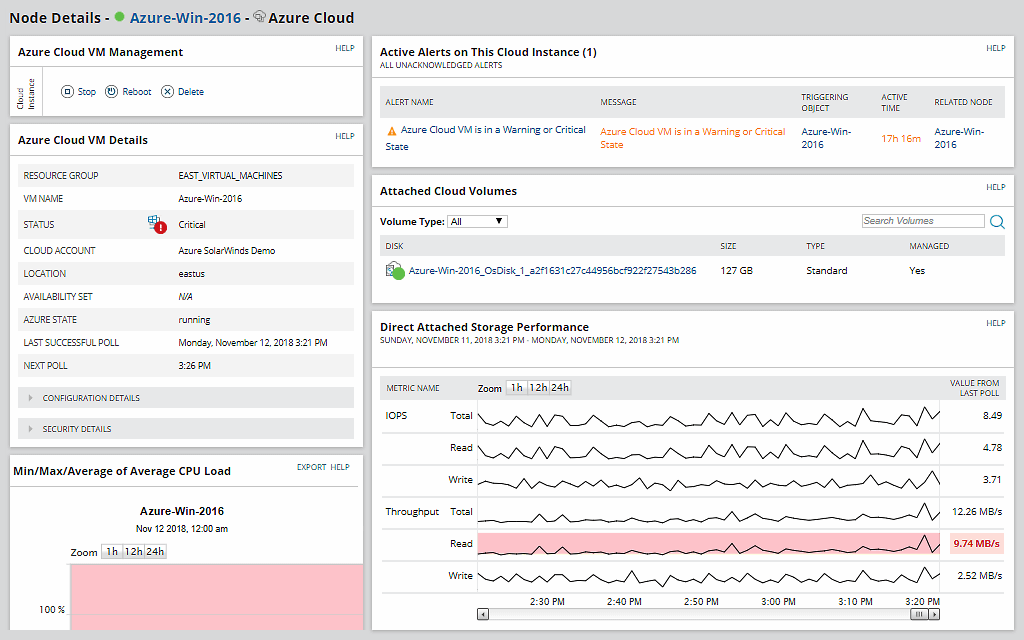
With SolarWinds® Server & Application Monitor (SAM), you can more easily monitor, track, and gain insight into the performance of Azure IaaS services. SAM lets you monitor Azure VM performance for both Windows and Linux operating systems and Kubernetes for CPU, latency, IOPs, and more.
With the Azure IaaS monitoring tool in SAM, you can:
You can also use Azure IaaS services monitoring data to discover bottlenecks and optimize Azure infrastructure performance.
With an Azure IaaS monitoring tool like SolarWinds Server & Application Monitor, you can correlate Azure IaaS monitoring metrics alongside system and application metrics. In fact, SAM is specifically designed to help pinpoint Azure IaaS cloud application problems faster by visually correlating metrics from Azure, operating systems, and applications.
The clear dashboards in SAM are also designed to make it easier to view Azure IaaS-based cloud metrics next to on-prem metrics to help you ensure you’re getting the performance you expect. This visibility can help you gain the insights you need to identify potential bottlenecks, network performance, and cloud provider issues.
Your Azure IaaS services are just one part of your larger Microsoft Azure environment. Leverage the power of SolarWinds software to gain deep insight into the operations of the Azure servers you use—including full Azure performance monitoring to give you the ability to react quickly to potential issues causing performance slowdowns in your Azure infrastructure.
SAM is built to provide valuable monitoring and insights into Azure IaaS, Azure PaaS, Azure virtual machines, and service performance by offering valuable features, including:
Make sure you’re staying on top of your entire Microsoft environment (not just your Azure IaaS services) with SolarWinds Server & Application Monitor. SAM helps ensure you have visibility and performance monitoring for your Microsoft systems, applications, and cloud resources in a single centralized view.
In addition to Azure performance monitoring, SAM includes several other Microsoft monitoring tools designed to optimize the performance of your entire ecosphere of Microsoft software, such as:
For organizations with IT resources running on-premises or in other clouds, using an affordable, easy-to-use Azure infrastructure monitoring tool can help simplify monitoring your entire environment.
In addition to Server & Application Monitor, SolarWinds offers other IT Operations Management solutions designed to be integrated into a single dashboard, making it easier to stay on top of your entire environment’s performance.
With SolarWinds IT monitoring and management solutions, you can:
Azure Infrastructure as a Service, or Azure IaaS, is a Microsoft solution that provides highly scalable and automated compute resources. Microsoft manages the underlying infrastructure such as CPU, memory, and storage. You are responsible for managing the operating system, middleware, application, and data.
Before getting into the specifics of Azure IaaS, it’s important to first define IaaS in general. Infrastructure as a service (IaaS) replaces your traditional on-premises data center infrastructure by providing memory, compute, storage, networking, and other related software as a cloud service instead. In practical terms, IaaS takes the form of virtual servers you can rent from a vendor who has a data center. With IaaS, you get access, not ownership—and you get a higher level of flexibility than you would with an on-prem data center.
Microsoft Azure is a public cloud vendor, offering the popular Azure IaaS option for businesses looking to move to the cloud. Azure IaaS was built to help organizations build, test, deploy, and manage applications and services through their Microsoft-managed data centers. There are many potential advantages to using Azure IaaS, which may include financial savings, scalability, and high performance for your IT deployments, reliability, stability, and supportability, as well as disaster recovery and business continuity.
The popularity of Azure IaaS means Azure infrastructure management is often crucial for organizations. For those management efforts to be successful, organizations using Azure IaaS should also have effective Azure IaaS monitoring solutions.
At a time when digital transformation is in full swing and more business-critical data and services are being deployed to public cloud environments (like Microsoft Azure), gaining deeper insights from Azure IaaS services monitoring is often a necessity.
Monitoring the health and performance of your Azure IaaS infrastructure can allow you to more easily control external resources your organization depends on for the functioning of your internal infrastructure, services, or applications. Everything from capacity issues and resource allocation to bottlenecks can go unnoticed without consistent monitoring. Since so many critical systems rely on Azure IaaS being up and running and performing well, a minor issue can have major consequences.
Advantages of monitoring IaaS services include helping you identify, diagnose, and resolve incidents affecting performance more quickly. Monitoring can also give you insight into errors, whether they’re human or machine-made, so you can detect issues and resolve them before your end users become aware. Quicker problem identification and troubleshooting also mean Azure IaaS monitoring is a great way to help businesses achieve and maintain peak application performance.
IaaS monitoring can give you the data and insights you need to better understand cloud performance and dig into the health of your Azure IaaS services. By tracking and understanding the health of those services, you can more quickly identify when there’s an issue, meaning you can act fast to target and resolve it.
While there are clearly many advantages to Azure IaaS monitoring, there are also some clear disadvantages to not monitoring Azure IaaS more comprehensively. By not monitoring IaaS services alongside other key infrastructure metrics, you may lack visibility into issues that could also be affecting the health of Azure IaaS services. Then, when you do realize there’s a problem, it will be much more difficult to identify its root cause or to troubleshoot a solution without the data and metrics collected through the monitoring process. The same is true when it comes to identifying specific errors and incidents related to your Azure IaaS services. Without effective Azure IaaS monitoring that can allow you to view and correlate the health of Azure services in relation to other key infrastructure metrics like application performance, your understanding of Azure performance will likely be limited to troubleshooting using only part of a potentially broader performance issue.
There are several features you need to look out for in any IaaS tools you consider. These include:
When using Azure infrastructure monitoring tools, it’s important to choose software that will allow you to do more than monitor the above-mentioned operations. When choosing tools for working with cloud infrastructure such as the Azure service, check the correlation between performance fluctuations of the Azure infrastructure with the performance of services or applications your organization provides.
Quality Azure IaaS monitoring can help ensure that if problems do arise, you have the tools you need to resolve them quickly—often before your end users even realize there was an issue. This better positions you to make sure downtime doesn’t end up affecting your bottom line.
Other SolarWinds tools to help support Azure environment:
Related features:
Azure Infrastructure as a Service, or Azure IaaS, is a Microsoft solution that provides highly scalable and automated compute resources. Microsoft manages the underlying infrastructure such as CPU, memory, and storage. You are responsible for managing the operating system, middleware, application, and data.
Before getting into the specifics of Azure IaaS, it’s important to first define IaaS in general. Infrastructure as a service (IaaS) replaces your traditional on-premises data center infrastructure by providing memory, compute, storage, networking, and other related software as a cloud service instead. In practical terms, IaaS takes the form of virtual servers you can rent from a vendor who has a data center. With IaaS, you get access, not ownership—and you get a higher level of flexibility than you would with an on-prem data center.
Microsoft Azure is a public cloud vendor, offering the popular Azure IaaS option for businesses looking to move to the cloud. Azure IaaS was built to help organizations build, test, deploy, and manage applications and services through their Microsoft-managed data centers. There are many potential advantages to using Azure IaaS, which may include financial savings, scalability, and high performance for your IT deployments, reliability, stability, and supportability, as well as disaster recovery and business continuity.
The popularity of Azure IaaS means Azure infrastructure management is often crucial for organizations. For those management efforts to be successful, organizations using Azure IaaS should also have effective Azure IaaS monitoring solutions.
At a time when digital transformation is in full swing and more business-critical data and services are being deployed to public cloud environments (like Microsoft Azure), gaining deeper insights from Azure IaaS services monitoring is often a necessity.
Monitoring the health and performance of your Azure IaaS infrastructure can allow you to more easily control external resources your organization depends on for the functioning of your internal infrastructure, services, or applications. Everything from capacity issues and resource allocation to bottlenecks can go unnoticed without consistent monitoring. Since so many critical systems rely on Azure IaaS being up and running and performing well, a minor issue can have major consequences.
Advantages of monitoring IaaS services include helping you identify, diagnose, and resolve incidents affecting performance more quickly. Monitoring can also give you insight into errors, whether they’re human or machine-made, so you can detect issues and resolve them before your end users become aware. Quicker problem identification and troubleshooting also mean Azure IaaS monitoring is a great way to help businesses achieve and maintain peak application performance.
IaaS monitoring can give you the data and insights you need to better understand cloud performance and dig into the health of your Azure IaaS services. By tracking and understanding the health of those services, you can more quickly identify when there’s an issue, meaning you can act fast to target and resolve it.
While there are clearly many advantages to Azure IaaS monitoring, there are also some clear disadvantages to not monitoring Azure IaaS more comprehensively. By not monitoring IaaS services alongside other key infrastructure metrics, you may lack visibility into issues that could also be affecting the health of Azure IaaS services. Then, when you do realize there’s a problem, it will be much more difficult to identify its root cause or to troubleshoot a solution without the data and metrics collected through the monitoring process. The same is true when it comes to identifying specific errors and incidents related to your Azure IaaS services. Without effective Azure IaaS monitoring that can allow you to view and correlate the health of Azure services in relation to other key infrastructure metrics like application performance, your understanding of Azure performance will likely be limited to troubleshooting using only part of a potentially broader performance issue.
There are several features you need to look out for in any IaaS tools you consider. These include:
When using Azure infrastructure monitoring tools, it’s important to choose software that will allow you to do more than monitor the above-mentioned operations. When choosing tools for working with cloud infrastructure such as the Azure service, check the correlation between performance fluctuations of the Azure infrastructure with the performance of services or applications your organization provides.
Quality Azure IaaS monitoring can help ensure that if problems do arise, you have the tools you need to resolve them quickly—often before your end users even realize there was an issue. This better positions you to make sure downtime doesn’t end up affecting your bottom line.
Other SolarWinds tools to help support Azure environment:
Related features:
Server & Application Monitor
Track and trend key Azure IaaS services and metrics
Correlate IaaS metrics to application performance
Monitor your complete Microsoft ecosphere of products