- Events
-
Partners
- Government
- Customer Portal
- Contact Us
- Contact Sales
-
English
In large or complex environments, it can be hard to know where to start when it comes to performance monitoring for remote servers. SAM can help you simplify remote server monitoring by allowing you to quickly drill down on what you need to know. This agentless remote server monitoring software is designed to monitor key indicators of server performance like hard drive status, array status, and CPU right out of the box.
SAM also offers multi-application and multi-server support. From Active Directory to Azure to Dell PowerEdge, SAM can help you track the metrics that matter and generate data-driven insights.
To take remote performance monitoring for servers to the next level, admins need tools to help them analyze the data they gather from remote services monitoring more easily and quickly. SAM remote server monitoring software comes with unique features designed to help you dig deeper.
For example, using the PerfStack™ feature, you can troubleshoot faster by dragging and dropping remote server monitoring metrics on a common timeline alongside other performance metrics for quick visual correlation across your environment. Also, the included AppInsight™ monitoring templates can help you more easily identify complex issues in key business tools like Active Directory, Microsoft Exchange, and databases like SQL Server.
Server monitoring is the process of tracking server resources and metrics. This can help you ensure systems are working properly, monitor server performance, better understand how your resources are being used, and improve end-user experience.
Remote server monitoring applies the same principles of server monitoring to resources admins monitor, manage, and operate remotely. System administrators can use remote monitoring and management software, off-hours server support, and other solutions to extend their reach and control more services without having to be physically near them. Also, remote environments can improve efficiency, save money, and reduce the footprint of the data center. Remote server monitoring software helps keep these valuable servers running at their highest capacity.
A main benefit of remote server monitoring is being proactively notified of server performance issues before end users notice a problem. With remote server monitoring software, you can:
With legacy hardware, virtual machines, thousands of applications, remote servers, and more, today’s server environments are highly complex. As such, there are many ways to approach server monitoring in your environment using a remote system monitor. To remotely monitor your server environment most effectively, you should pay special attention to remote system metrics, the health of critical hardware components, and Windows event logs.
Key metrics for remote server monitoring and troubleshooting slow systems include:
With the Real-Time Event Viewer in SAM remote server monitoring software, you can monitor Windows server event logs as they happen in addition to:
Remote performance monitoring for servers and standard server monitoring share many similarities and best practices. For example, infrastructure dependency mapping, server volume monitoring, and key server metrics are relevant to server performance monitoring no matter where your servers are located.
SolarWinds Server & Application Monitor is designed to be a robust server monitoring solution and remote server monitoring software, with feature likes the Real-Time Process Explorer (RTPE) remote server management tool built to let you remotely monitor and quickly kill processes affecting server and app performance. You can also run RTPE to retrieve a machine’s vital statistics to gain a deeper understanding of monitored and unmonitored processes. Features like these can give you more granular access to your remote servers, helping streamline remote services monitoring by providing more detailed insights.
SolarWinds Server & Application Monitor (SAM) is a robust and server environment monitor designed to make remote server monitoring easier and more intuitive for servers and applications from hypervisors and SaaS products to home-grown applications across private, public, and hybrid cloud environments.
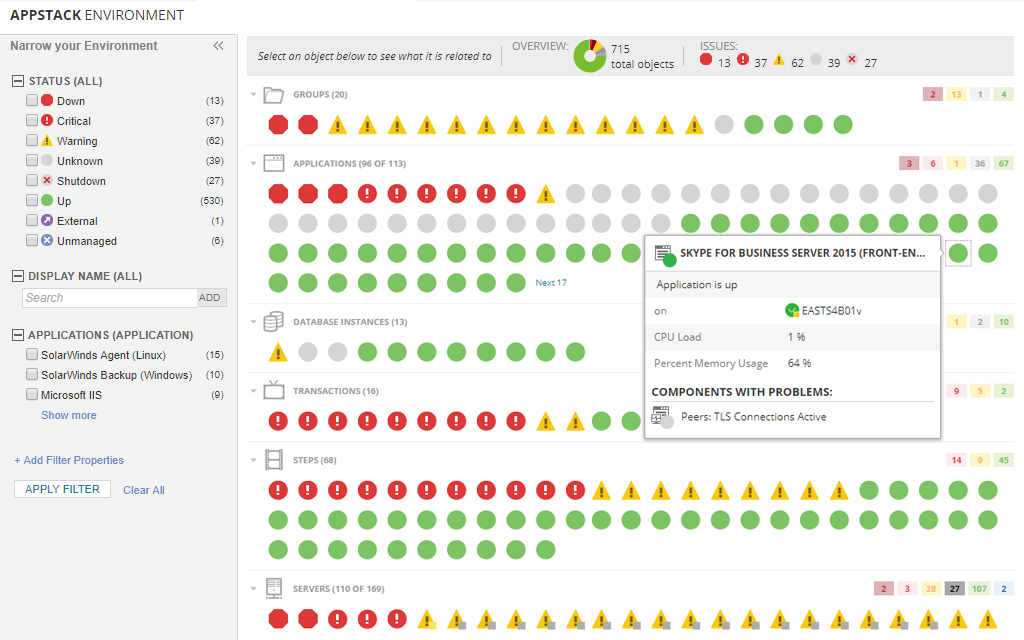
With over 1,200 out-of-the-box monitoring templates, you can more easily get started monitoring performance and availability for servers, applications, systems, and infrastructure in your environment—even remote servers. You can also create custom templates to build the remote server monitoring solution that makes sense for your business. SAM remote server monitoring software can collect key metrics like CPU usage, hard drive status, and array status to make it easier to drill down on the metrics that matter, track performance, and make more informed decisions using data-driven insights. You can also use the proprietary PerfStack, AppStack™, and AppInsight visualization and monitoring features to identify and remediate issues faster.
SAM is designed to give you the insights you need to stay on top of remote server performance to deliver the best possible experience to users.
Server monitoring is the process of tracking server resources and metrics. This can help you ensure systems are working properly, monitor server performance, better understand how your resources are being used, and improve end-user experience.
Remote server monitoring applies the same principles of server monitoring to resources admins monitor, manage, and operate remotely. System administrators can use remote monitoring and management software, off-hours server support, and other solutions to extend their reach and control more services without having to be physically near them. Also, remote environments can improve efficiency, save money, and reduce the footprint of the data center. Remote server monitoring software helps keep these valuable servers running at their highest capacity.
A main benefit of remote server monitoring is being proactively notified of server performance issues before end users notice a problem. With remote server monitoring software, you can:
With legacy hardware, virtual machines, thousands of applications, remote servers, and more, today’s server environments are highly complex. As such, there are many ways to approach server monitoring in your environment using a remote system monitor. To remotely monitor your server environment most effectively, you should pay special attention to remote system metrics, the health of critical hardware components, and Windows event logs.
Key metrics for remote server monitoring and troubleshooting slow systems include:
With the Real-Time Event Viewer in SAM remote server monitoring software, you can monitor Windows server event logs as they happen in addition to:
Remote performance monitoring for servers and standard server monitoring share many similarities and best practices. For example, infrastructure dependency mapping, server volume monitoring, and key server metrics are relevant to server performance monitoring no matter where your servers are located.
SolarWinds Server & Application Monitor is designed to be a robust server monitoring solution and remote server monitoring software, with feature likes the Real-Time Process Explorer (RTPE) remote server management tool built to let you remotely monitor and quickly kill processes affecting server and app performance. You can also run RTPE to retrieve a machine’s vital statistics to gain a deeper understanding of monitored and unmonitored processes. Features like these can give you more granular access to your remote servers, helping streamline remote services monitoring by providing more detailed insights.
SolarWinds Server & Application Monitor (SAM) is a robust and server environment monitor designed to make remote server monitoring easier and more intuitive for servers and applications from hypervisors and SaaS products to home-grown applications across private, public, and hybrid cloud environments.
With over 1,200 out-of-the-box monitoring templates, you can more easily get started monitoring performance and availability for servers, applications, systems, and infrastructure in your environment—even remote servers. You can also create custom templates to build the remote server monitoring solution that makes sense for your business. SAM remote server monitoring software can collect key metrics like CPU usage, hard drive status, and array status to make it easier to drill down on the metrics that matter, track performance, and make more informed decisions using data-driven insights. You can also use the proprietary PerfStack, AppStack™, and AppInsight visualization and monitoring features to identify and remediate issues faster.
SAM is designed to give you the insights you need to stay on top of remote server performance to deliver the best possible experience to users.
Server & Application Monitor
Use a remote resource monitor to perform robust server monitoring across multiple locations.
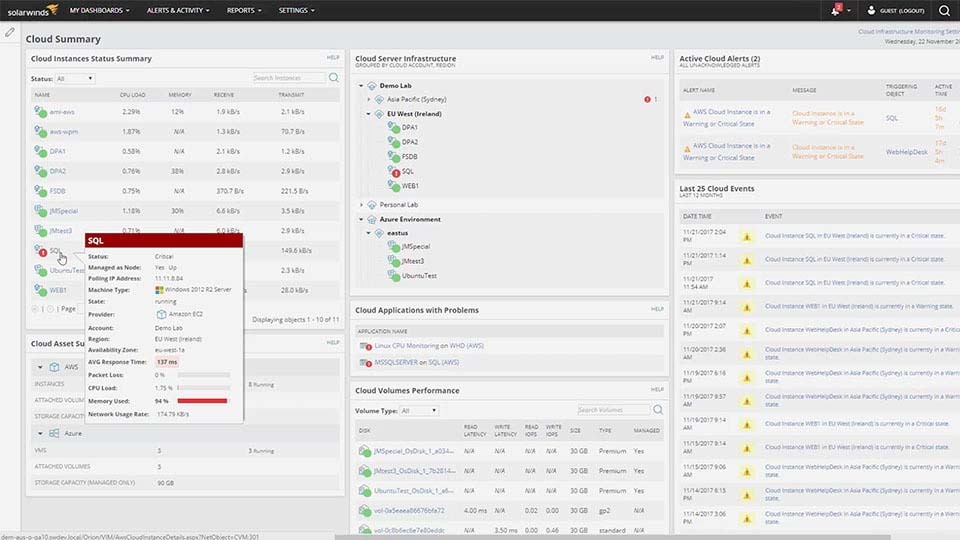
Monitor the performance of Azure and AWS services with remote server monitoring software.
Streamline and optimize remote performance monitoring for servers using built-in monitoring templates.