- Events
-
Partners
- Government
- Customer Portal
- Contact Us
- Contact Sales
-
English
Get complete monitoring of your environment with SolarWinds® Server & Application Monitor (SAM), a powerful Azure monitoring tool. Monitor both your complex Azure environment and other infrastructure for more contextual overviews and insights.
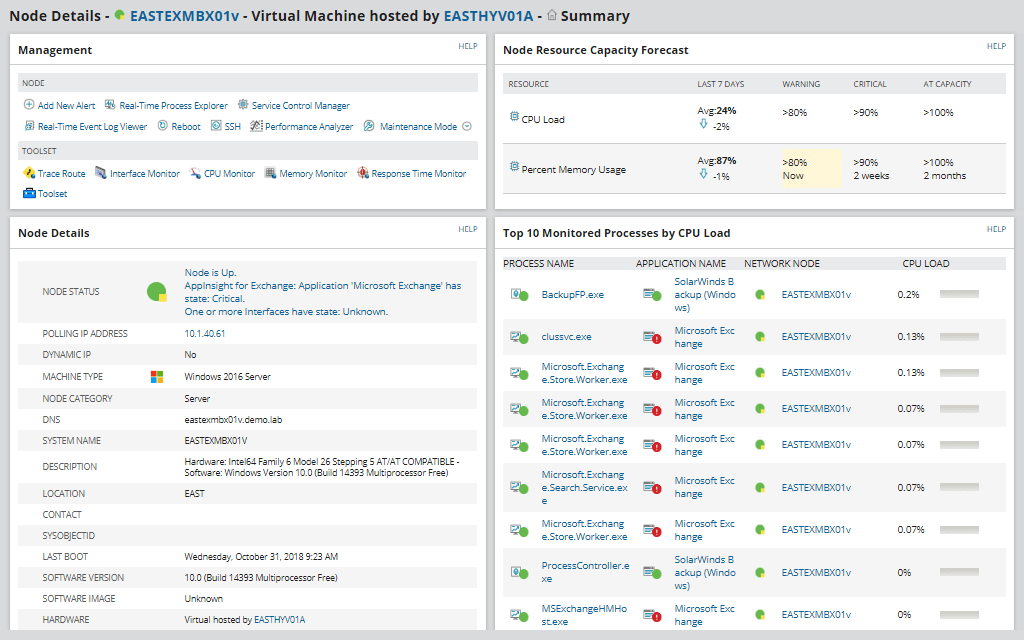
The single-pane-of-glass dashboard is built to offer you insights into systems, applications, and infrastructure performance, regardless of where they reside. Visualize and correlate metrics across your entire environment and define “what’s normal” with dynamic baselining and alerting. Plus, use auto-discovery to ensure your monitoring includes any Azure cloud VMs and containers.
Gain insights into the performance of your Azure IaaS services, including virtual machines and Kubernetes, with robust Azure IaaS monitoring. With the SAM Azure monitor, you can view and correlate infrastructure metrics in relation to application performance with a single pane of glass. You can also view Azure performance over time to optimize service delivery.
SAM is built to let you auto-discover newly created VMs and containers, then monitor network communication between VMs and use mapping between VMs and applications for visual insights. You can also easily view Azure region, configuration, and security details.
Track key Azure PaaS service metrics to help ensure application performance and availability. SAM offers Azure service monitoring of critical Azure components such as CPU, memory, requests, and response time for your dynamic Azure workloads.
You can view metrics for:
If there's an Azure service not included in the out-of-the-box templates, you can use the API Poller to build the one you need, now with 10x more metrics per poller.
In addition to being designed as a powerful Azure service monitoring and Azure application monitoring tool, SAM can help you more easily monitor your Microsoft ecosystem—including on-premises and remote Microsoft systems, applications, and cloud resources—with agent or agentless monitoring in a convenient, centralized view.
SAM is designed to monitor, optimize, and extend the performance of many Microsoft products, such as:
For many businesses, Office 365 applications are one of the most used of the Microsoft suite and need to function well to support productivity. SAM includes Azure monitor templates to make it easier to monitor and trend the performance of your Office 365 applications. Monitor and report on data such as active users, mailbox size and growth, mobile devices, and more. You can easily view these metrics next to your on-prem Exchange server monitoring to assist with email migrations.
SolarWinds Server & Application Monitor (SAM) includes Azure monitoring templates that use real-time SNMP, UDP, TCP, WMI, and WinRM calls to collect valuable information about the performance of Azure applications and servers. Access to this data can help you gain a more thorough picture of server and application performance and troubleshoot performance issues across your Azure environment more effectively.
As a comprehensive Azure monitor, SAM is designed to provide a range of capabilities, including Azure virtual machine monitoring, Azure IoT Hub monitoring, Azure Service Bus monitoring, and Azure application monitoring capabilities.
Microsoft Azure is a large and intricate platform, with hundreds of cloud-based products and services that allow organizations to build, manage, and deploy their applications. Monitoring Azure servers, Azure cloud services, and Azure applications can be difficult and time-consuming—even with Azure monitoring tools made by Microsoft. Using a comprehensive third-party Azure monitoring tool is important for ensuring your Azure environment’s infrastructure and services are running properly, reducing bottlenecks and downtime, and allocating your resources more effectively.
Investing in Azure environment monitoring can help you:
By using a powerful Azure monitoring tool for key tasks—including Azure Service Bus monitoring, Azure usage monitoring, Azure virtual machine monitoring, and Azure service monitoring—you can gain a better picture of your entire Azure environment and optimize its performance.
Collecting, tracking, and analyzing Azure monitor metrics can help give you a deeper understanding of your Azure environment, so you can detect issues quicker and make more effective, data-driven decisions. Using a comprehensive Azure monitoring tool can help you track key metrics, including:
Microsoft offers first-party Azure service monitoring tools like Azure Monitor, Azure Monitor Metrics, and Azure Monitor Logs. Azure Monitor tools collect metrics, logs, and performance data from Azure resources, applications, and virtual machine agents and store the metrics in a time-series database. However, you may need to switch between different monitoring tools within the Azure portal to view these insights.
SolarWinds Server & Application Monitor Azure monitor is designed to provide in-depth, up-to-date metrics and user-friendly dashboards to help you monitor your Azure environment in a central location. SAM makes collecting, viewing, and analyzing critical Azure performance metrics easier by offering unified dashboards and contextual insights alongside other monitoring metrics. With performance monitoring capabilities for over 1,200 systems and applications and end-to-end visibility, SAM enables users to monitor their entire IT environment and ensure the health and performance of their applications and servers from a single pane of glass.
Powerful and scalable, Azure IoT (Internet of Things)—a group of cloud services managed by Microsoft—offers new and experienced cloud developers useful services and tools for developing IoT solutions. These IoT solutions consist of one or more IoT devices that communicate with cloud-based back-end services to receive, process, store, and analyze telemetry data, send commands to specific devices, monitor device activities, and manage device firmware.
Though Azure IoT infrastructure, middleware, and operating system are fully managed by Microsoft, it’s important to monitor your Azure IoT Hub to understand what devices and services are connected to your IoT Hub and pinpoint root causes of performance issues. However, Azure IoT Hub monitoring can be challenging and involve manually compiling and analyzing IoT Hub performance metrics and Azure Service Bus monitoring insights from disparate sources.
SAM Azure monitoring includes a dedicated template for tracking Microsoft Azure IoT Hub performance in one location, so you can more easily monitor various key elements, including:
SolarWinds Server & Application Monitor (SAM) includes Azure monitoring templates that use real-time SNMP, UDP, TCP, WMI, and WinRM calls to collect valuable information about the performance of Azure applications and servers. Access to this data can help you gain a more thorough picture of server and application performance and troubleshoot performance issues across your Azure environment more effectively.
As a comprehensive Azure monitor, SAM is designed to provide a range of capabilities, including Azure virtual machine monitoring, Azure IoT Hub monitoring, Azure Service Bus monitoring, and Azure application monitoring capabilities.
Microsoft Azure is a large and intricate platform, with hundreds of cloud-based products and services that allow organizations to build, manage, and deploy their applications. Monitoring Azure servers, Azure cloud services, and Azure applications can be difficult and time-consuming—even with Azure monitoring tools made by Microsoft. Using a comprehensive third-party Azure monitoring tool is important for ensuring your Azure environment’s infrastructure and services are running properly, reducing bottlenecks and downtime, and allocating your resources more effectively.
Investing in Azure environment monitoring can help you:
By using a powerful Azure monitoring tool for key tasks—including Azure Service Bus monitoring, Azure usage monitoring, Azure virtual machine monitoring, and Azure service monitoring—you can gain a better picture of your entire Azure environment and optimize its performance.
Collecting, tracking, and analyzing Azure monitor metrics can help give you a deeper understanding of your Azure environment, so you can detect issues quicker and make more effective, data-driven decisions. Using a comprehensive Azure monitoring tool can help you track key metrics, including:
Microsoft offers first-party Azure service monitoring tools like Azure Monitor, Azure Monitor Metrics, and Azure Monitor Logs. Azure Monitor tools collect metrics, logs, and performance data from Azure resources, applications, and virtual machine agents and store the metrics in a time-series database. However, you may need to switch between different monitoring tools within the Azure portal to view these insights.
SolarWinds Server & Application Monitor Azure monitor is designed to provide in-depth, up-to-date metrics and user-friendly dashboards to help you monitor your Azure environment in a central location. SAM makes collecting, viewing, and analyzing critical Azure performance metrics easier by offering unified dashboards and contextual insights alongside other monitoring metrics. With performance monitoring capabilities for over 1,200 systems and applications and end-to-end visibility, SAM enables users to monitor their entire IT environment and ensure the health and performance of their applications and servers from a single pane of glass.
Server & Application Monitor
Monitor, trend, and correlate key Azure services and metrics
Monitor system and applications on-prem, in the cloud, or in hybrid environments
Monitor your complete Microsoft ecosphere of products