- Events
-
Partners
- Government
- Customer Portal
- Contact Us
- Contact Sales
-
English
VMAN, an Orion module, is built on the SolarWinds Platform
All-in-one tool for comprehensive virtual environment management.
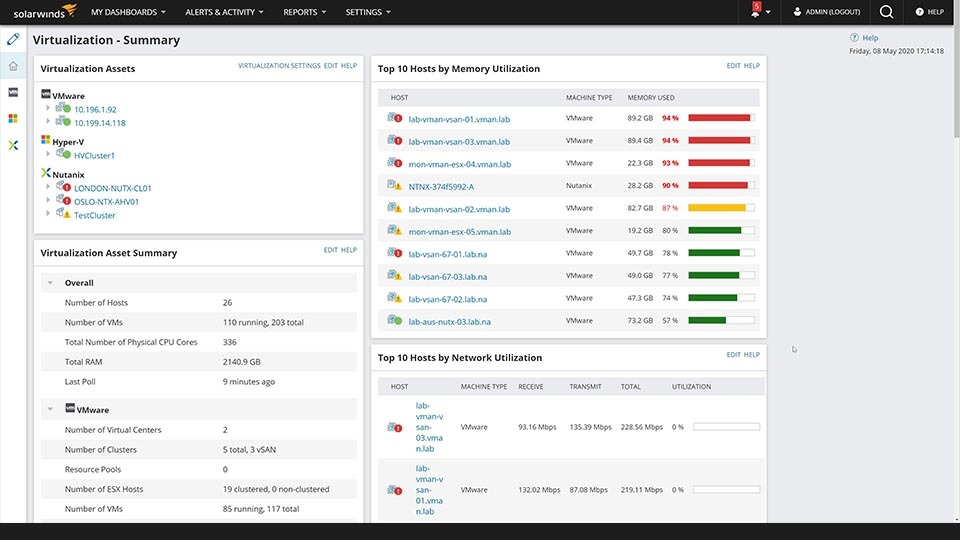
SolarWinds® Virtualization Manager (VMAN) is a powerful virtual machine (VM) monitoring tool built to consolidate a variety of useful observations in one interface. VMAN can provide you with comprehensive visibility into the health and performance of VMware vSphere, Nutanix AHV, and Microsoft Hyper-V hypervisors, whether they’re on-premises, hyperconverged, hybrid, or in the cloud. Easily manage the health of your entire environment—whether it’s server, virtual, or storage infrastructure—and troubleshoot specific, interrelated problems from a single-pane-of-glass view.
Track the right metrics.
Use VMAN to mix and match different metrics from your system and other sources with PerfStack™ to create a virtualization monitoring experience and prioritize the metrics you need. VMAN can also monitor Azure and AWS metrics from a single dashboard, which means no more toggling between different virtualization monitoring tools.
Map dependencies between virtual objects.
Use VMAN to get contextual dependency maps of an object or multiple objects, so you can see relationships between server and objects in your virtual environment. Gain insight into dependencies among clusters, virtual machines, virtual application groups, hosts, and storage.
Quickly optimize your virtual environment.
SolarWinds VMAN is designed to analyze the current state of environment performance, identify over- or under-allocated CPUs, and provide actionable recommendations to help optimize your virtual environment for optimal performance.
Quickly reclaim wasted virtual storage resources.
VMAN can monitor virtual hard disks and alert you to elements hogging storage resources such as zombie VMs, unneeded VM snapshots, and orphaned VMDK files so they can be quickly deleted to instantly free up usable disk space.
Isolate VM performance issues caused by configuration changes.
Virtualization Manager is equipped with virtual machine configuration management capabilities to easily track and trend virtual machine configurations, including changes for hosts, guest operating systems, and virtualized applications. Use the Virtual DNA feature, designed to hold historical records, to compare VM configuration changes over time, making it easier to see how VM configurations have changed as a result of day-to-day operations, putting you in a better position to troubleshoot and proactively respond to issues.
SolarWinds VMAN provides easy-to-use reporting that calculates the computing costs of specific virtual workloads, so you can clearly communicate virtual infrastructure cost information for more effective budgeting.
All-in-one tool for comprehensive virtual environment management.
SolarWinds® Virtualization Manager (VMAN) is a powerful virtual machine (VM) monitoring tool built to consolidate a variety of useful observations in one interface. VMAN can provide you with comprehensive visibility into the health and performance of VMware vSphere, Nutanix AHV, and Microsoft Hyper-V hypervisors, whether they’re on-premises, hyperconverged, hybrid, or in the cloud. Easily manage the health of your entire environment—whether it’s server, virtual, or storage infrastructure—and troubleshoot specific, interrelated problems from a single-pane-of-glass view.
Track the right metrics.
Use VMAN to mix and match different metrics from your system and other sources with PerfStack™ to create a virtualization monitoring experience and prioritize the metrics you need. VMAN can also monitor Azure and AWS metrics from a single dashboard, which means no more toggling between different virtualization monitoring tools.
Map dependencies between virtual objects.
Use VMAN to get contextual dependency maps of an object or multiple objects, so you can see relationships between server and objects in your virtual environment. Gain insight into dependencies among clusters, virtual machines, virtual application groups, hosts, and storage.
Quickly optimize your virtual environment.
SolarWinds VMAN is designed to analyze the current state of environment performance, identify over- or under-allocated CPUs, and provide actionable recommendations to help optimize your virtual environment for optimal performance.
Quickly reclaim wasted virtual storage resources.
VMAN can monitor virtual hard disks and alert you to elements hogging storage resources such as zombie VMs, unneeded VM snapshots, and orphaned VMDK files so they can be quickly deleted to instantly free up usable disk space.
Isolate VM performance issues caused by configuration changes.
Virtualization Manager is equipped with virtual machine configuration management capabilities to easily track and trend virtual machine configurations, including changes for hosts, guest operating systems, and virtualized applications. Use the Virtual DNA feature, designed to hold historical records, to compare VM configuration changes over time, making it easier to see how VM configurations have changed as a result of day-to-day operations, putting you in a better position to troubleshoot and proactively respond to issues.
SolarWinds VMAN provides easy-to-use reporting that calculates the computing costs of specific virtual workloads, so you can clearly communicate virtual infrastructure cost information for more effective budgeting.