- Events
-
Partners
- Government
- Customer Portal
- Contact Us
- Contact Sales
-
English
SAM’s automatically generated reports can help users make sense of real-time performance alerts and build an archive of historical data. You can also build custom reports based on the metrics you want to investigate.
SAM can also automatically create reports when new servers or apps are discovered and added, or wherever there’s sufficient system data for a full report. SolarWinds SAM is built to make it easier to set a specific schedule and can send custom reports according to your needs.
Performance monitoring system refers to any tool or application designed to collect health status data and performance metrics about a system’s operational health.
Is an application or web server responsible for a network slowdown? Are resources being used properly? Is this system running as efficiently as it could be? A performance monitoring system helps answer these questions and more.
A performance monitoring system should include the following necessary functions:
System performance monitoring tools can help users gain critical visibility into their networks by streamlining and automating many of these tasks.
A performance monitoring system works by continuously gathering data on system resources, which can help you stay apprised of everything going on in systems environments. When you have this information at your fingertips, you can often better maintain the overall health of your system, troubleshoot performance issues quickly, and anticipate any potential future issues.
First, system performance monitoring tools automatically discover servers, applications, and devices in your network. Next, you have to set the performance monitoring system to track specific metrics, like memory usage or web server response time, to inform you about the health of various system elements.
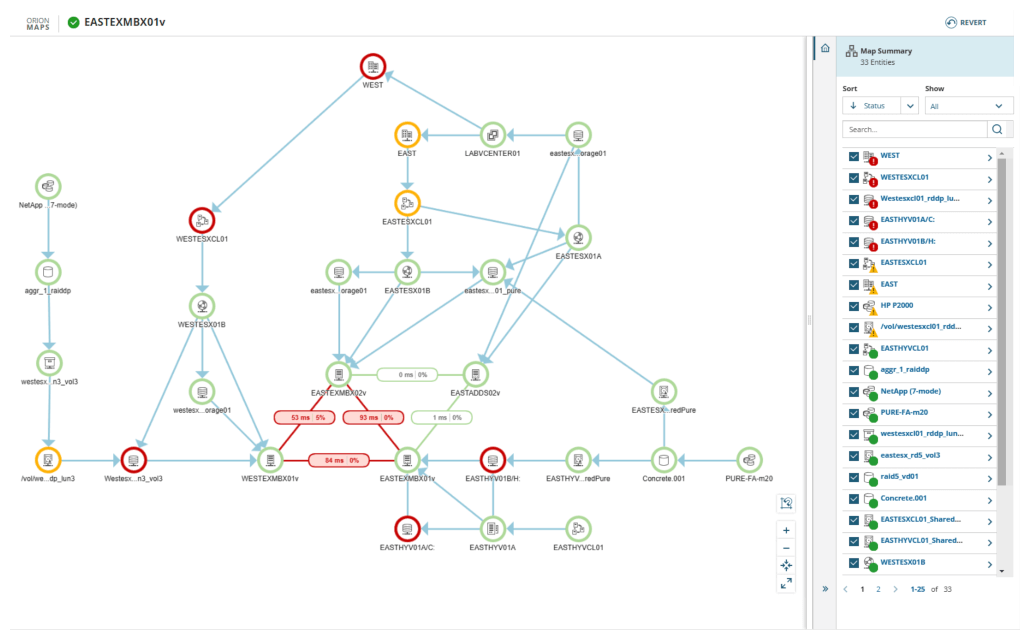
Performance monitoring tools can also allow you to access this information at a glance from a unified dashboard, so you don’t have to hunt for relevant information. If the performance monitoring system detects a performance issue or slowdown, it can send you an alert to notify you of the problem, so you can troubleshoot as soon as possible.
Performance monitoring is important because it can help you ensure your system stays healthy now and in the future. If performance drops, it can impact the end-user experience and even cause slowdowns in business productivity. Ultimately, failing to monitor servers and applications could result in a financial hit for your business.
Performance monitoring can allow you to proactively catch performance issues before they escalate into larger slowdowns and affect end-user experience. In addition, the information you gain from routine performance monitoring can be used to configure your system for better performance in the future. With the right performance monitoring tools, you can automate much of the process, gain more accurate insights, and better protect your business against performance slowdowns.
SolarWinds Server & Application Monitor is a comprehensive, enterprise-grade performance monitoring system built to help you take control of your system. SAM can allow you to monitor your on-premises, cloud, or hybrid infrastructure using 1,200-plus application monitoring templates. These templates can be easily adapted to fit your custom applications as well.
SAM also comes equipped with unique features to set it apart from other performance monitoring management systems. This includes the integrated PerfStack and AppStack features, which can help you generate deeper insights about your system by cross-referencing different data sources across the same metric and highlighting complex relationships.
Also included in SolarWinds SAM is AppInsight™, which monitors popular applications like Microsoft IIS, Microsoft Exchange, Apache, and more. Additionally, the Real-Time Process Explorer feature in SAM can eliminate the need to manually log in and out of different machines by displaying data for monitored and unmonitored processes on one screen.
With SolarWinds Server & Application Monitor, users have access to a powerful and easy-to-use performance monitoring system scalable enough for large enterprises. You can try SAM free for 30 days to see the difference it can make for your system performance.
Performance monitoring system refers to any tool or application designed to collect health status data and performance metrics about a system’s operational health.
Is an application or web server responsible for a network slowdown? Are resources being used properly? Is this system running as efficiently as it could be? A performance monitoring system helps answer these questions and more.
A performance monitoring system should include the following necessary functions:
System performance monitoring tools can help users gain critical visibility into their networks by streamlining and automating many of these tasks.
A performance monitoring system works by continuously gathering data on system resources, which can help you stay apprised of everything going on in systems environments. When you have this information at your fingertips, you can often better maintain the overall health of your system, troubleshoot performance issues quickly, and anticipate any potential future issues.
First, system performance monitoring tools automatically discover servers, applications, and devices in your network. Next, you have to set the performance monitoring system to track specific metrics, like memory usage or web server response time, to inform you about the health of various system elements.
Performance monitoring tools can also allow you to access this information at a glance from a unified dashboard, so you don’t have to hunt for relevant information. If the performance monitoring system detects a performance issue or slowdown, it can send you an alert to notify you of the problem, so you can troubleshoot as soon as possible.
Performance monitoring is important because it can help you ensure your system stays healthy now and in the future. If performance drops, it can impact the end-user experience and even cause slowdowns in business productivity. Ultimately, failing to monitor servers and applications could result in a financial hit for your business.
Performance monitoring can allow you to proactively catch performance issues before they escalate into larger slowdowns and affect end-user experience. In addition, the information you gain from routine performance monitoring can be used to configure your system for better performance in the future. With the right performance monitoring tools, you can automate much of the process, gain more accurate insights, and better protect your business against performance slowdowns.
SolarWinds Server & Application Monitor is a comprehensive, enterprise-grade performance monitoring system built to help you take control of your system. SAM can allow you to monitor your on-premises, cloud, or hybrid infrastructure using 1,200-plus application monitoring templates. These templates can be easily adapted to fit your custom applications as well.
SAM also comes equipped with unique features to set it apart from other performance monitoring management systems. This includes the integrated PerfStack and AppStack features, which can help you generate deeper insights about your system by cross-referencing different data sources across the same metric and highlighting complex relationships.
Also included in SolarWinds SAM is AppInsight™, which monitors popular applications like Microsoft IIS, Microsoft Exchange, Apache, and more. Additionally, the Real-Time Process Explorer feature in SAM can eliminate the need to manually log in and out of different machines by displaying data for monitored and unmonitored processes on one screen.
With SolarWinds Server & Application Monitor, users have access to a powerful and easy-to-use performance monitoring system scalable enough for large enterprises. You can try SAM free for 30 days to see the difference it can make for your system performance.
Server & Application Monitor
Track activity and performance for over 1,200 apps with built-in monitoring templates.
Use reports generated by a performance monitoring and reporting system to enhance troubleshooting.
Leverage a performance monitoring system with specialized monitoring tools to more easily assess system performance.