- Events
-
Partners
- Government
- Customer Portal
- Contact Us
- Contact Sales
-
English
The SolarWinds NCM network audit software delivers the network device audit tools you need to help manage and check for compliance. The integrated inventory reports in NCM are built to gather key information about automatically added devices, including serial numbers, port details, IP addresses, vendors, end-of-life dates, and more.
All you have to do to collect and review inventory data is run an inventory scan manually when you want updates or schedule a regular inventory scan so your information is always up-to-date. Doing so can help you with network compliance and auditing.
If your organization is subject to standards like HIPAA, SOX, DISA, FISMA, PCI, or STIG, you must ensure your network devices are always configured well, and you must be able to provide reports for internal stakeholders and external auditors proving your compliance.
NCM is designed to provide a wide range of network compliance software features to help you demonstrate regulatory guidelines, including dozens of predefined reports built right into the network auditing software. The reports fall into categories including NCM Audit, NCM Brocade Inventory, NCM Cisco Inventory, NCM F5 Inventory, NCM Inventory, NCM Node Details, NCM Polling Status, NCM Route Tables Inventory, NCM Security, and NCM Windows Server Inventory.
A network audit is an important way to measure and report on key aspects of a network. It can provide a comprehensive overview of network settings and health to help administrators better assess status and strategy. For external auditors, a network audit can help demonstrate an organization’s compliance with key regulations.
More specifically, a network audit can help you establish which devices are connected to your network, view their current hardware and software settings, and understand whether they’re reaching end-of-service or end-of-life status. Network audits can also focus on network configuration and change management to help illustrate whether configuration deployments were successful, whether out-of-process changes have occurred, whether configuration violations exist, and more, all of which are important to understand to maintain compliance.
Network auditing can also help you address performance, especially for networks with multi-vendor devices. If you don’t have a network audit solution in place, hardware, software, and even end-user devices can be added—and unauthorized changes can be made—to a network without your awareness.
Network audits can also provide visibility so you can understand performance failures or slowdowns across your network, such as when backup jobs or data archiving fail or devices reach end-of-life status. With better insights, you can adjust settings, restore function, and replace components as needed. In short, a network audit is an important way to identify issues with network performance, ensure proper configuration, and maintain compliance.
Though it’s possible to manually perform a network audit, this process requires a lot of effort and is less accurate than automating these tasks. With the right tools, you can perform a comprehensive network audit in just a few steps.
Whether you’re handling your network audit yourself or having a tool do it for you, the basic network auditing steps and strategies include the following:
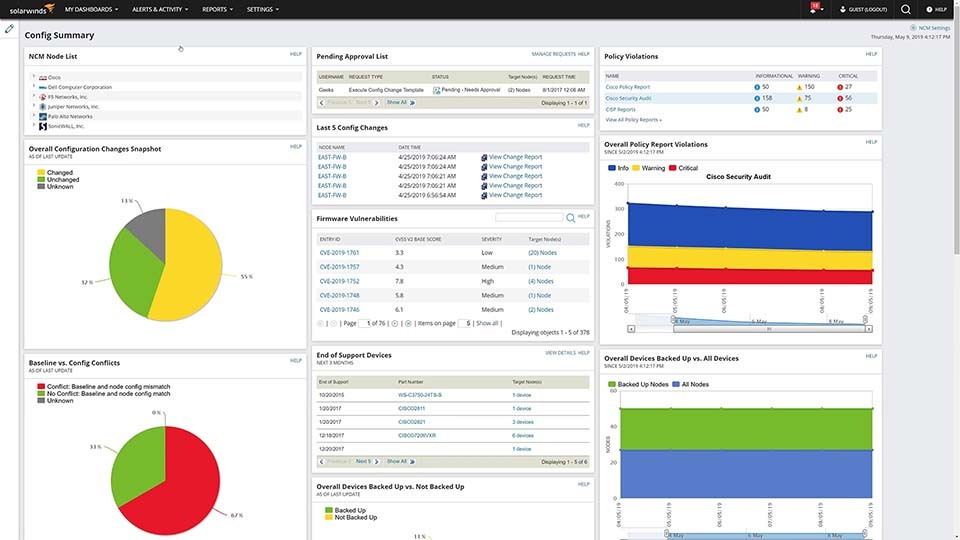
SolarWinds Network Configuration Manager offers straightforward and comprehensive network auditing features to provide users with real-time and historical insight into configuration settings and changes.
NCM is designed to automatically maintain an up-to-date network inventory with network scanning features capable of importing details from newly discovered devices, including routers, switches, and more from vendors like Cisco, Juniper, HP, and Dell. This unified inventory of devices and locations can make it easier to make informed decisions and identify end-of-life conditions.
NCM also allows you to run reports providing useful overviews of configuration change settings. For example, you can quickly understand where users have made unauthorized changes. NCM offers 53 detailed report templates designed to help you assess your compliance, but you can also utilize custom reports or community-created templates from the SolarWinds THWACK® community.
The SolarWinds NCM network audit solution comes with dozens of built-in reports falling into ten categories.
The primary category is Network Audit, which includes reports displaying the results of audit checks. The specific reports in this category include the following:
In addition to these four essential network auditing reports, NCM also has many other reports for the following categories:
With a network audit system like SolarWinds Network Configuration Manager, you can find device configurations not complying with policies using policy reports. From there, all it takes is a couple of clicks to remediate the issue and verify the change was implemented.
To find and remediate policy violations in NCM, you must do the following:
As a network audit solution, SolarWinds NCM has a straightforward process for auditing Cisco routers for policy compliance. The NCM network auditing tools have out-of-the-box policy reports designed to make verifying and maintaining policy compliance simple.
To run a Cisco security audit report on NCM, you must do the following:
There are three main types of alert actions in the SolarWinds NCM network audit tool:
A network audit is an important way to measure and report on key aspects of a network. It can provide a comprehensive overview of network settings and health to help administrators better assess status and strategy. For external auditors, a network audit can help demonstrate an organization’s compliance with key regulations.
More specifically, a network audit can help you establish which devices are connected to your network, view their current hardware and software settings, and understand whether they’re reaching end-of-service or end-of-life status. Network audits can also focus on network configuration and change management to help illustrate whether configuration deployments were successful, whether out-of-process changes have occurred, whether configuration violations exist, and more, all of which are important to understand to maintain compliance.
Network auditing can also help you address performance, especially for networks with multi-vendor devices. If you don’t have a network audit solution in place, hardware, software, and even end-user devices can be added—and unauthorized changes can be made—to a network without your awareness.
Network audits can also provide visibility so you can understand performance failures or slowdowns across your network, such as when backup jobs or data archiving fail or devices reach end-of-life status. With better insights, you can adjust settings, restore function, and replace components as needed. In short, a network audit is an important way to identify issues with network performance, ensure proper configuration, and maintain compliance.
Though it’s possible to manually perform a network audit, this process requires a lot of effort and is less accurate than automating these tasks. With the right tools, you can perform a comprehensive network audit in just a few steps.
Whether you’re handling your network audit yourself or having a tool do it for you, the basic network auditing steps and strategies include the following:
SolarWinds Network Configuration Manager offers straightforward and comprehensive network auditing features to provide users with real-time and historical insight into configuration settings and changes.
NCM is designed to automatically maintain an up-to-date network inventory with network scanning features capable of importing details from newly discovered devices, including routers, switches, and more from vendors like Cisco, Juniper, HP, and Dell. This unified inventory of devices and locations can make it easier to make informed decisions and identify end-of-life conditions.
NCM also allows you to run reports providing useful overviews of configuration change settings. For example, you can quickly understand where users have made unauthorized changes. NCM offers 53 detailed report templates designed to help you assess your compliance, but you can also utilize custom reports or community-created templates from the SolarWinds THWACK® community.
The SolarWinds NCM network audit solution comes with dozens of built-in reports falling into ten categories.
The primary category is Network Audit, which includes reports displaying the results of audit checks. The specific reports in this category include the following:
In addition to these four essential network auditing reports, NCM also has many other reports for the following categories:
With a network audit system like SolarWinds Network Configuration Manager, you can find device configurations not complying with policies using policy reports. From there, all it takes is a couple of clicks to remediate the issue and verify the change was implemented.
To find and remediate policy violations in NCM, you must do the following:
As a network audit solution, SolarWinds NCM has a straightforward process for auditing Cisco routers for policy compliance. The NCM network auditing tools have out-of-the-box policy reports designed to make verifying and maintaining policy compliance simple.
To run a Cisco security audit report on NCM, you must do the following:
There are three main types of alert actions in the SolarWinds NCM network audit tool:
Network Configuration Manager
Save time with network automation.
Simplify and improve network compliance.
Fast disaster recovery.