- Events
-
Partners
- Government
- Customer Portal
- Contact Us
- Contact Sales
-
English
Once an attacker breaches a firewall, they often attempt to map the network in search of additional vulnerabilities. Once they find one, they will install malware. Whether intentional or as an unintentional side effect, these actions can be disruptive and cause systems to lose communication ability or fail.
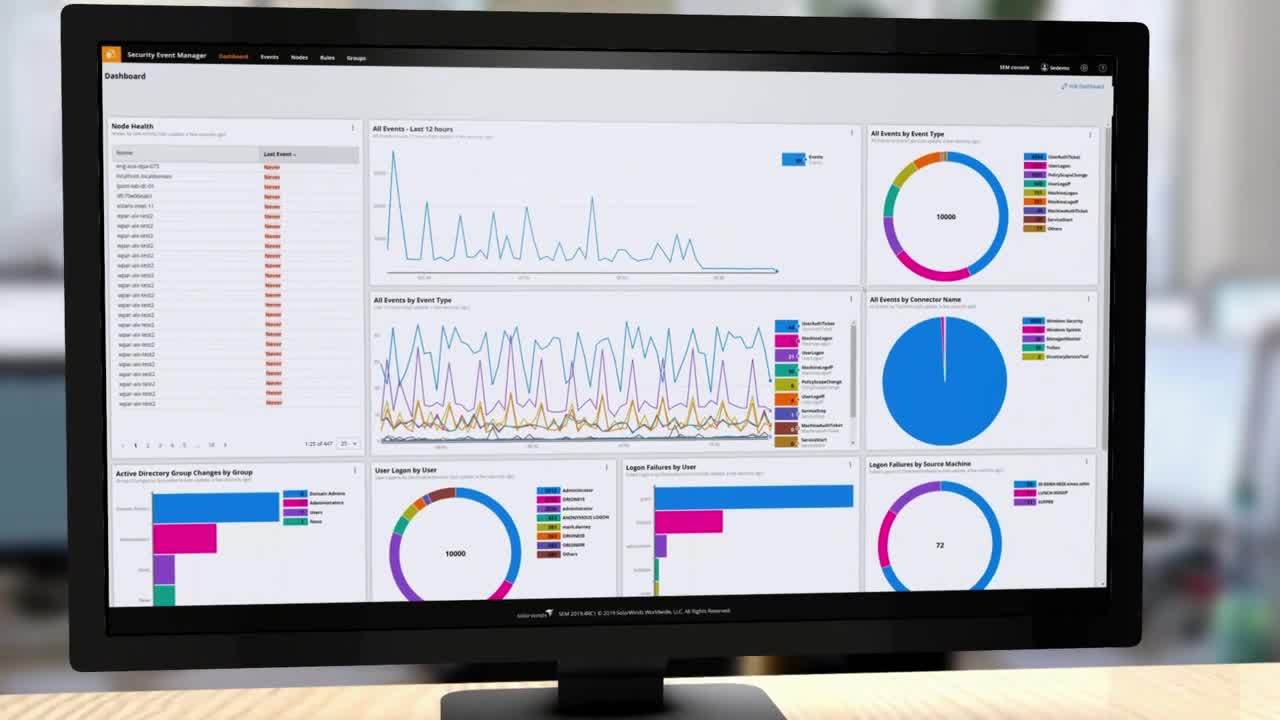
SolarWinds Security Event Manager is built to help identify a phishing attack by correlating events within log files from a wide range of inputs, including email, intrusion software, file transfers, and many other network elements and processes. SEM can receive events sent by installed SEM Agents, syslog, and SNMP.
Spear phishing is the act of sending emails to specific targets while pretending to be a trusted sender. The aim of these attacks is to either infect a victim’s devices with malware or to convince the victim to willingly offer their information or money. Spear phishing is frustrating because no matter how secure your network, applications, and endpoints are, it’s all too easy for humans to be exploited via social engineering tactics.
While regular phishing campaigns aim to damage or steal data from a large number of relatively low-value targets, spear phishing attacks are aimed at specific targets. As such, they will use specific language in their emails or texts to trick the intended victim. This requires the attacker to thoroughly research their target before carrying out an attack, so they can make their emails seem completely legitimate to their victims.
There are different kinds of spear phishing attacks, including whaling attacks or smart phishing. A whale attack (also known as whale phishing) is the act of targeting high-profile employees so attackers can steal the most valuable information from a company. Since CEOs and COOs are in positions of power at their organizations, they typically have access to more sensitive data, and as such, attackers will target these “whales” over the smaller “fish” at a company. Smart phishing, on the other hand, is driven by AI-powered malware that deploys untraceable malicious applications, often via benign data payloads. With the use of AI, attackers can more easily conceal these attacks and make it almost impossible to reverse-engineer their threats.
Both attacks are prime examples of spear phishing, since each generally requires more time and effort on the part of the attacker than ordinary phishing attacks.
The targeted nature of spear phishing threats can make it difficult to identify an attack, but there are ways to identify malicious emails. While the best technique is to use software that protects against and monitors for spear phishing attacks, individuals can also take phishing attack prevention steps when using email in the workplace.
The first step is to be alert when you receive an email asking you to send sensitive information that is not usually shared over email. This is the first sign that you might be targeted by a spear phishing attack. When this happens, you must check both the email address itself as well as the sender’s name. Attackers will create fraudulent sender names to pose as someone you recognize. Although this might make the sender seem legitimate, mimicking the email address is more difficult. As such, always verify the email address itself—and not just the name of the sender—and make sure the email matches your record of correspondence.
If an attacker manages to mimic both the name of the sender and their email address, it’s important to check the email format. If the format of the suspected phishing email does not match with any of the previous emails from that sender, users must take further measures to confirm the legitimacy of the email.
Always be cautious with links sent to you in emails and verify them whenever possible. Attackers want to trick you into clicking a link that they’ve shared via email. Even in scenarios when you are confident the email address and the sender name are legitimate, you can never be too careful: make sure the link embedded in the hypertext does not lead to a fraudulent website. To identify if the link is legit or not, simply hover over it to see the complete address. If the web address or the link path seems suspicious, don’t click on it. Just one click can compromise your web browser, install malware in your system, and even lead to an attacker gaining full control of your system and all its stored information. In cases when the address looks familiar, make sure the page you are redirected to does not ask for sensitive information like passwords or other login credentials. This might be a sign that an attacker created a well-developed fraudulent webpage.
There is software that organizations can use to defend themselves against the onslaught of phishing emails. Choosing the right software solution for your organization will depend on several factors: the type of business you’re in, the size of your network, and your priority towards cyberthreats. This is why it’s a good idea to invest in solutions that are robust and scalable to fit your needs, like SolarWinds Security Event Manager.
Spear phishing security software typically works by continuously or intermittently monitoring files and folders. When suspicious changes are made to those files, the software will send alerts to IT admins who can then take steps to mitigate the cybersecurity risk. Additionally, many spear phishing software can help identify a phishing attack and protect against them by monitoring specific types of account activity, including password changes, privilege changes, remote logins, and more.
Spear phishing prevention is important because attacks are becoming more common and more sophisticated every day. Your organization and its employees are all at risk of being exploited by an attack—even those trained in cybersecurity are at risk. Since data breaches are proliferating at an incredibly high rate, compounded by the fact that individual attacks can cost organizations hundreds of thousands of dollars, it’s important to be able to defend against them with spear phishing security tools.
Even when attackers use spear phishing to deploy malware payloads—instead of simply exfiltrating valuable data for ransom—this can cause massive disruptions on your organization's servers and networks. Fixing these issues and getting operations up to normal speed can be costly. For these reasons, preventing spear phishing attacks it the best tactic for avoiding disruptions and potentially irreversible breaches.
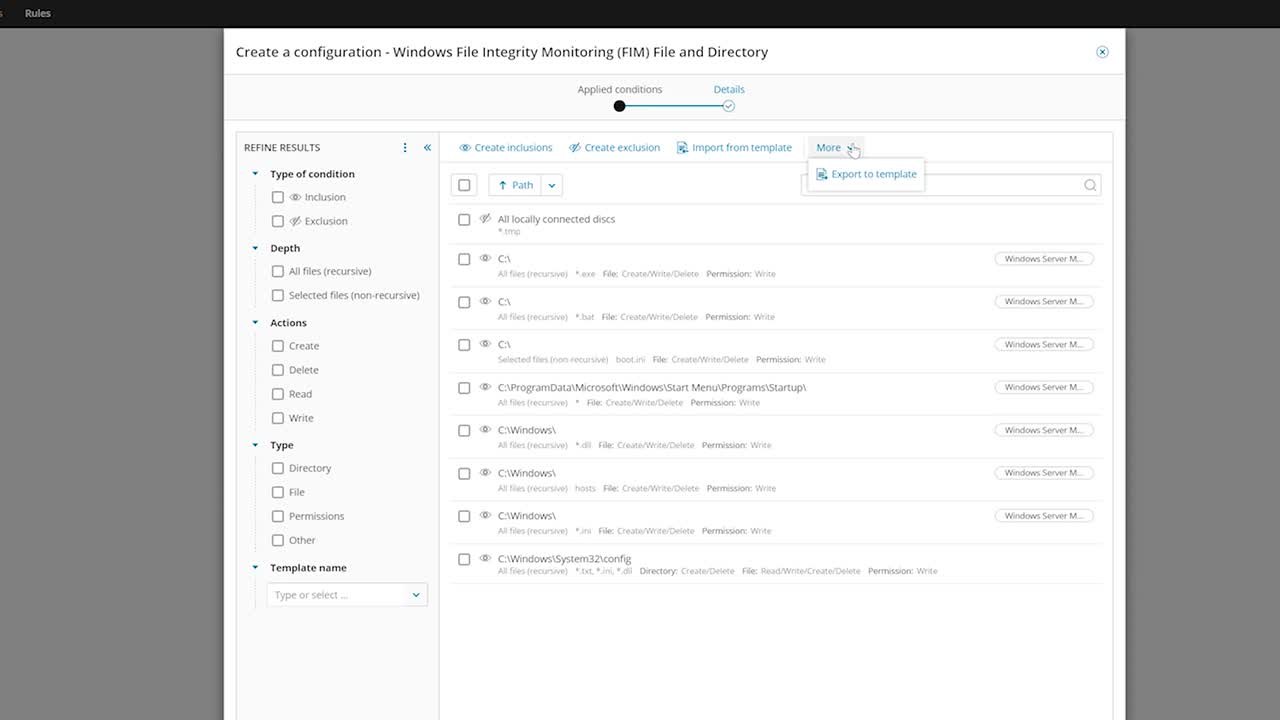
SolarWinds® Security Event Manager is a robust log event manager designed to defend against the most sophisticated spear phishing attacks. With SEM, IT admins can use File Integrity Monitoring (FIM) to protect their sensitive data. This feature offers enhanced detection and alerting on changes to files, folders, and any registry settings. SEM can also help IT admins identify a spear phishing attack by correlating event log files from a wide range of inputs, including network devices, servers, applications, and more.
SEM is built to provide better admin control over account settings. This is especially helpful during spear phishing attacks when threats target specific users for login credentials. With increased control and visibility over employee access configurations, admins have a better vantage point to monitor suspicious activity. This can be particularly helpful when a privileged account is breached in a phishing attack. SEM will recognize the noticeable shift in the account’s usage pattern and will send an alert to the necessary admin. This affords admins a more proactive approach to monitoring potentially malicious network activity.
Beyond acting as a security threat protection tool for phishing attacks, SolarWinds Security Event Manager is a security information and event management solution with many other uses. For example, SEM features a Cyberthreat Intelligence Framework tool IT admins can use to more easily identify security threats and make informed decisions about how to mitigate potential attacks. Additionally, admins can use SEM to flag events and send alarms, so any potentially malicious activity can easily be identified and brought to the attention of the relevant IT worker.
SEM also has a robust compliance reporting software for IT capable of managing your organization’s logs. With this tool, you can automate the log collection process to help you maintain and demonstrate compliance. This feature also offers log analysis and viewing tools capable of turning raw log files into actionable insights IT workers can use to improve network performance.
Related Features:
Spear phishing is the act of sending emails to specific targets while pretending to be a trusted sender. The aim of these attacks is to either infect a victim’s devices with malware or to convince the victim to willingly offer their information or money. Spear phishing is frustrating because no matter how secure your network, applications, and endpoints are, it’s all too easy for humans to be exploited via social engineering tactics.
While regular phishing campaigns aim to damage or steal data from a large number of relatively low-value targets, spear phishing attacks are aimed at specific targets. As such, they will use specific language in their emails or texts to trick the intended victim. This requires the attacker to thoroughly research their target before carrying out an attack, so they can make their emails seem completely legitimate to their victims.
There are different kinds of spear phishing attacks, including whaling attacks or smart phishing. A whale attack (also known as whale phishing) is the act of targeting high-profile employees so attackers can steal the most valuable information from a company. Since CEOs and COOs are in positions of power at their organizations, they typically have access to more sensitive data, and as such, attackers will target these “whales” over the smaller “fish” at a company. Smart phishing, on the other hand, is driven by AI-powered malware that deploys untraceable malicious applications, often via benign data payloads. With the use of AI, attackers can more easily conceal these attacks and make it almost impossible to reverse-engineer their threats.
Both attacks are prime examples of spear phishing, since each generally requires more time and effort on the part of the attacker than ordinary phishing attacks.
The targeted nature of spear phishing threats can make it difficult to identify an attack, but there are ways to identify malicious emails. While the best technique is to use software that protects against and monitors for spear phishing attacks, individuals can also take phishing attack prevention steps when using email in the workplace.
The first step is to be alert when you receive an email asking you to send sensitive information that is not usually shared over email. This is the first sign that you might be targeted by a spear phishing attack. When this happens, you must check both the email address itself as well as the sender’s name. Attackers will create fraudulent sender names to pose as someone you recognize. Although this might make the sender seem legitimate, mimicking the email address is more difficult. As such, always verify the email address itself—and not just the name of the sender—and make sure the email matches your record of correspondence.
If an attacker manages to mimic both the name of the sender and their email address, it’s important to check the email format. If the format of the suspected phishing email does not match with any of the previous emails from that sender, users must take further measures to confirm the legitimacy of the email.
Always be cautious with links sent to you in emails and verify them whenever possible. Attackers want to trick you into clicking a link that they’ve shared via email. Even in scenarios when you are confident the email address and the sender name are legitimate, you can never be too careful: make sure the link embedded in the hypertext does not lead to a fraudulent website. To identify if the link is legit or not, simply hover over it to see the complete address. If the web address or the link path seems suspicious, don’t click on it. Just one click can compromise your web browser, install malware in your system, and even lead to an attacker gaining full control of your system and all its stored information. In cases when the address looks familiar, make sure the page you are redirected to does not ask for sensitive information like passwords or other login credentials. This might be a sign that an attacker created a well-developed fraudulent webpage.
There is software that organizations can use to defend themselves against the onslaught of phishing emails. Choosing the right software solution for your organization will depend on several factors: the type of business you’re in, the size of your network, and your priority towards cyberthreats. This is why it’s a good idea to invest in solutions that are robust and scalable to fit your needs, like SolarWinds Security Event Manager.
Spear phishing security software typically works by continuously or intermittently monitoring files and folders. When suspicious changes are made to those files, the software will send alerts to IT admins who can then take steps to mitigate the cybersecurity risk. Additionally, many spear phishing software can help identify a phishing attack and protect against them by monitoring specific types of account activity, including password changes, privilege changes, remote logins, and more.
Spear phishing prevention is important because attacks are becoming more common and more sophisticated every day. Your organization and its employees are all at risk of being exploited by an attack—even those trained in cybersecurity are at risk. Since data breaches are proliferating at an incredibly high rate, compounded by the fact that individual attacks can cost organizations hundreds of thousands of dollars, it’s important to be able to defend against them with spear phishing security tools.
Even when attackers use spear phishing to deploy malware payloads—instead of simply exfiltrating valuable data for ransom—this can cause massive disruptions on your organization's servers and networks. Fixing these issues and getting operations up to normal speed can be costly. For these reasons, preventing spear phishing attacks it the best tactic for avoiding disruptions and potentially irreversible breaches.
SolarWinds® Security Event Manager is a robust log event manager designed to defend against the most sophisticated spear phishing attacks. With SEM, IT admins can use File Integrity Monitoring (FIM) to protect their sensitive data. This feature offers enhanced detection and alerting on changes to files, folders, and any registry settings. SEM can also help IT admins identify a spear phishing attack by correlating event log files from a wide range of inputs, including network devices, servers, applications, and more.
SEM is built to provide better admin control over account settings. This is especially helpful during spear phishing attacks when threats target specific users for login credentials. With increased control and visibility over employee access configurations, admins have a better vantage point to monitor suspicious activity. This can be particularly helpful when a privileged account is breached in a phishing attack. SEM will recognize the noticeable shift in the account’s usage pattern and will send an alert to the necessary admin. This affords admins a more proactive approach to monitoring potentially malicious network activity.
Beyond acting as a security threat protection tool for phishing attacks, SolarWinds Security Event Manager is a security information and event management solution with many other uses. For example, SEM features a Cyberthreat Intelligence Framework tool IT admins can use to more easily identify security threats and make informed decisions about how to mitigate potential attacks. Additionally, admins can use SEM to flag events and send alarms, so any potentially malicious activity can easily be identified and brought to the attention of the relevant IT worker.
SEM also has a robust compliance reporting software for IT capable of managing your organization’s logs. With this tool, you can automate the log collection process to help you maintain and demonstrate compliance. This feature also offers log analysis and viewing tools capable of turning raw log files into actionable insights IT workers can use to improve network performance.
Related Features:
Security Event Manager
Monitor files, folders, and registry settings to protect data from phishing attacks.
Gain increased visibility into account activity to detect signs of suspicious events.
Analyze event logs across a network to identify anomalies that may be signs of a breach.