- Events
-
Partners
- Government
- Customer Portal
- Contact Us
- Contact Sales
-
English
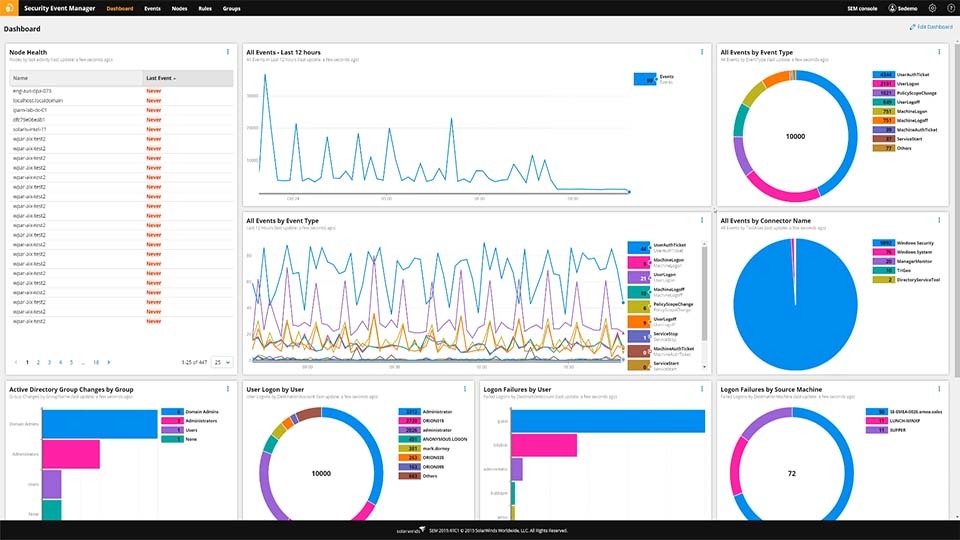
Generating reports with SolarWinds Security Event Manager is simple and reliable. SEM includes built-in report templates for internal and external regulatory compliance, including PCI DSS, GLBA, SOX, NERC CIP, HIPAA, and more. Or, you can create a custom report using the intuitive reporting console.
SEM includes the following features:
A compliance report is a document concerning specific IT operations that is formatted according to industry standards and audited by a regulatory organization. Many industries, ranging from education to finance to healthcare, require compliance to help ensure personal data is stored safely.
Security log data (as monitored by SolarWinds Security Event Manager) is usually the centerpiece of a compliance report. Log data can help reveal if a data breach has occurred, including insider threats and intrusion attempts. When your organization is audited for security compliance, a compliance report can help demonstrate that your data security measures were sufficient for the given time period.
The main type of compliance report involves data log monitoring, though some standards account for network and other IT reports. Data compliance reports start with the security data log, which monitors system logon, logoff, and data modification activity. Keeping a reliable record of your data log can give your IT team the ability to revisit log data from any point in your system history, and diagnose potential security breaches or unusual events. In a compliance report, the data log should fit the audit standards of your industry compliance organization, whether that be HIPAA (for healthcare professionals), FERPA (for educational institutions), SOX (for financial institutions), or others.
Different compliance standards may require different formats for a report. SolarWinds Security Event Manager is built to allow you to download customizable compliance reporting templates, so you can configure your compliance report with the most up-to-date industry regulations.
Compliance reporting is a means of establishing data security accountability for businesses operating within certain industry regulations. Regulatory compliance reporting is often used in industries that require a heightened degree of privacy in their log data. A compliance report, in the form of a thorough log of your system data, can help demonstrate that your organization has maintained sufficient security safeguards.
For example, compliance audits for HIPAA set security standards for any business operating within the healthcare industry, so that customers can rest assured that a HIPAA-certified organization meets nationwide standards of security and confidentiality.
A compliance reporting tool is built to collect, monitor, and store the original log data while the normalized data is immediately searchable and reportable. A versatile compliance reporting software should also provide report templates for regulatory compliance including PCI DSS, GLBA, SOX, NERC CIP, HIPAA, and many more.
The best compliance reporting tools should:
In addition to Security Event Manager, which audits security data logs to help you meet compliance standards, SolarWinds offers additional tools designed to support other requirements of IT compliance. These products include:
Certain compliance standards, including HIPAA, PCI DSS, and GDPR, require an audit of user authentication, authorization, and Microsoft Active Directory permissions management. Access Rights Manager is built to allow you to audit user credentials to fit these standards.
Certain industries require that users with Linux/Unix systems comply with up-to-date patch standards to help ensure your software is not susceptible to bugs or viruses. SolarWinds Patch Manager offers exportable patch compliance reports.
Network configuration might be an auditable compliance factor for certain standards like PCI DSS, SOX, DISA STIG, HIPAA, and others. SolarWinds Network Configuration Manager monitors network security that complies with most network security protocols.
Software License Management Tool
Some industries require compliance with software licensing rules. The software license management tool in SolarWinds Service Desk is built to detect a software license compliance gap, and reallocate or add licenses to fit industry standards.
SEM compliance reporting process is built to work in three simple steps:
A compliance report is a document concerning specific IT operations that is formatted according to industry standards and audited by a regulatory organization. Many industries, ranging from education to finance to healthcare, require compliance to help ensure personal data is stored safely.
Security log data (as monitored by SolarWinds Security Event Manager) is usually the centerpiece of a compliance report. Log data can help reveal if a data breach has occurred, including insider threats and intrusion attempts. When your organization is audited for security compliance, a compliance report can help demonstrate that your data security measures were sufficient for the given time period.
The main type of compliance report involves data log monitoring, though some standards account for network and other IT reports. Data compliance reports start with the security data log, which monitors system logon, logoff, and data modification activity. Keeping a reliable record of your data log can give your IT team the ability to revisit log data from any point in your system history, and diagnose potential security breaches or unusual events. In a compliance report, the data log should fit the audit standards of your industry compliance organization, whether that be HIPAA (for healthcare professionals), FERPA (for educational institutions), SOX (for financial institutions), or others.
Different compliance standards may require different formats for a report. SolarWinds Security Event Manager is built to allow you to download customizable compliance reporting templates, so you can configure your compliance report with the most up-to-date industry regulations.
Compliance reporting is a means of establishing data security accountability for businesses operating within certain industry regulations. Regulatory compliance reporting is often used in industries that require a heightened degree of privacy in their log data. A compliance report, in the form of a thorough log of your system data, can help demonstrate that your organization has maintained sufficient security safeguards.
For example, compliance audits for HIPAA set security standards for any business operating within the healthcare industry, so that customers can rest assured that a HIPAA-certified organization meets nationwide standards of security and confidentiality.
A compliance reporting tool is built to collect, monitor, and store the original log data while the normalized data is immediately searchable and reportable. A versatile compliance reporting software should also provide report templates for regulatory compliance including PCI DSS, GLBA, SOX, NERC CIP, HIPAA, and many more.
The best compliance reporting tools should:
In addition to Security Event Manager, which audits security data logs to help you meet compliance standards, SolarWinds offers additional tools designed to support other requirements of IT compliance. These products include:
Certain compliance standards, including HIPAA, PCI DSS, and GDPR, require an audit of user authentication, authorization, and Microsoft Active Directory permissions management. Access Rights Manager is built to allow you to audit user credentials to fit these standards.
Certain industries require that users with Linux/Unix systems comply with up-to-date patch standards to help ensure your software is not susceptible to bugs or viruses. SolarWinds Patch Manager offers exportable patch compliance reports.
Network configuration might be an auditable compliance factor for certain standards like PCI DSS, SOX, DISA STIG, HIPAA, and others. SolarWinds Network Configuration Manager monitors network security that complies with most network security protocols.
Software License Management Tool
Some industries require compliance with software licensing rules. The software license management tool in SolarWinds Service Desk is built to detect a software license compliance gap, and reallocate or add licenses to fit industry standards.
SEM compliance reporting process is built to work in three simple steps:
Security Event Manager
Collecting logs from different sources can feel like herding cats without the right tool.
Cutting through the noise to quickly get to the logs you need doesn’t have to be difficult.
Identifying suspicious behavior faster, with less manual effort and less security expertise, is possible.