- Events
-
Partners
- Government
- Customer Portal
- Contact Us
- Contact Sales
-
English
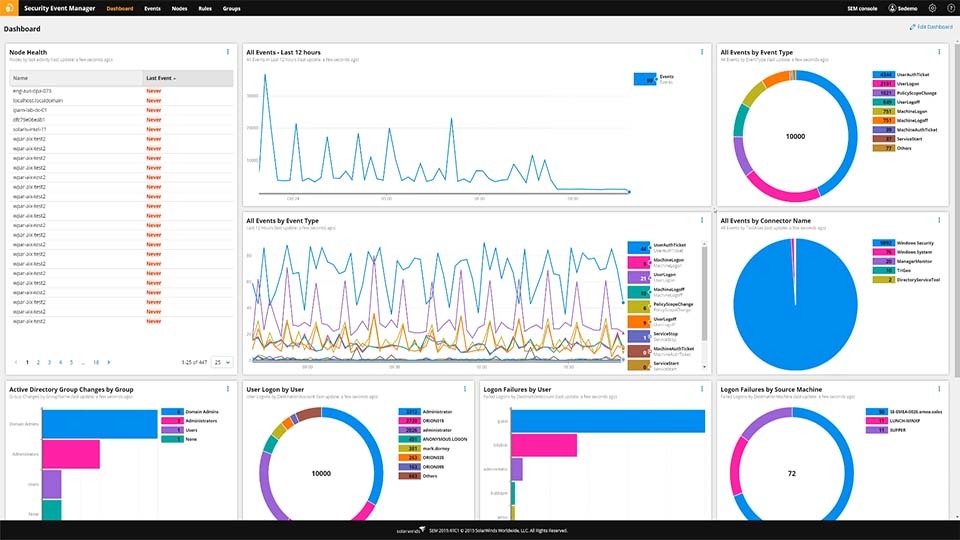
It’s important for security teams to realize that once a threat actor gains access to privileged or admin accounts, it can be difficult to restrict the damage. Proper privilege-access management is crucial to counter not only ransomware but also other kinds of cyberattacks. SolarWinds® Security Event Manager (SEM) helps you monitor suspicious log activity, including monitoring user activity on the registry and detecting any changes in the extension of files, their locations, and authorizations.
With SEM, you can set predefined or manually create threshold-based alerts for suspicious activity, such as triggering whenever someone repeatedly fails authentication or for daily logins beyond a certain limit and from multiple locations that occur within a few minutes of each other. You can also define group policies for Windows to restrict access to folder locations where ransomware is most commonly installed.
A ransomware attack is when an unauthorized user, usually a hacker or another malicious actor, accesses enterprise networking devices and data. The ransomware bad actor then holds this information hostage through encryption or other blocking methods, demanding a ransom from the affected business if they hope to regain access.
Lack of enterprise access is the primary issue associated with ransomware—when a ransomware attack occurs, the compromised data becomes inaccessible to users, applications, and other devices. While some ransomware hackers threaten to expose sensitive or private enterprise data, most ransomware attacks aim to disrupt business operations to the point where there is no choice but to pay the ransom.
While paying a ransom might seem like the easiest way to deal with ransomware, many government agencies—including the FBI and the No More Ransom Project—advise against this. Paying ransom only encourages the ransomware cycle, and half of the ransomware victims who pay will suffer from a repeat attack due to the prior attack’s success.
Ransomware works by traveling through malicious URLs, weaponized attachments in emails, or other seemingly innocent links. As soon as a user clicks on one of these malicious vehicles, the ransomware seeks out any possible attack vendors—points of vulnerability in your network—and promptly exploits them.
These fraudulent links and attachments are how ransomware makes its way into your network. Once the ransomware is inside your network, the corresponding bad actor or actors can search your network freely, then discover and encrypt sensitive enterprise data.
Some common kinds of ransomware methods include:
There are ways you can protect against these efforts, like carefully ensuring all sources are legitimate (and don’t just “seem” legitimate), disabling autorun or automatic download features, and limiting user access to prevent accidental downloads or installations of malware. As ransomware attackers become smarter and their methods increase in complexity, these efforts become less and less effective.
The most efficient way to detect a ransomware attack is by using detection software. These technologies are designed to spot malware by scanning incoming emails, websites, applications, and flash drives for suspicious data or activity. Anti-ransomware tools can prevent employees from opening dangerous links, attachments, and other vehicles ransomware uses to enter your network.
Ransomware attacks are notoriously difficult to spot, and it’s tricky to detect ransomware fast enough to stop bad actors from accessing proprietary data. Cybercriminals use many engineering methods to effectively install ransomware onto the targeted network, including military-grade encryption algorithms built to scramble network data. Anti-ransomware tools can enable you to see through these tricks and catch ransomware attackers in their tracks.
Ransomware detection software is designed to notice common indicators of ransomware, then block these attempts through data encryption. Signs of ransomware activity include:
Ransomware detection software is built to monitor these common indicators, plus more network metrics and activity, to spot potential ransomware attacks in your network. Most anti-ransomware software is designed to consistently gather ransomware indicators in the background, allowing normal network functions and operations to run normally.
SolarWinds Security Event Manager (SEM) is designed to aid ransomware detection through gathering, consolidating, and analyzing log data. SEM is built to draw log data from across your network devices, servers, and applications. Using this information, SEM enables you to detect and respond to ransomware attacks as soon as related issues arise.
Through SEM, you could dive into log data analysis to uncover ransomware in your network. SEM enables you to customize log searches, which makes it easier to zero in on specific details. Along with log data, SEM is built to automatically pinpoint any other suspicious changes in network activity that includes modifications to file extensions, such as their locations or authorizations.
Along with consistently monitoring network performance metrics to detect ransomware, SEM enables you to access community-sourced threat intelligence feeds. These feeds are designed to offer insights into suspicious network activity and help you determine if issues stem from a ransomware infection. SEM is also built to directly source from these feeds and automatically compile lists of potential malicious actors.
SEM is designed to support more ransomware prevention efforts, including setting operational thresholds. These thresholds are used to detect anomalous activity and generate intelligent SEM alerts. You can use predefined thresholds or manually customize your own thresholds, depending on your business requirements.
Take preventive measures against ransomware attacks with SEM, which enables you to define group policies for Windows. This allows you to restrict access to folder locations where ransomware is commonly installed, helping prevent malicious actors from easily gaining access to enterprise data. Enable configurable alarms and reports through SEM for more preventative measures against ransomware attacks.
See other SolarWinds Tools to Help Detect Security Threats:
Related Features:
A ransomware attack is when an unauthorized user, usually a hacker or another malicious actor, accesses enterprise networking devices and data. The ransomware bad actor then holds this information hostage through encryption or other blocking methods, demanding a ransom from the affected business if they hope to regain access.
Lack of enterprise access is the primary issue associated with ransomware—when a ransomware attack occurs, the compromised data becomes inaccessible to users, applications, and other devices. While some ransomware hackers threaten to expose sensitive or private enterprise data, most ransomware attacks aim to disrupt business operations to the point where there is no choice but to pay the ransom.
While paying a ransom might seem like the easiest way to deal with ransomware, many government agencies—including the FBI and the No More Ransom Project—advise against this. Paying ransom only encourages the ransomware cycle, and half of the ransomware victims who pay will suffer from a repeat attack due to the prior attack’s success.
Ransomware works by traveling through malicious URLs, weaponized attachments in emails, or other seemingly innocent links. As soon as a user clicks on one of these malicious vehicles, the ransomware seeks out any possible attack vendors—points of vulnerability in your network—and promptly exploits them.
These fraudulent links and attachments are how ransomware makes its way into your network. Once the ransomware is inside your network, the corresponding bad actor or actors can search your network freely, then discover and encrypt sensitive enterprise data.
Some common kinds of ransomware methods include:
There are ways you can protect against these efforts, like carefully ensuring all sources are legitimate (and don’t just “seem” legitimate), disabling autorun or automatic download features, and limiting user access to prevent accidental downloads or installations of malware. As ransomware attackers become smarter and their methods increase in complexity, these efforts become less and less effective.
The most efficient way to detect a ransomware attack is by using detection software. These technologies are designed to spot malware by scanning incoming emails, websites, applications, and flash drives for suspicious data or activity. Anti-ransomware tools can prevent employees from opening dangerous links, attachments, and other vehicles ransomware uses to enter your network.
Ransomware attacks are notoriously difficult to spot, and it’s tricky to detect ransomware fast enough to stop bad actors from accessing proprietary data. Cybercriminals use many engineering methods to effectively install ransomware onto the targeted network, including military-grade encryption algorithms built to scramble network data. Anti-ransomware tools can enable you to see through these tricks and catch ransomware attackers in their tracks.
Ransomware detection software is designed to notice common indicators of ransomware, then block these attempts through data encryption. Signs of ransomware activity include:
Ransomware detection software is built to monitor these common indicators, plus more network metrics and activity, to spot potential ransomware attacks in your network. Most anti-ransomware software is designed to consistently gather ransomware indicators in the background, allowing normal network functions and operations to run normally.
SolarWinds Security Event Manager (SEM) is designed to aid ransomware detection through gathering, consolidating, and analyzing log data. SEM is built to draw log data from across your network devices, servers, and applications. Using this information, SEM enables you to detect and respond to ransomware attacks as soon as related issues arise.
Through SEM, you could dive into log data analysis to uncover ransomware in your network. SEM enables you to customize log searches, which makes it easier to zero in on specific details. Along with log data, SEM is built to automatically pinpoint any other suspicious changes in network activity that includes modifications to file extensions, such as their locations or authorizations.
Along with consistently monitoring network performance metrics to detect ransomware, SEM enables you to access community-sourced threat intelligence feeds. These feeds are designed to offer insights into suspicious network activity and help you determine if issues stem from a ransomware infection. SEM is also built to directly source from these feeds and automatically compile lists of potential malicious actors.
SEM is designed to support more ransomware prevention efforts, including setting operational thresholds. These thresholds are used to detect anomalous activity and generate intelligent SEM alerts. You can use predefined thresholds or manually customize your own thresholds, depending on your business requirements.
Take preventive measures against ransomware attacks with SEM, which enables you to define group policies for Windows. This allows you to restrict access to folder locations where ransomware is commonly installed, helping prevent malicious actors from easily gaining access to enterprise data. Enable configurable alarms and reports through SEM for more preventative measures against ransomware attacks.
See other SolarWinds Tools to Help Detect Security Threats:
Related Features:
Security Event Manager
Get real-time actionable insights from your servers, endpoints, and applications.
Block malicious IPs, patch vulnerabilities, and detect unusual activity in your network.
Use predefined or custom rules to set operational thresholds and receive intelligent alerts.