- Events
-
Partners
- Government
- Customer Portal
- Contact Us
- Contact Sales
-
English
Security orchestration tools can help ensure security measures are both efficient and effective. SolarWinds® Security Event Manager (SEM) is built to gather, normalize, and analyze data from anti-malware programs, IDS/IPS solutions, and firewalls, as well as event logs from servers, routers, switches, user endpoints, and more.
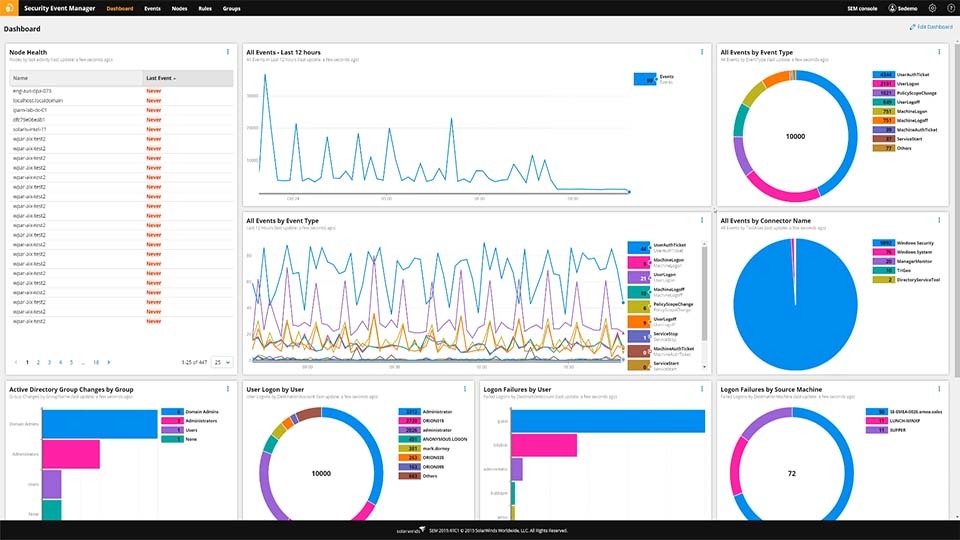
Stop managing your security tools individually. SEM is designed to make it easy to achieve a real-time, unified view for faster log analysis. Centralized logging and monitoring can help you see whether critical configuration and rule changes are functional. Simplify your workflow even further by utilizing orchestration for tracking files, folders, and Windows Registry settings with the File Integrity Monitoring tool included in SolarWinds SEM.
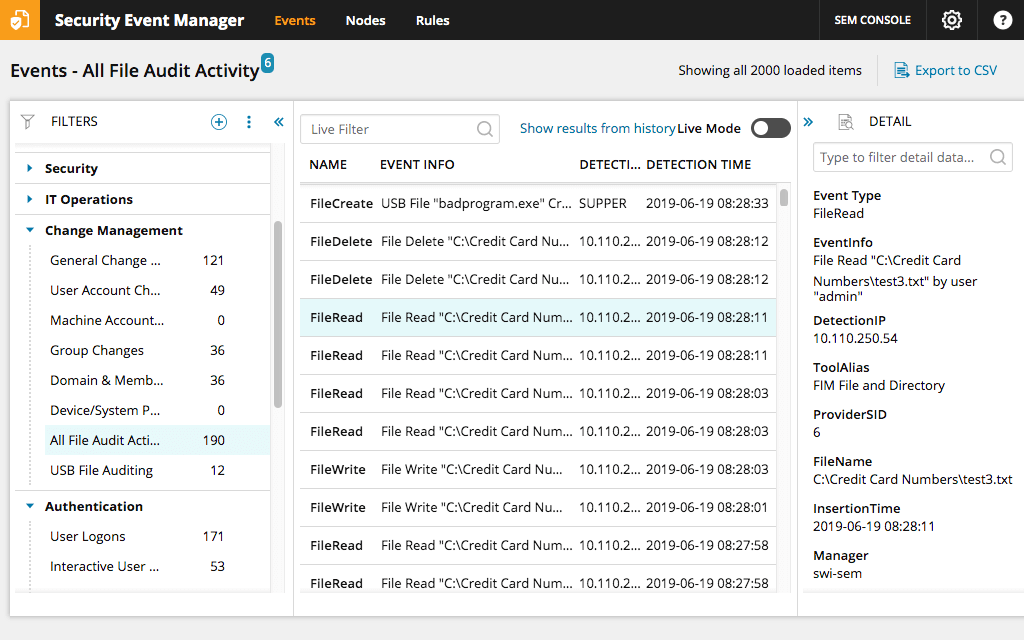
SEM is designed with advanced workflow options to help ensure no threats go overlooked. Use predefined filters organized by categories to achieve real-time visibility into domain activity. It’s also easy to drill down into event name details, including insertion/detection time, source IP, destination account, and even severity level. You can also create custom filters and define conditions as needed using SolarWinds SEM.
Additionally, admins can leverage automatic alerts to optimize their security orchestration processes. By enabling in-console or email notifications, SEM can help users detect specific types of network, server, application, or end-user activity that could signal potential threats.
Ensuring compliance is a critical part of the security orchestration process. SolarWinds SEM is built to help collect the log data required to reconstruct violations across system and user activities. Streamline reporting with over 300 built-in report templates, including predefined IT compliance templates for common industry regulations like PCI DSS, GLBA, SOX, NERC CIP, HIPAA, and more. Or, build custom filters for audience-specific reports based on specific time periods.
SEM also lets you include visual graphs and extensive details to support your findings. Plus, you can schedule reports to run every day, every week, or whenever needed—simply view in-console, print, or export to share.
With SolarWinds SEM, you can gain insight into event correlations across tens of thousands of network components, including devices, applications, and databases to better configure automated responses to identified threats or suspicious activity. SEM is built to correlate time- and transaction-based events across your domain.
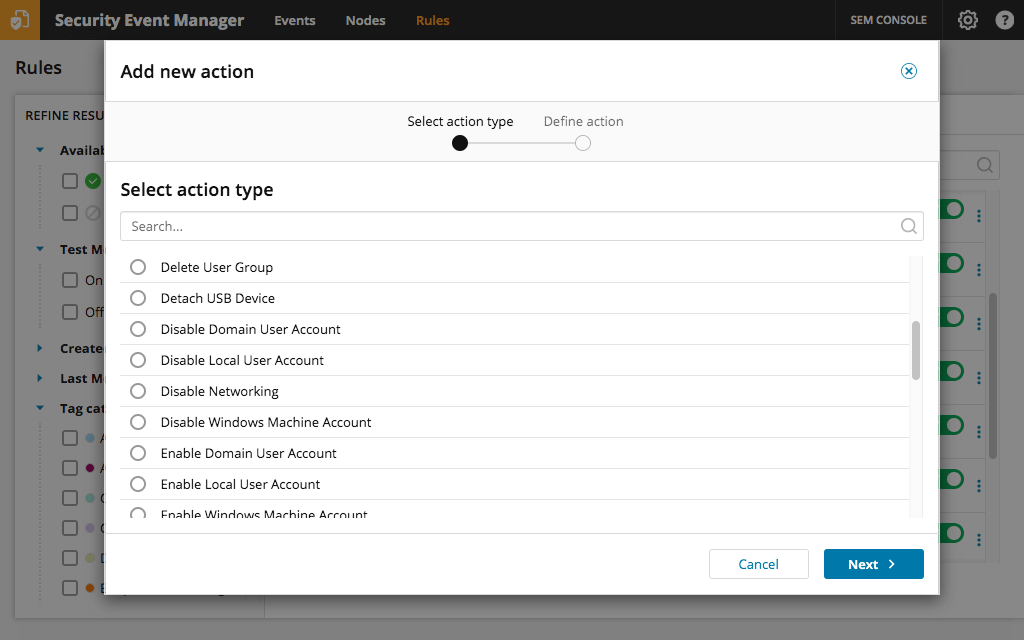
The built-in Active Responses in SEM are designed to automate a wide range of threat mitigation actions. You can use over 700 out-of-the-box event correlation rules to perform multiple response actions at once. For instance, you can integrate rules with the continually updated feed of malicious hosts in SEM to block traffic to and from problem sources. You can also immediately enable or disable accounts, shut down devices, and even block USB connections.
Get More on Security Orchestration and Automation
Security orchestration entails integrating all the security tools and functions IT admins need to successfully and efficiently protect against network threats. All too often, admins end up addressing security for individual network components on a case-by-case basis.
Security orchestration involves integrating security tools like anti-malware or antivirus software, intrusion detection software, firewalls, and similar components. This integration should include user access information and activity, such as Active Directory data. Orchestration should also integrate applications that aren’t specific to security, as threats to a network can emerge from anywhere. Even software that is missing a key software patch or update can leave the door open for an attack. A major part of security orchestration is reconfiguring your security workflow to offer full visibility across these many components. Successful orchestration will also incorporate tools for incident response, so that there is a seamless flow between risk identification and mitigation.
Security automation, or machine-driven actions, is key to security orchestration, as automation is a critical part of successfully reorganizing your security workflow. Admins should have a way to collect data automatically from across their network and tools that can automatically identify potential threats. Automation also plays into orchestration in the form of immediate alerts. Security orchestration and automation platforms should also perform automated threat response functions that quarantine components until admins can more thoroughly address the issue.
Security orchestration and automation works by optimizing how security threats are identified and addressed across a network infrastructure. Tools for security orchestration and automation should have the ability to run a logical and effective sequence of events, based on a holistic view of a network infrastructure, to identify and address cyber security risks.
For instance, imagine that a bad actor sends a malicious email to an employee. Security software will flag the email and automatically run it through a database of threat intelligence. If the employee opens the email, the subsequent network activity will show up in application logs and the software will flag it as suspicious. Either way, the admin will receive an automatic alert. The security orchestrion solution could also be configured to take automatic first steps, such as quarantining the email as an immediate safety measure. Then, the admin can confirm the threat and take steps toward mitigating any potential damage.
Once you think about multiplying this process by hundreds of potentially malicious emails per day, it becomes clear that security orchestration tools are crucial for nearly every business. This process can apply equally to malware detection, phishing attacks, intrusion detection software, access control management, and other key business applications. Security orchestration and automation is all about drawing this process into one streamlined and largely automated workflow.
When threats occur, consequences to businesses can include lost productivity, data breaches, and compliance failures—all of which can be costly. IT teams need to be able to provide protection against the damage caused by a range of security incidents. Unfortunately, the multitude of potential attack types and vectors often makes it impossible for even an entire IT team to be proactive against potential vulnerabilities. These vulnerabilities often stem from inefficient processes, such as attempting to manage individual network components separately, or relying on disparate tools to perform various security functions.
Instead of being reactive and resolving issues after they happen, organizations can mount an effective defense against cyber threats using security orchestrion and automation. Security orchestration and automation is important because it helps unify and streamline security measures in a way that enables businesses to quickly deliver more effective responses to cyberthreats.
Repetitive manual tasks simply aren’t an effective use of time. Admins can replace slow, manual processes with an automated, integrated security orchestration and automation approach. Common features of security automation tools include:
SolarWinds SEM is designed to help businesses meet their cybersecurity automation and orchestration needs. With automated log collection and comprehensive monitoring features, SEM is built to make real-time event correlation and active threat responses simple.
Use the default rules out-of-the-box from categories like Change Management and Compliance to set up automatic, real-time alerts and create responses that trigger based on potentially malicious activity. There are also many ways to customize SEM to help teams focus on the security alerts that matter in their environment. These customizations include the ability to create rules that monitor for particular event types, send alerts only after passing set thresholds like high activity levels, automate actions to only trigger when events are from a particular source or if they contain key details, and automation based on multi-event occurrences like new user account creation paired with extensive file changes.
Security orchestration entails integrating all the security tools and functions IT admins need to successfully and efficiently protect against network threats. All too often, admins end up addressing security for individual network components on a case-by-case basis.
Security orchestration involves integrating security tools like anti-malware or antivirus software, intrusion detection software, firewalls, and similar components. This integration should include user access information and activity, such as Active Directory data. Orchestration should also integrate applications that aren’t specific to security, as threats to a network can emerge from anywhere. Even software that is missing a key software patch or update can leave the door open for an attack. A major part of security orchestration is reconfiguring your security workflow to offer full visibility across these many components. Successful orchestration will also incorporate tools for incident response, so that there is a seamless flow between risk identification and mitigation.
Security automation, or machine-driven actions, is key to security orchestration, as automation is a critical part of successfully reorganizing your security workflow. Admins should have a way to collect data automatically from across their network and tools that can automatically identify potential threats. Automation also plays into orchestration in the form of immediate alerts. Security orchestration and automation platforms should also perform automated threat response functions that quarantine components until admins can more thoroughly address the issue.
Security orchestration and automation works by optimizing how security threats are identified and addressed across a network infrastructure. Tools for security orchestration and automation should have the ability to run a logical and effective sequence of events, based on a holistic view of a network infrastructure, to identify and address cyber security risks.
For instance, imagine that a bad actor sends a malicious email to an employee. Security software will flag the email and automatically run it through a database of threat intelligence. If the employee opens the email, the subsequent network activity will show up in application logs and the software will flag it as suspicious. Either way, the admin will receive an automatic alert. The security orchestrion solution could also be configured to take automatic first steps, such as quarantining the email as an immediate safety measure. Then, the admin can confirm the threat and take steps toward mitigating any potential damage.
Once you think about multiplying this process by hundreds of potentially malicious emails per day, it becomes clear that security orchestration tools are crucial for nearly every business. This process can apply equally to malware detection, phishing attacks, intrusion detection software, access control management, and other key business applications. Security orchestration and automation is all about drawing this process into one streamlined and largely automated workflow.
When threats occur, consequences to businesses can include lost productivity, data breaches, and compliance failures—all of which can be costly. IT teams need to be able to provide protection against the damage caused by a range of security incidents. Unfortunately, the multitude of potential attack types and vectors often makes it impossible for even an entire IT team to be proactive against potential vulnerabilities. These vulnerabilities often stem from inefficient processes, such as attempting to manage individual network components separately, or relying on disparate tools to perform various security functions.
Instead of being reactive and resolving issues after they happen, organizations can mount an effective defense against cyber threats using security orchestrion and automation. Security orchestration and automation is important because it helps unify and streamline security measures in a way that enables businesses to quickly deliver more effective responses to cyberthreats.
Repetitive manual tasks simply aren’t an effective use of time. Admins can replace slow, manual processes with an automated, integrated security orchestration and automation approach. Common features of security automation tools include:
SolarWinds SEM is designed to help businesses meet their cybersecurity automation and orchestration needs. With automated log collection and comprehensive monitoring features, SEM is built to make real-time event correlation and active threat responses simple.
Use the default rules out-of-the-box from categories like Change Management and Compliance to set up automatic, real-time alerts and create responses that trigger based on potentially malicious activity. There are also many ways to customize SEM to help teams focus on the security alerts that matter in their environment. These customizations include the ability to create rules that monitor for particular event types, send alerts only after passing set thresholds like high activity levels, automate actions to only trigger when events are from a particular source or if they contain key details, and automation based on multi-event occurrences like new user account creation paired with extensive file changes.
Security Event Manager
Orchestrate your security efforts with insight into network-wide log data.
Automate custom alerts and set event-based threat responses.
Benefit from business-critical features like compliance reporting.