- Events
-
Partners
- Government
- Customer Portal
- Contact Us
- Contact Sales
-
English
A log parser converts your text-based logs into structured data for in-depth analysis and visualization. Event log parsing is a critical step in log analysis, as it prepares logs for searching, monitoring, and troubleshooting.
A log parser gathers logs from all types of network sources, bringing them together for unified log file analysis and applying relevant actionable insights. Typically, a log parser takes two steps:
You can parse logs from any text-based data using a log parser, including key data sources from operating systems like Active Directory and the Windows Event Log. By bringing all kinds of log file data together, a log parser enables you to gain an integrated view of your file system.
For a log parser to work, it has to determine the format of the relevant logs. Though you must sometimes direct the log file parser to a source for input or output, the tool can often determine these formats on its own. This can help you avoid having to manually determine the input and write the output every time.
A log parser is helpful because it enables you to transform any text-based log data into manageable, understandable bits of information. When you perform log file parsing with a tool, you effectively split up data into digestible chunks for easier manipulation, storage, and analysis. This helps you manage key data sources, discover their importance, and act accordingly.
A log file parser enables you to recognize, group, and analyze logs in a value-driving way on a centralized and readable UI. This design helps you easily gain insights into your network, spot patterns and trends, and rapidly search through large file systems so you can find the information you need. A log parser also makes it easier to perform log analysis and quickly use those findings to optimize your operating system.
Along with improved organization and log file analysis, a tool can help you gather more actionable insights. Well-parsed logs help create clear visualizations, enabling you to filter data and discover trends. Many tools also leverage filters, alerts, and automated responses to help you stay on top of your log files and gain instant insights into your file system.
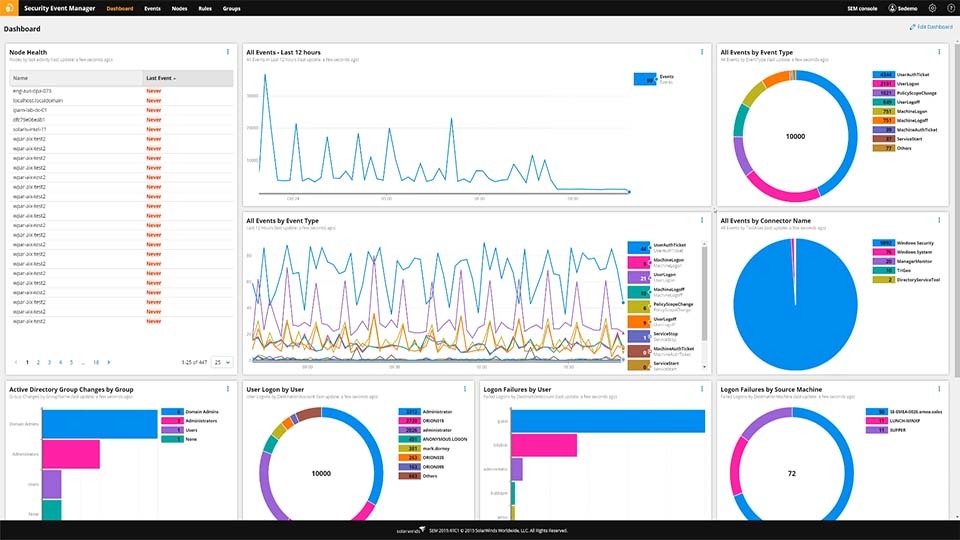
SolarWinds® Security Event Manager (SEM) is built to parse log files using connectors. You can think of an SEM connector as an interpreter built to read and translate the raw log data. Technically, a connector is an XML file loaded with regular expressions capable of parsing and classifying specific vendors, formats, product log types, and key data sources. A connector must be configured for every type of data received by SEM.
SEM includes many out-of-the-box connectors. SEM is also designed with a GUI console, which is built to let you configure a connector for a specific kind of key data source. Through these connectors, SEM enables you to parse various types of data, including the following:
Through log parsing, SEM enables you to separate the data into fields without changing or altering any critical information. After parsing, all normalized data is inserted into the SEM historical Alert database. You can use the GUI console’s nDepth search feature—as well as the SEM reporting capabilities—to retrieve historical data from the Alert database.
A log parser converts your text-based logs into structured data for in-depth analysis and visualization. Event log parsing is a critical step in log analysis, as it prepares logs for searching, monitoring, and troubleshooting.
A log parser gathers logs from all types of network sources, bringing them together for unified log file analysis and applying relevant actionable insights. Typically, a log parser takes two steps:
You can parse logs from any text-based data using a log parser, including key data sources from operating systems like Active Directory and the Windows Event Log. By bringing all kinds of log file data together, a log parser enables you to gain an integrated view of your file system.
For a log parser to work, it has to determine the format of the relevant logs. Though you must sometimes direct the log file parser to a source for input or output, the tool can often determine these formats on its own. This can help you avoid having to manually determine the input and write the output every time.
A log parser is helpful because it enables you to transform any text-based log data into manageable, understandable bits of information. When you perform log file parsing with a tool, you effectively split up data into digestible chunks for easier manipulation, storage, and analysis. This helps you manage key data sources, discover their importance, and act accordingly.
A log file parser enables you to recognize, group, and analyze logs in a value-driving way on a centralized and readable UI. This design helps you easily gain insights into your network, spot patterns and trends, and rapidly search through large file systems so you can find the information you need. A log parser also makes it easier to perform log analysis and quickly use those findings to optimize your operating system.
Along with improved organization and log file analysis, a tool can help you gather more actionable insights. Well-parsed logs help create clear visualizations, enabling you to filter data and discover trends. Many tools also leverage filters, alerts, and automated responses to help you stay on top of your log files and gain instant insights into your file system.
Security Event Manager
Unify and extract actionable intelligence from your logs in real time.
Expedite threat response against malicious IPs, accounts, applications, and more.
Get out-of-the-box compliance reporting for HIPAA, PCI DSS, SOX, ISO, and more.