- Events
-
Partners
- Government
- Customer Portal
- Contact Us
- Contact Sales
-
English
SolarWinds® Security Event Manager (SEM) is designed to process Azure Active Directory (AD) activity logs—including audit logs, sign-in logs, and provisioning logs—and bring them together in a single place to simplify analysis.
SEM can also help facilitate easier Azure AD log and event correlation, so you can quickly investigate potential threats and suspicious activity with the ability to set event-time correlation rules to initiate active responses to triggered thresholds.
SEM is designed to leverage Azure Active Directory log alarms and notifications, which can let you know of detected threats as soon as possible. SEM enables you to initiate real-time remediation efforts as soon as certain thresholds are crossed, which can help expedite time to resolution.
SEM real-time alerts can also identify forced attempts to bypass firewalls, misconfigurations, malicious IPs, and repeated login failures followed by a success using predefined rules or by customizing your own thresholds.
Azure AD, which is short for Azure Active Directory, is the Microsoft cloud-based identity and access management solution. Azure AD is also used as the directory service for Microsoft 365. Azure Active Directory is built to bring all these logs together, giving you a comprehensive view of your system activity. Use these Azure AD log analytics to gain critical insights into the performance of your IT infrastructure.
Azure Active Directory logs collect events having to do with user, group, application, domain, and directory activities as performed from the Microsoft 365 admin center or in the Azure management portal. There are three kinds of Azure AD activity logs:
Collecting and analyzing Azure AD activity log activity can help you more easily maintain the health and performance of Azure AD. You can use Azure Active Directory log analytics to better interpret events occurring in your network and correlate data across your infrastructure sources to more easily discover trends.
By gathering and monitoring Azure Active Directory logs consistently, you can generate more comprehensive, up-to-date log analytics. Azure AD log analytics also present you with metrics to help you investigate security incidents.
With Azure AD log analytics, you can gain clearer insights into potential privileged account abuse by understanding user access and Azure AD activity. You can leverage specific identity and access modifications information—including the date, time, and actor for each change—to help you more quickly detect potential security threats using Azure AD log analytics notifications, alerts, and alarms.
Combining Azure AD log analytics with your security information and event management (SIEM) efforts by sending Azure AD audit logs to a SIEM tool can help you more easily stay on top of security incidents and generate reports to help you demonstrate compliance.
Audit and analyze Azure Active Directory logs with SolarWinds Security Event Manager (SEM) by collecting actions and events from Microsoft Azure Active Directory. SEM enables you to monitor, analyze, and visualize data taken from Azure Active Directory activity logs and audit logs, giving you greater visibility into historical and real-time Azure Active Directory operations.
SEM is designed to monitor for and can alert on potentially suspicious log activities in Azure Active Directory, such as adding or deleting user accounts, editing specific access privileges, changes to passwords and policies, user logins, and permission grants to applications to help you more quickly detect security issues.
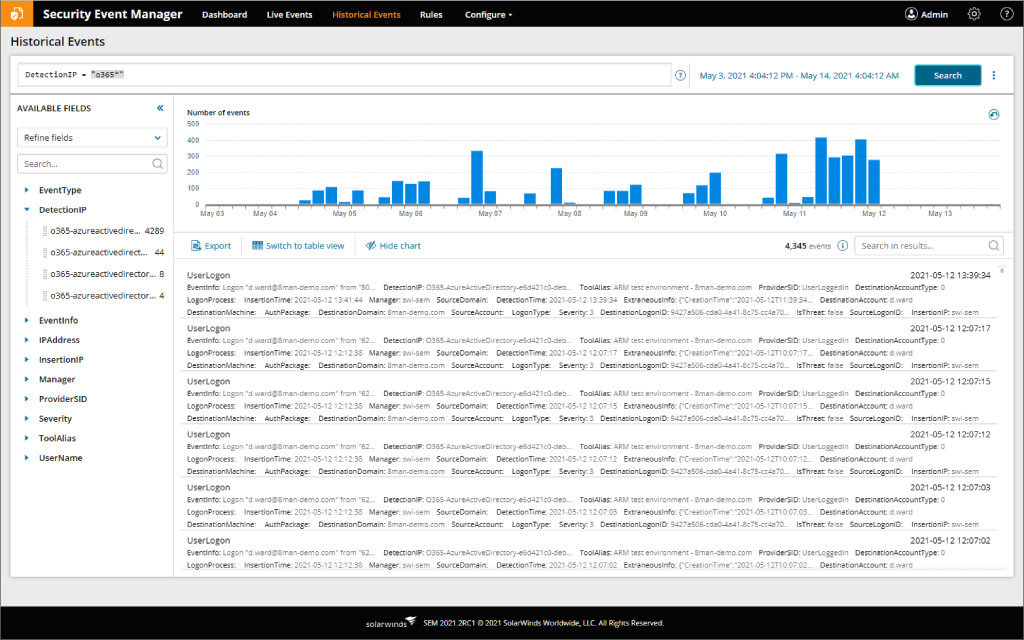
SEM can also help you more easily correlate actions from across cloud and on-premises Active Directory audit logs to create a centralized view of activity in your hybrid environments for more effective log monitoring, analysis, and storage. This intuitive UI can enable you to access and compare logs to gain insights using searchable fields and interactive graphs more easily.
SEM also enables you to automate report creation, change alerts, and incident responses. SEM includes hundreds of out-of-the-box reports you can use to view events, trends, and make more informed decisions about network activity and security, including critical logon and logoff events to help you more easily identify potential brute force cyberattacks.
Other SolarWinds tools to help monitor Azure AD:
Related features:
Azure AD, which is short for Azure Active Directory, is the Microsoft cloud-based identity and access management solution. Azure AD is also used as the directory service for Microsoft 365. Azure Active Directory is built to bring all these logs together, giving you a comprehensive view of your system activity. Use these Azure AD log analytics to gain critical insights into the performance of your IT infrastructure.
Azure Active Directory logs collect events having to do with user, group, application, domain, and directory activities as performed from the Microsoft 365 admin center or in the Azure management portal. There are three kinds of Azure AD activity logs:
Collecting and analyzing Azure AD activity log activity can help you more easily maintain the health and performance of Azure AD. You can use Azure Active Directory log analytics to better interpret events occurring in your network and correlate data across your infrastructure sources to more easily discover trends.
By gathering and monitoring Azure Active Directory logs consistently, you can generate more comprehensive, up-to-date log analytics. Azure AD log analytics also present you with metrics to help you investigate security incidents.
With Azure AD log analytics, you can gain clearer insights into potential privileged account abuse by understanding user access and Azure AD activity. You can leverage specific identity and access modifications information—including the date, time, and actor for each change—to help you more quickly detect potential security threats using Azure AD log analytics notifications, alerts, and alarms.
Combining Azure AD log analytics with your security information and event management (SIEM) efforts by sending Azure AD audit logs to a SIEM tool can help you more easily stay on top of security incidents and generate reports to help you demonstrate compliance.
Audit and analyze Azure Active Directory logs with SolarWinds Security Event Manager (SEM) by collecting actions and events from Microsoft Azure Active Directory. SEM enables you to monitor, analyze, and visualize data taken from Azure Active Directory activity logs and audit logs, giving you greater visibility into historical and real-time Azure Active Directory operations.
SEM is designed to monitor for and can alert on potentially suspicious log activities in Azure Active Directory, such as adding or deleting user accounts, editing specific access privileges, changes to passwords and policies, user logins, and permission grants to applications to help you more quickly detect security issues.
SEM can also help you more easily correlate actions from across cloud and on-premises Active Directory audit logs to create a centralized view of activity in your hybrid environments for more effective log monitoring, analysis, and storage. This intuitive UI can enable you to access and compare logs to gain insights using searchable fields and interactive graphs more easily.
SEM also enables you to automate report creation, change alerts, and incident responses. SEM includes hundreds of out-of-the-box reports you can use to view events, trends, and make more informed decisions about network activity and security, including critical logon and logoff events to help you more easily identify potential brute force cyberattacks.
Other SolarWinds tools to help monitor Azure AD:
Related features:
Security Event Manager
More easily correlate Azure AD logs and search for specific details
Continuously gather Azure AD log analytics
Simplify demonstrating compliance with hundreds of out-of-the-box reports