- Events
-
Partners
- Government
- Customer Portal
- Contact Us
- Contact Sales
-
English
Centralize logs from Ubuntu machines and thousands of applications, network devices, and servers with SolarWinds® Security Event Manager (SEM). Log analysis and forensics can be easier when you centralize and control logs from a single location. Security Event Manager is built to automatically classify system logs by source machine, source and destination IPs, insertion and detection times, protocols, logon/logoff data, and more—helping eliminate guesswork during the troubleshooting process.
You can customize SEM’s Ubuntu log analyzer to correlate key events from across your Ubuntu systems in real time. If there’s malicious activity in the Ubuntu system, SEM’s built-in Active Response technology lets you automate critical actions to help protect your system, including automatically killing processes by ID or name, logging users off, removing user-defined group elements, restarting or shutting down machines, and sending incident alerts, emails, or pop-up messages.
Security Event Manager includes hundreds of built-in rule templates that can be further organized by categories to help you quickly get to the problem during a firefight. These built-in rules are designed to provide real-time security incident awareness right out of the box, and you can customize them to suit your business needs or industry-standard compliance requirements.
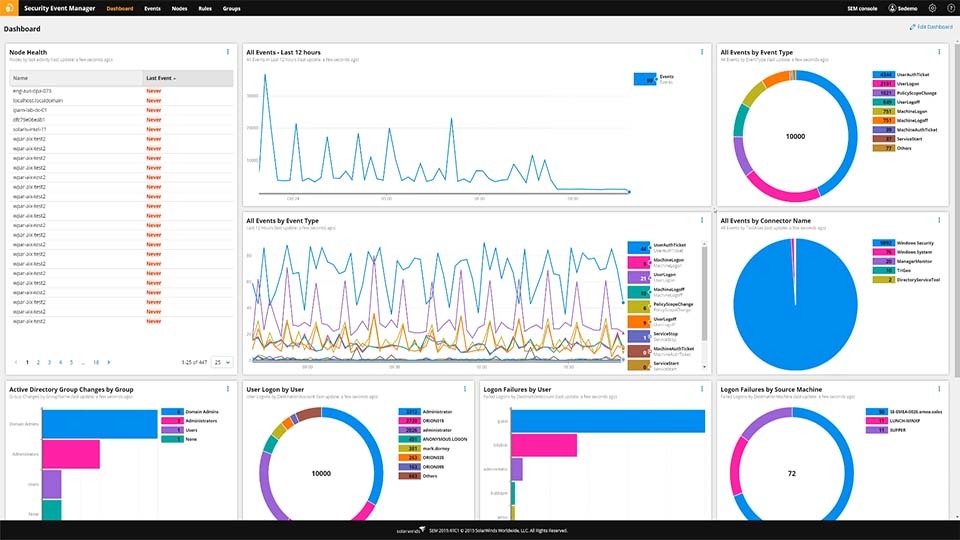
SEM’s Ubuntu system log normalization and intuitive graphical user interface can also help you more easily visualize the machine data in a meaningful format, without the need for complex coding or scripting processes.
Ubuntu is a popular open-source operating system built to offer a great degree of customization. Ubuntu is similar to Linux or Unix OS but incorporates a customizable graphical interface. While Linux and Unix systems have a reputation as being primarily for developers, Ubuntu can offer a user-friendly alternative to Windows and Mac OS operating systems for both personal computers and servers.
Linux refers to a free, open source operating system built around the Linux kernel. Linux operating systems are widely used on web servers around the world.
While all Ubuntu systems use the Linux kernel, not all Linux distributions are Ubuntu. Ubuntu is one variety of Linux distribution and comes in several variations with specific applications or uses. Ubuntu is also available in server distributions and is commonly used in IoT devices.
Every action, event, or activity is logged in the Ubuntu system log, or syslog. Ubuntu syslogs can track the basic functions of the operating system, including authorizations (like password prompts), systems messages, and system daemons (or service processes in the background).
Ubuntu log files contain information about events and activities for workstations, servers, applications, and even the Linux kernel itself. When properly managed, monitored, and analyzed, these records can offer powerful and useful insights into each device’s performance, including security and error messages.
Event log analysis can also provide visibility into everything from opportunities to improve IT operations to more easily identifying potential malware. Given how costly cyberattacks have become, minimizing the time between detecting a threat and starting the remediation processes can save organizations resources and money, and even help mitigate the harm the attack could cause.
An Ubuntu log analyzer is designed to compile and aggregate log files generated every day across an environment from Ubuntu systems, other apps, and databases into one location to save time and support quicker identification of patterns and potential issues. Using an Ubuntu system monitor to correlate event data from hundreds of systems in real-time can also help improve security incident awareness.
Security Event Manager is built to automate traditionally manual SIEM log monitoring processes to provide an easy and intuitive Ubuntu log analyzer solution. The tool can centralize log files from servers and devices operating Ubuntu—and the applications those devices are running—and provides the ability to drill down to the specific log details or metric to more easily reveal potential issues.
If SEM detects potential security threats in Ubuntu systems, correlation rules can trigger auto-response functions to automatically kill processes, shut down machines, and more, helping you quickly resolve and contain cyberthreats. Security Event Manager also comes pre-packaged with customizable security rule templates to simplify your ability to demonstrate compliance.
Ubuntu is a popular open-source operating system built to offer a great degree of customization. Ubuntu is similar to Linux or Unix OS but incorporates a customizable graphical interface. While Linux and Unix systems have a reputation as being primarily for developers, Ubuntu can offer a user-friendly alternative to Windows and Mac OS operating systems for both personal computers and servers.
Linux refers to a free, open source operating system built around the Linux kernel. Linux operating systems are widely used on web servers around the world.
While all Ubuntu systems use the Linux kernel, not all Linux distributions are Ubuntu. Ubuntu is one variety of Linux distribution and comes in several variations with specific applications or uses. Ubuntu is also available in server distributions and is commonly used in IoT devices.
Every action, event, or activity is logged in the Ubuntu system log, or syslog. Ubuntu syslogs can track the basic functions of the operating system, including authorizations (like password prompts), systems messages, and system daemons (or service processes in the background).
Ubuntu log files contain information about events and activities for workstations, servers, applications, and even the Linux kernel itself. When properly managed, monitored, and analyzed, these records can offer powerful and useful insights into each device’s performance, including security and error messages.
Event log analysis can also provide visibility into everything from opportunities to improve IT operations to more easily identifying potential malware. Given how costly cyberattacks have become, minimizing the time between detecting a threat and starting the remediation processes can save organizations resources and money, and even help mitigate the harm the attack could cause.
An Ubuntu log analyzer is designed to compile and aggregate log files generated every day across an environment from Ubuntu systems, other apps, and databases into one location to save time and support quicker identification of patterns and potential issues. Using an Ubuntu system monitor to correlate event data from hundreds of systems in real-time can also help improve security incident awareness.
Security Event Manager is built to automate traditionally manual SIEM log monitoring processes to provide an easy and intuitive Ubuntu log analyzer solution. The tool can centralize log files from servers and devices operating Ubuntu—and the applications those devices are running—and provides the ability to drill down to the specific log details or metric to more easily reveal potential issues.
If SEM detects potential security threats in Ubuntu systems, correlation rules can trigger auto-response functions to automatically kill processes, shut down machines, and more, helping you quickly resolve and contain cyberthreats. Security Event Manager also comes pre-packaged with customizable security rule templates to simplify your ability to demonstrate compliance.
Security Event Manager
Collect, centralize, and analyze events and logs across Ubuntu systems, routers, switches, servers, and applications.
Reduce time between detection and response using an Ubuntu log viewer.
Automate, simplify, and demonstrate compliance, and get actionable data in less time.