- Events
-
Partners
- Government
- Customer Portal
- Contact Us
- Contact Sales
-
English
In any size organization, there may be just as many servers to manage and monitor as there are employees - if not more. It can be impossible for any administrator to be responsible for individually checking every error log on every server.
SolarWinds Security Event Manager (SEM) relies on an agent-based approach for the collection of logs across server types, so you can monitor logs and view possible errors, abuse traffic, hackers, and more in a centralized location. Once you have configured the SEM agent, it is built to automatically send all the data to SolarWinds SEM, which performs real-time analysis of Apache log files to provide you actionable intelligence. You can quickly track customer sessions, browsing patterns, and detect issues across your distributed stack.
Most traditional Apache log file analyzers are not equipped to analyze complex modern workloads and can get painfully slow as the load increases. There can also be a lot of manual effort required to monitor HTTP Status Codes (2XX, 3XX, etc.), URL Paths, Request Time, Unique ID, and other important fields. SolarWinds SEM is built to simplify the monitoring and analysis of Apache logs so you can immediately troubleshoot and investigate security and performance issues, including identifying security breaches using real-time, in-memory correlation.
SEM’s Apache log analyzer helps you pinpoint critical issues and is designed to save you time troubleshooting by making it simple to analyze Apache server logs to gather data to help you improve and protect your hosted websites. You can easily identify the root cause of 404 errors, centrally monitor all such errors, and take remedial actions in a prioritized manner.
The challenge with most Apache log file analyzer tools is the time and effort required in troubleshooting can increase as organizations scale up. Some of these tools have limited features for advanced analysis of large volumes of logs from disparate sources.
SolarWinds Security Event Manager helps solve this challenge of scale by automatically collecting, normalizing, and performing in-memory event correlation on log data in real time. More than 700 built-in event correlation rules cover some of the most common and even rare scenarios in log file monitoring and event analysis. With these templates, SEM’s Apache log analyzer is built to help you easily detect issues, receive alarms, and configure automated responses based on issue severity. And unlike many traditional Apache log file analyzers, SEM’s virtual appliance deployment allows you to be “live by lunch” without the need for expensive consultants. With its simple-to-understand node-based licensing model and rich UI, start simplifying your Apache access log file monitoring and analysis workflows with SEM to help make troubleshooting a breeze.
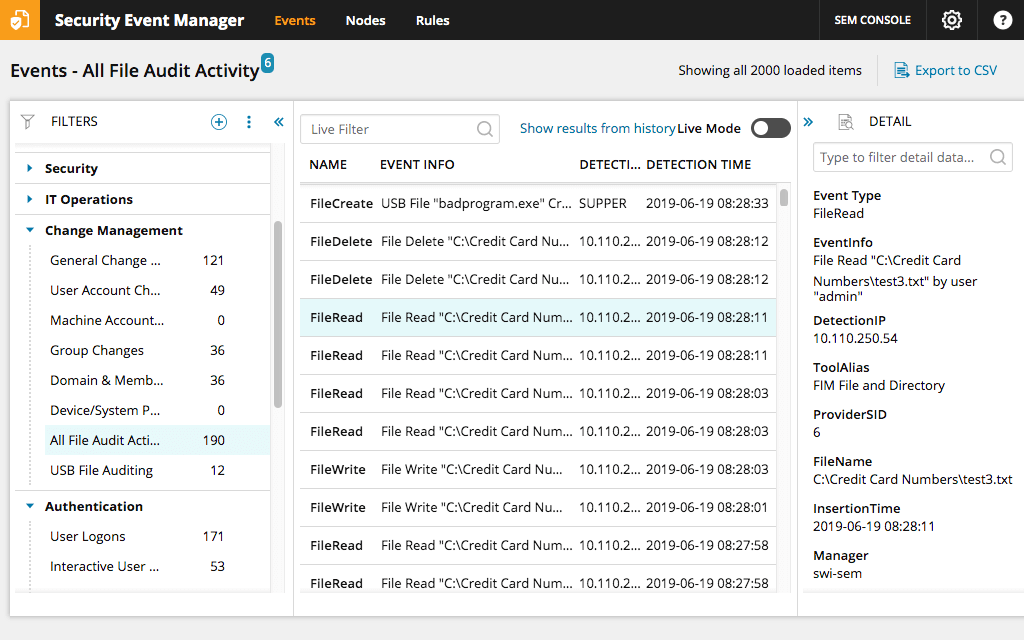
While threshold-based alerts can expedite threat response, you need to monitor recurring patterns or other anomalies that may be well under your thresholds but still require attention. SEM can help detect these patterns more easily with Apache web server logs visualization capabilities. SolarWinds Security Event Manager can help you visualize data from your Apache log files with treemaps, charts, and word clouds. You can also use discovery techniques, such as the parameterized search, to get a quick overview of your environment and filter out the noise present in log data to pinpoint important security events.
Apache logs are the records of events that occur as your Apache HTTP Server handles requests and responses from other devices and runs internal processes. The two primary types of Apache logs files are access logs and error logs. Access logs record requests made of a website, while error logs record various errors on the server. Apache access log data also includes timestamps, so you can view exactly when events occurred.
Tracking Apache logs is a crucial component of web server security monitoring. Basically, logs allow you to gain precise insight into past and present interactions that may affect your server performance. Accessing these files is necessary to troubleshoot your Apache web server’s performance and security. You can also use historical Apache logs to demonstrate compliance with regulations.
Since Apache log files provide granular insight into your web server history, log analytics software can allow you to examine log data for your server more easily. An Apache log analyzer is a tool designed to help you find events within your log files collection and better locate, sort, and use access log information.
Access logs record the requests for files people (or bots) make on a website. These records can be valuable sources of information about how your website is used.
An Apache access log analyzer tool is built to help you filter your logs to pinpoint certain access events, sort your access events to find specific log trends, and analyze log data information. You can also use this tool for real-time access log analysis or to look through historical logs.
You may also want to use this tool to identify specification interactions as noted by specific logs, especially if you think a transaction was problematic. You can also use an Apache access log analyzer to better detect anomalies that may indicate a threat to your system. Log data allows you to understand data that helps you to fix bugs, reduce downtime, identify security threats, and correct other issues affecting your website’s end-user experience. As soon as you identify a key log, you can scale back to other associated logs within your transaction history for additional context.
Although your focus may be on Apache access logs, a comprehensive log analyzer can allow you to view logs from a variety of services and formats. You can benefit from this additional context and insight into logs from across your systems.
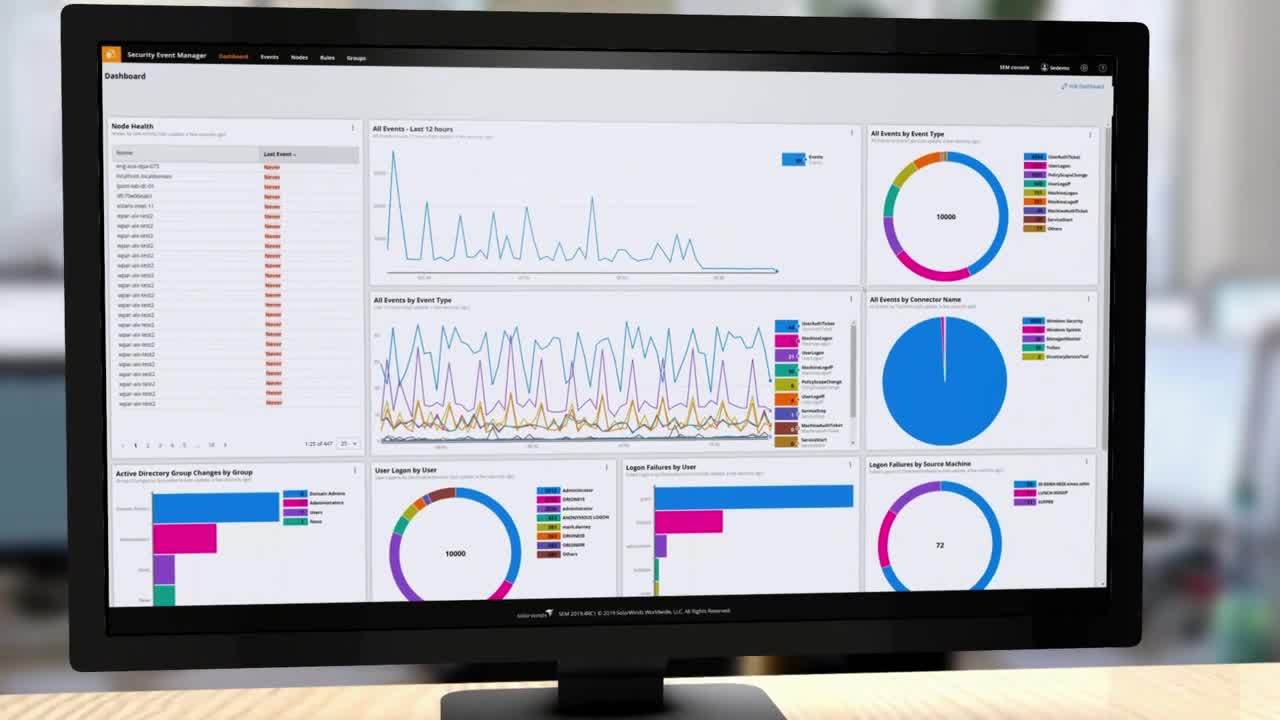
Apache log viewing tools can allow you to monitor your Apache server logs in a user-friendly display by offering intuitive dashboards for analyzing log correlations and sources.
Log viewer tools are designed to bring automation to your log monitoring capabilities, so you can get to the root cause of anomalies quicker and more accurately. Since log viewers can help streamline your log monitoring process, an effective log viewer should include visualized graphs and data, a user-friendly control center, and a search bar that doesn’t require you to sift through mountains of code to find the log you’re looking for. With a bird’s-eye, visual overview of your log files, you can identify issues more quickly and dig into the relevant log files with just a few clicks.
SolarWinds Security Event Manager uses high-performance, high-compression data models to solve this challenge. With its advanced data model for log storage designed to let you use less external storage for your logs, SolarWinds SEM can store Apache, Microsoft IIS, NGINX, and log data from other sources in one place without worrying about storage capacity. SEM’s Apache log viewer and analyzer can also store data at up to a 60:1 ratio, which can eliminate the need for external storage hardware while also enabling you to store massive amounts of log data. This centralized Apache logs view can also be crucial when crossing the dots across a distributed stack and help you resolve issues faster.
In addition to tracking the web server capacity and performance glitches, monitoring logs can also help you monitor user activity. It’s important to monitor users and track what assets they are logging in to in addition to what ports and protocols are being actively used. Any deviation from these regular patterns could be a sign of a security breach.
SolarWinds SEM is built to help you detect security events, trigger notifications, and take predefined actions to help mitigate security issues. SEM’s Apache log analyzer also includes an active cyberthreat intelligence feed from third-party sources built to automatically detect and respond to traffic from known bad IPs and other threat vectors.
SolarWinds Security Event Manager (SEM) offers an intuitive approach to log management designed to not compromise accuracy for usability. In typically just a few minutes, you can configure SEM to begin monitoring logs from your Apache web server. SEM can access a wide variety of log formats, including Apache syslog data, Apache access logs, error logs, and more.
Since the SEM log viewer tool can store a high volume of cloud-based log data, you can quickly access to see a wide range of historical logs without the need to worry about the size of your web server or the complexity of your stack with integrated intuitive log filters, search capabilities, and customizable alerts.
When it’s time for a security audit, SEM can allow you to more easily document application logs and core operating system logs, with exportable report formats based on industry standards, including HIPAA, SOX, PCI DSS, and more.
Instead of wasting precious downtime looking for a specific Apache log file, SolarWinds SEM is designed to help identify anomalies faster with intuitive log viewer software and real-time log monitoring. With automation and accuracy, SEM can help take the hassle out of Apache web server monitoring.
SolarWinds SEM also offers a built-in reporting console to help you with compliance reporting and other reporting challenges. You can generate compliance reports and graphical summaries with a few simple clicks. There are over 300 customizable templates to help you generate reports for internal security audits or other compliance standards. Not only can these reports provide a quick overview, you can also use SEM to drill down into the original log data using its nDepth advanced search query tool. You can also schedule the delivery of reports to automatically send to internal stakeholders, auditors, and other regulatory bodies.
Other SolarWinds solutions to help analyze logs:
Related features:
Apache logs are the records of events that occur as your Apache HTTP Server handles requests and responses from other devices and runs internal processes. The two primary types of Apache logs files are access logs and error logs. Access logs record requests made of a website, while error logs record various errors on the server. Apache access log data also includes timestamps, so you can view exactly when events occurred.
Tracking Apache logs is a crucial component of web server security monitoring. Basically, logs allow you to gain precise insight into past and present interactions that may affect your server performance. Accessing these files is necessary to troubleshoot your Apache web server’s performance and security. You can also use historical Apache logs to demonstrate compliance with regulations.
Since Apache log files provide granular insight into your web server history, log analytics software can allow you to examine log data for your server more easily. An Apache log analyzer is a tool designed to help you find events within your log files collection and better locate, sort, and use access log information.
Access logs record the requests for files people (or bots) make on a website. These records can be valuable sources of information about how your website is used.
An Apache access log analyzer tool is built to help you filter your logs to pinpoint certain access events, sort your access events to find specific log trends, and analyze log data information. You can also use this tool for real-time access log analysis or to look through historical logs.
You may also want to use this tool to identify specification interactions as noted by specific logs, especially if you think a transaction was problematic. You can also use an Apache access log analyzer to better detect anomalies that may indicate a threat to your system. Log data allows you to understand data that helps you to fix bugs, reduce downtime, identify security threats, and correct other issues affecting your website’s end-user experience. As soon as you identify a key log, you can scale back to other associated logs within your transaction history for additional context.
Although your focus may be on Apache access logs, a comprehensive log analyzer can allow you to view logs from a variety of services and formats. You can benefit from this additional context and insight into logs from across your systems.
Apache log viewing tools can allow you to monitor your Apache server logs in a user-friendly display by offering intuitive dashboards for analyzing log correlations and sources.
Log viewer tools are designed to bring automation to your log monitoring capabilities, so you can get to the root cause of anomalies quicker and more accurately. Since log viewers can help streamline your log monitoring process, an effective log viewer should include visualized graphs and data, a user-friendly control center, and a search bar that doesn’t require you to sift through mountains of code to find the log you’re looking for. With a bird’s-eye, visual overview of your log files, you can identify issues more quickly and dig into the relevant log files with just a few clicks.
SolarWinds Security Event Manager uses high-performance, high-compression data models to solve this challenge. With its advanced data model for log storage designed to let you use less external storage for your logs, SolarWinds SEM can store Apache, Microsoft IIS, NGINX, and log data from other sources in one place without worrying about storage capacity. SEM’s Apache log viewer and analyzer can also store data at up to a 60:1 ratio, which can eliminate the need for external storage hardware while also enabling you to store massive amounts of log data. This centralized Apache logs view can also be crucial when crossing the dots across a distributed stack and help you resolve issues faster.
In addition to tracking the web server capacity and performance glitches, monitoring logs can also help you monitor user activity. It’s important to monitor users and track what assets they are logging in to in addition to what ports and protocols are being actively used. Any deviation from these regular patterns could be a sign of a security breach.
SolarWinds SEM is built to help you detect security events, trigger notifications, and take predefined actions to help mitigate security issues. SEM’s Apache log analyzer also includes an active cyberthreat intelligence feed from third-party sources built to automatically detect and respond to traffic from known bad IPs and other threat vectors.
SolarWinds Security Event Manager (SEM) offers an intuitive approach to log management designed to not compromise accuracy for usability. In typically just a few minutes, you can configure SEM to begin monitoring logs from your Apache web server. SEM can access a wide variety of log formats, including Apache syslog data, Apache access logs, error logs, and more.
Since the SEM log viewer tool can store a high volume of cloud-based log data, you can quickly access to see a wide range of historical logs without the need to worry about the size of your web server or the complexity of your stack with integrated intuitive log filters, search capabilities, and customizable alerts.
When it’s time for a security audit, SEM can allow you to more easily document application logs and core operating system logs, with exportable report formats based on industry standards, including HIPAA, SOX, PCI DSS, and more.
Instead of wasting precious downtime looking for a specific Apache log file, SolarWinds SEM is designed to help identify anomalies faster with intuitive log viewer software and real-time log monitoring. With automation and accuracy, SEM can help take the hassle out of Apache web server monitoring.
SolarWinds SEM also offers a built-in reporting console to help you with compliance reporting and other reporting challenges. You can generate compliance reports and graphical summaries with a few simple clicks. There are over 300 customizable templates to help you generate reports for internal security audits or other compliance standards. Not only can these reports provide a quick overview, you can also use SEM to drill down into the original log data using its nDepth advanced search query tool. You can also schedule the delivery of reports to automatically send to internal stakeholders, auditors, and other regulatory bodies.
Other SolarWinds solutions to help analyze logs:
Related features:
Security Event Manager
Unify and extract actionable intelligence from all your Apache logs file in real-time.
Expedite threat response against malicious IPs, accounts, applications, and more.
Get out-of-the-box compliance reporting for HIPAA, PCI DSS, SOX, ISO, and more.