Real-Time Log Monitoring Tool

Search, analyze, and monitor network and server device log data

Monitor critical log data in real time to aid in troubleshooting

Monitor critical log data in real time to aid in troubleshooting

Your infrastructure continuously generates log data to provide performance insights, and monitoring logs in real time can help give you the immediate insight you need. Whether it’s syslog, SNMP traps, or Windows event logs, these log files can provide the critical pieces of insight you need to help with troubleshooting. Monitoring, collecting, consolidating, and analyzing log information using one log management tool can help you find root causes faster. SolarWinds® Log Analyzer was designed to be the log monitoring tool you need to help keep your network and business up and running.

Filter your log data to find entries faster

Filter your log data to find entries faster

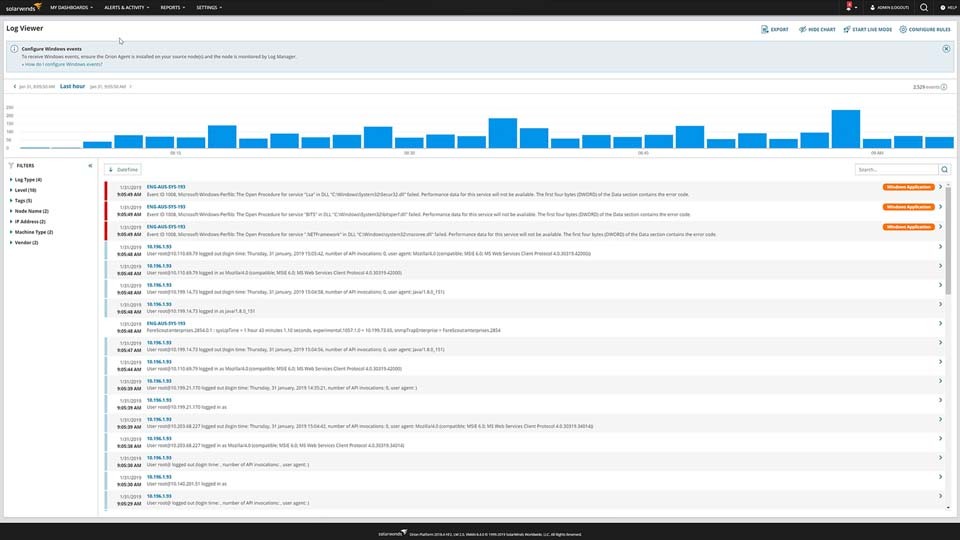
Log Analyzer can help you easily filter your monitored log data. Once you collect the logs, you can refine them via intuitive, out-of-the-box filters. Using the powerful search engine built into Log Analyzer, you can quickly find the log entries of interest and save valuable time.

Visualize data via an interactive chart

Visualize data via an interactive chart

Log Analyzer is designed to give you the capability to quickly visualize log volume, search results, and refine timeframes via an interactive chart. Since Log Analyzer is integrated into the Orion® Platform of products, you can seamlessly integrate the log data you’ve monitored and collected into the Orion Platform console, so you can view it alongside network and systems performance metrics. Unifying your log monitoring data and infrastructure performance can help give you a clearer view of your network’s performance.

Get More on Log Aggregation
Do you find yourself asking…
  • What is log monitoring?
  • What contains a log file?
  • Related Features and Tools
  • What is log monitoring?

    Log monitoring is a part of the larger cycle of log management, which can be broken down into five steps. 

    1. Log collection: First, event log files must be collected from all parts of the infrastructure and application stack.
    2. Normalized: Once collected, the logs must be normalized, so they can be more easily searched and analyzed.
    3. Analysis: One of the goals of analysis is to identify patterns and be notified of urgent issues in need of an immediate response. After your log aggregation tool organizes and indexes the logs, they can be searched and analyzed for signs of anomalous activity or patterns requiring attention.
    4. Monitoring: Robust ongoing log monitoring is critical to successful log management. It's important to have a tool with messaging and notification systems—this feature allows you to receive updates about critical systems and respond in a timely manner.
    5. Reporting: The last step involves making application performance data accessible to relevant team members and stakeholders, typically providing visibility in the form of reports and dashboards.

  • What contains a log file?

    The utility of log files is due in part to different types of information the files contain. Typically, log files fall into one of five categories.

    1. Information: These file logs record changes in the state of an application, and changes in entities within a given application. Informational logs focus on successfully completed operations, in contrast to other log types, which report on unsuccessful tasks. This makes them especially useful for determining exactly what happened in the application.
    2. Application errors and failures: Depending on the application in question, an error could cause wide-reaching service interruptions internally and in customer-facing roles. Error logs therefore need to be investigated immediately so as to minimize any disruptions to end users and ensure your critical services remain accessible and operational.
    3. Warnings and application malfunction: Warnings are similar to errors in that they indicate the application has attempted to carry out an operation and failed. If an application has a slightly longer than normal load time, then the log file should be a warning.
    4. Positive security events: The successful completion of a security event will typically lead the majority of applications to generate a login response.
    5. Negative security events


    Furthermore, logs tend to include a baseline set of data points, regardless of the event type or source. These details include:

    • Date and time the event occurred
    • Event description with applicable error code if available
    • Active user profile at time of event
    • Name of device where event occurred
    • Event identification number
    • Event source

  • Related Features and Tools

    Other SolarWinds log monitoring tools:


    Related features:

What is log monitoring?

Log monitoring is a part of the larger cycle of log management, which can be broken down into five steps. 

  1. Log collection: First, event log files must be collected from all parts of the infrastructure and application stack.
  2. Normalized: Once collected, the logs must be normalized, so they can be more easily searched and analyzed.
  3. Analysis: One of the goals of analysis is to identify patterns and be notified of urgent issues in need of an immediate response. After your log aggregation tool organizes and indexes the logs, they can be searched and analyzed for signs of anomalous activity or patterns requiring attention.
  4. Monitoring: Robust ongoing log monitoring is critical to successful log management. It's important to have a tool with messaging and notification systems—this feature allows you to receive updates about critical systems and respond in a timely manner.
  5. Reporting: The last step involves making application performance data accessible to relevant team members and stakeholders, typically providing visibility in the form of reports and dashboards.

Close
What contains a log file?

The utility of log files is due in part to different types of information the files contain. Typically, log files fall into one of five categories.

  1. Information: These file logs record changes in the state of an application, and changes in entities within a given application. Informational logs focus on successfully completed operations, in contrast to other log types, which report on unsuccessful tasks. This makes them especially useful for determining exactly what happened in the application.
  2. Application errors and failures: Depending on the application in question, an error could cause wide-reaching service interruptions internally and in customer-facing roles. Error logs therefore need to be investigated immediately so as to minimize any disruptions to end users and ensure your critical services remain accessible and operational.
  3. Warnings and application malfunction: Warnings are similar to errors in that they indicate the application has attempted to carry out an operation and failed. If an application has a slightly longer than normal load time, then the log file should be a warning.
  4. Positive security events: The successful completion of a security event will typically lead the majority of applications to generate a login response.
  5. Negative security events


Furthermore, logs tend to include a baseline set of data points, regardless of the event type or source. These details include:

  • Date and time the event occurred
  • Event description with applicable error code if available
  • Active user profile at time of event
  • Name of device where event occurred
  • Event identification number
  • Event source

Close
Related Features and Tools

Visualize log aggregation data with easy-to-understand displays

Log Analyzer

  • Gain insight into the performance of your environment

  • Rapid identification of performance and availability issues

  • See log data in real time with an interactive chart and graph

Starts at {#Product Price#} LA, an Orion module, is built on the SolarWinds Platform
Let’s talk it over.
Contact our team. Anytime.
{#Contact Phone#}
{{STATIC CONTENT}}
{{CAPTION_TITLE}}

{{CAPTION_CONTENT}}

{{TITLE}}