- Events
-
Partners
- Government
- Customer Portal
- Contact Us
- Contact Sales
-
English
Your infrastructure continuously generates log data to help provide performance insight and monitoring logs in real time can give you the immediate insight you need. Whether it’s syslog, SNMP traps, or Windows system event logs, these critical pieces of insight can help with troubleshooting—but without an efficient and easy way to consume this data, you may not be fully leveraging these insights.
SolarWinds® Log Analyzer is designed to reduce the log “noise” and let you focus on the log data that matters most. Use SolarWinds Log Analyzer to monitor, collect, consolidate, and analyze Windows event log information all within a single tool.
To save time and eliminate hours of manual work, admins need Windows event log reader tools with the capability to search Windows events.
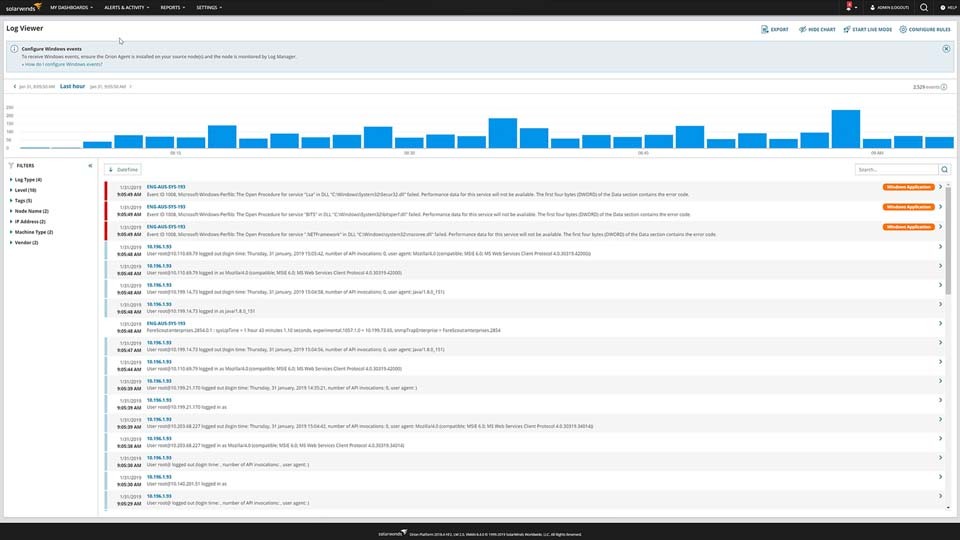
Log Analyzer is designed to go above and beyond the functionalities of a traditional log viewer by letting you search logs and use out-of-the-box tags and filters to more easily refine your monitored log data and pinpoint issues. Using Log Analyzer, you can quickly find Windows event log entries of interest and get the insights you need.
When the blue screen of death stares back at you from your computer, the first question on your mind is, “What happened?”
This question becomes much easier to answer with Log Analyzer’s integration with the Orion® Platform and SolarWinds PerfStack™ dashboard. Using a common timeline, users can correlate network and systems availability and performance metrics from other SolarWinds products alongside Windows server event log data from Log Analyzer.
A Windows event log is a record of transactions on a Microsoft system. All the devices and services on a network generate logs, which include reports of errors and issues as well as many records of successful transactions and interactions. Windows systems have three types of event logs: system, application, and security logs, each of which is meant to report on events involving that area of the system. The logs typically include information like the data and time generated, the associated user or computer, the event ID, the source, and event type.
To perform Windows event log monitoring, admins may choose to take manual steps, although an automated Windows event log analyzer can make the process more efficient.
A few basic steps are required to effectively collect and monitor Windows event logs for troubleshooting insights:
Aggregate and centralize logs: The only way to monitor the full scope of your Windows event logs is either by going through the tens of thousands of logs produced each day manually or by using a Windows event log collector tool. Typically, the easiest way to aggregate logs is to manage your various devices and services through an automated tool and view your system logs through a single interface.
Scan logs: The process of monitoring Windows event logs also involves going through the collected logs to find suspicious behavior, like patterns of increased log activity indicative of an attack or logs showing a problem within the system, often indicated by an error log. Once you find a suspicious log, you can use the record to help determine the cause of whatever problem your system is facing and resolve it.
While scanning Windows event logs can be incredibly useful, it can also be quite overwhelming. This is because the systems on your network produce tens of thousands of logs every day, which can make manually monitoring logs extremely difficult. Additionally, the most critical logs for maintaining the security and functionality of your network may not always be flagged as such. For example, it’s possible that not all the logs related to the security of your system are stored as “security” logs, making it more difficult to promptly notice a threat. Security threats may not even appear within specific error logs but show up as unusual patterns of log entries, such as an increased volume of a certain type of log in a short amount of time to indicate an attack on the system. These patterns can be very difficult to spot when manually sorting through logs.
Gain log insights: The more devices and systems you have on your network, the more time-consuming the task of manually sorting through logs for insights becomes. You may even miss important warning signs that could prevent your network and business from being seriously threatened.
To effectively and efficiently monitor Windows event log data and make sure you’re not missing critical information, using a tool to automatically collect and monitor your logs and provide alerts whenever a threat is detected can enable you to act quickly to find and address the danger before your network is compromised. Automated event log tools can also provide additional capabilities, like event log tagging, search features, and alerting.
Windows event log monitoring is one of the best ways to protect your network and devices. Looking at granular log data and patterns within log data allows admins to identify both external threats and system problems that can result in reduced network performance and even decreased business productivity.
Windows event logs are incredibly useful for making sure your network runs efficiently. They can be used to monitor and report on error messages, network connections, file access, unauthorized activity, and unusual system and network behavior. They’re meant to help you find the source of an issue in the system, so you can then tackle the problem before it causes further problems, whether through an actual attack or simply through a decrease in the performance of the system.
When you can effectively monitor your event logs, you can easily get to the root of a problem before it causes more serious issues for your business. Windows event logs provide information—like event type, user data, and date and time—to help you more quickly pinpoint a problem in the system. Otherwise, you risk missing threats, whether it’s a performance bottleneck, a system failure, or an issue as significant as a data leak or customer data theft. Having a handle on event logs can also be helpful when demonstrating compliance with regulatory guidelines, like HIPAA. For these reasons, monitoring Windows event logs is an important part of any network security framework.
Windows event log monitoring tools are built to more quickly identify critical logs and the insights they need to support troubleshooting. While the devices and systems on your network create tens of thousands of logs every day, a Windows event log management tool is designed to take the noise out of those logs, so you can focus on the most important data to keep your network up and running.
Event log monitoring tools for Windows are built so you can easily search through logs and apply filters for specific and useful views of log data, so you get to the root cause of a problem and begin troubleshooting sooner. This log search capability can let you quickly pinpoint and address and problems within your network before your systems and devices are seriously affected. A Windows event log viewer tool should also come with alerting features like predefined alerts to trigger with certain events in the network and the ability to set up your own alerts for event conditions indicative of a threat to the network.
SolarWinds Log Analyzer is built to make Windows event log monitoring simple and easy. Log Analyzer was built by IT professionals for users of all skill levels. The tool works by collecting and sorting through event logs from devices across your network to provide useful insights with the ability to filter and implement colorful, intuitive tags for highlighting and searching through logs, allowing for greater visibility into your system.
Log Analyzer comes with built-in alerts to inform you when critical logs are reporting errors or unusual behavior patterns. Users can also set their own alerts based on the most important events for their operations. Since Log Analyzer monitors Windows event logs in near real-time, these alerts are designed to notify as soon as a Windows event log records any problems or suspicious behavior, so you can begin troubleshooting problems as soon as possible.
Log Analyzer can help you retain logs, so you can revisit them for audit and security purposes. It’s also simple to forward and export log data to other devices in CSV format. Log Analyzer also easily integrates with other SolarWinds tools through the Orion Platform, which is designed to allow for a more unified view of your entire IT infrastructure monitoring alongside Log Analyzer insights.
A Windows event log is a record of transactions on a Microsoft system. All the devices and services on a network generate logs, which include reports of errors and issues as well as many records of successful transactions and interactions. Windows systems have three types of event logs: system, application, and security logs, each of which is meant to report on events involving that area of the system. The logs typically include information like the data and time generated, the associated user or computer, the event ID, the source, and event type.
To perform Windows event log monitoring, admins may choose to take manual steps, although an automated Windows event log analyzer can make the process more efficient.
A few basic steps are required to effectively collect and monitor Windows event logs for troubleshooting insights:
Aggregate and centralize logs: The only way to monitor the full scope of your Windows event logs is either by going through the tens of thousands of logs produced each day manually or by using a Windows event log collector tool. Typically, the easiest way to aggregate logs is to manage your various devices and services through an automated tool and view your system logs through a single interface.
Scan logs: The process of monitoring Windows event logs also involves going through the collected logs to find suspicious behavior, like patterns of increased log activity indicative of an attack or logs showing a problem within the system, often indicated by an error log. Once you find a suspicious log, you can use the record to help determine the cause of whatever problem your system is facing and resolve it.
While scanning Windows event logs can be incredibly useful, it can also be quite overwhelming. This is because the systems on your network produce tens of thousands of logs every day, which can make manually monitoring logs extremely difficult. Additionally, the most critical logs for maintaining the security and functionality of your network may not always be flagged as such. For example, it’s possible that not all the logs related to the security of your system are stored as “security” logs, making it more difficult to promptly notice a threat. Security threats may not even appear within specific error logs but show up as unusual patterns of log entries, such as an increased volume of a certain type of log in a short amount of time to indicate an attack on the system. These patterns can be very difficult to spot when manually sorting through logs.
Gain log insights: The more devices and systems you have on your network, the more time-consuming the task of manually sorting through logs for insights becomes. You may even miss important warning signs that could prevent your network and business from being seriously threatened.
To effectively and efficiently monitor Windows event log data and make sure you’re not missing critical information, using a tool to automatically collect and monitor your logs and provide alerts whenever a threat is detected can enable you to act quickly to find and address the danger before your network is compromised. Automated event log tools can also provide additional capabilities, like event log tagging, search features, and alerting.
Windows event log monitoring is one of the best ways to protect your network and devices. Looking at granular log data and patterns within log data allows admins to identify both external threats and system problems that can result in reduced network performance and even decreased business productivity.
Windows event logs are incredibly useful for making sure your network runs efficiently. They can be used to monitor and report on error messages, network connections, file access, unauthorized activity, and unusual system and network behavior. They’re meant to help you find the source of an issue in the system, so you can then tackle the problem before it causes further problems, whether through an actual attack or simply through a decrease in the performance of the system.
When you can effectively monitor your event logs, you can easily get to the root of a problem before it causes more serious issues for your business. Windows event logs provide information—like event type, user data, and date and time—to help you more quickly pinpoint a problem in the system. Otherwise, you risk missing threats, whether it’s a performance bottleneck, a system failure, or an issue as significant as a data leak or customer data theft. Having a handle on event logs can also be helpful when demonstrating compliance with regulatory guidelines, like HIPAA. For these reasons, monitoring Windows event logs is an important part of any network security framework.
Log Analyzer
Get clear insights into the performance of your Microsoft devices
Use interactive charts and graphs to easily see log data in near real time
Quickly identify performance and availability issues in your network