- Events
-
Partners
- Government
- Customer Portal
- Contact Us
- Contact Sales
-
English
Nearly every element of your IT infrastructure is generating event logs at a constant rate, and you can use them to gain insight into the performance of your environment. However, when an error occurs and you refer to your logs to see what went wrong, you can end up searching dozens or hundreds of files. Using a tool to aggregate logs to a centralized location can help you more easily and promptly troubleshoot problems.
SolarWinds® Log Analyzer can help you collect and organize logs and can be configured to store log files for up to one year in a central location—providing you with quick, reliable visibility into potential issues and enabling you to respond and troubleshoot problems in a timely manner.
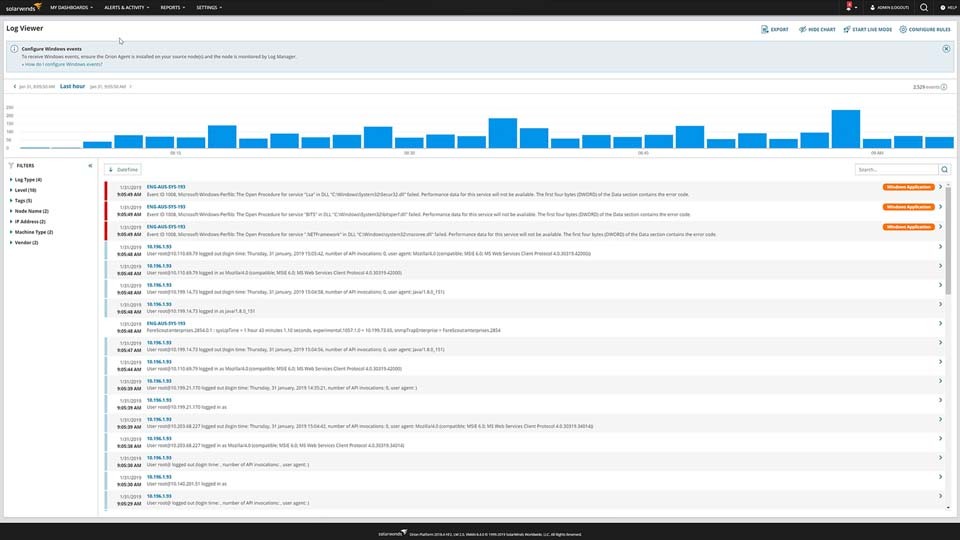
Log Analyzer gives you the capability to quickly visualize volume, search results, and refine timeframes of aggregated log files through an interactive chart.
Since Log Analyzer is integrated into the Orion® Platform of products, you can also seamlessly integrate your log file aggregation data directly into the Orion Platform console to view it alongside other critical network and systems performance metrics. Including aggregation insights in this log visualization tool can help give you a clearer image of your network’s performance.
Log aggregation is the important process of organizing log files from multiple different sources across the IT environment into a single centralized location, where they can be more easily analyzed, searched, and used to generate reports.
Log file aggregation falls under the larger umbrella of log management, which includes managing processes like collecting and storing logs, in addition to log analysis, search, and reporting to help you more easily use log file information when determining the root source of system behavior.
Using log aggregation tools can allow you to access logs in one place, regardless of source or file type, and enable more efficient troubleshooting and root cause analysis.
Logs are an important element of every IT environment, as they can provide critical visibility into the causes of performance issues. Nearly every system, application, and device creates some form of log file, and while individually small, they can accumulate and hog necessary disk space if not properly managed.
Having a robust log management process strategy can become even more necessary for enterprise-level businesses as the size and complexity of an environment grows.
Log file aggregation can help simplify log analysis by consolidating logs into a central location. When your logs aren’t consolidated, they’re dispersed across various locations, which can lead to not detecting potential issues and wasted resources.
Log aggregation tools are designed to collect and organize different types of logs into one location, making the process of searching and analyzing easier.
SolarWinds Log Analyzer is built to provide a powerful and intuitive all-in-one solution for your log aggregation, monitoring, and analysis needs. From the simple dashboard, it’s easier to collect, tag, filter, search, report on, and export your data, which can be attached to help desk tickets, shared with team members, archived for historical reference, and more. Each exported record includes the date, time, severity level, IP address, node, source, and message accessible both to your team and other key stakeholders.
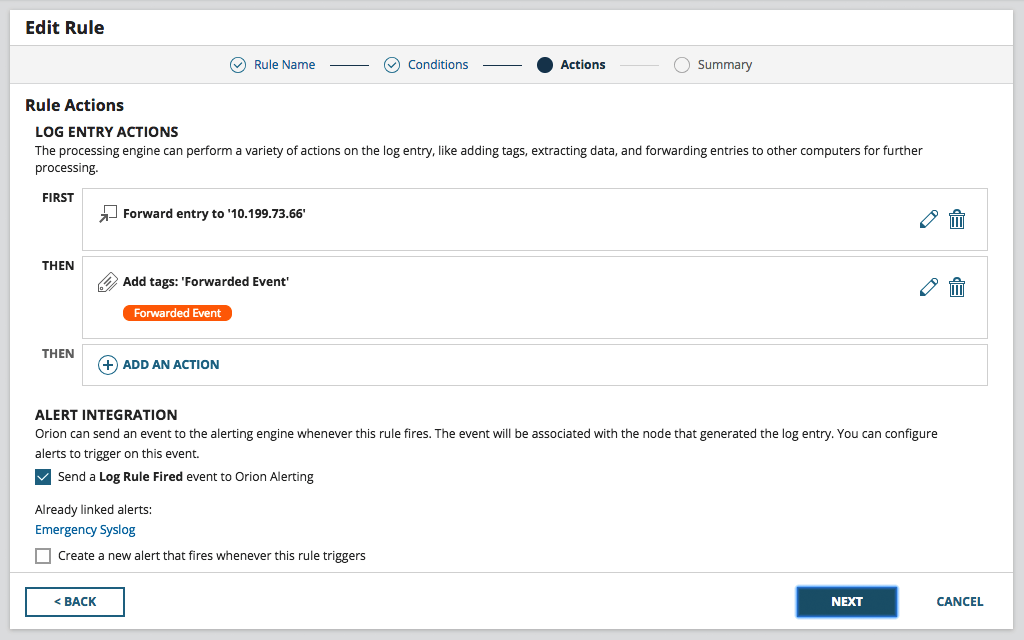
Log Analyzer also allows you to configure notifications and alerts, so you can troubleshoot urgent issues as they arise and before they can impact end users.
As part of the Orion Platform of products, Log Analyzer can allow you to view logs alongside network and systems performance.
With fast and efficient log aggregation, Log Analyzer can help you simplify the process of analyzing logs for your environment.
Log aggregation is the important process of organizing log files from multiple different sources across the IT environment into a single centralized location, where they can be more easily analyzed, searched, and used to generate reports.
Log file aggregation falls under the larger umbrella of log management, which includes managing processes like collecting and storing logs, in addition to log analysis, search, and reporting to help you more easily use log file information when determining the root source of system behavior.
Using log aggregation tools can allow you to access logs in one place, regardless of source or file type, and enable more efficient troubleshooting and root cause analysis.
Logs are an important element of every IT environment, as they can provide critical visibility into the causes of performance issues. Nearly every system, application, and device creates some form of log file, and while individually small, they can accumulate and hog necessary disk space if not properly managed.
Having a robust log management process strategy can become even more necessary for enterprise-level businesses as the size and complexity of an environment grows.
Log file aggregation can help simplify log analysis by consolidating logs into a central location. When your logs aren’t consolidated, they’re dispersed across various locations, which can lead to not detecting potential issues and wasted resources.
Log aggregation tools are designed to collect and organize different types of logs into one location, making the process of searching and analyzing easier.
SolarWinds Log Analyzer is built to provide a powerful and intuitive all-in-one solution for your log aggregation, monitoring, and analysis needs. From the simple dashboard, it’s easier to collect, tag, filter, search, report on, and export your data, which can be attached to help desk tickets, shared with team members, archived for historical reference, and more. Each exported record includes the date, time, severity level, IP address, node, source, and message accessible both to your team and other key stakeholders.
Log Analyzer also allows you to configure notifications and alerts, so you can troubleshoot urgent issues as they arise and before they can impact end users.
As part of the Orion Platform of products, Log Analyzer can allow you to view logs alongside network and systems performance.
With fast and efficient log aggregation, Log Analyzer can help you simplify the process of analyzing logs for your environment.
Log Analyzer
Gain insight into the performance of your environment.
Rapid identification of performance and availability issues.
See log data in real-time with an interactive chart and graph.