- Events
-
Partners
- Government
- Customer Portal
- Contact Us
- Contact Sales
-
English
A Windows flat log file is very similar to a Windows event log file. It’s a record of transactions on a Microsoft system. All Windows applications generate flat log files, which include reports of errors and issues and records of successful transactions and interactions. Windows systems have three types of event logs: system, application, and security logs, each of which is meant to report on events involving their respective areas of the system. The logs typically include information like the data and time generated, the associated user or computer, the event ID, the source, and event type.
Windows flat log file monitoring is one of the best ways to protect your Windows applications. Looking at granular log data and patterns within log data allows admins to identify problems that can result in reduced application performance and even decreased business productivity.
Windows flat log files are incredibly useful for making sure your Windows applications run efficiently. They can be used to monitor and report on error messages and unusual system behavior. They’re meant to help you find the source of an issue in the application, so you can then tackle the problem before it becomes catastrophic, adversely affecting the performance of an application.
Windows flat log file monitoring tools are built to more quickly identify critical logs and the insights they need to support troubleshooting. While the applications on your network create hundreds of logs every day, a Windows flat log file management tool is designed to take the noise out of those logs, so you can focus on the most important data to keep your applications performing optimally.
Windows flat log file monitoring tools are built so you can easily search through logs and apply filters for specific and useful views of log data, so you get to the root cause of a problem and begin troubleshooting sooner. This log search capability can let you quickly pinpoint and address and problems within your application before performance is seriously affected. A Windows flat log file monitoring tool should also come with alerting features, like predefined alerts to trigger on certain application events and the ability to set up your own alerts for event conditions indicative of a dip in application performance.
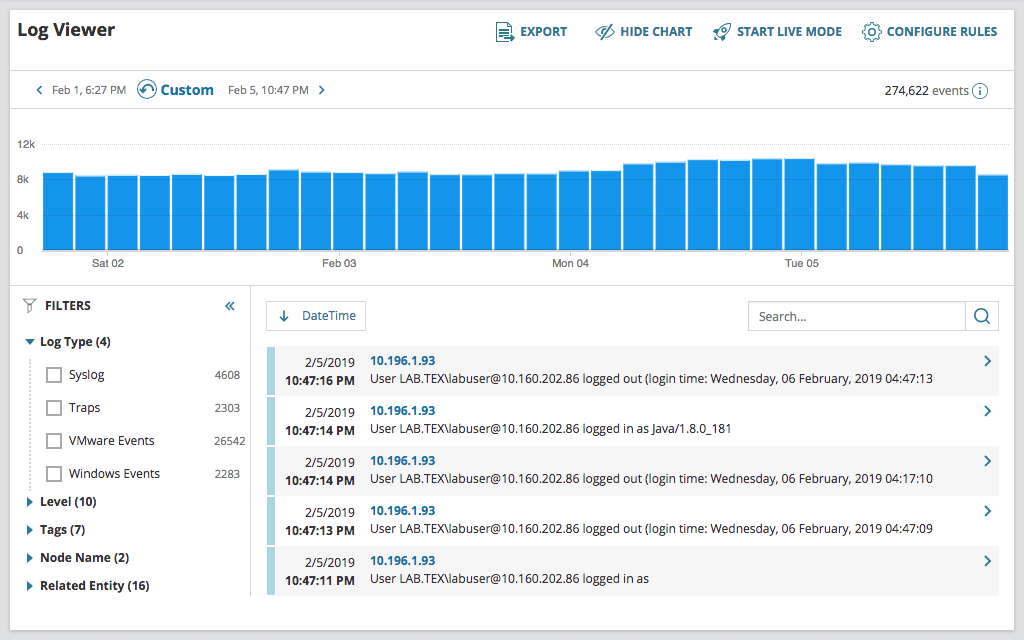
SolarWinds Log Analyzer is built to make Windows flat log file monitoring simple and easy. Log Analyzer was built by IT professionals for users of all skill levels. The tool works by collecting and sorting through flat log files from Windows applications across your network to provide useful insights with the ability to filter and implement colorful, intuitive tags for highlighting and searching, allowing for greater visibility into performance.
Log Analyzer comes with built-in alerts to inform you when business-critical Windows application logs are reporting errors or unusual behavior patterns. Users can also set their own alerts based on the most important events for their operations. Since Log Analyzer monitors Windows flat log files in near-real time, these alerts are designed to notify you as soon as a Windows flat log file records any problems or suspicious behavior, so you can begin troubleshooting problems immediately.
Log Analyzer can help you retain logs, so you can revisit them for audit purposes. It’s also simple to forward and export log data to other devices in CSV format. Log Analyzer also easily integrates with other SolarWinds tools through the Orion Platform, which is designed to allow for a more unified view of your entire IT infrastructure monitoring alongside Log Analyzer insights.
A Windows flat log file is very similar to a Windows event log file. It’s a record of transactions on a Microsoft system. All Windows applications generate flat log files, which include reports of errors and issues and records of successful transactions and interactions. Windows systems have three types of event logs: system, application, and security logs, each of which is meant to report on events involving their respective areas of the system. The logs typically include information like the data and time generated, the associated user or computer, the event ID, the source, and event type.
Windows flat log file monitoring is one of the best ways to protect your Windows applications. Looking at granular log data and patterns within log data allows admins to identify problems that can result in reduced application performance and even decreased business productivity.
Windows flat log files are incredibly useful for making sure your Windows applications run efficiently. They can be used to monitor and report on error messages and unusual system behavior. They’re meant to help you find the source of an issue in the application, so you can then tackle the problem before it becomes catastrophic, adversely affecting the performance of an application.
Windows flat log file monitoring tools are built to more quickly identify critical logs and the insights they need to support troubleshooting. While the applications on your network create hundreds of logs every day, a Windows flat log file management tool is designed to take the noise out of those logs, so you can focus on the most important data to keep your applications performing optimally.
Windows flat log file monitoring tools are built so you can easily search through logs and apply filters for specific and useful views of log data, so you get to the root cause of a problem and begin troubleshooting sooner. This log search capability can let you quickly pinpoint and address and problems within your application before performance is seriously affected. A Windows flat log file monitoring tool should also come with alerting features, like predefined alerts to trigger on certain application events and the ability to set up your own alerts for event conditions indicative of a dip in application performance.
SolarWinds Log Analyzer is built to make Windows flat log file monitoring simple and easy. Log Analyzer was built by IT professionals for users of all skill levels. The tool works by collecting and sorting through flat log files from Windows applications across your network to provide useful insights with the ability to filter and implement colorful, intuitive tags for highlighting and searching, allowing for greater visibility into performance.
Log Analyzer comes with built-in alerts to inform you when business-critical Windows application logs are reporting errors or unusual behavior patterns. Users can also set their own alerts based on the most important events for their operations. Since Log Analyzer monitors Windows flat log files in near-real time, these alerts are designed to notify you as soon as a Windows flat log file records any problems or suspicious behavior, so you can begin troubleshooting problems immediately.
Log Analyzer can help you retain logs, so you can revisit them for audit purposes. It’s also simple to forward and export log data to other devices in CSV format. Log Analyzer also easily integrates with other SolarWinds tools through the Orion Platform, which is designed to allow for a more unified view of your entire IT infrastructure monitoring alongside Log Analyzer insights.
Log Analyzer
Get clear insight into the performance of your Windows applications
Use filter and search capabilities to easily pinpoint specific log data
Create alerts and be notified when triggers or thresholds are crossed