- Events
-
Partners
- Government
- Customer Portal
- Contact Us
- Contact Sales
-
English
Your enterprise infrastructure is constantly generating syslog, SNMP traps, and other log data that can help provide performance insights when troubleshooting. Being able to quickly and easily view this crucial information can help simplify and speed up troubleshooting.
SolarWinds® Log Analyzer is built to be an all-in-one enterprise log management tool to help keep your network and business up and running. The tool continuously monitors server log data, so you can identify potential issues as they occur. You can also quickly pinpoint issues by filtering for particular keywords like event IDs or error codes.
Managing a large network comes with lots of log entries, and trying to manually pinpoint just one error among thousands of log files can make enterprise logging a chore. Enterprise log management tools are most effective when they can effectively search this data, so you spend more time solving the issue rather than finding it.
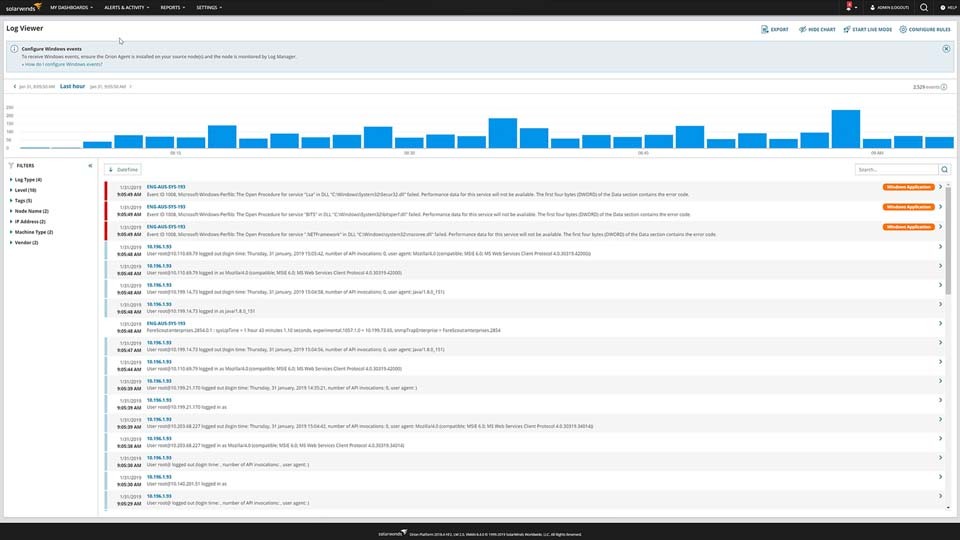
SolarWinds Log Analyzer is designed to help you easily search and filter your aggregated log data, allowing you to refine log data via intuitive, out-of-the-box filters. Using a powerful search engine that comes built-in with Log Analyzer, you can more quickly find log entries of interest and save time.
One of the most important elements of effective enterprise log management is being able to clearly understand and view server logs. The enterprise logging solutions in Log Analyzer are built to help you quickly visualize log volume, search results, and refine timeframes via an interactive chart. You can also visualize your server log data in an interactive, real-time log stream. Since Log Analyzer can automatically normalize log data as part of its enterprise logging, you can compare logs from different sources in a single chart.
When it comes to enterprise log management, you often need to access and view server logs more than once — and sometimes you need to use logs outside of your server log monitoring software. That’s why SolarWinds Log Analyzer lets you export your log filter and search results to a CSV file right from the server log viewer, so you can attach search results to help tickets, share the enterprise logging information with other team members, or archive the data as part of your server log management.
While server logs are critical to maintaining performance, they can give you even more information when your server log analysis tools are combined with other enterprise performance monitoring products. Since Log Analyzer is integrated into the Orion Platform of products, you can seamlessly include your enterprise logging file data in the Orion Platform console and view it alongside your other enterprise network and systems performance metrics. Unifying your log data and infrastructure performance can help give you a clearer view of your overall network performance.
An enterprise server log management system is a software solution that helps you with server log monitoring.
The server log management process can involve:
The process of enterprise logging, which involves monitoring and managing the logs in enterprise servers, depends on following best practices to suit the scale of your business.
For any enterprise, there are often too many logs being produced for manual monitoring and management to be a viable option. It makes sense to utilize a server log monitoring software solution that aggregates and analyzes logs from across your system to help you make sense of thousands of data points.
Effective enterprise logging (even with the use of a tool) it’s based on checking logs routinely. Far too often, organizations view logs as a reactive means of troubleshooting. While important for that purpose, logs can also be used to proactively spot trends and make improvements before problems arise. In large environments, you should make log management a regular project, taking time each day to look at the enterprise log management solution’s Log Viewer to see if there are any logs indicating potential issues.
Even with regularly checking logs, it’s possible for issues to slip through the cracks, which is why an important part of log monitoring and management is ensuring the necessary devices and applications are in fact being monitored — and checking you have effective alerting systems in place. For effective enterprise-scale logging, it’s important to set up alerts to catch anomalies and can send an automatic notification to IT. Set alerts for logs tied to compliance as well as those tied to security and system performance.
A universal solution to this tedious process is to implement an effective system for collecting and managing logs from the computer system. Proper software should be designed to collect data, normalize it, enable visualization, real-time viewing as well as alerting about anomalies.
There are many reasons to improve your enterprise logging management by investing in a server log analysis tool. Some of the most important benefits include:
From small to large infrastructures, SolarWinds Log Analyzer is designed to handle enterprise server log management and help you maintain performance and avoid issues that impact end users.
Log Analyzer is built to be a powerful and intuitive log management tool that can be integrated with the SolarWinds Orion Platform, meaning Log Analyzer can be integrated with other SolarWinds products to bring you a unified view of your complete IT infrastructure. Through the Orion Platform, you can easily see the associated logs alongside other performance metrics on a single centralized dashboard.
With Log Analyzer, you can more easily identify the root cause of server and network issues with the help of built-in log analysis and management features in addition to the tool’s Log Viewer. Not only can Log Analyzer collect and normalize your server logs, so you can more easily understand them and put them in context with each other, the tool also offers advanced filters and a powerful search engine to help you find the exact log or logs associated with a specific problem to make it easier to find the root cause of performance problems as they arise, which translates into faster troubleshooting and problem-solving.
Log Analyzer also comes with a wide variety of features designed to aid in enterprise server log management, including:
An enterprise server log management system is a software solution that helps you with server log monitoring.
The server log management process can involve:
The process of enterprise logging, which involves monitoring and managing the logs in enterprise servers, depends on following best practices to suit the scale of your business.
For any enterprise, there are often too many logs being produced for manual monitoring and management to be a viable option. It makes sense to utilize a server log monitoring software solution that aggregates and analyzes logs from across your system to help you make sense of thousands of data points.
Effective enterprise logging (even with the use of a tool) it’s based on checking logs routinely. Far too often, organizations view logs as a reactive means of troubleshooting. While important for that purpose, logs can also be used to proactively spot trends and make improvements before problems arise. In large environments, you should make log management a regular project, taking time each day to look at the enterprise log management solution’s Log Viewer to see if there are any logs indicating potential issues.
Even with regularly checking logs, it’s possible for issues to slip through the cracks, which is why an important part of log monitoring and management is ensuring the necessary devices and applications are in fact being monitored — and checking you have effective alerting systems in place. For effective enterprise-scale logging, it’s important to set up alerts to catch anomalies and can send an automatic notification to IT. Set alerts for logs tied to compliance as well as those tied to security and system performance.
A universal solution to this tedious process is to implement an effective system for collecting and managing logs from the computer system. Proper software should be designed to collect data, normalize it, enable visualization, real-time viewing as well as alerting about anomalies.
There are many reasons to improve your enterprise logging management by investing in a server log analysis tool. Some of the most important benefits include:
From small to large infrastructures, SolarWinds Log Analyzer is designed to handle enterprise server log management and help you maintain performance and avoid issues that impact end users.
Log Analyzer is built to be a powerful and intuitive log management tool that can be integrated with the SolarWinds Orion Platform, meaning Log Analyzer can be integrated with other SolarWinds products to bring you a unified view of your complete IT infrastructure. Through the Orion Platform, you can easily see the associated logs alongside other performance metrics on a single centralized dashboard.
With Log Analyzer, you can more easily identify the root cause of server and network issues with the help of built-in log analysis and management features in addition to the tool’s Log Viewer. Not only can Log Analyzer collect and normalize your server logs, so you can more easily understand them and put them in context with each other, the tool also offers advanced filters and a powerful search engine to help you find the exact log or logs associated with a specific problem to make it easier to find the root cause of performance problems as they arise, which translates into faster troubleshooting and problem-solving.
Log Analyzer also comes with a wide variety of features designed to aid in enterprise server log management, including:
Log Analyzer
See log data in real-time with an interactive chart and graph
Achieve rapid identification of performance and availability issues
Gain deeper insight into the performance of your environment