- Events
-
Partners
- Government
- Customer Portal
- Contact Us
- Contact Sales
-
English
Change management software can be used to facilitate any kind of change within an organization. These platforms help streamline change management processes and minimize their impact on employees’ daily routines.
Change management systems can be used to address a variety of change types, including the following:
When researching change management, it’s important to address the differences between “changes,” “incidents,” and “problems.”
Here’s a brief overview of each one:
Though there are several types of change management within the industry today, ITIL change management and Agile change management are two of the most common.
ITIL change management: Within ITIL, change management falls under the service transition phase with change evaluation, project management, and release and deployment management. ITIL management is designed to ensure changes are implemented efficiently and effectively to minimize their impact on the functioning of the organization. ITIL change management can be broken down into smaller subprocesses.
Many of these subprocesses are rolled into the overall ITIL management process, which includes the following:
Agile change management: Unlike ITIL change management’s rigid structure, Agile change management is more fluid. Instead of consolidating the change management steps under a single umbrella held by one central team, it divides change management activities among various project owners. “Speed” in Agile change management is measured by how quickly employees can get up and running versus the rate at which the change is implemented. While IT change management software is often built with ITIL in mind, these platforms offer several services (including workflow automation) also capable of facilitating Agile change management.
No two change management processes are exactly the same. In fact, businesses are encouraged to customize their change management processes to ensure they fit their goals and objectives. The most important thing is having a process in place—one management has signed off on—to ensure each change implementation follows a standard set of procedures.
So, what are the essential elements of change management? Most ITIL change management processes follow some variation of these five steps:
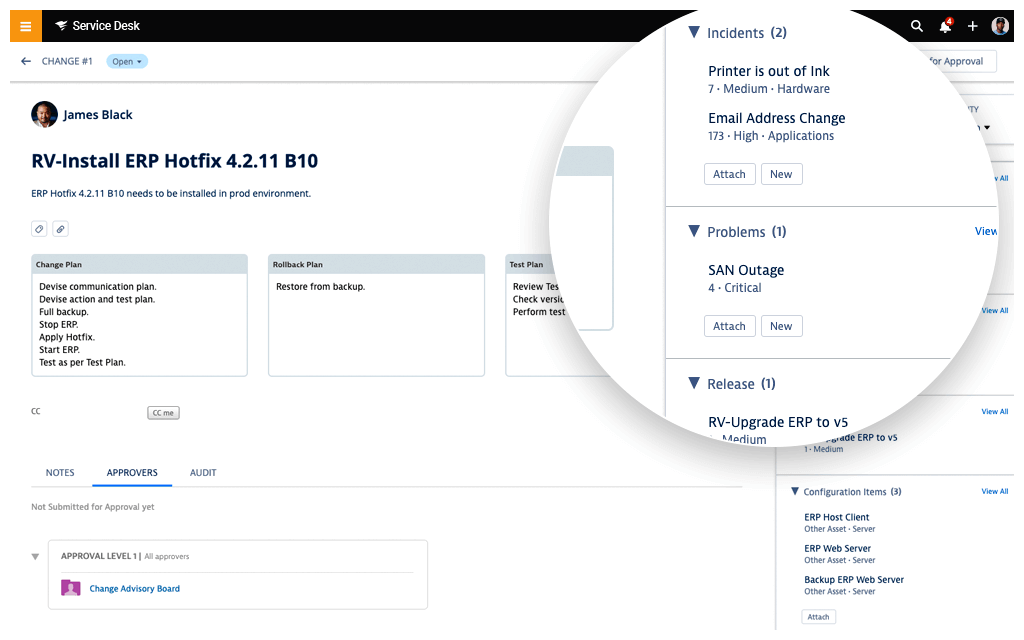
A service desk with change management tools can benefit from a more consolidated change execution by aligning its ITIL processes with applicable problems and releases as well as its CMDB. When a change occurs, you’ll have all the information you need to understand who will be impacted and for how long. Since the details of the change are stored within one platform, you can use these tools to track the progress of a release. Tracking is also crucial because it allows IT administrators to pinpoint where errors occur. Knowing where a change went wrong helps ensure the same error won’t happen in a future rollout.
Many help and service desk tools are designed to streamline the way you provide support and deliver services to your organization. They can consolidate, manage, and prioritize tickets coming in via phone, email, and other channels so all ticket details and resolutions are stored within one easy-to-access hub. Automation rules can also help streamline ticket routing, allowing you to build rules to quickly and efficiently get tickets into the right hands. This removes ticket routing bottlenecks, so you can manage tickets and requests as soon as possible.
These services go hand in hand with the change management process. As a result, service desk solutions should also serve as change management tools. Combining these platforms can help you follow ITIL best practices by offering built-in ticket escalation. This means any incident ticket can be bumped up to a problem ticket or associated with an upcoming change or release, which can help you more easily identify and address redundancies.
SolarWinds® Service Desk is designed to support IT change management with its change and release management modules. These modules can be configured to support every step of your company’s service management process, helping you ensure every change is implemented as smoothly as possible.
Through the platform’s CMDB, you can gain in-depth visibility into the technology infrastructure of your entire organization. Additionally, the platform makes it easier to identify the connections between users, assets, and any other configuration items and better understand how each employee will be impacted by scheduled changes. With this information, you can alert employees well in advance to ensure they have as much time as possible to prepare. The more you communicate with your employees, the smoother the change management process will be for all parties involved.
SolarWinds Service Desk can also help facilitate the change management process through its robust change history. Retaining historical data allows users to track and store changes, root causes of problems, and the actions taken during the implementation process. Building on your historical data can help save your team the effort and time involved in trying to remember what worked and what didn’t, allowing them to focus on continuously improving and evolving.
But this isn’t the only way Service Desk can help drive greater efficiency within the IT change management process. Its intelligence software can also help you identify changes with similar traits, and it combines these factors into a single release to streamline deployments and reduce the need for multiple outages.
SolarWinds Service Desk is designed to make the end-user experience—a pivotal consideration within any IT change management process—a top priority. The Employee Service Portal in Service Desk can serve as a communication hub for IT technicians and employees across departments. On the IT side, technicians can use the portal to send employees detailed alerts regarding potential disruptions and even provide status updates throughout the entire change management process. This helps ensure employees are kept aware of need-to-know information. From an employee perspective, the portal can be leveraged to more easily submit incident, problem, and change requests. If an urgent problem requires immediate attention, the portal can provide a 24/7 direct line of communication to service providers and a knowledge base where they can access resources to resolve known issues.
Change management software can be used to facilitate any kind of change within an organization. These platforms help streamline change management processes and minimize their impact on employees’ daily routines.
Change management systems can be used to address a variety of change types, including the following:
When researching change management, it’s important to address the differences between “changes,” “incidents,” and “problems.”
Here’s a brief overview of each one:
Though there are several types of change management within the industry today, ITIL change management and Agile change management are two of the most common.
ITIL change management: Within ITIL, change management falls under the service transition phase with change evaluation, project management, and release and deployment management. ITIL management is designed to ensure changes are implemented efficiently and effectively to minimize their impact on the functioning of the organization. ITIL change management can be broken down into smaller subprocesses.
Many of these subprocesses are rolled into the overall ITIL management process, which includes the following:
Agile change management: Unlike ITIL change management’s rigid structure, Agile change management is more fluid. Instead of consolidating the change management steps under a single umbrella held by one central team, it divides change management activities among various project owners. “Speed” in Agile change management is measured by how quickly employees can get up and running versus the rate at which the change is implemented. While IT change management software is often built with ITIL in mind, these platforms offer several services (including workflow automation) also capable of facilitating Agile change management.
No two change management processes are exactly the same. In fact, businesses are encouraged to customize their change management processes to ensure they fit their goals and objectives. The most important thing is having a process in place—one management has signed off on—to ensure each change implementation follows a standard set of procedures.
So, what are the essential elements of change management? Most ITIL change management processes follow some variation of these five steps:
A service desk with change management tools can benefit from a more consolidated change execution by aligning its ITIL processes with applicable problems and releases as well as its CMDB. When a change occurs, you’ll have all the information you need to understand who will be impacted and for how long. Since the details of the change are stored within one platform, you can use these tools to track the progress of a release. Tracking is also crucial because it allows IT administrators to pinpoint where errors occur. Knowing where a change went wrong helps ensure the same error won’t happen in a future rollout.
Many help and service desk tools are designed to streamline the way you provide support and deliver services to your organization. They can consolidate, manage, and prioritize tickets coming in via phone, email, and other channels so all ticket details and resolutions are stored within one easy-to-access hub. Automation rules can also help streamline ticket routing, allowing you to build rules to quickly and efficiently get tickets into the right hands. This removes ticket routing bottlenecks, so you can manage tickets and requests as soon as possible.
These services go hand in hand with the change management process. As a result, service desk solutions should also serve as change management tools. Combining these platforms can help you follow ITIL best practices by offering built-in ticket escalation. This means any incident ticket can be bumped up to a problem ticket or associated with an upcoming change or release, which can help you more easily identify and address redundancies.
SolarWinds® Service Desk is designed to support IT change management with its change and release management modules. These modules can be configured to support every step of your company’s service management process, helping you ensure every change is implemented as smoothly as possible.
Through the platform’s CMDB, you can gain in-depth visibility into the technology infrastructure of your entire organization. Additionally, the platform makes it easier to identify the connections between users, assets, and any other configuration items and better understand how each employee will be impacted by scheduled changes. With this information, you can alert employees well in advance to ensure they have as much time as possible to prepare. The more you communicate with your employees, the smoother the change management process will be for all parties involved.
SolarWinds Service Desk can also help facilitate the change management process through its robust change history. Retaining historical data allows users to track and store changes, root causes of problems, and the actions taken during the implementation process. Building on your historical data can help save your team the effort and time involved in trying to remember what worked and what didn’t, allowing them to focus on continuously improving and evolving.
But this isn’t the only way Service Desk can help drive greater efficiency within the IT change management process. Its intelligence software can also help you identify changes with similar traits, and it combines these factors into a single release to streamline deployments and reduce the need for multiple outages.
SolarWinds Service Desk is designed to make the end-user experience—a pivotal consideration within any IT change management process—a top priority. The Employee Service Portal in Service Desk can serve as a communication hub for IT technicians and employees across departments. On the IT side, technicians can use the portal to send employees detailed alerts regarding potential disruptions and even provide status updates throughout the entire change management process. This helps ensure employees are kept aware of need-to-know information. From an employee perspective, the portal can be leveraged to more easily submit incident, problem, and change requests. If an urgent problem requires immediate attention, the portal can provide a 24/7 direct line of communication to service providers and a knowledge base where they can access resources to resolve known issues.
Try Web Help Desk. It’s our affordable and safe Help Desk Ticketing and Asset Management Software.
Automate user service request management from ticket creation, assignment, routing, and escalation.
Use built-in reports (or create your own) to track ticket status, technician performance, and customer support needs.
Leverage a built-in help desk knowledge base to create and maintain KB articles and promote end-user self-service for common issues.