- Events
-
Partners
- Government
- Customer Portal
- Contact Us
- Contact Sales
-
English
From big-picture views of your entire network topology to granular detail on specific devices and applications, SolarWinds® Server & Application Monitor (SAM) is designed to make it easy to perform Linux server management for Red Hat Enterprise Linux monitoring, CentOS, SUSE Linux Enterprise Server, Ubuntu Server, Debian, Fedora, and more.
While SAM is installed on a Windows server, the tool is designed to monitor heterogeneous environments—whether on-premises, cloud-based, or hybrid—running on Linux and Windows.
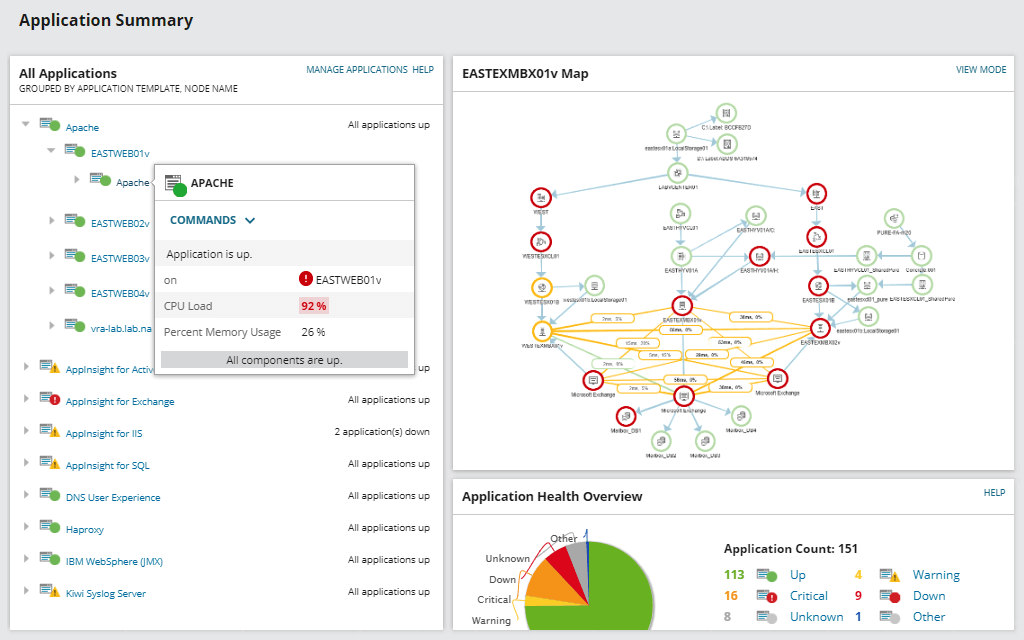
SolarWinds SAM includes easy-to-understand dashboard views for you to quickly track performance metrics like server usage, server load, memory utilization, and more, all at a glance.
Drag-and-drop visualizations can also help simplify the process of data correlation across the IT stack, allowing admins to swiftly identify the root cause of Linux server slowdowns across the entire networking environment. SAM is built to automatically assign application monitors for each node it detects based on the protocols and parameters you set.
Linux server admins need to monitor added nodes, software, and applications as infrastructure expands and as network topology changes to incorporate the new assets.
SAM’s IT asset inventory management dashboard can help keep inventory data current with detailed records of each node’s hardware and software specifications, including Linux servers. These automatically collected inventory details can be used to track warranties, SSL certifications, system updates, and other key information critical to assessing overall Linux server health and performance.
SAM is built to provide useful performance insights into important Linux metrics with valuable information about device performance. SAM makes it easy to manage Linux servers by helping you identify the root cause of bottlenecks, so you can quickly troubleshoot the issue.
SAM also offers the ability to create custom scripts to get Linux server metrics, as well as a number of available premade Linux templates in Perl that can be used for monitoring CPU, disk, memory, and sendmail status.
Linux server administration refers to the monitoring and maintenance of Linux servers to ensure optimal operating performance. Linux server management can involve monitoring, updating, and configuring, in addition to general troubleshooting.
Servers running Linux-based operating systems are known for being flexible, secure, and stable, making them a good choice for organizations and companies with large workloads. Linux servers can run applications, web services, database management systems, and other business-critical functions.
One of the primary functions of Linux server management is monitoring the health and status of server and apps. This involves tracking performance metrics over time to more easily identify any new or recurring problems. Comprehensive Linux server management can also help keep users informed of sudden changes in CPU performance or memory usage that could lead to system downtime or interruptions in service.
Using Linux server manager software can also provide insights into performance metrics with the ability to drill down on anomalous behavior in greater detail. This is especially useful—if not essential—for enterprises and larger organizations managing multiple Linux servers.
As organizations expand or shift focus, they may also need to add or alter Linux server configurations. By working proactively to keep servers and dependent hardware functioning optimally, companies can make more informed decisions regarding server capacity needs.
SolarWinds Server & Application Monitor is a comprehensive monitoring tool designed to be used as a Linux server manager capable of quickly identifying underperforming applications and helping prevent end-user issues and interruptions of service.
No matter where Linux servers and applications are running, SAM server monitoring software can provide broad visibility across your infrastructure—including visibility into physical and virtual servers, on-prem, the cloud, or hybrid environments—while allowing admins to drill down on Linux server performance issues to more easily identify whether a Linux application or the virtual infrastructure is the root cause.
SAM’s automatic detection protocols can quickly create application dependency maps to help visualize codependency and connections across applications and nodes. The intuitive user interface can also allow for easy visual data correlation across dashboards to more easily track down the source of potential issues.
SAM is built to display data around hardware health, capacity forecasts, and network assets in a centralized dashboard. Out of the box, SAM supports more than 1,200 applications and systems templates built to monitor Linux, Azure, AWS, Java, Apache, Active Directory, and many more. By bringing all monitoring data into a single location, SAM can allow users to more easily track metrics like server usage and load, memory utilization, and more to support detailed assessments and swift issue resolutions for problems across the infrastructure.
Linux server administration refers to the monitoring and maintenance of Linux servers to ensure optimal operating performance. Linux server management can involve monitoring, updating, and configuring, in addition to general troubleshooting.
Servers running Linux-based operating systems are known for being flexible, secure, and stable, making them a good choice for organizations and companies with large workloads. Linux servers can run applications, web services, database management systems, and other business-critical functions.
One of the primary functions of Linux server management is monitoring the health and status of server and apps. This involves tracking performance metrics over time to more easily identify any new or recurring problems. Comprehensive Linux server management can also help keep users informed of sudden changes in CPU performance or memory usage that could lead to system downtime or interruptions in service.
Using Linux server manager software can also provide insights into performance metrics with the ability to drill down on anomalous behavior in greater detail. This is especially useful—if not essential—for enterprises and larger organizations managing multiple Linux servers.
As organizations expand or shift focus, they may also need to add or alter Linux server configurations. By working proactively to keep servers and dependent hardware functioning optimally, companies can make more informed decisions regarding server capacity needs.
SolarWinds Server & Application Monitor is a comprehensive monitoring tool designed to be used as a Linux server manager capable of quickly identifying underperforming applications and helping prevent end-user issues and interruptions of service.
No matter where Linux servers and applications are running, SAM server monitoring software can provide broad visibility across your infrastructure—including visibility into physical and virtual servers, on-prem, the cloud, or hybrid environments—while allowing admins to drill down on Linux server performance issues to more easily identify whether a Linux application or the virtual infrastructure is the root cause.
SAM’s automatic detection protocols can quickly create application dependency maps to help visualize codependency and connections across applications and nodes. The intuitive user interface can also allow for easy visual data correlation across dashboards to more easily track down the source of potential issues.
SAM is built to display data around hardware health, capacity forecasts, and network assets in a centralized dashboard. Out of the box, SAM supports more than 1,200 applications and systems templates built to monitor Linux, Azure, AWS, Java, Apache, Active Directory, and many more. By bringing all monitoring data into a single location, SAM can allow users to more easily track metrics like server usage and load, memory utilization, and more to support detailed assessments and swift issue resolutions for problems across the infrastructure.
Server & Application Monitor
Enjoy the efficiency of customizable templates, monitors, and alerts for focused Linux server management.
Easily maintain an up-to-date understanding of Linux server health.
Leverage in-depth data to troubleshoot Linux server issues.