- Events
-
Partners
- Government
- Customer Portal
- Contact Us
- Contact Sales
-
English
DBAs need database monitoring tools to track performance, storage, and usage across several database types, including:
This database management software can help make it easier to get status summaries, check wait times, and monitor other essential database vitals to ensure end users get reliable performance from every asset.
A database management system (DBMS) serves as the bridge between databases and the end users or applications it interacts with, ensuring information is consistently well-organized. A DBMS primarily uses queries to interact with relational databases and is built to consolidate and centralize data, so multiple users from any location can access it.
DBAs use DBMSs to control what data end users see, dictate how end users view the data, and provide multiple views of a single database schema. This means end users and applications don’t have to know where data is located or worry about finding it—the DBMS does the heavy lifting and handles the requests.
The benefits of using a DBMS over a traditional file system in your enterprise include:
While there are many kinds of DBMSs, the most common types are divided into four broad categories—relational, hierarchical, network, and object-oriented:
The particular features of each DBMS can vary by vendor, but the best solutions on the market often share the following five features:
Database monitoring is essential for keeping DBMSs fully effective, no matter the conditions or circumstances. Organizations whose work depends on accessing and rapidly processing information can use database administration tools to monitor and improve the performance of databases.
Without a solution to drill down into root causes, it can be challenging to diagnose and address relational database slowdowns before they affect end users. Not all database management tools allow for the in-depth, customizable performance metrics you need, and far fewer offer advice on indexing strategies and improving overall database performance.
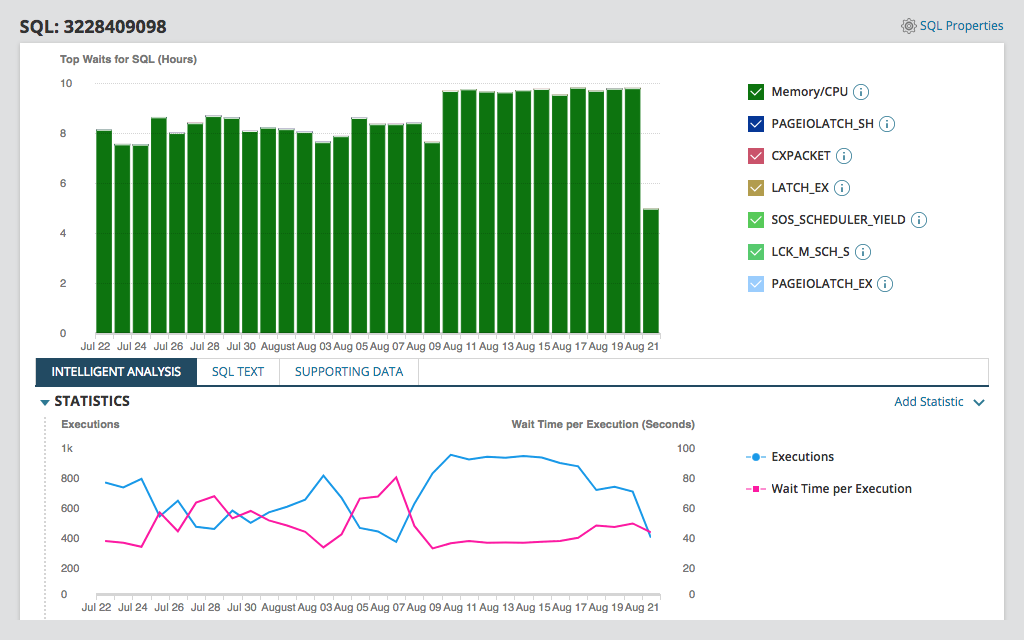
SolarWinds Database Performance Analyzer (DPA) is a powerful, lightweight database administration tool making cross-platform database performance management easier. DPA offers 24/7, down-to-the-second database monitoring for virtualized, physical, and cloud-based instances. Real-time and historical analyses can also help isolate root causes and speed up troubleshooting before bottlenecks impact your end users or compromise database performance. Also, DPA comes equipped with Table Tuning Advisors to help you identify your worst-performing queries and optimize them for improved database performance.
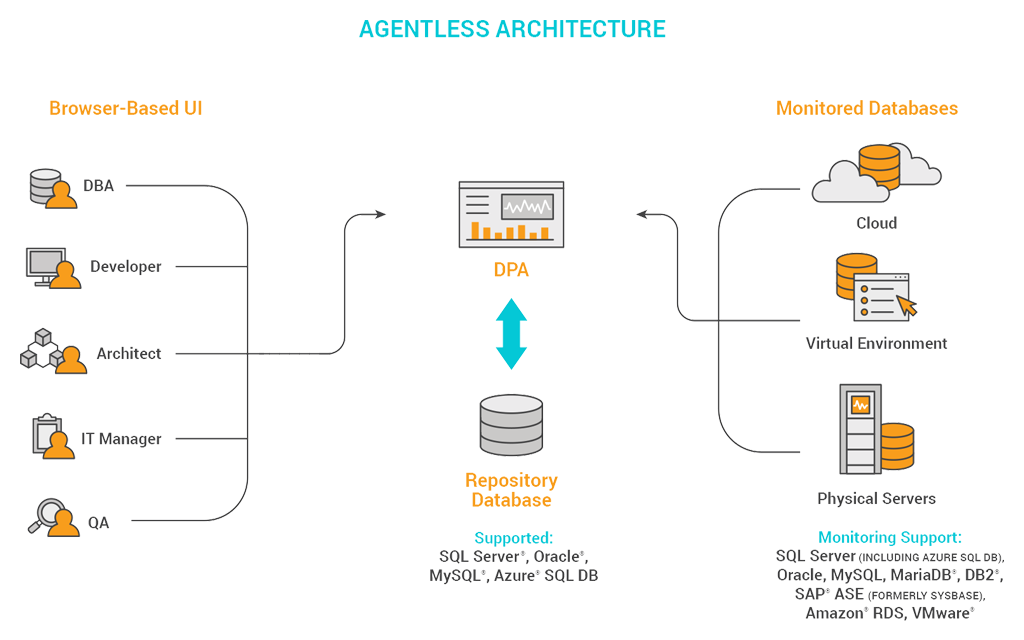
DPA incorporates an agentless architecture safe for development, testing, and production. You can use DPA to optimize the performance of production instances so everyone on your team—DBAs, developers, engineers—can help maintain database health. And DPA database administration software scales across hundreds of databases, so you have complete, lightweight performance monitoring coverage across your systems.
Other SolarWinds tools to help manage and monitor databases:
Related Features:
A database management system (DBMS) serves as the bridge between databases and the end users or applications it interacts with, ensuring information is consistently well-organized. A DBMS primarily uses queries to interact with relational databases and is built to consolidate and centralize data, so multiple users from any location can access it.
DBAs use DBMSs to control what data end users see, dictate how end users view the data, and provide multiple views of a single database schema. This means end users and applications don’t have to know where data is located or worry about finding it—the DBMS does the heavy lifting and handles the requests.
The benefits of using a DBMS over a traditional file system in your enterprise include:
While there are many kinds of DBMSs, the most common types are divided into four broad categories—relational, hierarchical, network, and object-oriented:
The particular features of each DBMS can vary by vendor, but the best solutions on the market often share the following five features:
Database monitoring is essential for keeping DBMSs fully effective, no matter the conditions or circumstances. Organizations whose work depends on accessing and rapidly processing information can use database administration tools to monitor and improve the performance of databases.
Without a solution to drill down into root causes, it can be challenging to diagnose and address relational database slowdowns before they affect end users. Not all database management tools allow for the in-depth, customizable performance metrics you need, and far fewer offer advice on indexing strategies and improving overall database performance.
SolarWinds Database Performance Analyzer (DPA) is a powerful, lightweight database administration tool making cross-platform database performance management easier. DPA offers 24/7, down-to-the-second database monitoring for virtualized, physical, and cloud-based instances. Real-time and historical analyses can also help isolate root causes and speed up troubleshooting before bottlenecks impact your end users or compromise database performance. Also, DPA comes equipped with Table Tuning Advisors to help you identify your worst-performing queries and optimize them for improved database performance.
DPA incorporates an agentless architecture safe for development, testing, and production. You can use DPA to optimize the performance of production instances so everyone on your team—DBAs, developers, engineers—can help maintain database health. And DPA database administration software scales across hundreds of databases, so you have complete, lightweight performance monitoring coverage across your systems.
Other SolarWinds tools to help manage and monitor databases:
Related Features:
Database Performance Analyzer
Analyze and resolve performance issues quickly by using database performance monitoring software
Troubleshoot DBMS errors using database administration tools to maintain consistent performance
Manage multiple databases simultaneously from a convenient, centralized dashboard