- Events
-
Partners
- Government
- Customer Portal
- Contact Us
- Contact Sales
-
English
To properly monitor Azure AD, you must dig into user access rights across your entire IT infrastructure, but this can be challenging in complex environments.
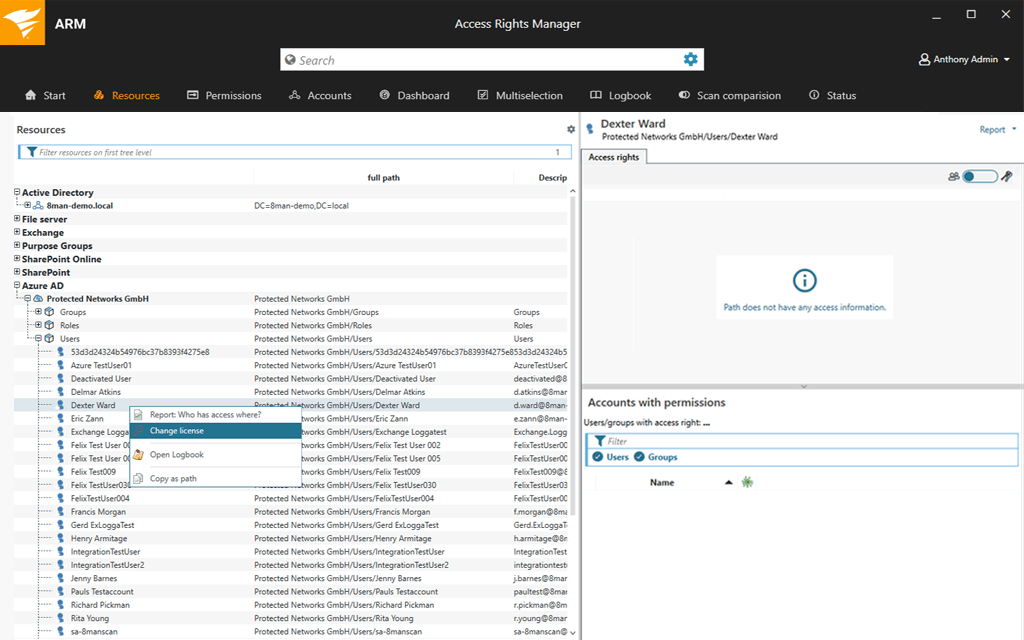
SolarWinds® Access Rights Manager (ARM) is a powerful Azure AD monitoring tool designed to make user access management easier. ARM offers user permissions analysis, monitoring, and logging for Azure Active Directory, Exchange Online, SharePoint Online, OneDrive, and more. You can also more easily review user permissions, groups, and user access to systems and files.
Credential misuse and misconfiguration can make an organization vulnerable to data breaches and other risks. Azure AD monitoring can help keep you apprised of what’s going on in the network, so you can quickly identify when something looks out of place.
ARM is built to identify and alert on credential misconfigurations and indicators of unauthorized access, so you can address issues quickly and reduce risk. If a threat is detected, ARM is designed to make it quick and easy to delete compromised accounts before they threaten the entire network.
Provisioning and deprovisioning user access is a core function of Azure Active Directory, but it can be challenging and time-consuming in large enterprises with hundreds or even thousands of users.
ARM is built to make provisioning and deprovisioning easier and faster using automated actions. You can set up and manage new user accounts in seconds with standardized role-specific templates, so you can safely manage users at scale. This feature can also make onboarding and rapid response to security issues easier. With ARM’s automation, your IT team has more time to focus on value-adding projects.
Azure Active Directory, from Microsoft, is a multi-tenant, cloud-based identity and access management service that allows you to manage user identities and access privileges from one location. You can choose what information will stay in the cloud, which end users and applications can have access to it, and more.
Azure Active Directory plays an important role in many enterprises, but with increasingly sophisticated cyberattacks on the rise and the need to comply with regulations, making sure Active Directory is running smoothly can be critical. It’s also important to monitor Azure AD to ensure you can access business-critical files and servers using Active Directory Azure.
Other benefits of Active Directory Azure monitoring include:
Azure Active Directory monitoring is the process of tracking metrics in an Active Directory environment to find and solve problems that could affect the entire directory and prevent users from accessing business-critical credentials, files, servers, or access privileges.
For these reasons, many use third-party Azure Active Directory monitoring tools. Azure AD monitoring tools can assist in various aspects of identity and access management. While the exact processes of each tool may differ based on the developer, Azure AD monitoring software typically starts by collecting performance counters and using them to monitor the health and performance of Azure AD. The Azure Active Directory monitoring tool can then provide statistics related to the AD environment via central dashboards, graphs, visualizations, and reports. When AD monitoring reveals abnormal user behavior, unauthorized access, or performance issues, the AD monitoring tool can send alerts.
Common Azure AD monitoring best practices include:
SolarWinds Access Rights Manager (ARM) is a powerful and versatile identity and access management tool designed to give you everything you need to more effectively manage access rights across your IT infrastructure with features specially designed for Azure Active Directory. ARM can also extend to Azure-based Active Directory deployments, meaning organizations using Azure AD or adopting hybrid environments can use ARM to help increase their visibility and control over both.
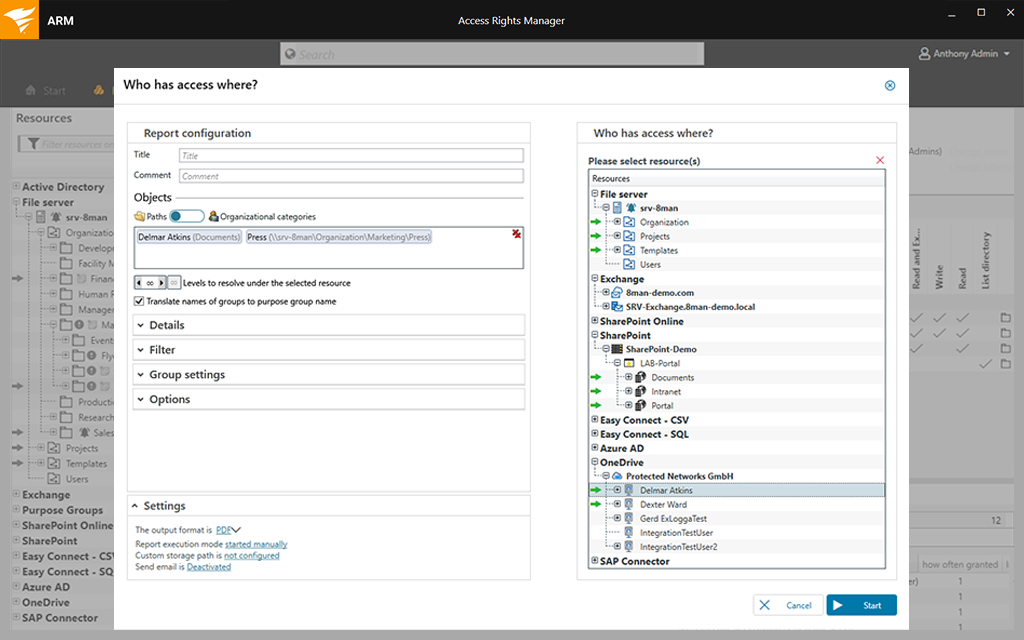
ARM helps you monitor Azure AD by providing user permissions analysis, monitoring, and logging for Azure AD and other Microsoft applications and services. This offers increased visibility into how users are interacting with your environment, who’s making which changes and when, and whose accounts are inactive. The information gained from Azure AD monitoring in ARM can be used to improve user experience, streamline user access management, and aid troubleshooting. ARM can also alert on credential misconfigurations and other indicators of unauthorized access, so you can quickly reduce risk and delete compromised accounts before they affect the entire network.
ARM also helps you more easily distill your findings from Azure Active Directory monitoring into customizable reports. These reports are designed to be compliant with many security policies and industry-specific regulations like GDPR, PCI DSS, and HIPAA. Plus, ARM is designed to allow you to create reports in just a few clicks.
Other SolarWinds tools to help you administer and monitor Active Directory:
Other features:
Azure Active Directory, from Microsoft, is a multi-tenant, cloud-based identity and access management service that allows you to manage user identities and access privileges from one location. You can choose what information will stay in the cloud, which end users and applications can have access to it, and more.
Azure Active Directory plays an important role in many enterprises, but with increasingly sophisticated cyberattacks on the rise and the need to comply with regulations, making sure Active Directory is running smoothly can be critical. It’s also important to monitor Azure AD to ensure you can access business-critical files and servers using Active Directory Azure.
Other benefits of Active Directory Azure monitoring include:
Azure Active Directory monitoring is the process of tracking metrics in an Active Directory environment to find and solve problems that could affect the entire directory and prevent users from accessing business-critical credentials, files, servers, or access privileges.
For these reasons, many use third-party Azure Active Directory monitoring tools. Azure AD monitoring tools can assist in various aspects of identity and access management. While the exact processes of each tool may differ based on the developer, Azure AD monitoring software typically starts by collecting performance counters and using them to monitor the health and performance of Azure AD. The Azure Active Directory monitoring tool can then provide statistics related to the AD environment via central dashboards, graphs, visualizations, and reports. When AD monitoring reveals abnormal user behavior, unauthorized access, or performance issues, the AD monitoring tool can send alerts.
Common Azure AD monitoring best practices include:
SolarWinds Access Rights Manager (ARM) is a powerful and versatile identity and access management tool designed to give you everything you need to more effectively manage access rights across your IT infrastructure with features specially designed for Azure Active Directory. ARM can also extend to Azure-based Active Directory deployments, meaning organizations using Azure AD or adopting hybrid environments can use ARM to help increase their visibility and control over both.
ARM helps you monitor Azure AD by providing user permissions analysis, monitoring, and logging for Azure AD and other Microsoft applications and services. This offers increased visibility into how users are interacting with your environment, who’s making which changes and when, and whose accounts are inactive. The information gained from Azure AD monitoring in ARM can be used to improve user experience, streamline user access management, and aid troubleshooting. ARM can also alert on credential misconfigurations and other indicators of unauthorized access, so you can quickly reduce risk and delete compromised accounts before they affect the entire network.
ARM also helps you more easily distill your findings from Azure Active Directory monitoring into customizable reports. These reports are designed to be compliant with many security policies and industry-specific regulations like GDPR, PCI DSS, and HIPAA. Plus, ARM is designed to allow you to create reports in just a few clicks.
Other SolarWinds tools to help you administer and monitor Active Directory:
Other features:
Access Rights Manager
Keep an eye on how users interact with your environment using a tool to help you monitor Azure AD.
Use high-quality Azure Active Directory monitoring to improve cybersecurity.
Prepare detailed reports to demonstrate compliance based on Azure AD monitoring.