- Events
-
Partners
- Government
- Customer Portal
- Contact Us
- Contact Sales
-
English
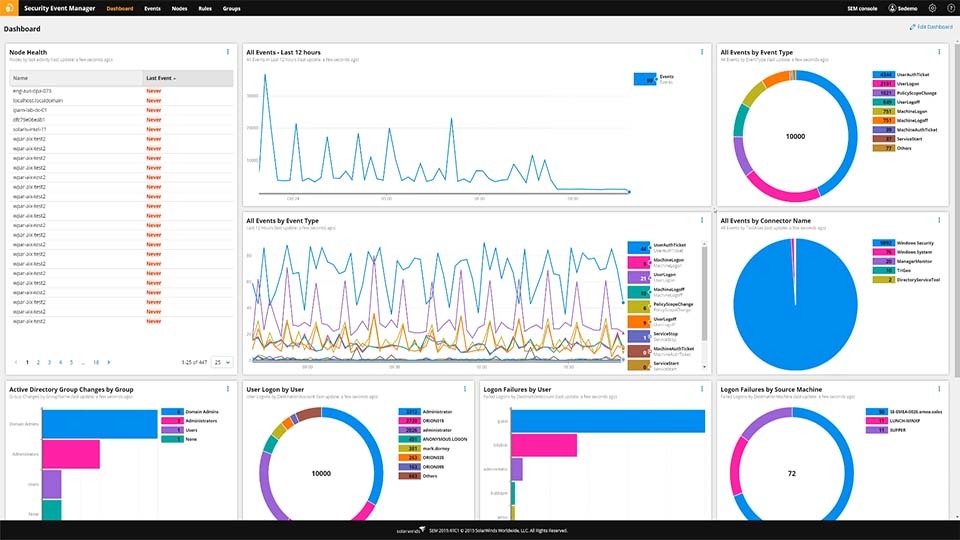
With SolarWinds Security Event Manager (SEM), users can leverage out-of-the-box, predefined rules to improve their cybersecurity predictive analytics. These rules offer added context for disparate events across the network, such as user activities and login attempts.
SEM allows you to leverage both default and custom rules to help ensure you’re following best practices for security threat analysis. In addition, SEM allows admins to set thresholds to better identify relationships between events.
With logs being generated at all hours of the day, it can be easy to get lost in the noise of alerts and notifications. But SEM gives you the ability to customize alert thresholds as you see fit, so you’re less likely to receive useless pings—or miss malicious activity on your network.
If the threat analyzer detects suspicious activity, Security Event Manager can send an auto-alert over email or SMS to the necessary team member.
With a cybersecurity threat analysis tool, it’s easier to catch potential issues within your log data—even across a hybrid IT environment.
SolarWinds SEM is built to send data through a built-in and continually-updated threat intelligence feed designed to identify bad IP addresses, malware, and more. In addition, users can easily search and filter data to better isolate issues, as well as run custom reports for compliance and to support forensic analysis.
Cyberthreat analysis is the process of matching information about vulnerabilities in an organization's network against real-world cyberthreats. It’s a practice that mixes vulnerability testing with risk assessment to offer a deeper understanding of the potential risks a network may face.
Cybersecurity threat analysis is based on the theory that if you know more about your own system’s weak spots, you are better able to defend it. By reverse engineering cybersecurity practices, cyberthreat analysis seeks to capture information about potential threats and security risks to your organization to help turn reactive cybersecurity methods into proactive practices.
Cyberthreat analysis first involves defining the scope of what you want to include in your analysis. Thus, teams must look critically at what network entities and data they want to protect and define levels of sensitivity for those items to utilize resources appropriately.
Next, teams must implement policies that require collecting data for monitoring, as well as recording when a cyberattack or data breach occurs. To gather data for threat analysis, teams must collect and aggregate log data about past incidents like phishing attacks, malware infections, port scan attacks, and other security events. Good information typically comes from logs for network firewalls, intrusion attempts, detection system incidents, and similar devices.
Teams also need to look at event logs from across the IT infrastructure for log data patterns, comparing against an updated database of known worldwide threats. This strategy can include examining failed SQL injections, which might be a sign of an attacker targeting your databases, as well as improper user activity, unauthorized USB usage, intrusion attempts, and bad IP addresses.
Cyberthreat analysis is an important practice to implement because it can greatly improve an organization’s overall security posture and help prevent the loss of sensitive company data.
Cyberthreats are becoming more persistent and more sophisticated. Organizations rely more on data than ever before, and this data may be spread across an organization's network infrastructure, from on-premises servers to the cloud. At the same time, admins must be concerned about insider threats, as user activity can pose a risk to sensitive business data.
Cyberthreat analysis addresses these concerns by enabling teams to more easily assess threats. Admins can also use threat intelligence feeds to automatically compare potential issues with known threats.
The more data you can incorporate from past incidents into the cyberthreat analysis process, the better this information can help inform future security strategies. Putting all this historical and real-time log data to use can help businesses develop better practices to anticipate and defend against potential cyberthreats as well as minimize damages and recover quicker if an attack occurs.
A cyberthreat analyzer is a solution designed to use automation and monitoring to quickly detect threats and help with compliance management.
A cyberthreat analysis tool is built to transform security log data from different parts of a network into useful information to provide users with real-time monitoring. Cyberthreat analyzers can gather log data from across multiple sources, including firewalls, routers, workstations, servers, and more.
Additionally, these tools can be customized to the unique needs of your IT environment, such as the ability to send immediate alerts on potential threats or run automatic reports that highlight key vulnerabilities and risks. And unlike human analysts, a tool is built to do this across more data, and with more accuracy, to help save your organization both resources and costs.
SolarWinds Security Event Manager is an on-premises, full-featured SIEM tool designed as a comprehensive cyberthreat analysis tool. SEM can enable teams to define custom or out-of-the-box log event rules for cyberthreat analysis practices, so they can improve their investigations of security breaches.
Additionally, the tool allows teams to set automatic alarms and alerts when suspicious events occur. Admins can also define thresholds for alerts as needed to avoid false positives and ensure that relevant notifications are sent to the right team members. Users can set the system to run automatic reports based on custom threat filters. These features can allow teams to both respond to immediate issues and collect valuable data to help improve their cyberthreat intelligence framework.
Cyberthreat analysis is the process of matching information about vulnerabilities in an organization's network against real-world cyberthreats. It’s a practice that mixes vulnerability testing with risk assessment to offer a deeper understanding of the potential risks a network may face.
Cybersecurity threat analysis is based on the theory that if you know more about your own system’s weak spots, you are better able to defend it. By reverse engineering cybersecurity practices, cyberthreat analysis seeks to capture information about potential threats and security risks to your organization to help turn reactive cybersecurity methods into proactive practices.
Cyberthreat analysis first involves defining the scope of what you want to include in your analysis. Thus, teams must look critically at what network entities and data they want to protect and define levels of sensitivity for those items to utilize resources appropriately.
Next, teams must implement policies that require collecting data for monitoring, as well as recording when a cyberattack or data breach occurs. To gather data for threat analysis, teams must collect and aggregate log data about past incidents like phishing attacks, malware infections, port scan attacks, and other security events. Good information typically comes from logs for network firewalls, intrusion attempts, detection system incidents, and similar devices.
Teams also need to look at event logs from across the IT infrastructure for log data patterns, comparing against an updated database of known worldwide threats. This strategy can include examining failed SQL injections, which might be a sign of an attacker targeting your databases, as well as improper user activity, unauthorized USB usage, intrusion attempts, and bad IP addresses.
Cyberthreat analysis is an important practice to implement because it can greatly improve an organization’s overall security posture and help prevent the loss of sensitive company data.
Cyberthreats are becoming more persistent and more sophisticated. Organizations rely more on data than ever before, and this data may be spread across an organization's network infrastructure, from on-premises servers to the cloud. At the same time, admins must be concerned about insider threats, as user activity can pose a risk to sensitive business data.
Cyberthreat analysis addresses these concerns by enabling teams to more easily assess threats. Admins can also use threat intelligence feeds to automatically compare potential issues with known threats.
The more data you can incorporate from past incidents into the cyberthreat analysis process, the better this information can help inform future security strategies. Putting all this historical and real-time log data to use can help businesses develop better practices to anticipate and defend against potential cyberthreats as well as minimize damages and recover quicker if an attack occurs.
A cyberthreat analyzer is a solution designed to use automation and monitoring to quickly detect threats and help with compliance management.
A cyberthreat analysis tool is built to transform security log data from different parts of a network into useful information to provide users with real-time monitoring. Cyberthreat analyzers can gather log data from across multiple sources, including firewalls, routers, workstations, servers, and more.
Additionally, these tools can be customized to the unique needs of your IT environment, such as the ability to send immediate alerts on potential threats or run automatic reports that highlight key vulnerabilities and risks. And unlike human analysts, a tool is built to do this across more data, and with more accuracy, to help save your organization both resources and costs.
SolarWinds Security Event Manager is an on-premises, full-featured SIEM tool designed as a comprehensive cyberthreat analysis tool. SEM can enable teams to define custom or out-of-the-box log event rules for cyberthreat analysis practices, so they can improve their investigations of security breaches.
Additionally, the tool allows teams to set automatic alarms and alerts when suspicious events occur. Admins can also define thresholds for alerts as needed to avoid false positives and ensure that relevant notifications are sent to the right team members. Users can set the system to run automatic reports based on custom threat filters. These features can allow teams to both respond to immediate issues and collect valuable data to help improve their cyberthreat intelligence framework.
Security Event Manager
Monitor threat intelligence feeds to ensure proactive security threat analysis.
Set custom security rules to stay alert to suspicious activity and potential threats.
Receive immediate alerts to improve incident response times and stay ahead of bad actors.