- Events
-
Partners
- Government
- Customer Portal
- Contact Us
- Contact Sales
-
English
A web application is a program or software that is accessible through any web browser. Some of the most common web apps include online retail sales, email, instant messaging services, and online auction services.
Web applications are often confused with websites, which are defined as a group of interlinked web pages that share a single domain name and can be accessed through a network. While web applications are technically websites, not all websites are web applications.
The ability for users to manipulate the page is the distinguishing feature of web apps. Even if the web apps have content, that content is dynamic. This distinction means that web applications offer the user significantly more interaction than they could achieve with a website. While this is the primary distinction between the two, there are also more specific differences between web applications and websites, covering everything from their deployment and authentication requirements to the user interaction.
A web application works according to these steps:
Every web application is made up of two parts: the front end and the back end. The front end (or client-side) is executed by the web browser and, as the name suggests, is the part of the app that the user interacts with. It is typically created using JavaScript, HTML, and CSS, though other technologies can be used as well.
The back end (or server-side) is usually executed by a remote server that executes the back end code. That code is typically written in Java, Python, C#, PHP, or other common languages. The back end is at the core of steps 2-4 of the process outlined above.
To make sure that all the elements of your web app are working properly it’s important that you engage in website application monitoring.
There are a number of different forms of web application monitoring. There are three basic levels to web application performance monitoring, each of which includes several types of monitors. The levels of web app monitoring are:
External website monitoring:
This level of web application monitoring focuses on system performance from the end-user perspective. It includes:
Application level monitoring:
This level of website application monitoring collects and stores application stack data using an agent-based approach. This level of monitoring is particularly important for identifying and troubleshooting problems before they impact end users. Application level monitoring includes:
Server (OS) level monitoring:
This level of web application monitoring is focused on tracking the hardware and infrastructure resources that are essential to the success of a web app. It includes:
Web application monitoring is incredibly important for both users and for businesses. Without it, proactively detecting and diagnosing web application performance issues before they impact users is practically impossible. Issues like slow web application response time and web server overload can cause serious issues if you can’t locate the bottlenecks impacting responsiveness and end-user experience.
When your web application is having issues with response times and overall performance, users can quickly get annoyed or tired of waiting, leaving the web app and moving elsewhere. That can lead directly to lost business opportunities as well as unhappy customers who may start overwhelming you with tickets. With effective web application performance monitoring—which is always at its best with a quality automated web application monitoring solution like SolarWinds Server & Application Monitor (SAM)—you can respond to potential issues fast, driving user satisfaction and potentially boosting your business.
Web application monitoring tools give you complete visibility into your application, helping you track all the essential infrastructure components that can impact your web application. That includes monitoring your databases, web servers, virtualizations, hardware, and more.
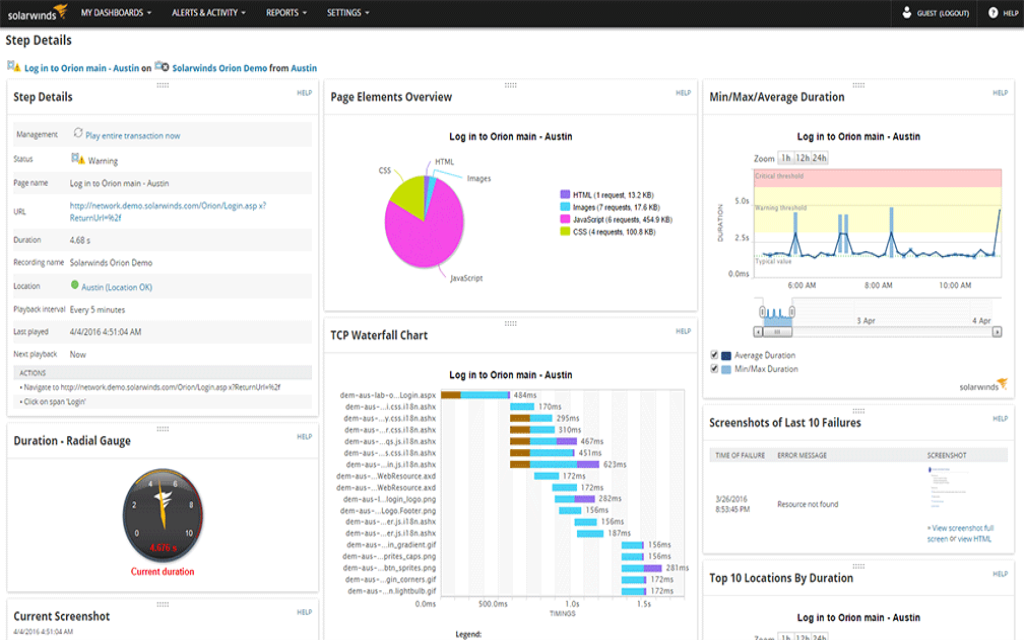
Instead of having to navigate between a variety of tools that each give you insight into just one of these elements of the system, a quality automated web application monitoring solution gives you visibility into all of these components from a single dashboard. Not only do web application monitoring tools monitor the transaction user experience, page load times, and the related infrastructure performance, they also make it easier to put all that collected data in context thanks to their unified dashboards. Plus, your web app monitoring solution will alert you when it detects an issue with any of the elements it’s tracking. It can then arm you with information that makes it easier to identify the root cause of that issue.
To get all these benefits, all you have to do is open your website application monitoring tool, pick the node you want monitored, and select the monitors you want for that node. The tool will automatically start its web application performance monitoring from there.
SolarWinds Server & Application Monitor (SAM) delivers powerful, customizable website application monitoring that helps you ensure your web apps are performing as expected.
When it comes to choosing your web application monitoring tools, it’s important that whatever you choose includes hardware monitoring functions. SAM does just that, automatically monitoring metrics like disk capacity, CPU utilization, memory usage, and more. The tool also tracks a variety of other essential metrics tied to web apps, including those tied to application pools, connections, and cache. Insight into these metrics can make it easier to balance your resource allocation and server load.
When it comes to web application performance monitoring, one of SAM’s biggest strengths is the volume and quality of its out-of-box templates. Out of its 1,200+ built-in templates, more than 250 are application monitor templates that you can assign to your nodes (the representations of your web apps within the SolarWinds Orion Platform) to start monitoring changes. Each of the templates has one or more component monitors designed to monitor a specific element of your node.
Another key element of SAM’s website application monitoring is its custom application monitoring feature. Not only does SAM make it easy to customize its templates and monitors to fit your specific needs, you can also create custom monitors to suit your custom web applications. With just a few clicks you can import custom scripts, implement and edit community-generated templates (which are made and shared on THWACK®), or build new templates and component monitors from scratch.
A web application is a program or software that is accessible through any web browser. Some of the most common web apps include online retail sales, email, instant messaging services, and online auction services.
Web applications are often confused with websites, which are defined as a group of interlinked web pages that share a single domain name and can be accessed through a network. While web applications are technically websites, not all websites are web applications.
The ability for users to manipulate the page is the distinguishing feature of web apps. Even if the web apps have content, that content is dynamic. This distinction means that web applications offer the user significantly more interaction than they could achieve with a website. While this is the primary distinction between the two, there are also more specific differences between web applications and websites, covering everything from their deployment and authentication requirements to the user interaction.
A web application works according to these steps:
Every web application is made up of two parts: the front end and the back end. The front end (or client-side) is executed by the web browser and, as the name suggests, is the part of the app that the user interacts with. It is typically created using JavaScript, HTML, and CSS, though other technologies can be used as well.
The back end (or server-side) is usually executed by a remote server that executes the back end code. That code is typically written in Java, Python, C#, PHP, or other common languages. The back end is at the core of steps 2-4 of the process outlined above.
To make sure that all the elements of your web app are working properly it’s important that you engage in website application monitoring.
There are a number of different forms of web application monitoring. There are three basic levels to web application performance monitoring, each of which includes several types of monitors. The levels of web app monitoring are:
External website monitoring:
This level of web application monitoring focuses on system performance from the end-user perspective. It includes:
Application level monitoring:
This level of website application monitoring collects and stores application stack data using an agent-based approach. This level of monitoring is particularly important for identifying and troubleshooting problems before they impact end users. Application level monitoring includes:
Server (OS) level monitoring:
This level of web application monitoring is focused on tracking the hardware and infrastructure resources that are essential to the success of a web app. It includes:
Web application monitoring is incredibly important for both users and for businesses. Without it, proactively detecting and diagnosing web application performance issues before they impact users is practically impossible. Issues like slow web application response time and web server overload can cause serious issues if you can’t locate the bottlenecks impacting responsiveness and end-user experience.
When your web application is having issues with response times and overall performance, users can quickly get annoyed or tired of waiting, leaving the web app and moving elsewhere. That can lead directly to lost business opportunities as well as unhappy customers who may start overwhelming you with tickets. With effective web application performance monitoring—which is always at its best with a quality automated web application monitoring solution like SolarWinds Server & Application Monitor (SAM)—you can respond to potential issues fast, driving user satisfaction and potentially boosting your business.
Web application monitoring tools give you complete visibility into your application, helping you track all the essential infrastructure components that can impact your web application. That includes monitoring your databases, web servers, virtualizations, hardware, and more.
Instead of having to navigate between a variety of tools that each give you insight into just one of these elements of the system, a quality automated web application monitoring solution gives you visibility into all of these components from a single dashboard. Not only do web application monitoring tools monitor the transaction user experience, page load times, and the related infrastructure performance, they also make it easier to put all that collected data in context thanks to their unified dashboards. Plus, your web app monitoring solution will alert you when it detects an issue with any of the elements it’s tracking. It can then arm you with information that makes it easier to identify the root cause of that issue.
To get all these benefits, all you have to do is open your website application monitoring tool, pick the node you want monitored, and select the monitors you want for that node. The tool will automatically start its web application performance monitoring from there.
SolarWinds Server & Application Monitor (SAM) delivers powerful, customizable website application monitoring that helps you ensure your web apps are performing as expected.
When it comes to choosing your web application monitoring tools, it’s important that whatever you choose includes hardware monitoring functions. SAM does just that, automatically monitoring metrics like disk capacity, CPU utilization, memory usage, and more. The tool also tracks a variety of other essential metrics tied to web apps, including those tied to application pools, connections, and cache. Insight into these metrics can make it easier to balance your resource allocation and server load.
When it comes to web application performance monitoring, one of SAM’s biggest strengths is the volume and quality of its out-of-box templates. Out of its 1,200+ built-in templates, more than 250 are application monitor templates that you can assign to your nodes (the representations of your web apps within the SolarWinds Orion Platform) to start monitoring changes. Each of the templates has one or more component monitors designed to monitor a specific element of your node.
Another key element of SAM’s website application monitoring is its custom application monitoring feature. Not only does SAM make it easy to customize its templates and monitors to fit your specific needs, you can also create custom monitors to suit your custom web applications. With just a few clicks you can import custom scripts, implement and edit community-generated templates (which are made and shared on THWACK®), or build new templates and component monitors from scratch.
Server & Application Monitor
Automatic application discovery and server monitoring.
Quickly monitor the performance and availability of Microsoft Azure and Amazon AWS services.
Built-in templates provide best practices.