- Events
-
Partners
- Government
- Customer Portal
- Contact Us
- Contact Sales
-
English
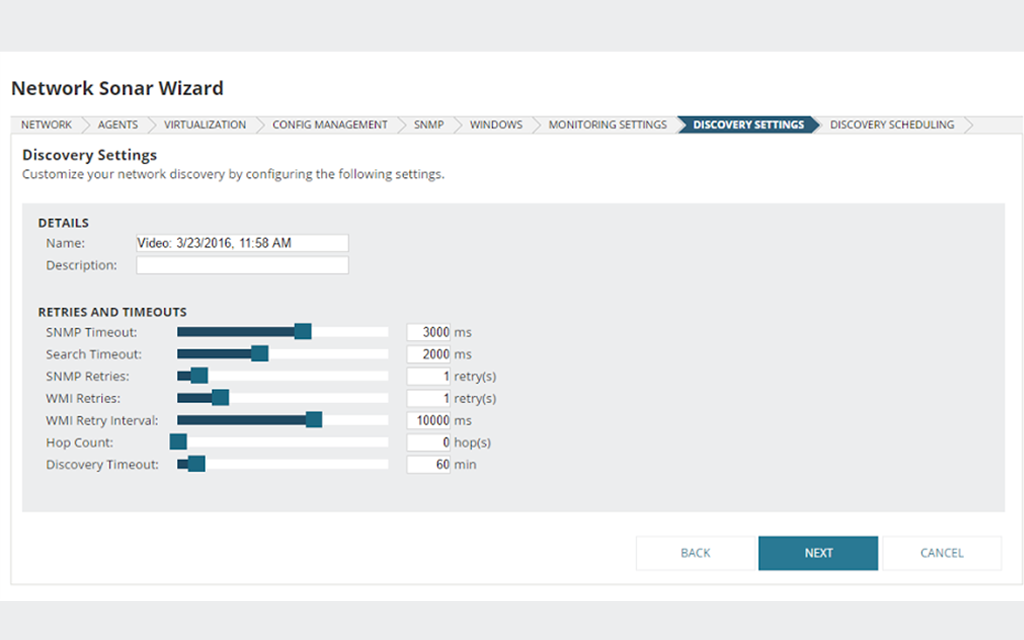
SolarWinds® Network Performance Monitor (NPM) includes the easy-to-use Network Sonar Wizard, which walks you through discovering objects for monitoring. NPM provides the number of interfaces on which you can monitor network traffic after automated discovery or the manual addition of a parent node.
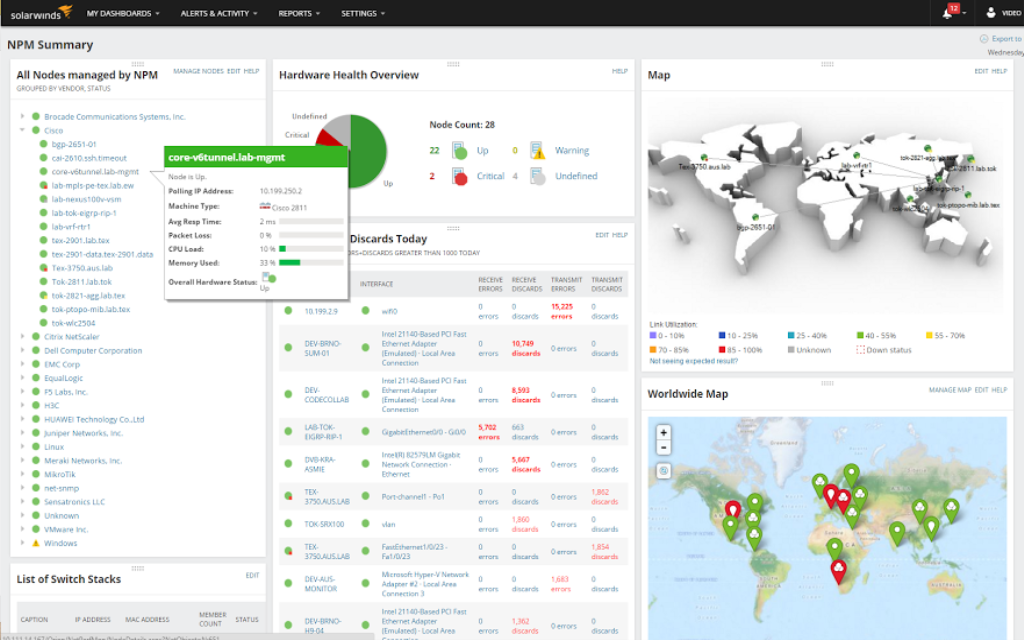
Use NPM’s Discovery Central as a router traffic monitor to gain a centralized overview of the types and number of routers you’re monitoring with your currently installed SolarWinds products.
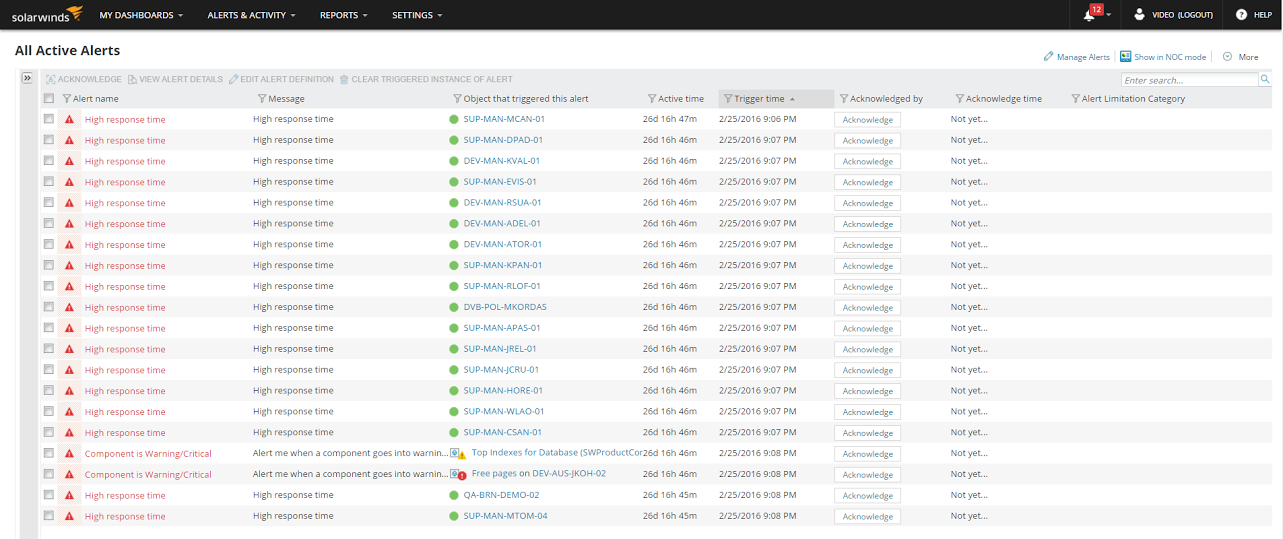
Network Performance Monitor's intelligent network alerts include conditional group dependencies and allow you to logically group connected routers and/or interfaces together.
With these intelligent dependencies, you can receive a single critical alert if your core router goes down—instead of an onslaught of hundreds of alerts for each of the downstream devices and interfaces. With streamlined alerts, you can more quickly understand what’s down and what’s simply unreachable.
Simplify monitoring for large and complex IT environments by using SolarWinds router monitoring software to easily group routers according to virtually any category.
With dynamic service groups, you can monitor and aggregate views of routers according to services such as email, location, department, or manufacturer to roll up service-level status across your business. Pair redundant links to quickly determine if one is up or both are down. This can help you quickly determine the real impact of network issues.
Router monitoring is the process of tracking router traffic and monitoring router status to maintain network performance and reduce the likelihood of network outages. Router monitoring is a form of network traffic monitoring focused on router function and the information traveling through your routers.
The devices on your network constantly send traffic back and forth to access online services and connect with other devices. When devices communicate across a network, they send information to each other in the form of packets. Routers analyze the contents of those packets and determine the destinations and routes for the data.
Packet traffic can provide a lot of information about your network performance. Monitoring router traffic can give you quick insight into network availability, uptime, and latency, so you can better optimize network performance. Overall, making sure routers are performing as expected helps you ensure your entire network functions effectively.
Router traffic monitoring is important for maintaining the security and the performance of your network. Your applications, devices, and end users all rely on functional routers and normal levels of network traffic. With router monitoring, you gain insight and control for:
Network UsageEvery organization and network has a finite amount of available bandwidth. If one application uses up a disproportionate amount of bandwidth, other services will inevitably experience issues like latency and interruptions.
Router monitoring can help you understand whether network resources are distributed evenly and using appropriate amounts of overall network resources. If bandwidth use becomes unbalanced, a router traffic monitor can identify which application is causing the problem, so you can take steps to rebalance the connection.
Network SecurityRouter monitoring tools are important because they constantly watch network traffic through your routers, checking for any suspicious activity such as unauthorized users or devices consuming excessive bandwidth. With router monitoring, you can see more quickly whether you have unauthorized or suspicious devices accessing the network and using up your bandwidth.
Network UptimeRouter traffic monitoring is a pinpointed way to ensure network uptime. If your routers go down, it could affect hundreds of other devices. Monitoring uptime and availability for routers is therefore important for ensuring the functioning of your business network overall. For instance, router monitoring tools can offer built-in alerts to immediately inform you of router performance failures, so you can fix the problem and bring large numbers of other devices back online at the same time.
Several features are essential for a good router monitor, including:
Router monitoring can help prevent network failure and downtime. You can use real-time analysis and insights to catch an issue then more quickly work to remedy it, ideally before a network failure occurs.
Network failure can occur for many reasons, but one of the top reasons is hardware failure. As critical network hardware, router downtime can affect large swaths of your network and drag down business performance. With router monitoring, you can use the SNMP protocol to keep track of hardware status, especially for your core router, and gain quick insight into errors and outages.
When you monitor router traffic, you can also avoid network failure by closely tracking traffic levels, both for specific applications and for general data spikes. Traffic hogs can severely impact network performance and even signal malicious activity, so it’s worthwhile to track traffic levels and identify overly high usage. On the other hand, it’s also critical to note sudden drops in traffic signaling outages. With router traffic monitoring, you can catch early warning signs regarding traffic hogs, potential security threats, or connectivity drop-offs, and act more quickly.
SolarWinds Network Performance Monitor is built to provide the router monitoring tools you need to ensure good network performance.
NPM is built for fast, automated device discovery. Its Network Sonar Wizard helps you discover routers, so you can begin monitoring the network traffic traveling across them. You can then use the Discovery Central to see a clear, centralized overview of the numbers and types of routers you monitor with your SolarWinds products.
SolarWinds NPM uses SNMP monitoring for seamless communication between your routers and the monitoring tool. With SNMP, you can get quick insights into key metrics regarding network usage, traffic levels, and uptime.
SolarWinds NPM is also compatible with router logging. You can choose to forward router syslogs to NPM using the Orion Syslog Viewer. Router logging can provide additional information about events and activity on your router and network.
NPM is built to help you simplify your network monitoring, even for complex IT environments. You can group routers across virtually any category. You can also monitor and collect information about routers by service, including categories like department, location, email, and manufacturer.
In addition, NPM offers intelligent alerts. The tool helps you intelligently structure the dependencies in your network, so you can streamline alerts and avoid being inundated with hundreds of related alerts. With NPM alerts, you can act more quickly on router problems to prevent further downtime and performance issues.
Router monitoring is the process of tracking router traffic and monitoring router status to maintain network performance and reduce the likelihood of network outages. Router monitoring is a form of network traffic monitoring focused on router function and the information traveling through your routers.
The devices on your network constantly send traffic back and forth to access online services and connect with other devices. When devices communicate across a network, they send information to each other in the form of packets. Routers analyze the contents of those packets and determine the destinations and routes for the data.
Packet traffic can provide a lot of information about your network performance. Monitoring router traffic can give you quick insight into network availability, uptime, and latency, so you can better optimize network performance. Overall, making sure routers are performing as expected helps you ensure your entire network functions effectively.
Router traffic monitoring is important for maintaining the security and the performance of your network. Your applications, devices, and end users all rely on functional routers and normal levels of network traffic. With router monitoring, you gain insight and control for:
Network UsageEvery organization and network has a finite amount of available bandwidth. If one application uses up a disproportionate amount of bandwidth, other services will inevitably experience issues like latency and interruptions.
Router monitoring can help you understand whether network resources are distributed evenly and using appropriate amounts of overall network resources. If bandwidth use becomes unbalanced, a router traffic monitor can identify which application is causing the problem, so you can take steps to rebalance the connection.
Network SecurityRouter monitoring tools are important because they constantly watch network traffic through your routers, checking for any suspicious activity such as unauthorized users or devices consuming excessive bandwidth. With router monitoring, you can see more quickly whether you have unauthorized or suspicious devices accessing the network and using up your bandwidth.
Network UptimeRouter traffic monitoring is a pinpointed way to ensure network uptime. If your routers go down, it could affect hundreds of other devices. Monitoring uptime and availability for routers is therefore important for ensuring the functioning of your business network overall. For instance, router monitoring tools can offer built-in alerts to immediately inform you of router performance failures, so you can fix the problem and bring large numbers of other devices back online at the same time.
Several features are essential for a good router monitor, including:
Router monitoring can help prevent network failure and downtime. You can use real-time analysis and insights to catch an issue then more quickly work to remedy it, ideally before a network failure occurs.
Network failure can occur for many reasons, but one of the top reasons is hardware failure. As critical network hardware, router downtime can affect large swaths of your network and drag down business performance. With router monitoring, you can use the SNMP protocol to keep track of hardware status, especially for your core router, and gain quick insight into errors and outages.
When you monitor router traffic, you can also avoid network failure by closely tracking traffic levels, both for specific applications and for general data spikes. Traffic hogs can severely impact network performance and even signal malicious activity, so it’s worthwhile to track traffic levels and identify overly high usage. On the other hand, it’s also critical to note sudden drops in traffic signaling outages. With router traffic monitoring, you can catch early warning signs regarding traffic hogs, potential security threats, or connectivity drop-offs, and act more quickly.
SolarWinds Network Performance Monitor is built to provide the router monitoring tools you need to ensure good network performance.
NPM is built for fast, automated device discovery. Its Network Sonar Wizard helps you discover routers, so you can begin monitoring the network traffic traveling across them. You can then use the Discovery Central to see a clear, centralized overview of the numbers and types of routers you monitor with your SolarWinds products.
SolarWinds NPM uses SNMP monitoring for seamless communication between your routers and the monitoring tool. With SNMP, you can get quick insights into key metrics regarding network usage, traffic levels, and uptime.
SolarWinds NPM is also compatible with router logging. You can choose to forward router syslogs to NPM using the Orion Syslog Viewer. Router logging can provide additional information about events and activity on your router and network.
NPM is built to help you simplify your network monitoring, even for complex IT environments. You can group routers across virtually any category. You can also monitor and collect information about routers by service, including categories like department, location, email, and manufacturer.
In addition, NPM offers intelligent alerts. The tool helps you intelligently structure the dependencies in your network, so you can streamline alerts and avoid being inundated with hundreds of related alerts. With NPM alerts, you can act more quickly on router problems to prevent further downtime and performance issues.
Network Performance Monitor
Simplify router monitoring by organizing your routers based on any category.
Use intelligent alerts within router monitoring software to quickly catch issues.
Streamline troubleshooting with a real-time router traffic monitor tool.