- Events
-
Partners
- Government
- Customer Portal
- Contact Us
- Contact Sales
-
English
Keeping network topology maps up to date manually can be a difficult task and only becomes more complicated as your network scales up or takes on new devices.
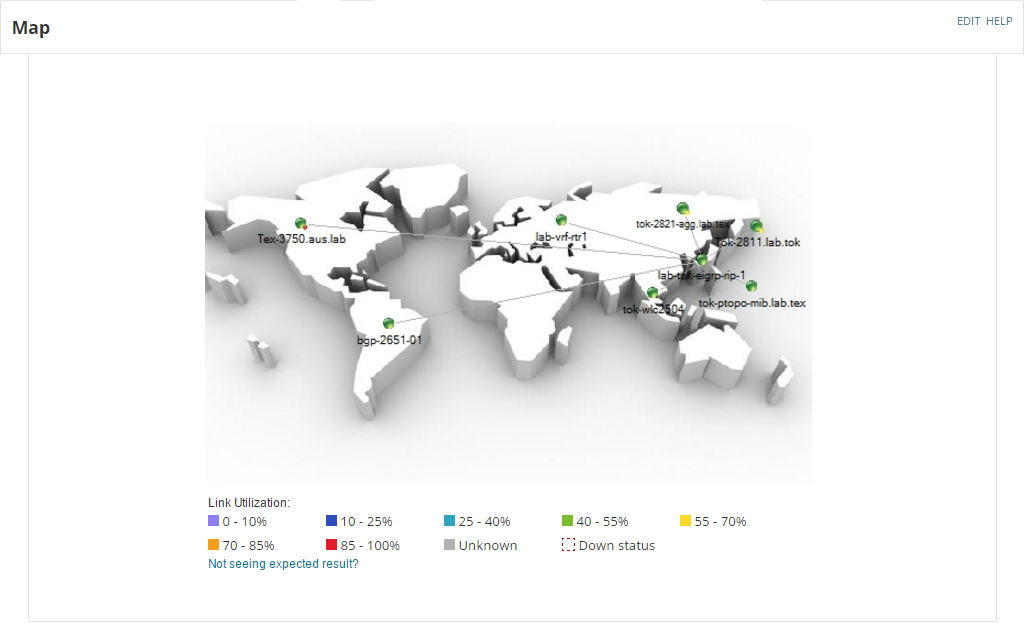
SolarWinds NPM is designed to make network visualization easy with custom dynamic network mapping. You can create dozens of auto-updated maps and easily adjust their visual features as needed. This tool also allows you to display device performance metrics, so you can more easily visualize the performance of your network.
A network discovery tool is a type of detection software built to find and help you identify all the devices on your network. The tool uses automatic network discovery to help you better understand what devices are on a local area network (LAN) either through manually running discovery or scheduled jobs. They may also provide the option to monitor those devices for updates moving forward, which can help you visualize the devices in your network and track their performance metric.
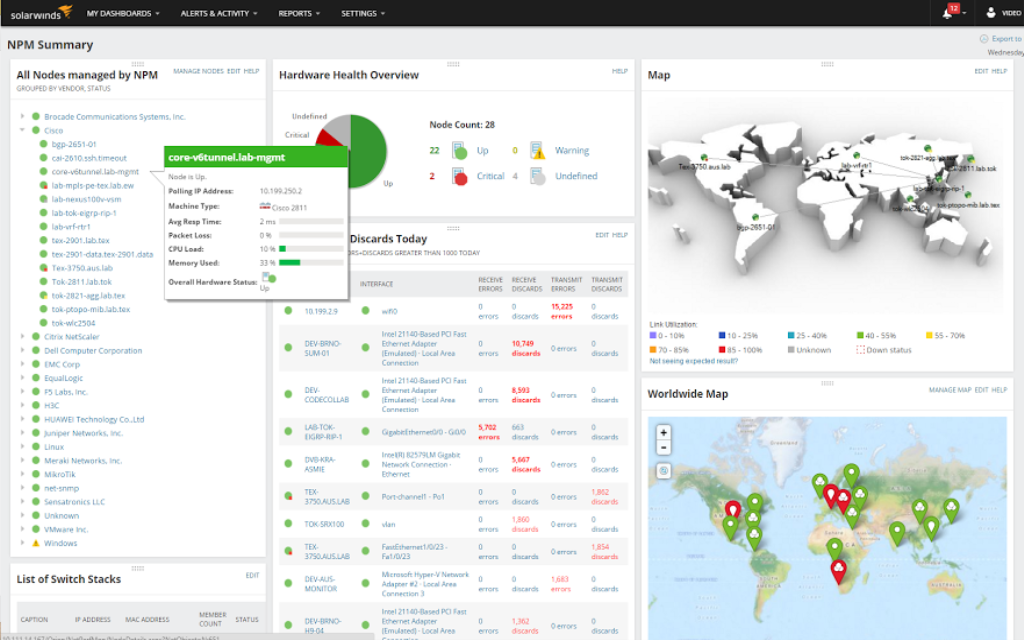
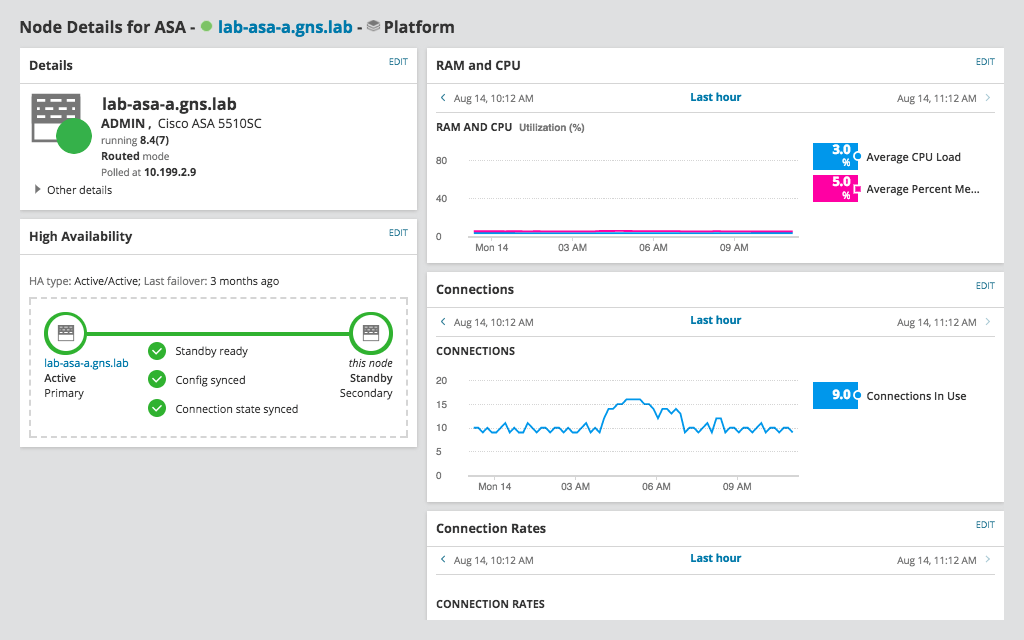
With the help of an auto-generated map, a network device discovery tool can make it easier to drill down on specific nodes on your network to see device details, including device information, packet loss, current node status, average response time, and more. These details can help with troubleshooting specific devices when you encounter an issue in the network.
A network discovery tool works by scanning IP addresses and subnets across your network, typically by using the SNMP protocol. The SNMP protocol uses UDP polling to identify SNMP-compatible devices, a process with a minimal network performance impact. Since the devices have object identifiers (OIDs) stored on them, the network discovery software can “read” the identifying information to determine the device type.
The basic steps for creating a discovery job on a network device discovery tool include:
After you run discovery jobs, the network device detection software can automatically import and begin monitoring devices based on the default settings. If you want to be more selective in which devices and nodes are monitored, as well as which applications and interfaces on them are monitored, you can follow a few extra steps:
While there are several benefits of having a network discovery tool, the most important one is its ability to automatically create and update an inventory of the devices on your network.
With the rise of BYOD policies, the number of devices on any given network is growing. Network detection tools help ensure you remain aware of all the devices on the network, with the ability to monitor the performance of those devices.
Using an automated tool is especially important if you’re dealing with a large or dynamic network with many new devices added or removed on a regular basis. With virtualization and mobile devices, this kind of rapid turnover is common. Automation is also useful if you have devices from multiple vendors, which can otherwise be difficult to identify. A network discovery tool can help you ensure you have an accurate picture of your network.
SolarWinds Network Performance Monitor is built with a network discovery tool to automatically search your network to help discover all the devices and nodes on it. Once those devices are discovered, you can use the integrated Discovery Wizard and Network Sonar Results Wizard to specify which devices and nodes you want to monitor.
Once you create a discovery job in the Discovery Wizard, the network discovery tool in NPM is designed to use SNMP monitoring to discover the SNMP-enabled devices on your network. NPM can then create a detailed network inventory list, which can help users keep track of the devices on the network.
From the device inventory list, the tool can create a network topology map. In NPM, this map is built to be continuously updated as new devices are discovered. With the network topology map, you can easily focus on specific nodes and device performance metrics, which is helpful to support your ability to more easily monitor and troubleshoot performance issues your network. You can also customize the map’s appearance and monitoring features as needed.
Along with the other features included in NPM, the network discovery tool can help you gain an understanding and help improve the performance of your network.
A network discovery tool is a type of detection software built to find and help you identify all the devices on your network. The tool uses automatic network discovery to help you better understand what devices are on a local area network (LAN) either through manually running discovery or scheduled jobs. They may also provide the option to monitor those devices for updates moving forward, which can help you visualize the devices in your network and track their performance metric.
With the help of an auto-generated map, a network device discovery tool can make it easier to drill down on specific nodes on your network to see device details, including device information, packet loss, current node status, average response time, and more. These details can help with troubleshooting specific devices when you encounter an issue in the network.
A network discovery tool works by scanning IP addresses and subnets across your network, typically by using the SNMP protocol. The SNMP protocol uses UDP polling to identify SNMP-compatible devices, a process with a minimal network performance impact. Since the devices have object identifiers (OIDs) stored on them, the network discovery software can “read” the identifying information to determine the device type.
The basic steps for creating a discovery job on a network device discovery tool include:
After you run discovery jobs, the network device detection software can automatically import and begin monitoring devices based on the default settings. If you want to be more selective in which devices and nodes are monitored, as well as which applications and interfaces on them are monitored, you can follow a few extra steps:
While there are several benefits of having a network discovery tool, the most important one is its ability to automatically create and update an inventory of the devices on your network.
With the rise of BYOD policies, the number of devices on any given network is growing. Network detection tools help ensure you remain aware of all the devices on the network, with the ability to monitor the performance of those devices.
Using an automated tool is especially important if you’re dealing with a large or dynamic network with many new devices added or removed on a regular basis. With virtualization and mobile devices, this kind of rapid turnover is common. Automation is also useful if you have devices from multiple vendors, which can otherwise be difficult to identify. A network discovery tool can help you ensure you have an accurate picture of your network.
SolarWinds Network Performance Monitor is built with a network discovery tool to automatically search your network to help discover all the devices and nodes on it. Once those devices are discovered, you can use the integrated Discovery Wizard and Network Sonar Results Wizard to specify which devices and nodes you want to monitor.
Once you create a discovery job in the Discovery Wizard, the network discovery tool in NPM is designed to use SNMP monitoring to discover the SNMP-enabled devices on your network. NPM can then create a detailed network inventory list, which can help users keep track of the devices on the network.
From the device inventory list, the tool can create a network topology map. In NPM, this map is built to be continuously updated as new devices are discovered. With the network topology map, you can easily focus on specific nodes and device performance metrics, which is helpful to support your ability to more easily monitor and troubleshoot performance issues your network. You can also customize the map’s appearance and monitoring features as needed.
Along with the other features included in NPM, the network discovery tool can help you gain an understanding and help improve the performance of your network.
Network Performance Monitor
Gain automatic multi-vendor network discovery and inventory.
Create network topography maps for device monitoring and troubleshooting.
Easily compare monitoring data with PerfStack™ cross-stack network data correlation.