- Events
-
Partners
- Government
- Customer Portal
- Contact Us
- Contact Sales
-
English
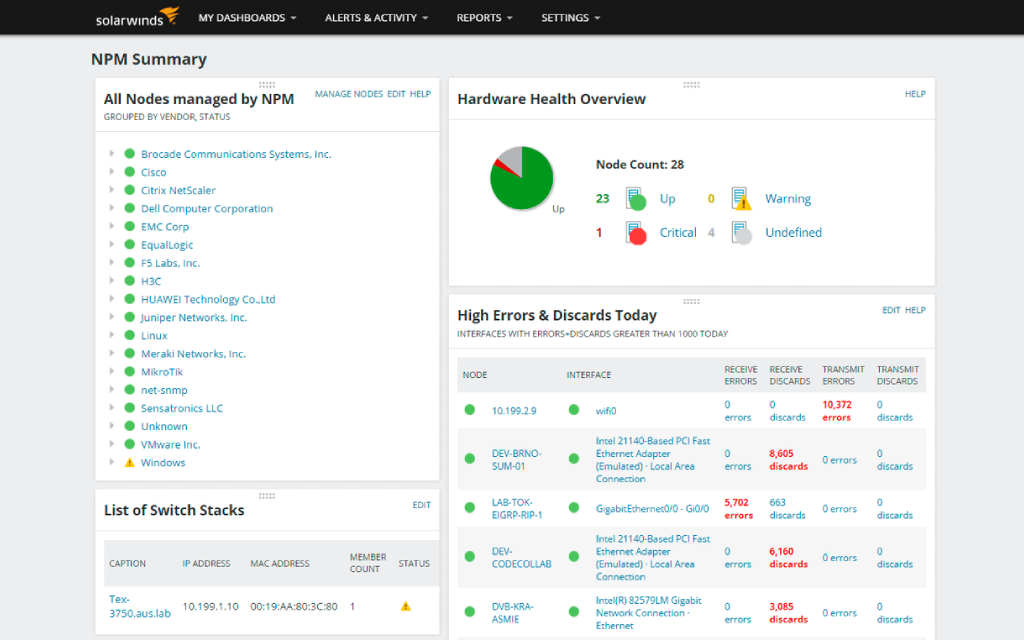
Once you locate and resolve any latency issues on the network, the next step to optimize a network may be to upgrade your IT infrastructure. With NPM, users can gain insights into hardware health and monitor key device metrics, including temperature, fan speed, power supply, and more. Users can also generate alerts when devices are performing below expected thresholds to be sent to the proper admin, who can then inspect the hardware and help mitigate potential issues before they occur.
IT teams can also use SolarWinds NPM to generate reports to help them make decisions about upgrade purchases, with the ability to drill down into device details and inspect node status, device information, average response time, packet loss, and more.
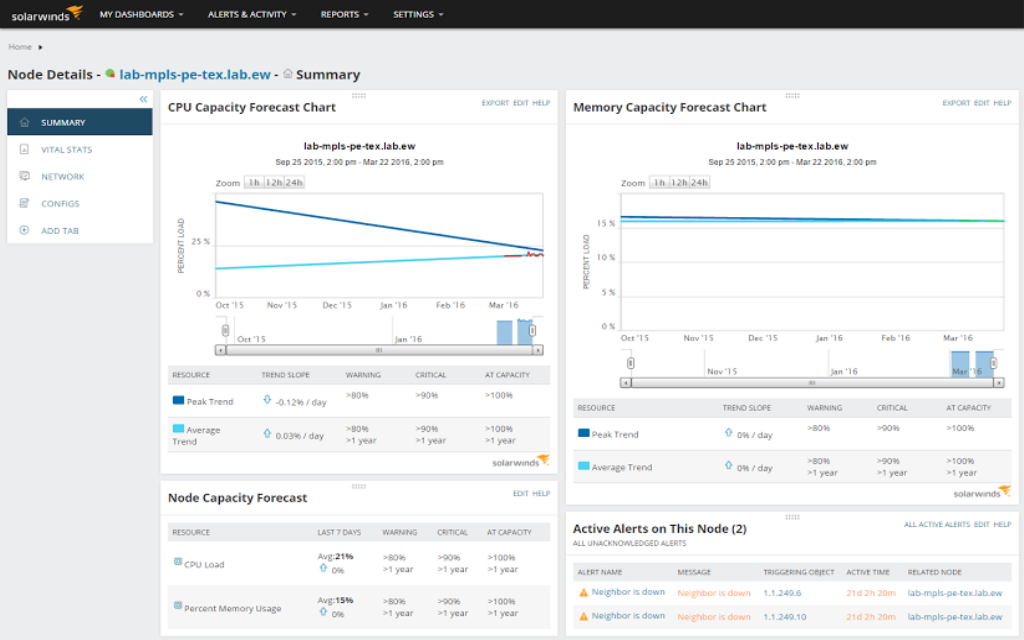
Users can leverage the network optimization software in NPM to dig deeper into specific nodes for current and projected capacity based on historical utilization data. NPM is built to automate capacity forecast planning with its ability to calculate exhaustion dates based on peak and average usage from user-defined thresholds.
With an easy-to-understand dashboard solely dedicated to node details, Network Performance Monitor users can use forecast data as well as obtain useful and detailed capacity information on interfaces, memory, storage, and CPU usage trends.
In addition to the capacity feature for network optimization, you can also use one of the more than 100 out-of-the-box predefined reporting templates built into NPM or create customizable performance and availability reports to help monitor for and ensure optimized network performance of critical network devices like core routers, applications, and switches.
There are many ways to optimize network performance. One common method is to upgrade network hardware. Upgrading can often be a good option, given the number of new devices available today—old equipment can’t always provide the necessary network infrastructure to keep overall performance optimized. If a router, switch, connection, or other node on your infrastructure is built with old standards, it’s advisable to upgrade them with a newer model. On the other hand, new equipment is expensive, so this might not be an option for many businesses.
Changes in current resource use and management strategy can also help optimize performance. For instance, admins should mitigate any devices or applications eating too much bandwidth. In addition, identifying and eliminating network bottlenecks is a crucial component of improving network performance. Bottlenecks, areas of heavy congestion between different components of a network, are a common root cause behind slow network performance. Network teams need to be able to identify and eliminate such issues, which typically requires the use of effective network optimizer software.
Overall, the best way to perform network optimization is to simply have a thorough, real-time understanding of network activity. Knowing an issue is occurring is just the first step—being aware of the issue, how it occurred, how it can be mitigated, and whether it could happen again is crucial for network performance optimization.
Network optimization tools are built to help IT teams streamline their network optimization process. When choosing a solution, look for an optimization tool providing comprehensive monitoring of your network environments. The best network optimizer software should include the ability to check hardware health, application performance, and internet connectivity. These network optimization tools should measure key metrics for connectivity like data speeds and present this data in easy-to-read charts and graphs.
Advanced network optimization tools can also generate network alerts and reports based on the network monitoring software, so admins can collect actionable information from their network performance. With this enhanced visibility into network inventory, bottlenecks, and stats, admins can proactively measures to mitigate and prevent performance issues to ensure end-user connectivity.
Some top techniques for network optimization are based on measuring and responding to key network performance indicators. The most common performance indicators used to optimize networks include:
By monitoring these three key elements, IT admins can gain better insights into their network performance and develop better solutions for network optimization.
Network optimization has a big impact on end-user experience, productivity, and can even save your business money. A network with poor latency can make any simple task, from connecting to a cloud application to loading a webpage, significantly slower. While some of these delays are minor, even small delays can affect end-user experience—and, in some cases, can even be the first sign of larger issues to come.
Delays in network performance can have a ripple effect throughout an organization and result in a lot of wasted hours. Admins can use network optimization to help prevent and mitigate performance issues by using network optimization solutions to head off minor delays, immediately address any slowdowns, and optimize the network structure so slowdowns are unlikely to occur or reoccur.
SolarWinds Network Performance Monitor is built to be an intuitive and easy-to-use network optimization tool. With its robust features, users can monitor network performance, availability, and faults to help optimize network performance for their organizations.
NPM network optimization software is designed to enable users to quickly detect, diagnose, and resolve network performance issues to help head off any network downtime. The network optimization tool in NPM also has a built-in alerting system, so if there are any issues on a network, an IT admin can be sent an alert containing information about the issue, including its location and suggestions for mitigation.
NPM includes an automated network capacity forecasting tool designed to help admins improve network capacity planning. With better capacity planning, users can better anticipate utilization, bandwidth, operations, availability, and other network capacity constraints. This helps IT teams prevent issues before they occur. Since this process is automated, users just need to input their preferred capacity thresholds and NPM can take care of the rest.
NPM features a hardware health monitoring solution built to automatically monitor key device metrics, including temperature, fan speed, power supply, and more. If any device appears to be underperforming, alerts can be sent to the appropriate IT admin to address the issue. If you decide you need to upgrade a piece of hardware, you can generate reports on these metrics to help verify the upgrade is necessary.
SolarWinds Network Performance Monitor is a multi-vendor network monitoring software designed to scale and expand with the needs of a network in any vertical. No matter what network support your organization needs, NPM has a solution to offer.
One popular use of NPM is the network monitoring alert tool, which allow users to either use built-in default alerts or set precise custom alerts according to their needs. For larger networks, users can leverage intelligent alerting to help avoid unnecessary notifications. Users can also create dependency- and topology-aware notifications, so they only receive truly critical alerts to help users quickly identify root causes.
Another popular feature of NPM is the network latency test tool. This solution is designed to automate the typical processes IT teams use to analyze network response time and identify performance problems, which allows admins to more easily determine if performance issues are being caused by a specific application or the network.
See where issues are occurring on a network with the intelligent mapping software feature in NPM, which can aggregate and visualize network data via customizable maps and graphs. This is a great tool for all sizes of network environments, especially ones where logs of network data can be overwhelming.
There are many ways to optimize network performance. One common method is to upgrade network hardware. Upgrading can often be a good option, given the number of new devices available today—old equipment can’t always provide the necessary network infrastructure to keep overall performance optimized. If a router, switch, connection, or other node on your infrastructure is built with old standards, it’s advisable to upgrade them with a newer model. On the other hand, new equipment is expensive, so this might not be an option for many businesses.
Changes in current resource use and management strategy can also help optimize performance. For instance, admins should mitigate any devices or applications eating too much bandwidth. In addition, identifying and eliminating network bottlenecks is a crucial component of improving network performance. Bottlenecks, areas of heavy congestion between different components of a network, are a common root cause behind slow network performance. Network teams need to be able to identify and eliminate such issues, which typically requires the use of effective network optimizer software.
Overall, the best way to perform network optimization is to simply have a thorough, real-time understanding of network activity. Knowing an issue is occurring is just the first step—being aware of the issue, how it occurred, how it can be mitigated, and whether it could happen again is crucial for network performance optimization.
Network optimization tools are built to help IT teams streamline their network optimization process. When choosing a solution, look for an optimization tool providing comprehensive monitoring of your network environments. The best network optimizer software should include the ability to check hardware health, application performance, and internet connectivity. These network optimization tools should measure key metrics for connectivity like data speeds and present this data in easy-to-read charts and graphs.
Advanced network optimization tools can also generate network alerts and reports based on the network monitoring software, so admins can collect actionable information from their network performance. With this enhanced visibility into network inventory, bottlenecks, and stats, admins can proactively measures to mitigate and prevent performance issues to ensure end-user connectivity.
Some top techniques for network optimization are based on measuring and responding to key network performance indicators. The most common performance indicators used to optimize networks include:
By monitoring these three key elements, IT admins can gain better insights into their network performance and develop better solutions for network optimization.
Network Performance Monitor
Obtain comprehensive insights into your network’s bandwidth, latency, and overall health.
Get to the root cause quicker with intelligent, dependency- and topology-aware network alerts.
Improve your network capacity planning with automation.