- Events
-
Partners
- Government
- Customer Portal
- Contact Us
- Contact Sales
-
English
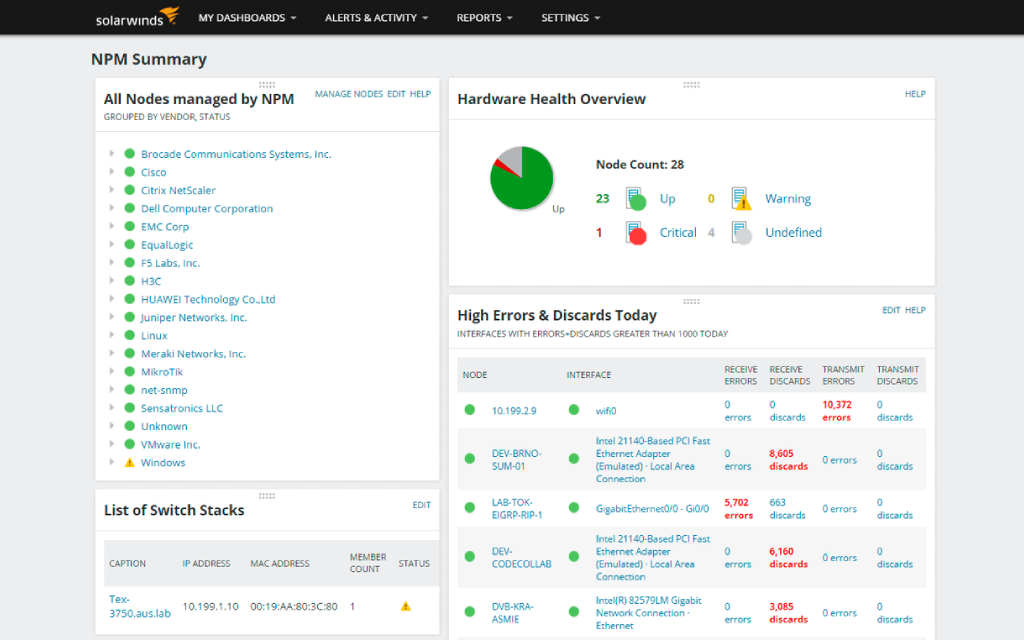
The Quality of Experience (QoE) dashboard in SolarWinds® Network Performance Monitor (NPM) is built to measure network response time and run network latency tests to help identify areas for improvement.
The QoE dashboard also pulls metadata directly from sensors in your physical and virtual servers—no more guessing how network latency affects end users.
Network latency, or network response time, is a measure of the amount of time required for a packet to travel across a network path from a sender to a receiver. When network path latency occurs, performance can be affected.
With the network latency test tool in SolarWinds NPM, users can more easily identify the source and nature of network performance problems or application reliability issues to better perform network optimization. NPM also includes customizable alerts on latency issues, so you can be made aware of issues before users notice them.
With NPM, users can analyze and identify network traffic with a single network latency monitoring tool.
SolarWinds NPM is designed to calculate network response time and categorize over 1,200 applications by risk level and relation to typical business function. This function can help you determine whether end-user quality of experience is being negatively affected by the whole network or just one application.
Latency monitoring can provide insight into whether the network is performing as expected. As an in-depth network latency test tool, NPM is designed to go beyond basic monitoring to actively measure response time for apps across your business network, like Skype, SQL Server, and more.
With easy-to-read dashboard displays, NPM can help you more easily identify high-latency slowdowns in real time.
Network latency issues occur when network packets fail to reach their destinations or experience delays on the journey. Such issues can be caused by many different factors, but it helps to get a working definition of network latency before diving into network latency issues.
Issues with network latency response time or “high latency” might look like websites not loading, data taking too long to send, and slow applications.
Common causes of latency include:
Network latency monitoring involves using a tool to monitor, detect, and troubleshoot IP latency issues. This can be done using a tool specifically designed for network latency monitoring or using a more generalized network monitoring tool capable of performing network latency monitoring. The latency monitoring process involves tracking applications running on a network to determine whether they’re experiencing latency issues. The network itself can also experience these issues.
Once you know where the issues are in the network or on an application, you can use the information gained from network latency monitoring to perform network latency tests or network delay tests. This involves analyzing network response times and identifying the root causes of issues.
Monitoring network latency is important because latency can critically impact the performance of your network and the devices and applications on it. When latency is low or otherwise acceptable, network performance tends to be sufficient unless impacted by some other issue.
However, when network latency is too high, devices, services, and applications can slow to a crawl or stop. In the worst case, unchecked network latency can result in packet loss. Packet loss refers to when one or more packets fail to reach their destination because of network disruptions, connectivity issues, or latency. Even if you get the network back up to speed relatively soon after it went down, those packets dropped due to latency must start their journeys all over again. This can critically cut into network performance speeds.
Network latency can be measured in two ways: roundtrip time (RTT) or time to first byte (TTFB). RTT measures the amount of time it takes for a data packet to make a successful journey from source to destination and back again. TTFB measures how long it takes for the server to receive the first byte of the data packet once a client sends a request.
To manually measure latency on Windows, you can open a command prompt, type “tracert” and then type the destination you think is moving slowly. The sum after adding up the measurements is the latency between your system and the application or website in question.
However, using a tool to measure network latency can help provide a more automated—and typically more accurate—measurement.
There are a few strategies you can try to help reduce network latency:
When many different computers, applications, users, and servers are competing for resources on one network, it can be challenging to keep track of it all. Without a network latency tool, you may have to manually go through each application on your network and check its status, which is not only labor-intensive but can be incredibly inefficient.
Network latency tools work by helping users streamline finding, troubleshooting, and resolving network latency issues by monitoring and analyzing packets.
SolarWinds Network Performance Monitor is designed to be an automated solution for capturing packet latency data points across your network. NPM can also monitor networks and the devices connected to it to help you more easily drill down into network latency issues. Using NPM, you can more easily drill down on performance issues using the included deep packet inspection tool, which is designed to help you more easily analyze packets.
NPM’s quality of experience dashboard is specially designed to measure network latency using deep packet inspection and is built to analyze over 1,200 applications right out of the box. With these insights, SolarWinds NPM can help you more easily identify the source of performance problems as well as determine if latency issues are being caused by applications or the network.
NPM is built to help eliminate the need for guesswork when it comes to network latency tests and can help you dig into important issues by providing deeper performance insights you can leverage to help solve a range of network issues.
Network latency issues occur when network packets fail to reach their destinations or experience delays on the journey. Such issues can be caused by many different factors, but it helps to get a working definition of network latency before diving into network latency issues.
Issues with network latency response time or “high latency” might look like websites not loading, data taking too long to send, and slow applications.
Common causes of latency include:
Network latency monitoring involves using a tool to monitor, detect, and troubleshoot IP latency issues. This can be done using a tool specifically designed for network latency monitoring or using a more generalized network monitoring tool capable of performing network latency monitoring. The latency monitoring process involves tracking applications running on a network to determine whether they’re experiencing latency issues. The network itself can also experience these issues.
Once you know where the issues are in the network or on an application, you can use the information gained from network latency monitoring to perform network latency tests or network delay tests. This involves analyzing network response times and identifying the root causes of issues.
Monitoring network latency is important because latency can critically impact the performance of your network and the devices and applications on it. When latency is low or otherwise acceptable, network performance tends to be sufficient unless impacted by some other issue.
However, when network latency is too high, devices, services, and applications can slow to a crawl or stop. In the worst case, unchecked network latency can result in packet loss. Packet loss refers to when one or more packets fail to reach their destination because of network disruptions, connectivity issues, or latency. Even if you get the network back up to speed relatively soon after it went down, those packets dropped due to latency must start their journeys all over again. This can critically cut into network performance speeds.
Network latency can be measured in two ways: roundtrip time (RTT) or time to first byte (TTFB). RTT measures the amount of time it takes for a data packet to make a successful journey from source to destination and back again. TTFB measures how long it takes for the server to receive the first byte of the data packet once a client sends a request.
To manually measure latency on Windows, you can open a command prompt, type “tracert” and then type the destination you think is moving slowly. The sum after adding up the measurements is the latency between your system and the application or website in question.
However, using a tool to measure network latency can help provide a more automated—and typically more accurate—measurement.
There are a few strategies you can try to help reduce network latency:
When many different computers, applications, users, and servers are competing for resources on one network, it can be challenging to keep track of it all. Without a network latency tool, you may have to manually go through each application on your network and check its status, which is not only labor-intensive but can be incredibly inefficient.
Network latency tools work by helping users streamline finding, troubleshooting, and resolving network latency issues by monitoring and analyzing packets.
SolarWinds Network Performance Monitor is designed to be an automated solution for capturing packet latency data points across your network. NPM can also monitor networks and the devices connected to it to help you more easily drill down into network latency issues. Using NPM, you can more easily drill down on performance issues using the included deep packet inspection tool, which is designed to help you more easily analyze packets.
NPM’s quality of experience dashboard is specially designed to measure network latency using deep packet inspection and is built to analyze over 1,200 applications right out of the box. With these insights, SolarWinds NPM can help you more easily identify the source of performance problems as well as determine if latency issues are being caused by applications or the network.
NPM is built to help eliminate the need for guesswork when it comes to network latency tests and can help you dig into important issues by providing deeper performance insights you can leverage to help solve a range of network issues.
Network Performance Monitor
Multi-vendor fault, performance, and availability monitoring with Network Performance Monitor.
Advanced network troubleshooting for on-premises, hybrid, and cloud services with critical path hip-by-hop analysis.
PerfStack™ cross-stack network data correlation.