- Events
-
Partners
- Government
- Customer Portal
- Contact Us
- Contact Sales
-
English
Network jitter, also known as packet delay variance, refers to small delays as packets travel across a network. When a network has high jitter, packets are delivered at irregular intervals as opposed to a steady stream. A few packets might make it to their destinations on time, while other packets might be sent all at once, out of order, or not at all.
Jitter can eventually lead to packet loss, which causes a noticeable decline in the quality of real-time services. VoIP jitter is the same as network jitter but in relation to Voice over Internet Protocols.
The exact cause of network jitter can be hard to pinpoint in a large enterprise with many applications and endpoints competing for bandwidth.
However, four of the most common causes of jitter are:
To reduce jitter, you can:
Before you jump into troubleshooting jitter, however, you’ll need a way to measure network jitter. You can monitor and measure jitter using a standard network monitoring tool, but you can achieve more detailed results with a tool specially designed to monitor VoIP jitter.
Latency measures how long it takes a packet to make it to its destination, while jitter measures any delays in a packet’s journey.
Jitter is defined as the delay in packet transmission measured in milliseconds, while latency is the time it takes for data to successfully travel from source to destination measured in milliseconds. Jitter can be considered a subsection of latency.
Latency and jitter also share a few common causes, like poor Wi-Fi connectivity, old hardware, overloaded networks, and insufficient capacity. However, unlike jitter, latency has more causes unrelated to the internet connection. For instance, a misconfigured network can cause latency issues.
Network latency ultimately comes down to how long packets stay in transit, which is determined by the strength of your internet connection and how well organized and optimized your network is. When troubleshooting latency, you have more variables to consider.
The most common way to measure latency is by calculating “round-trip time” or RTT. As the name suggests, this is the amount of time it takes, in milliseconds, for a packet to successfully complete a journey from source to destination. You can also measure latency according to “time to first byte” or TTFB. TTFB measures the time difference between the moment the first byte of a packet leaves the source and the moment the first byte of that same packet arrives at its destination.
Another key difference between jitter and latency is latency can be controlled and eliminated, while jitter cannot.
Common ways to help resolve latency include:
When it comes to jitter, the best thing you can do is take measures to reduce it when it arises and try to create an environment where your network generates the least amount of jitter possible.
All networks are susceptible to jitter, but high levels of jitter are particularly problematic for networks handling VoIP phone calls, video conference calls, streaming services, or online gaming. Every time you make a VoIP voice call, your voice gets broken down into millions of data packets before being sent across your internet connection and to the user at the other end of the call. As your segmented voice data travels, it must compete against other business-critical operations on your network for its fair share of bandwidth. If there’s enough bandwidth to support these operations, then the VoIP call will go through without incident or acceptable jitter levels. If not, your voice will sound choppy and staticky on your call.
Why are VoIP calls so much more likely to experience jitter than other network operations? The difference between dropped packets and jitter during an email transmission and VoIP transmission lies in reassembly. Email packets can be reassembled and placed in the correct order immediately before final transmission to the destination. In general, it takes longer for VoIP packets to be reassembled, and when there’s jitter in the network, VoIP cannot be clearly reassembled in time for final transmission. This causes poor call quality.
When it comes to VoIP calls, the line between clear and indecipherable calls is very thin. Anything less than real-time delivery can cause dropped calls, crackly reception, and choppy audio, which is why it’s so crucial to frequently check jitter levels in your network.
All networks will have jitter. If network jitter is within the acceptable range, you might not experience any disruptions in service at all.
The following levels of jitter are typically considered acceptable:
If any of these thresholds are surpassed, you may notice a sharp decline in call quality. Your voice might sound distorted or warbled and the call itself might go in and out.
Jitter can be calculated in many ways. To find jitter manually, start by sending a ping to the destination for which you want to check jitter. You can find the jitter by finding the average time difference between each packet sequence. Of course, doing all these computations in a large network would take a long time. There are automatic jitter calculators available online to help you with this process.
You can also check jitter using a jitter test. A jitter test observes your network traffic, specifically packet delivery times, to calculate the differences in time taken to deliver packets. It’s usually done by connecting a computer to the external server and then sending data packets between them, then analyzing the results.
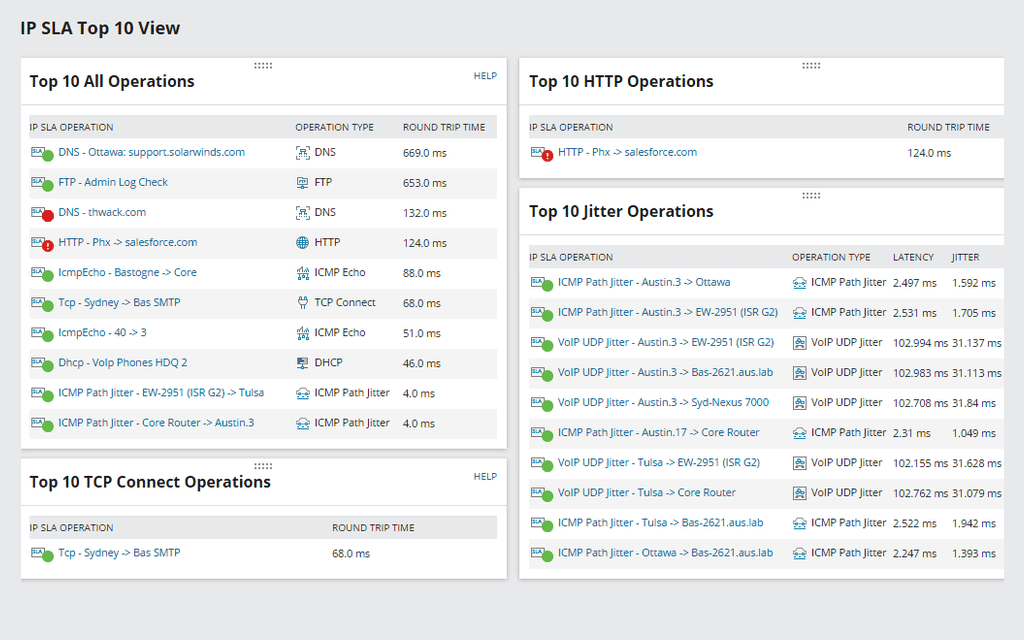
SolarWinds VoIP & Network Quality Manager is designed to be a highly intelligent, highly specialized network jitter monitoring tool with the tools you need to monitor, manage, and mitigate the effects of jitter. With this tool, you can capture and analyze VoIP traffic directly from the packet stream and use those findings to calculate jitter and latency. With routine network jitter monitoring, VNQM can help you maintain call quality in VoIP communications.
Other notable features include:
With SolarWinds VoIP & Network Quality Manager, you have everything you need to make sure VoIP calls come through loud and clear.
Network jitter, also known as packet delay variance, refers to small delays as packets travel across a network. When a network has high jitter, packets are delivered at irregular intervals as opposed to a steady stream. A few packets might make it to their destinations on time, while other packets might be sent all at once, out of order, or not at all.
Jitter can eventually lead to packet loss, which causes a noticeable decline in the quality of real-time services. VoIP jitter is the same as network jitter but in relation to Voice over Internet Protocols.
The exact cause of network jitter can be hard to pinpoint in a large enterprise with many applications and endpoints competing for bandwidth.
However, four of the most common causes of jitter are:
To reduce jitter, you can:
Before you jump into troubleshooting jitter, however, you’ll need a way to measure network jitter. You can monitor and measure jitter using a standard network monitoring tool, but you can achieve more detailed results with a tool specially designed to monitor VoIP jitter.
Latency measures how long it takes a packet to make it to its destination, while jitter measures any delays in a packet’s journey.
Jitter is defined as the delay in packet transmission measured in milliseconds, while latency is the time it takes for data to successfully travel from source to destination measured in milliseconds. Jitter can be considered a subsection of latency.
Latency and jitter also share a few common causes, like poor Wi-Fi connectivity, old hardware, overloaded networks, and insufficient capacity. However, unlike jitter, latency has more causes unrelated to the internet connection. For instance, a misconfigured network can cause latency issues.
Network latency ultimately comes down to how long packets stay in transit, which is determined by the strength of your internet connection and how well organized and optimized your network is. When troubleshooting latency, you have more variables to consider.
The most common way to measure latency is by calculating “round-trip time” or RTT. As the name suggests, this is the amount of time it takes, in milliseconds, for a packet to successfully complete a journey from source to destination. You can also measure latency according to “time to first byte” or TTFB. TTFB measures the time difference between the moment the first byte of a packet leaves the source and the moment the first byte of that same packet arrives at its destination.
Another key difference between jitter and latency is latency can be controlled and eliminated, while jitter cannot.
Common ways to help resolve latency include:
When it comes to jitter, the best thing you can do is take measures to reduce it when it arises and try to create an environment where your network generates the least amount of jitter possible.
All networks are susceptible to jitter, but high levels of jitter are particularly problematic for networks handling VoIP phone calls, video conference calls, streaming services, or online gaming. Every time you make a VoIP voice call, your voice gets broken down into millions of data packets before being sent across your internet connection and to the user at the other end of the call. As your segmented voice data travels, it must compete against other business-critical operations on your network for its fair share of bandwidth. If there’s enough bandwidth to support these operations, then the VoIP call will go through without incident or acceptable jitter levels. If not, your voice will sound choppy and staticky on your call.
Why are VoIP calls so much more likely to experience jitter than other network operations? The difference between dropped packets and jitter during an email transmission and VoIP transmission lies in reassembly. Email packets can be reassembled and placed in the correct order immediately before final transmission to the destination. In general, it takes longer for VoIP packets to be reassembled, and when there’s jitter in the network, VoIP cannot be clearly reassembled in time for final transmission. This causes poor call quality.
When it comes to VoIP calls, the line between clear and indecipherable calls is very thin. Anything less than real-time delivery can cause dropped calls, crackly reception, and choppy audio, which is why it’s so crucial to frequently check jitter levels in your network.
All networks will have jitter. If network jitter is within the acceptable range, you might not experience any disruptions in service at all.
The following levels of jitter are typically considered acceptable:
If any of these thresholds are surpassed, you may notice a sharp decline in call quality. Your voice might sound distorted or warbled and the call itself might go in and out.
Jitter can be calculated in many ways. To find jitter manually, start by sending a ping to the destination for which you want to check jitter. You can find the jitter by finding the average time difference between each packet sequence. Of course, doing all these computations in a large network would take a long time. There are automatic jitter calculators available online to help you with this process.
You can also check jitter using a jitter test. A jitter test observes your network traffic, specifically packet delivery times, to calculate the differences in time taken to deliver packets. It’s usually done by connecting a computer to the external server and then sending data packets between them, then analyzing the results.
SolarWinds VoIP & Network Quality Manager is designed to be a highly intelligent, highly specialized network jitter monitoring tool with the tools you need to monitor, manage, and mitigate the effects of jitter. With this tool, you can capture and analyze VoIP traffic directly from the packet stream and use those findings to calculate jitter and latency. With routine network jitter monitoring, VNQM can help you maintain call quality in VoIP communications.
Other notable features include:
With SolarWinds VoIP & Network Quality Manager, you have everything you need to make sure VoIP calls come through loud and clear.
VoIP & Network Quality Manager
Drill down on the cause of call failures by correlating network jitter with other metrics.
Create fake VoIP traffic to understand how call quality would be affected by certain changes.
Measure network jitter, gauge performance at a more granular level, and troubleshoot quickly.