- Events
-
Partners
- Government
- Customer Portal
- Contact Us
- Contact Sales
-
English
Visually display critical performance metrics for rapid insight into WAN performance.
Test the network between Cisco routers or from a Cisco router to a remote IP device.
Visually display WAN performance from the perspective of your remote sites.
Drill down when an operation has been identified with potential issues.
Perform further troubleshooting by viewing critical performance metrics.
Configure your IP SLA operation using a step-by-step wizard when troubleshooting WAN performance between sites. You can visually display the performance metrics of your operations for rapid insight into WAN performance. SolarWinds® VoIP and Network Quality Manager® allows you to set up IP SLA operations on your edge routers and switches with a wizard-like interface. You won’t need any complicated CLI commands to get started; just a few clicks of your mouse and you’re off.
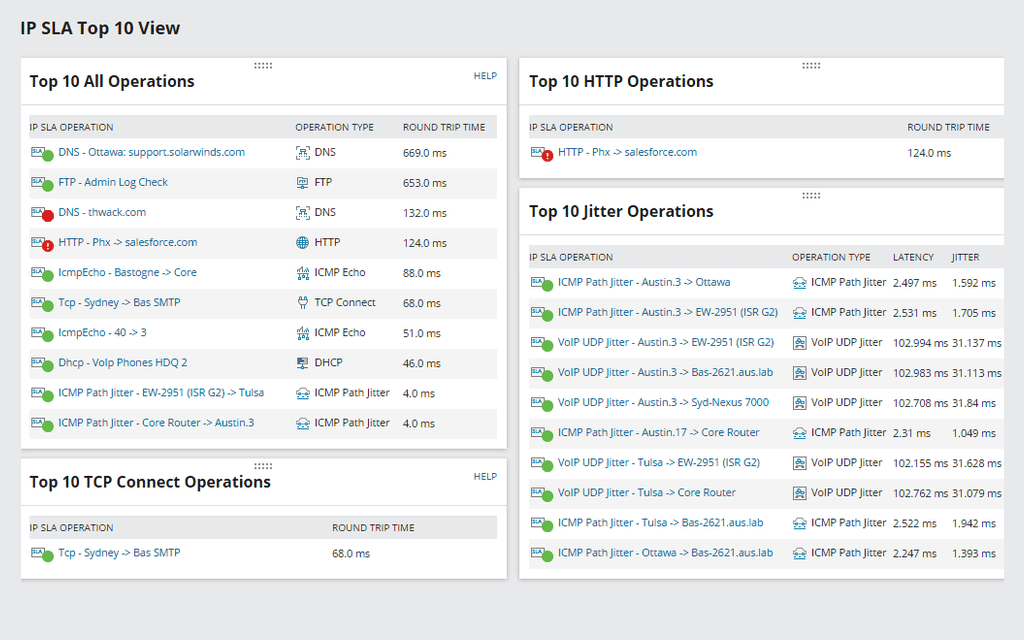
Gain critical overviews of your performance with SolarWinds VNQM’s summary view. The IP SLA summary view will display the status and health of your IP SLA operations in customizable dashboards and maps for a quick view into the performance of your WAN connections.
Visually display WAN performance from your remote sites.
WAN performance can be easily quantified and monitored by common metrics including jitter, latency, packet loss, and round trip time (RTT) through the use of these active IP SLA operations between sites. VNQM then displays these metrics in graphical top 10 views so you can easily see how your WAN is performing.
When an operation is identified with potential issues, you can drill down for further details. For example, an ICMP path jitter operation can be created to monitor connectivity to a web server on your network. Visualization of spikes in the RTT, high jitter, high latency, and other trends will help you gain deep insight at each hop.
When integrated with SolarWinds Network Performance Monitor (NPM), you can view detailed performance metrics such as CPU and memory utilization, interface status and utilization, latency, and response time of the IP SLA source device for further troubleshooting.