- Events
-
Partners
- Government
- Customer Portal
- Contact Us
- Contact Sales
-
English
VoIP calling offers several benefits for businesses, including reduced costs, flexible call and extension routing, and accessibility. However, these benefits aren’t useful if the VoIP call quality is unacceptable.
An effective way to improve VoIP call quality is to ensure your hardware is up to date. Category 6 (CAT6) Ethernet cables, for instance, can send data twice as fast as CAT5 cables, and upgrading your Ethernet cable can often solve minor VoIP quality issues.
Jitter buffers, which can be configured with the assistance of your VoIP vendor, are another common way to improve call quality. These function by briefly holding data packets in order before releasing them at even intervals into your network, helping ensure voice data is delivered accurately and intelligibly.
VoIP-optimized routers or routers with Quality of Service (QoS) features are another option to improve VoIP call quality. These devices prioritize certain kinds of network traffic (such as VoIP calls) or dedicate a percentage of overall bandwidth to specific forms of traffic to maximize quality.
Bandwidth usage can have a direct effect on VoIP call quality, so monitoring your network traffic and tracking VoIP call performance metrics is a crucial component of improving call quality. Using network monitoring software solutions can help you more easily monitor and protect data packet streams that transfer VoIP data, so you can more easily see which devices or routes might be creating bottlenecks, increasing latency, or impeding traffic.
Since VoIP calls work by translating sound into data packets and sending them as data packets via the internet, anything with an effect on bandwidth and connectivity can impact VoIP call quality. Transmission delays caused by network interference can also result in data packets being sent or received out of order or cause them to not arrive. This will have a noticeable impact on VoIP call quality, often causing jumbled or unintelligible sound.
The most common factors affecting VoIP call quality are:
Most end users may notice changes in VoIP call quality when roundtrip latency reaches 250ms or more. The recommended one-way latency for VoIP calls is 150ms, but it’s important to remember this is for the entirety of the voice path.
A variety of factors can contribute to latency. These include:
Using VoIP quality monitoring software to track and manage the transit latencies of your own network can help you more easily keep latency below 150ms and abide by network SLAs that may specify maximum latencies.
SolarWinds VNQM is a VoIP call quality monitoring software solution designed to help admins and IT professionals track and manage network health and performance to provide the best VoIP call quality possible.
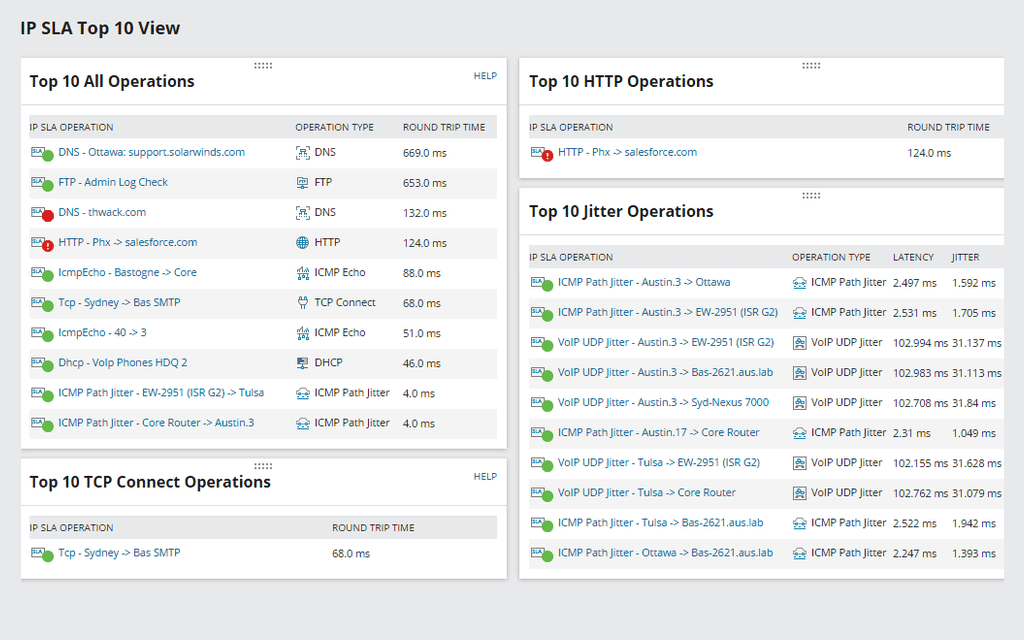
VNQM provides visibility into essential VoIP call performance metrics like jitter, latency, and packet loss, and can help you more easily analyze call detail records and call management records (CMRs) to determine the MOS, which is the measure of voice quality for each call. This visibility can also help you quickly troubleshoot and resolve distortion, unwanted sound, and other issues with an impact on call quality by allowing you to trace and identify problems at any point along the call path, from initiation to destination, and across all intermediate network hops.
VoIP calling offers several benefits for businesses, including reduced costs, flexible call and extension routing, and accessibility. However, these benefits aren’t useful if the VoIP call quality is unacceptable.
An effective way to improve VoIP call quality is to ensure your hardware is up to date. Category 6 (CAT6) Ethernet cables, for instance, can send data twice as fast as CAT5 cables, and upgrading your Ethernet cable can often solve minor VoIP quality issues.
Jitter buffers, which can be configured with the assistance of your VoIP vendor, are another common way to improve call quality. These function by briefly holding data packets in order before releasing them at even intervals into your network, helping ensure voice data is delivered accurately and intelligibly.
VoIP-optimized routers or routers with Quality of Service (QoS) features are another option to improve VoIP call quality. These devices prioritize certain kinds of network traffic (such as VoIP calls) or dedicate a percentage of overall bandwidth to specific forms of traffic to maximize quality.
Bandwidth usage can have a direct effect on VoIP call quality, so monitoring your network traffic and tracking VoIP call performance metrics is a crucial component of improving call quality. Using network monitoring software solutions can help you more easily monitor and protect data packet streams that transfer VoIP data, so you can more easily see which devices or routes might be creating bottlenecks, increasing latency, or impeding traffic.
Since VoIP calls work by translating sound into data packets and sending them as data packets via the internet, anything with an effect on bandwidth and connectivity can impact VoIP call quality. Transmission delays caused by network interference can also result in data packets being sent or received out of order or cause them to not arrive. This will have a noticeable impact on VoIP call quality, often causing jumbled or unintelligible sound.
The most common factors affecting VoIP call quality are:
Most end users may notice changes in VoIP call quality when roundtrip latency reaches 250ms or more. The recommended one-way latency for VoIP calls is 150ms, but it’s important to remember this is for the entirety of the voice path.
A variety of factors can contribute to latency. These include:
Using VoIP quality monitoring software to track and manage the transit latencies of your own network can help you more easily keep latency below 150ms and abide by network SLAs that may specify maximum latencies.
SolarWinds VNQM is a VoIP call quality monitoring software solution designed to help admins and IT professionals track and manage network health and performance to provide the best VoIP call quality possible.
VNQM provides visibility into essential VoIP call performance metrics like jitter, latency, and packet loss, and can help you more easily analyze call detail records and call management records (CMRs) to determine the MOS, which is the measure of voice quality for each call. This visibility can also help you quickly troubleshoot and resolve distortion, unwanted sound, and other issues with an impact on call quality by allowing you to trace and identify problems at any point along the call path, from initiation to destination, and across all intermediate network hops.
VoIP & Network Quality Manager
Monitor VoIP call performance metrics like jitter, latency, and packet loss.
Troubleshoot problems with VoIP call quality.
Trace call paths to quickly identify potential bottlenecks and issues.