- Events
-
Partners
- Government
- Customer Portal
- Contact Us
- Contact Sales
-
English
Packet capture is critical to ensuring business service delivery. Multi-vendor network monitoring tools reduce downtime, increase employee productivity, and improve ROI.
As a wireless sniffer, SolarWinds® Network Performance Monitor (NPM) is designed to manage and monitor performance metrics for autonomous access points, wireless controllers, and clients. NPM also offers fault, performance, and network availability monitoring, cross-stack network data correlation, hop-by-hop network path analysis, and more.
SolarWinds NPM features a customizable network topology and dependency-aware intelligent network monitoring alerts. Quickly and effectively detect, diagnose, and resolve network performance issues using customizable web performance dashboards.
The enterprise-grade Wi-Fi network sniffer in NPM is designed to automatically discover and map devices, capture performance metrics and link utilization, and view wireless coverage to help you troubleshoot issues before they affect your business.
SolarWinds NPM comes equipped with highly specialized features to help network administrators achieve complete control over their devices and networks.
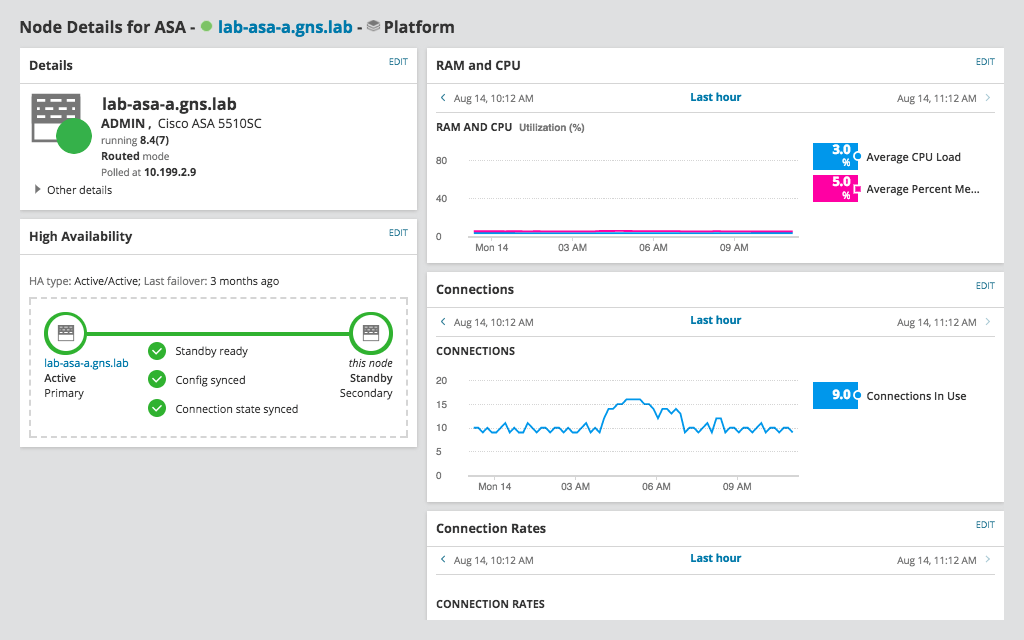
Use NetPath™ to view performance, traffic, and configuration details of devices and apps on-premises, in the cloud, or across hybrid environments. You can also get deeper visibility into critical network firewalls and load balancers with Network Insight™. This tool is built to simplify the management of complex network devices, including networks with Cisco ASA and F5 BIG-IP devices.
When your Wi-Fi network is frequently slow or down, it can compromise productivity, reduce ROI, and jeopardize business growth. If you don’t have a Wi-Fi packet sniffer in your toolkit to detect network issues before they occur, you may be wasting time, money, and resources.
Wireless sniffers like SolarWinds NPM can help you identify internal and external network connectivity issues by analyzing traffic, which puts you in a better position to maintain your network’s Wi-Fi uptime, avoid laggy service, and more.
In a large network handling millions of data packets at any given time, admins need a wireless network tool that’s also a packet analyzer.
NPM’s built-in network analyzer tool is designed to sniff, analyze, and categorize packets from over 1,200 applications out of the box. Since this data is broken down to a granular level, you can also use this analysis to generate deeper insights to resolve slowdowns quicker. In addition, smart sensors in NPM can provide insight into how current performance may be affecting end users.
A Wi-Fi sniffer is a kind of packet sniffer or network analyzer designed to capture packet data on wireless networks. Wireless sniffer solutions are built to capture wireless network traffic and analyze it to generate insights into what’s going on in a network at any given time. A Wi-Fi sniffer can also be referred to as a wireless packet sniffer or a wireless network sniffer.
Wireless networks often require a different approach to packet sniffing than the standard approach for wired networks. For example, wireless networks may be more susceptible to packet loss because data is traveling through the air between two distant points, which can cause data to get lost in translation. Also, wireless networks may involve numerous access points, adapters, and routers, while a wired network does not. For administrators in an enterprise that predominantly uses wireless networks, using a traditional sniffer tool instead of a wireless sniffer software might not be agile or expansive enough to meet these needs. Wi-Fi packet sniffers are designed to include key monitoring metrics specifically for wireless networks to provide comprehensive performance visibility.
Wi-Fi network sniffers work by crawling across a wireless network to intercept a wide range or a small subsection of data packets as they pass through the network, gathering information about those packets, and using the information to provide insights into what’s going on in a network.
Since data and metadata are unintelligible to humans in their raw state, Wi-Fi packet sniffers are built to decode network packets by transmuting them into a readable format. This can make it easier for administrators to pinpoint the root cause of wireless performance issues and support the ability to fix Wi-Fi issues quickly.
Wi-Fi packet sniffers can also contain settings for network administrators to select exactly how much network traffic they want to capture and analyze. For example, when a wireless sniffer is in filtered mode, it will only capture packets that fit within the user’s pre-selected parameters. When you know what you’re looking for or suspect only a particular application is responsible, a Wi-Fi network sniffer’s filtered mode helps make troubleshooting faster.
Wireless sniffing is an important component of network monitoring best practices. Sniffing networks, in general, can offer users critical visibility into their networks that can be used to spot network performance issues before they start, but Wi-Fi packet sniffers are designed to take network monitoring a level deeper. In addition to standard network monitoring protocols, wireless sniffers specifically look for packet data and performance metrics related to controllers, clients, and access points.
Wireless sniffing also helps simplify and speed up the troubleshooting process. When your Wi-Fi network is suffering from unidentified performance issues, you don’t have time to wade through a sea of metadata. Wireless sniffer tools are designed to help you pinpoint performance issues, so you can identify what needs to be fixed as quickly as possible.
SolarWinds Network Performance Monitor is a powerful, comprehensive network monitoring tool built to function as an enterprise-grade Wi-Fi packet sniffer for environments of all sizes.
From small business networks to large, diverse corporate networks, users often find themselves cobbling together a functioning sniffer system with the insights they need from disparate technologies—there’s a tool for standard sniffing, there’s a tool for wireless sniffing, network performance monitoring, and more. NPM is built to provide network administrators everything they need to achieve full control over their networks in one comprehensive tool.
NPM has numerous specialized features to help make wireless sniffing easy. You can use the PerfStack™ dashboard to investigate network slowdowns according to a variety of metrics, including Average Response Time, Average CPU Load, Average Percent Memory Used, and more. Once these metrics are laid on a timeline, you can spot performance issues more quickly.
SolarWinds NPM network analyzer tool is designed to gather packet data for over 1,200 applications, but you’ll never drown in information—NPM network analyzer is also built to allow you to categorize all the data according to a variety of relevant metrics, so you only see what you want when you want it.
Two of NPM’s many features—network mapping and network paths—are excellent for supplementing its Wi-Fi packet sniffer capabilities. If you combine these features with those specific to wireless sniffing, you have the tools you need to achieve gapless wireless network monitoring and wireless packet sniffing.
The wireless maps in Network Performance Monitor are a great way to look at your network’s performance visually, show real-time coverage, and pinpoint which clients or assets have struggling connections. Network mapping is particularly helpful for enterprises with large offices, because this process can help you map out the locations of wireless devices on top of actual floor plan.
NPM’s wireless heat maps use complex algorithms to determine signal strength and coverage, then displays the information using color coding. Once you’ve created a heat map, NPM is built to automatically update with the latest connectivity information, meaning you won’t have to create a new map every time or wait to start fixing dead zones, troubleshooting, and improving coverage.
NetPath is another mapping feature available in NPM to help you get the most out of your wireless sniffing data. This feature is designed to map out the problem area in your network and displays the most important performance metrics for devices both inside and outside of that problem area.
NetPath helps you answer the following questions:
When you combine this tool with NPM’s heat maps and other capabilities as a Wi-Fi packet sniffer, you should have everything you need to effectively analyze packets across your network.
A Wi-Fi sniffer is a kind of packet sniffer or network analyzer designed to capture packet data on wireless networks. Wireless sniffer solutions are built to capture wireless network traffic and analyze it to generate insights into what’s going on in a network at any given time. A Wi-Fi sniffer can also be referred to as a wireless packet sniffer or a wireless network sniffer.
Wireless networks often require a different approach to packet sniffing than the standard approach for wired networks. For example, wireless networks may be more susceptible to packet loss because data is traveling through the air between two distant points, which can cause data to get lost in translation. Also, wireless networks may involve numerous access points, adapters, and routers, while a wired network does not. For administrators in an enterprise that predominantly uses wireless networks, using a traditional sniffer tool instead of a wireless sniffer software might not be agile or expansive enough to meet these needs. Wi-Fi packet sniffers are designed to include key monitoring metrics specifically for wireless networks to provide comprehensive performance visibility.
Wi-Fi network sniffers work by crawling across a wireless network to intercept a wide range or a small subsection of data packets as they pass through the network, gathering information about those packets, and using the information to provide insights into what’s going on in a network.
Since data and metadata are unintelligible to humans in their raw state, Wi-Fi packet sniffers are built to decode network packets by transmuting them into a readable format. This can make it easier for administrators to pinpoint the root cause of wireless performance issues and support the ability to fix Wi-Fi issues quickly.
Wi-Fi packet sniffers can also contain settings for network administrators to select exactly how much network traffic they want to capture and analyze. For example, when a wireless sniffer is in filtered mode, it will only capture packets that fit within the user’s pre-selected parameters. When you know what you’re looking for or suspect only a particular application is responsible, a Wi-Fi network sniffer’s filtered mode helps make troubleshooting faster.
Wireless sniffing is an important component of network monitoring best practices. Sniffing networks, in general, can offer users critical visibility into their networks that can be used to spot network performance issues before they start, but Wi-Fi packet sniffers are designed to take network monitoring a level deeper. In addition to standard network monitoring protocols, wireless sniffers specifically look for packet data and performance metrics related to controllers, clients, and access points.
Wireless sniffing also helps simplify and speed up the troubleshooting process. When your Wi-Fi network is suffering from unidentified performance issues, you don’t have time to wade through a sea of metadata. Wireless sniffer tools are designed to help you pinpoint performance issues, so you can identify what needs to be fixed as quickly as possible.
SolarWinds Network Performance Monitor is a powerful, comprehensive network monitoring tool built to function as an enterprise-grade Wi-Fi packet sniffer for environments of all sizes.
From small business networks to large, diverse corporate networks, users often find themselves cobbling together a functioning sniffer system with the insights they need from disparate technologies—there’s a tool for standard sniffing, there’s a tool for wireless sniffing, network performance monitoring, and more. NPM is built to provide network administrators everything they need to achieve full control over their networks in one comprehensive tool.
NPM has numerous specialized features to help make wireless sniffing easy. You can use the PerfStack™ dashboard to investigate network slowdowns according to a variety of metrics, including Average Response Time, Average CPU Load, Average Percent Memory Used, and more. Once these metrics are laid on a timeline, you can spot performance issues more quickly.
SolarWinds NPM network analyzer tool is designed to gather packet data for over 1,200 applications, but you’ll never drown in information—NPM network analyzer is also built to allow you to categorize all the data according to a variety of relevant metrics, so you only see what you want when you want it.
Two of NPM’s many features—network mapping and network paths—are excellent for supplementing its Wi-Fi packet sniffer capabilities. If you combine these features with those specific to wireless sniffing, you have the tools you need to achieve gapless wireless network monitoring and wireless packet sniffing.
The wireless maps in Network Performance Monitor are a great way to look at your network’s performance visually, show real-time coverage, and pinpoint which clients or assets have struggling connections. Network mapping is particularly helpful for enterprises with large offices, because this process can help you map out the locations of wireless devices on top of actual floor plan.
NPM’s wireless heat maps use complex algorithms to determine signal strength and coverage, then displays the information using color coding. Once you’ve created a heat map, NPM is built to automatically update with the latest connectivity information, meaning you won’t have to create a new map every time or wait to start fixing dead zones, troubleshooting, and improving coverage.
NetPath is another mapping feature available in NPM to help you get the most out of your wireless sniffing data. This feature is designed to map out the problem area in your network and displays the most important performance metrics for devices both inside and outside of that problem area.
NetPath helps you answer the following questions:
When you combine this tool with NPM’s heat maps and other capabilities as a Wi-Fi packet sniffer, you should have everything you need to effectively analyze packets across your network.
Network Performance Monitor
Comprehensive fault monitoring and performance management with a powerful wireless sniffer.
Intelligent Wi-Fi network sniffer can isolate root causes faster.
Hop-by-hop analysis in NetPath can enhance your wireless sniffer software’s capabilities.