- Events
-
Partners
- Government
- Customer Portal
- Contact Us
- Contact Sales
-
English
With a comprehensive network packet sniffer in their toolkit, administrators can:
All benefits ensure your network keeps running smoothly and end-user experience remains unaffected.
A network packet sniffer is a passive monitoring tool that intercepts data packets as they pass through your network, then analyzes them for key insights. This makes it easier for administrators to break down network traffic and pinpoint exactly what needs fixing instead of individually hunting through thousands of applications on your network.
All traffic sniffers are comprised of two parts. The first part is the network adapter connecting the sniffer to the network, and the second part is the sniffer software facilitating the gathering and analysis of data gathered by the traffic sniffer.
To truly understand the role network packet sniffers play in network performance best practices, you must know the basics of internet routing and packet sniffing. Everything you do on a network must be broken down into thousands of tiny chunks of data called packets. When packets travel through a network, they inherently travel through four phases of the protocol stack called Transmission Control Protocol/Internet Protocol. The four phases are application protocol, transmission control protocol (TCP), internet protocol (IP), and hardware.
Data packets must pick up a port number and an IP address in the middle two phases before they can be transmitted over the internet, which happens during the final “hardware” phase. After the packets get where they’re supposed to go, the data used to route the packet through its host network is dropped and it must pick up more routing data from the receiving network’s protocol stack. The packet is then reassembled in its original form and the transmission process is complete.
Packet sniffing is the process of capturing the packets moving through the network at any given time (regardless of how they’re addressed) and analyzing those packets for information useful for troubleshooting or network monitoring purposes. This can include metadata (for quickly identifying spikes in traffic or overall traffic patterns) or internal packet information. Packet sniffing software takes the data gleaned from packet sniffing and transforms it into actionable data administrators can use to improve network performance.
There are two different kinds of network packet sniffers—hardware and software:
Network packet sniffers work by capturing packets as they travel across the network and turning data about those packets into usable insights for the administrator.
In a sense, network packet sniffing is about reversing the relationship computers usually have to packets. Under normal circumstances, computers are programmed to ignore the minutiae of network traffic activity because it would take too much time to process requests otherwise. Packet sniffers “reprogram” the computer, so to speak, using the promiscuous mode setting, and make the computer pay attention to the details contained in packets.
Traffic sniffers comb through a network’s traffic and look for details useful to the administrator. Once the sniffer gathers enough raw data to generate insights, it makes it intelligible to humans.
What network packet sniffers can capture depends on what kind of network they’re operating on and the settings. In wired networks, the network switches determine how much of the network the traffic sniffer can see, capture, and analyze. On the other hand, packet sniffers can only capture one channel at a time.
Further, network packet sniffers can gather packet data in filtered or unfiltered mode. In unfiltered mode, the tool will consolidate and analyze packets contacting the network before storing them in the hard drive for future examination. In filtered mode, the administrator has set certain parameters for what they want to be captured and the sniffer will only look for packets with elements matching those parameters.
Packet sniffers are important because they help facilitate effective network monitoring best practices in three crucial areas:
Keeping an Eye on Network UsagePacket sniffing is an important part of network monitoring best practices because it offers administrators another layer of critical visibility when it comes to their network. There are different traffic sniffers for different kinds of networks. For example, a Wi-Fi packet sniffer is specially designed to parse performance metrics related to wireless controllers, clients, and access points. This sniffer can help you monitor and improve bandwidth. Packet sniffers are great supplementary tools to help you attack network performance monitoring with a little more nuance.
Troubleshooting at a Granular LevelSimilarly, packet sniffing is excellent for drilling down on time-sensitive network performance issues. During a network slowdown, administrators don’t have time to go hunting for answers. Packet sniffing drills down on performance issues quickly, so administrators can pinpoint what needs to be fixed and do so as efficiently as possible.
Detecting and Mitigating Network Security RisksPacket sniffing cannot outright prevent security intrusion, but it can help administrators detect when something is amiss. Packet sniffing makes it easier to identify unanticipated spikes or fluctuations in network traffic on a crowded network, which in turn makes it easier to nip security risks in the bud before they become full-blown breaches. Packet sniffing can even help you identify the inappropriate use of applications on the network, as high levels of traffic can provide insight into specific employee activity.
The packet sniffing process differs slightly based on the integrations for your software, like Cisco or Wireshark. However, the overarching blueprint for sniffing network traffic remains the same. Once the network is in promiscuous mode, it’s the network packet sniffer’s job to separate the packets, put them back together, and log them.
In SolarWinds Network Performance Monitor, there are two different kinds of packet analysis sensors for administrators to monitor and analyze network traffic. The packet analysis sensor for networks analyzes packet data through a single switch capable of handling up to 50 applications per node. The packet analysis sensor for servers analyzes packet data only for specific applications.
For either one of these sensors, the communication agent sends packet data to the Orion server, which includes metrics like volume and both network and application response times. Here’s a short tutorial on how to start monitoring network traffic and analyzing packets using either of the above sensors.
From here, you can dig into packet inspection using the three most common packet analysis sensors scenarios—deployment per application, per site, and per client.
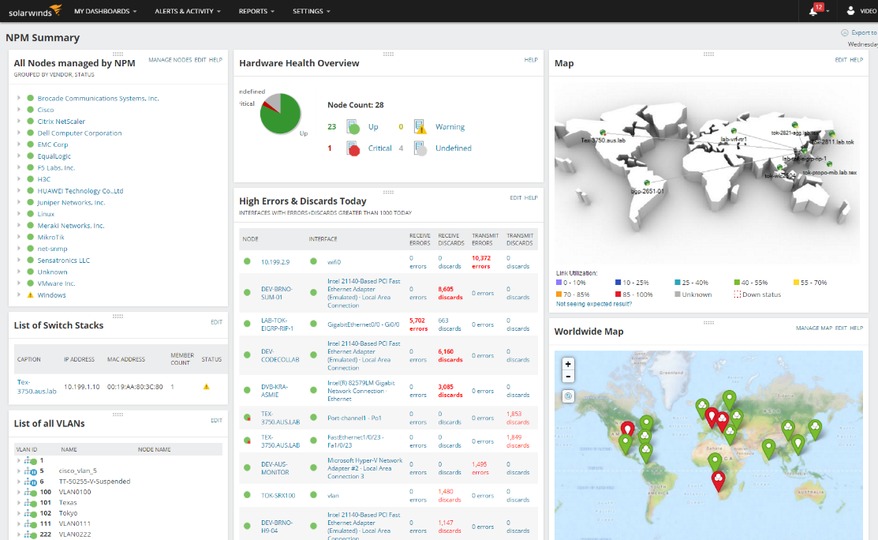
SolarWinds Network Performance Monitor is a powerhouse network monitoring tool equipped with everything administrators need to master packet sniffing.
When a network slowdown happens, the primary question is whether it was caused by a problematic application or an enterprise-wide problem. If you’re responsible for managing a network with thousands of different apps, answering this question can be problematic.
NPM has a packet scanner feature specially designed to identify bottlenecks, latency, and shifts in traffic volume for over 1,200 applications on your network. This critical visibility makes it easier to drill down to root causes and only fix what needs fixing—no more checking each application trying to find the problem. The PerfStack™ feature puts relevant performance metrics together on a timeline, so you can pinpoint exactly when network traffic started to slow down, which might lead you to re-provision resources at select times of day to improve end-user experiences.
What’s more, once you have a clearer overview of what your network traffic looks like day-to-day, you’re better able to identify spikes and other anomalies. Use this capability to help you spot potential security threats and stop them before they snowball into full-on breaches or shutdowns.
Many traffic sniffers can gather a large amount of application data, but don’t have what it takes to break it down into actionable intel. NPM can classify traffic according to several different metrics—application type, port usage, volume, destination, IP address, and more—so you can filter out the irrelevant data. Administrators know how crucial it is to zero in on certain metrics in the thick of a network slowdown.
It’s common for administrators to cobble together a functional sniffer software system from many different collectors, but SolarWinds Network Performance Monitor is a unified, comprehensive solution for your packet sniffing needs.
A network packet sniffer is a passive monitoring tool that intercepts data packets as they pass through your network, then analyzes them for key insights. This makes it easier for administrators to break down network traffic and pinpoint exactly what needs fixing instead of individually hunting through thousands of applications on your network.
All traffic sniffers are comprised of two parts. The first part is the network adapter connecting the sniffer to the network, and the second part is the sniffer software facilitating the gathering and analysis of data gathered by the traffic sniffer.
To truly understand the role network packet sniffers play in network performance best practices, you must know the basics of internet routing and packet sniffing. Everything you do on a network must be broken down into thousands of tiny chunks of data called packets. When packets travel through a network, they inherently travel through four phases of the protocol stack called Transmission Control Protocol/Internet Protocol. The four phases are application protocol, transmission control protocol (TCP), internet protocol (IP), and hardware.
Data packets must pick up a port number and an IP address in the middle two phases before they can be transmitted over the internet, which happens during the final “hardware” phase. After the packets get where they’re supposed to go, the data used to route the packet through its host network is dropped and it must pick up more routing data from the receiving network’s protocol stack. The packet is then reassembled in its original form and the transmission process is complete.
Packet sniffing is the process of capturing the packets moving through the network at any given time (regardless of how they’re addressed) and analyzing those packets for information useful for troubleshooting or network monitoring purposes. This can include metadata (for quickly identifying spikes in traffic or overall traffic patterns) or internal packet information. Packet sniffing software takes the data gleaned from packet sniffing and transforms it into actionable data administrators can use to improve network performance.
There are two different kinds of network packet sniffers—hardware and software:
Network packet sniffers work by capturing packets as they travel across the network and turning data about those packets into usable insights for the administrator.
In a sense, network packet sniffing is about reversing the relationship computers usually have to packets. Under normal circumstances, computers are programmed to ignore the minutiae of network traffic activity because it would take too much time to process requests otherwise. Packet sniffers “reprogram” the computer, so to speak, using the promiscuous mode setting, and make the computer pay attention to the details contained in packets.
Traffic sniffers comb through a network’s traffic and look for details useful to the administrator. Once the sniffer gathers enough raw data to generate insights, it makes it intelligible to humans.
What network packet sniffers can capture depends on what kind of network they’re operating on and the settings. In wired networks, the network switches determine how much of the network the traffic sniffer can see, capture, and analyze. On the other hand, packet sniffers can only capture one channel at a time.
Further, network packet sniffers can gather packet data in filtered or unfiltered mode. In unfiltered mode, the tool will consolidate and analyze packets contacting the network before storing them in the hard drive for future examination. In filtered mode, the administrator has set certain parameters for what they want to be captured and the sniffer will only look for packets with elements matching those parameters.
Packet sniffers are important because they help facilitate effective network monitoring best practices in three crucial areas:
Keeping an Eye on Network UsagePacket sniffing is an important part of network monitoring best practices because it offers administrators another layer of critical visibility when it comes to their network. There are different traffic sniffers for different kinds of networks. For example, a Wi-Fi packet sniffer is specially designed to parse performance metrics related to wireless controllers, clients, and access points. This sniffer can help you monitor and improve bandwidth. Packet sniffers are great supplementary tools to help you attack network performance monitoring with a little more nuance.
Troubleshooting at a Granular LevelSimilarly, packet sniffing is excellent for drilling down on time-sensitive network performance issues. During a network slowdown, administrators don’t have time to go hunting for answers. Packet sniffing drills down on performance issues quickly, so administrators can pinpoint what needs to be fixed and do so as efficiently as possible.
Detecting and Mitigating Network Security RisksPacket sniffing cannot outright prevent security intrusion, but it can help administrators detect when something is amiss. Packet sniffing makes it easier to identify unanticipated spikes or fluctuations in network traffic on a crowded network, which in turn makes it easier to nip security risks in the bud before they become full-blown breaches. Packet sniffing can even help you identify the inappropriate use of applications on the network, as high levels of traffic can provide insight into specific employee activity.
The packet sniffing process differs slightly based on the integrations for your software, like Cisco or Wireshark. However, the overarching blueprint for sniffing network traffic remains the same. Once the network is in promiscuous mode, it’s the network packet sniffer’s job to separate the packets, put them back together, and log them.
In SolarWinds Network Performance Monitor, there are two different kinds of packet analysis sensors for administrators to monitor and analyze network traffic. The packet analysis sensor for networks analyzes packet data through a single switch capable of handling up to 50 applications per node. The packet analysis sensor for servers analyzes packet data only for specific applications.
For either one of these sensors, the communication agent sends packet data to the Orion server, which includes metrics like volume and both network and application response times. Here’s a short tutorial on how to start monitoring network traffic and analyzing packets using either of the above sensors.
From here, you can dig into packet inspection using the three most common packet analysis sensors scenarios—deployment per application, per site, and per client.
SolarWinds Network Performance Monitor is a powerhouse network monitoring tool equipped with everything administrators need to master packet sniffing.
When a network slowdown happens, the primary question is whether it was caused by a problematic application or an enterprise-wide problem. If you’re responsible for managing a network with thousands of different apps, answering this question can be problematic.
NPM has a packet scanner feature specially designed to identify bottlenecks, latency, and shifts in traffic volume for over 1,200 applications on your network. This critical visibility makes it easier to drill down to root causes and only fix what needs fixing—no more checking each application trying to find the problem. The PerfStack™ feature puts relevant performance metrics together on a timeline, so you can pinpoint exactly when network traffic started to slow down, which might lead you to re-provision resources at select times of day to improve end-user experiences.
What’s more, once you have a clearer overview of what your network traffic looks like day-to-day, you’re better able to identify spikes and other anomalies. Use this capability to help you spot potential security threats and stop them before they snowball into full-on breaches or shutdowns.
Many traffic sniffers can gather a large amount of application data, but don’t have what it takes to break it down into actionable intel. NPM can classify traffic according to several different metrics—application type, port usage, volume, destination, IP address, and more—so you can filter out the irrelevant data. Administrators know how crucial it is to zero in on certain metrics in the thick of a network slowdown.
It’s common for administrators to cobble together a functional sniffer software system from many different collectors, but SolarWinds Network Performance Monitor is a unified, comprehensive solution for your packet sniffing needs.
Network Performance Monitor
Find out once and for all if performance issues are being caused by applications or the network.
Isolate network traffic for all your applications and generate actionable insights.
Unlock the precision and power of packet analysis with intelligent packet sniffing software.