- Events
-
Partners
- Government
- Customer Portal
- Contact Us
- Contact Sales
-
English
SolarWinds® Bandwidth Analyzer Pack (BAP), a bundle of Network Performance Monitor and NetFlow Traffic Analyzer, is a network usage monitor solution offering fault, performance, and availability monitoring, cross-stack network data correlation, hop-by-hop network path analysis, and more.
Using BAP, you can easily set custom alerts for simple or complex nested conditions, so you can get quick insights into meaningful network usage changes. In addition, BAP’s automated capacity forecasting and reporting tools can automatically calculate exhaustion dates using customizable thresholds.
Effective network usage monitoring requires a solution to be compatible with your equipment. BAP has unique features built to monitor the range of multi-vendor devices and technologies on your network.
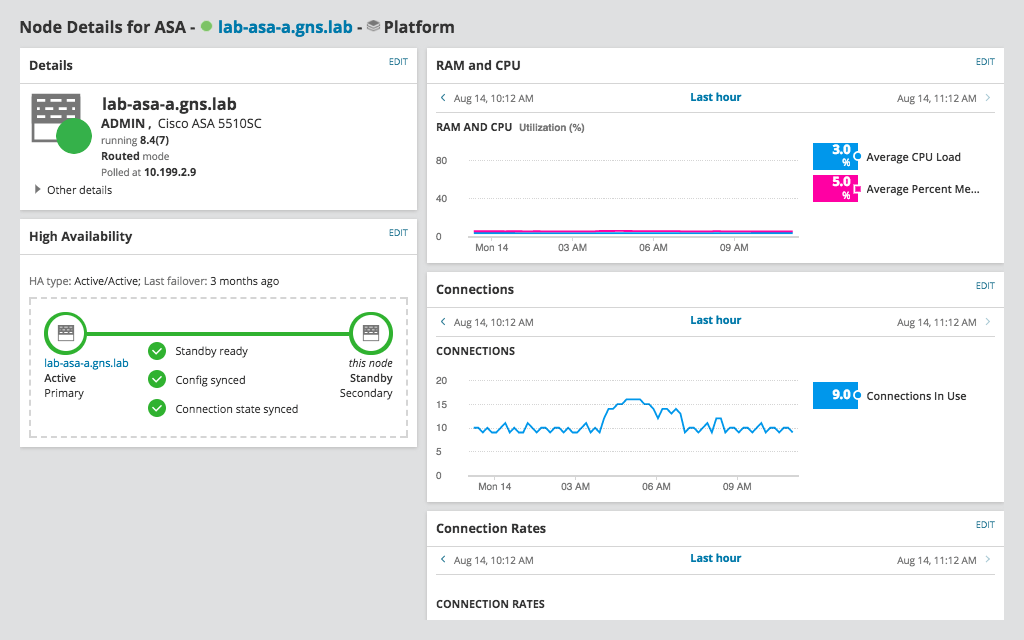
For example, the integrated Network Insight™ feature offers comprehensive monitoring of Cisco ASA suite of products, so you can achieve deeper visibility into critical network load balancers and firewalls. In addition, you can monitor the health and performance of all components of application delivery, including WideIPs, virtual servers, pool members, and more with F5 BIG-IP Global Traffic Manager and Local Traffic Manager insights.
BAP’s network usage monitor software is designed to facilitate the troubleshooting process by letting you perform easier data correlation. You can quickly identify root causes of issues by cross-referencing network performance metrics on a common timeline for immediate visual correlation across your network data.
Using SolarWinds BAP, you can also easily analyze network performance, link utilization, and wireless coverage to better troubleshoot issues before they affect the network and business.
Ensure at-a-glance visibility for current network usage issues, including availability and performance, by creating custom, auto-updated maps within Bandwidth Analyzer Pack.
BAP can also provide network discovery and automatically map your devices. You can also leverage dynamic network mapping features, allowing you to build maps within the Orion® Platform to ensure you have the network usage monitoring insights you need by customizing the appearance of nodes, labels, and links within BAP’s drag-and-drop maps.
Network usage refers to the amount of data sent back and forth across your network due to applications, servers, devices, and network users.
Throughput and bandwidth come up frequently in conversations about network usage because those two metrics are common ways to approach network usage monitoring to gain critical insight into what is going on in your network.
Throughput refers to the number of packets that make it across your network and to their destination successfully. Bandwidth, on the other hand, refers to the maximum number of packets that could theoretically travel across your network at any given time.
Throughput and bandwidth are closely related to network usage. For example, if a lot of users are on the network at a certain time, throughput may decrease causing users to experience network slowdown. This can manifest as packet loss, jitter, and latency. So, if you have a net usage monitor and notice throughput is low, your network usage may be high.
However, you don’t have to assume your network usage is high or low based on circumstantial evidence. Network usage monitoring software is designed to help you figure out what’s going on in your network, so you can minimize downtime, troubleshoot, and start collecting trend data to use for more comprehensive usage analysis.
Network usage monitor software can help take the guesswork out of finding out what’s slowing your network down by helping users optimize and streamline the network usage monitoring process.
You may be aware of how crucial network usage is, but usage monitoring can be challenging in a diverse systems environment with a lot of moving parts. Are spikes in network usage being caused by an influx of users or a lagging application? If it’s an application, how can you figure out which one is responsible for slowdowns?
Network usage monitoring software can make it easier to gain critical visibility to effectively monitor network usage. By eliminating standard pain points and automating the most time-consuming processes involved in usage monitoring—like network data correlation—users have the tools they need to effectively and accurately monitor network usage.
For example, suppose you want to gather information about network usage to establish trends. It can be time consuming to do this manually, especially for a large network. A net usage monitor like SolarWinds NPM is built to calculate capacity trends based on 180 days of historical data for all nodes, interfaces, and volumes, considering daily maximum and daily average values, to better foresee any potential usage issues in the future.
Network usage monitoring is a core component of network monitoring best practices. A network usage monitor can help users tackle performance issues before they snowball into huge enterprise-wide slowdowns and take a long time to resolve.
Slow network speeds caused by high network usage can compromise operational efficiency, reduce ROI, and make it harder to grow your business. Undetected high network usage can also create bandwidth hogs responsible for the heaviest bandwidth consumption and take up bandwidth resources.
Network usage monitoring is valuable when troubleshooting issues like unauthorized bandwidth consumption. The key to running an effective network is having critical visibility into performance, which can enable you to quickly identify root causes when something goes wrong and proactively identify issues before they slow productivity.
SolarWinds Network Bandwidth Analyzer Pack is designed with features to make it a powerhouse network usage monitor and analyzer solution. For instance, NetPath™ can allow you track packet paths from source to destination, so you can pinpoint traffic bottlenecks between nodes. You can also use BAP’s mapping tools for at-a-glance insight into the location of network slowdowns. Simply click on affected areas for more information about slowdowns signaling high usage levels.
With BAP, you gain troubleshooting features unlike any other network usage monitor on the market with the SolarWinds exclusive PerfStack™ dashboard built to show cross-stack data on a common timeline with different data types side-by-side, so you can more easily identify root causes of performance problems located across your environment faster.
Network usage refers to the amount of data sent back and forth across your network due to applications, servers, devices, and network users.
Throughput and bandwidth come up frequently in conversations about network usage because those two metrics are common ways to approach network usage monitoring to gain critical insight into what is going on in your network.
Throughput refers to the number of packets that make it across your network and to their destination successfully. Bandwidth, on the other hand, refers to the maximum number of packets that could theoretically travel across your network at any given time.
Throughput and bandwidth are closely related to network usage. For example, if a lot of users are on the network at a certain time, throughput may decrease causing users to experience network slowdown. This can manifest as packet loss, jitter, and latency. So, if you have a net usage monitor and notice throughput is low, your network usage may be high.
However, you don’t have to assume your network usage is high or low based on circumstantial evidence. Network usage monitoring software is designed to help you figure out what’s going on in your network, so you can minimize downtime, troubleshoot, and start collecting trend data to use for more comprehensive usage analysis.
Network usage monitor software can help take the guesswork out of finding out what’s slowing your network down by helping users optimize and streamline the network usage monitoring process.
You may be aware of how crucial network usage is, but usage monitoring can be challenging in a diverse systems environment with a lot of moving parts. Are spikes in network usage being caused by an influx of users or a lagging application? If it’s an application, how can you figure out which one is responsible for slowdowns?
Network usage monitoring software can make it easier to gain critical visibility to effectively monitor network usage. By eliminating standard pain points and automating the most time-consuming processes involved in usage monitoring—like network data correlation—users have the tools they need to effectively and accurately monitor network usage.
For example, suppose you want to gather information about network usage to establish trends. It can be time consuming to do this manually, especially for a large network. A net usage monitor like SolarWinds NPM is built to calculate capacity trends based on 180 days of historical data for all nodes, interfaces, and volumes, considering daily maximum and daily average values, to better foresee any potential usage issues in the future.
Network usage monitoring is a core component of network monitoring best practices. A network usage monitor can help users tackle performance issues before they snowball into huge enterprise-wide slowdowns and take a long time to resolve.
Slow network speeds caused by high network usage can compromise operational efficiency, reduce ROI, and make it harder to grow your business. Undetected high network usage can also create bandwidth hogs responsible for the heaviest bandwidth consumption and take up bandwidth resources.
Network usage monitoring is valuable when troubleshooting issues like unauthorized bandwidth consumption. The key to running an effective network is having critical visibility into performance, which can enable you to quickly identify root causes when something goes wrong and proactively identify issues before they slow productivity.
SolarWinds Network Bandwidth Analyzer Pack is designed with features to make it a powerhouse network usage monitor and analyzer solution. For instance, NetPath™ can allow you track packet paths from source to destination, so you can pinpoint traffic bottlenecks between nodes. You can also use BAP’s mapping tools for at-a-glance insight into the location of network slowdowns. Simply click on affected areas for more information about slowdowns signaling high usage levels.
With BAP, you gain troubleshooting features unlike any other network usage monitor on the market with the SolarWinds exclusive PerfStack™ dashboard built to show cross-stack data on a common timeline with different data types side-by-side, so you can more easily identify root causes of performance problems located across your environment faster.
Network Bandwidth Analyzer Pack
Achieve quality fault monitoring and performance management with a comprehensive net usage monitor.
Isolate root causes quickly with intelligent dependency and topology-aware network alerts.
Gain hop-by-hop analysis of both cloud and on-premises applications and services.