- Events
-
Partners
- Government
- Customer Portal
- Contact Us
- Contact Sales
-
English
Maintaining data such as serial numbers, port details, IP addresses, vendors, end-of-life dates, and end-of-support dates is necessary for keeping a configuration management database accurate. However, manually performing this task with multiple administrators can be painstaking and time consuming.
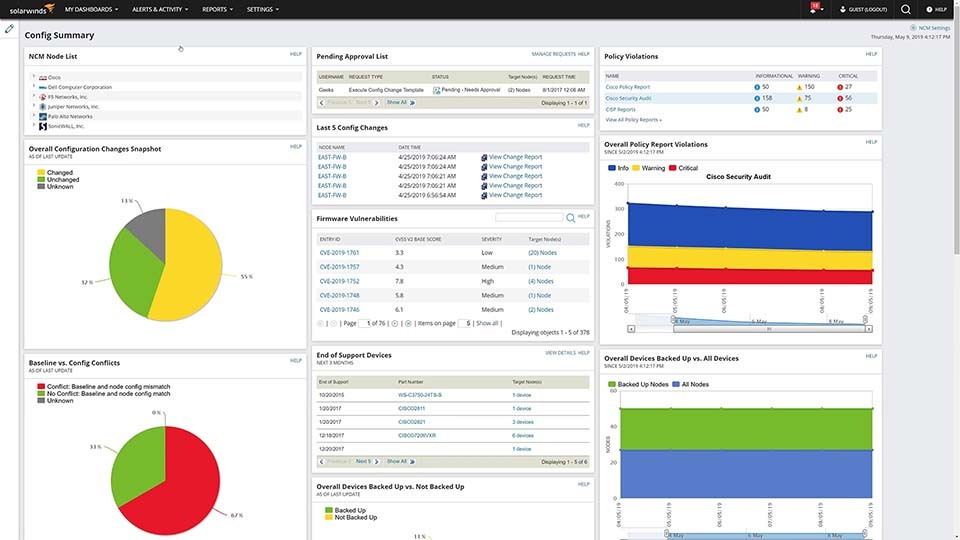
SolarWinds Network Configuration Manager is built to import existing devices, no matter which device type, and can automatically update your device information whenever it changes, which can help save time and effort.
Until a device fails, you may be unaware it has an expired maintenance contract or reached end-of-life status. In these cases, replacing the device is often more expensive and commonly results in costly network downtime.
By regularly polling for device data and updating the database with any new information, NCM is built to track device end-of-life information and can help you proactively plan for contract renewals or device replacements, if required.
SolarWinds Network Configuration Manager is built to automatically scan a network for connected devices to collect and report on data, such as device type, manufacturer, serial number, operating system, configurations, and location.
With NCM, you can specify the frequency of automatic network inventory scans, so your inventory always reflects the most up-to-date device information.
A network inventory is a list of all hardware and software elements that make up an IT environment, along with key information about those assets.
A thorough network inventory should include all your devices, no matter their vendor, and all your software. It should always be up to date and include your newest additions and not devices or programs you no longer use.
In terms of hardware, some of the key elements that should be in your network device inventory are:
The purpose of network inventory is to help you keep track of the assets and products in your network, regardless of vendor, with information like IP addresses, license keys, port details, expiration dates, serial numbers, place of installation, types, and other relevant information you can use as part of the network inventory management process.
A primary purpose of network inventory management is to make it easier to see the hardware and software on your network. It can be challenging to keep track of the services and devices you’re using and paying for, which can cause you to pay for a software service you haven’t used in months and only realize a device has reached end-of-life status or has an expired maintenance contract once the device fails.
Having an updated network inventory list can let you see all the services you’re paying for in one centralized view, so you can easily find ones you’re not using and can act to stop paying for them. Since a network device inventory can also keep track of key dates tied to your devices, you can also more easily stay aware of upcoming expiration dates.
Network inventory also serves an important purpose when it comes to other aspects of network configuration management, including auditing, assessments, and automation—all of which are important for maintaining the security and productivity of your network.
To determine how frequently you should do a network inventory scan, you should consider how frequently you add new assets or make changes to existing ones.
Most network inventory tools allow you to schedule automated scans following whatever schedule you’d like. You can also run an ad-hoc network inventory scanner between scheduled scans if you add new assets you want to inventory.
Once you’ve set your network inventory scanning schedule, network inventory software can make sure new devices and assets are regularly discovered and information is up to date. A network inventory tool typically leverages SNMP to help ensure devices on the network are included in the network inventory, no matter the vendor. The tool can then import the relevant data about each asset and store it in a single location, so you can more easily find the device information you’re looking for.
Network inventory software is designed to automate and streamline the process of starting and maintaining a list of devices and software. Using professional network inventory tools can leave you with more time and resources you can apply to more pressing issues.
Network inventory software can also go beyond simply creating records of your various assets. Tools like SolarWinds Network Configuration Manager are built to automatically scan your network. Network device inventory software helps determine what devices you have, but also helps determine the configurations of those devices and what operating systems and software are installed on each of them. These tools are also built to automatically update records whenever any information about device changes. This up-to-date device data is vital for making decisions and quickly resolving network issues.
You can easily schedule inventory scans of your network in SolarWinds® Network Configuration Manager (NCM). Running regular inventory scans helps you ensure all inventory information is up to date. By scheduling your inventory scans, you don’t have to remember to manually run them.
It’s easy to create flexible schedules of your inventory scans on NCM:
Scheduling the inventory scans of your network can enable you to save time, minimize your workload, and better manage your entire network.
As network device inventory software, NCM is built to let you easily adjust inventory settings. Adjusting the inventory settings of your network scan enables you to choose which information will be gathered in the network scan. Along with specifying the type of data collected, modifying your inventory settings could also allow you to change the number of devices NCM can inventory at one time.
You can adjust your network inventory settings in NCM by following these steps:
NCM can enable you to run a complete inventory scan or a single node scan. A single node scan will take a shorter time to complete, since the scan is only focused on one node. A full inventory scan can take anywhere from a few minutes to several hours depending on the number of nodes in the scan, plus the type of statistics collected.
Along with inventory scans, NCM is built to let you access inventory reports. These reports are designed to give you up-to-date device information like vendors, routing protocols, and end-of-support dates, so you can better manage the inventory of your network infrastructure. You can choose from several unique out-of-the-box inventory reports on NCM, or you can create your own.
In addition to network inventory management, SolarWinds Network Configuration Manager comes with a range of features designed to help keep your network up and running. Some of these are:
NCM is built on the Orion® Platform, meaning it can seamlessly integrate with your other SolarWinds products, giving you one unified dashboard through which you can see even more detailed information about your whole network.
A network inventory is a list of all hardware and software elements that make up an IT environment, along with key information about those assets.
A thorough network inventory should include all your devices, no matter their vendor, and all your software. It should always be up to date and include your newest additions and not devices or programs you no longer use.
In terms of hardware, some of the key elements that should be in your network device inventory are:
The purpose of network inventory is to help you keep track of the assets and products in your network, regardless of vendor, with information like IP addresses, license keys, port details, expiration dates, serial numbers, place of installation, types, and other relevant information you can use as part of the network inventory management process.
A primary purpose of network inventory management is to make it easier to see the hardware and software on your network. It can be challenging to keep track of the services and devices you’re using and paying for, which can cause you to pay for a software service you haven’t used in months and only realize a device has reached end-of-life status or has an expired maintenance contract once the device fails.
Having an updated network inventory list can let you see all the services you’re paying for in one centralized view, so you can easily find ones you’re not using and can act to stop paying for them. Since a network device inventory can also keep track of key dates tied to your devices, you can also more easily stay aware of upcoming expiration dates.
Network inventory also serves an important purpose when it comes to other aspects of network configuration management, including auditing, assessments, and automation—all of which are important for maintaining the security and productivity of your network.
To determine how frequently you should do a network inventory scan, you should consider how frequently you add new assets or make changes to existing ones.
Most network inventory tools allow you to schedule automated scans following whatever schedule you’d like. You can also run an ad-hoc network inventory scanner between scheduled scans if you add new assets you want to inventory.
Once you’ve set your network inventory scanning schedule, network inventory software can make sure new devices and assets are regularly discovered and information is up to date. A network inventory tool typically leverages SNMP to help ensure devices on the network are included in the network inventory, no matter the vendor. The tool can then import the relevant data about each asset and store it in a single location, so you can more easily find the device information you’re looking for.
Network inventory software is designed to automate and streamline the process of starting and maintaining a list of devices and software. Using professional network inventory tools can leave you with more time and resources you can apply to more pressing issues.
Network inventory software can also go beyond simply creating records of your various assets. Tools like SolarWinds Network Configuration Manager are built to automatically scan your network. Network device inventory software helps determine what devices you have, but also helps determine the configurations of those devices and what operating systems and software are installed on each of them. These tools are also built to automatically update records whenever any information about device changes. This up-to-date device data is vital for making decisions and quickly resolving network issues.
You can easily schedule inventory scans of your network in SolarWinds® Network Configuration Manager (NCM). Running regular inventory scans helps you ensure all inventory information is up to date. By scheduling your inventory scans, you don’t have to remember to manually run them.
It’s easy to create flexible schedules of your inventory scans on NCM:
Scheduling the inventory scans of your network can enable you to save time, minimize your workload, and better manage your entire network.
As network device inventory software, NCM is built to let you easily adjust inventory settings. Adjusting the inventory settings of your network scan enables you to choose which information will be gathered in the network scan. Along with specifying the type of data collected, modifying your inventory settings could also allow you to change the number of devices NCM can inventory at one time.
You can adjust your network inventory settings in NCM by following these steps:
NCM can enable you to run a complete inventory scan or a single node scan. A single node scan will take a shorter time to complete, since the scan is only focused on one node. A full inventory scan can take anywhere from a few minutes to several hours depending on the number of nodes in the scan, plus the type of statistics collected.
Along with inventory scans, NCM is built to let you access inventory reports. These reports are designed to give you up-to-date device information like vendors, routing protocols, and end-of-support dates, so you can better manage the inventory of your network infrastructure. You can choose from several unique out-of-the-box inventory reports on NCM, or you can create your own.
In addition to network inventory management, SolarWinds Network Configuration Manager comes with a range of features designed to help keep your network up and running. Some of these are:
NCM is built on the Orion® Platform, meaning it can seamlessly integrate with your other SolarWinds products, giving you one unified dashboard through which you can see even more detailed information about your whole network.
Network Configuration Manager
Automate network inventory scanning to help keep records up to date.
Use detailed device tracking to help save money and increase productivity.
Obtain reliable multi-vendor device data for more informed decision making.