- Events
-
Partners
- Government
- Customer Portal
- Contact Us
- Contact Sales
-
English
Cassandra monitoring requires a proactive approach to avoid performance issues, including bottlenecks and slowdowns, which could affect end users. But with Cassandra signature node replication, it can be difficult to pinpoint and troubleshoot issues. To ensure functionality and high availability at scale, you need a robust Cassandra monitoring tool to address slowdowns and head off cluster failure.
SolarWinds® Server & Application Monitor (SAM) is designed to help you drill down into individual Cassandra nodes to find and resolve the root causes of performance issues.
Effective Cassandra monitoring revolves around continuously monitoring a wide range of Cassandra performance metrics. These metrics measure different elements of the database and can help reveal issues that could impact overall performance and slowdowns.
SolarWinds Server & Application Monitor keeps track of important Cassandra performance metrics, including Cassandra JMX metrics, by aggregating them and creating clear visual representations, so DBAs can get to the bottom of any potential Cassandra database problems fast. SAM is built to monitor metrics tied to:
Cassandra monitoring metrics are only useful if you can make sense of them. SolarWinds SAM can help you view and more easily understand key Cassandra metrics. Using SAM, you can set the parameters you need to monitor a Cassandra server (even if installed on a Linux or Unix system), check system health by viewing network statistics and node status on commands and responses to help you ensure monitored components are functioning as expected, and monitor crucial Cassandra server metrics like latency, disk usage, thread pool tasks, and key and row cache values.
Apache Cassandra is an open-source, distributed database system known for its fault tolerance and scalability. It first began as a project at big IT corporations. Since then, Cassandra has transformed into a free Apache project and has matured into a widely adopted system.
While Cassandra can be used by any organization, it’s specifically built for organizations that regularly handle large volumes of data—including data spread over many commodity servers. In fact, Cassandra is designed to provide high levels of availability over a global distribution, enabling applications to write data to whatever node they want in a cluster. As a result, you often see Cassandra being used in high-traffic cloud apps.
Cassandra is a NoSQL database. NoSQL (non-relational) databases usually store data in the JSON format and attributes are usually stored in separate documents. They’re designed to manage unstructured data, and they can use horizontal scalability to manage large amounts of data.
The Cassandra architecture differs from some other popular databases. Its servers are arranged in a ring topology to give servers equal responsibility, as opposed to having certain servers in the cluster act as “primary” or “secondary.” Each server hosts replica copies of an application’s data, which means if one server goes down for whatever reason, another server can easily take over. Cassandra’s evenly distributed system means there’s no failover in a Cassandra cluster.
Because Cassandra is a Java application, it runs in a Java Virtual Machine (JVM). The result is Cassandra JMX metrics (Java Management Extensions) are often used to collect metrics during Cassandra monitoring.
Cassandra performance monitoring tools are important because the monitoring process is integral to maintaining your database performance. However, conducting Cassandra monitoring manually be challenging. These challenges include:
While Cassandra databases have many advantages when it comes to their ability to store and process large amounts of data, Cassandra clusters with a lot of nodes can increase the complexity of your data infrastructure. It is only through comprehensive Cassandra monitoring you can maintain optimal performance and mitigate potential bottlenecks or capacity issues.
Locating and mitigating those bottlenecks, slowdowns, critical resource limitations, and more depends on continuously monitoring Cassandra performance metrics. Even though built-in Cassandra features can take care of some elements of monitoring, Cassandra tools are still necessary to ensure you get the level of continuous and in-depth monitoring you need to optimize your database health and performance.
Cassandra monitoring tools are important because they can go beyond simply collecting and monitoring the Cassandra JMX metrics to collect even more critical Cassandra performance metrics and aggregate them to give database administrators (DBAs) the information they need when they need it.
Effective Cassandra monitoring involves continuously tracking a variety of performance metrics indicative of potential issues with the Cassandra database. The main purpose of monitoring is to gain visibility, which in turn leads to data, which finally culminates in action to improve database performance. Without Cassandra performance monitoring tool, database performance administrators don’t have the data they need to make informed decisions.
Cassandra monitoring begins with collecting data on performance metrics across several categories. Transforming data from simple numbers into informative data that can be used to improve your Cassandra servers involves using Cassandra tools to synthesize and aggregate data to help DBAs gain meaningful and actionable insights.
In short, a Cassandra monitoring tool is a necessity if you want to keep your database up and running. Cassandra performance monitoring tools track everything from the performance of processes and hosts to the performance of the metrics themselves. A tool like SolarWinds Server & Application Monitor (SAM) is designed to include features like advanced, customizable alerting systems to notify DBAs when metrics reach critical levels and data visualizations to help DBAs get to the bottom of potential issues more quickly.
While a wide range of metrics can be tracked with a Cassandra monitoring tool, some of the most important Cassandra server metrics you need to track are latency, throughput, errors and overruns, garbage collection, and disk usage. Also, because Cassandra is a Java application, effective Cassandra monitoring can involve Java performance tuning. DBAs who want to fully monitor their database need a Cassandra monitoring tool that traps JMX counters and events in addition to standard performance metrics.
For your Cassandra database to be able to serve your applications, it needs to be reliable and high performing. The best way to keep it this way is through Cassandra monitoring that keeps track of performance metrics tied to your Cassandra server.
When your database can’t receive or send requests efficiently and has a low-performing throughput, you’re more likely to see bottlenecks in your most critical applications. No amount of coding can keep your application running smoothly if your database itself isn’t performing up to par.
Key performance metrics to track through your Cassandra monitoring are:
When it comes to checking any of these metrics, the best strategy is to use a Cassandra performance monitoring tool like SolarWinds SAM, which checks the metrics for you and gives you the information you need in a clear, aggregated form.
SolarWinds Server & Application Monitor (SAM) is built to take the difficulty out of Cassandra monitoring. The tool tracks key Cassandra performance metrics, including Cassandra JMX metrics, so you can more easily identify problems, find where they’re occurring, drill down into specific Cassandra nodes to find the root cause, and begin the troubleshooting process.
To ensure Cassandra system health, address slowdowns, and uncover root causes, SAM is designed to help you proactively monitor your database performance metrics. This includes tracking network and node stats for Apache Cassandra-specific health updates as well as key metrics tied to latency, throughput, errors and overruns, garbage collection, disk usage, and more.
Server & Application Monitor was specifically built to support fast error detection and resolution. To achieve this, SAM allows DBAs to more easily zoom in on even the most granular issues with just a few clicks.
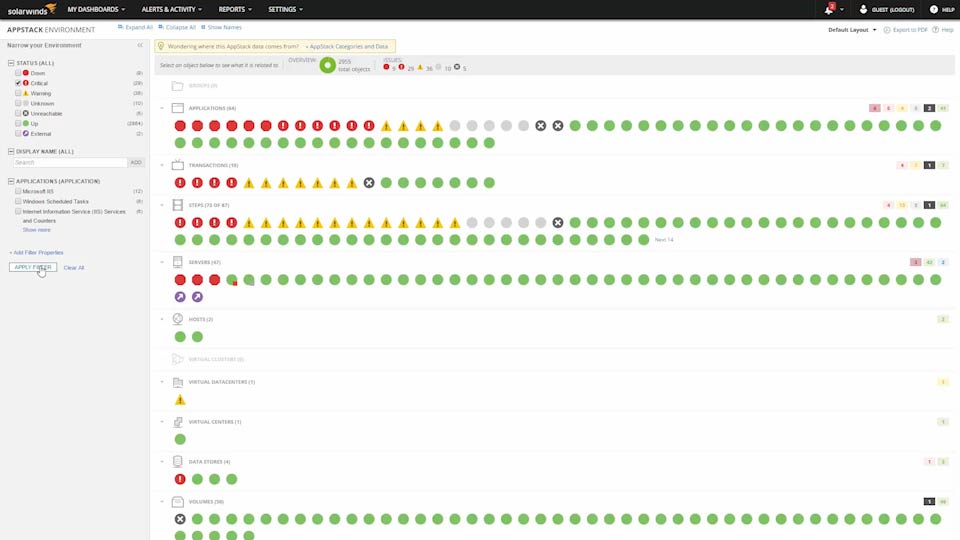
SAM’s single centralized dashboard is also designed to be intuitive and easy-to-use, making it simpler for DBAs to keep an eye on multiple metrics at once. With SAM, you can use a single dashboard to gain multi-level Cassandra performance insights.
SAM’s intelligent alerts help you stay on top of potential Cassandra performance issues. The Cassandra monitoring tool lets you set custom alerts for both routine and critical events, so you can head off potential performance problems before the issues compound and cause major interruptions. To avoid alert fatigue, SAM also lets you customize exactly where, when, and how you receive your alerts. This way, key stakeholders can stay in the loop without anyone else getting unnecessary notifications.
Apache Cassandra is an open-source, distributed database system known for its fault tolerance and scalability. It first began as a project at big IT corporations. Since then, Cassandra has transformed into a free Apache project and has matured into a widely adopted system.
While Cassandra can be used by any organization, it’s specifically built for organizations that regularly handle large volumes of data—including data spread over many commodity servers. In fact, Cassandra is designed to provide high levels of availability over a global distribution, enabling applications to write data to whatever node they want in a cluster. As a result, you often see Cassandra being used in high-traffic cloud apps.
Cassandra is a NoSQL database. NoSQL (non-relational) databases usually store data in the JSON format and attributes are usually stored in separate documents. They’re designed to manage unstructured data, and they can use horizontal scalability to manage large amounts of data.
The Cassandra architecture differs from some other popular databases. Its servers are arranged in a ring topology to give servers equal responsibility, as opposed to having certain servers in the cluster act as “primary” or “secondary.” Each server hosts replica copies of an application’s data, which means if one server goes down for whatever reason, another server can easily take over. Cassandra’s evenly distributed system means there’s no failover in a Cassandra cluster.
Because Cassandra is a Java application, it runs in a Java Virtual Machine (JVM). The result is Cassandra JMX metrics (Java Management Extensions) are often used to collect metrics during Cassandra monitoring.
Cassandra performance monitoring tools are important because the monitoring process is integral to maintaining your database performance. However, conducting Cassandra monitoring manually be challenging. These challenges include:
While Cassandra databases have many advantages when it comes to their ability to store and process large amounts of data, Cassandra clusters with a lot of nodes can increase the complexity of your data infrastructure. It is only through comprehensive Cassandra monitoring you can maintain optimal performance and mitigate potential bottlenecks or capacity issues.
Locating and mitigating those bottlenecks, slowdowns, critical resource limitations, and more depends on continuously monitoring Cassandra performance metrics. Even though built-in Cassandra features can take care of some elements of monitoring, Cassandra tools are still necessary to ensure you get the level of continuous and in-depth monitoring you need to optimize your database health and performance.
Cassandra monitoring tools are important because they can go beyond simply collecting and monitoring the Cassandra JMX metrics to collect even more critical Cassandra performance metrics and aggregate them to give database administrators (DBAs) the information they need when they need it.
Effective Cassandra monitoring involves continuously tracking a variety of performance metrics indicative of potential issues with the Cassandra database. The main purpose of monitoring is to gain visibility, which in turn leads to data, which finally culminates in action to improve database performance. Without Cassandra performance monitoring tool, database performance administrators don’t have the data they need to make informed decisions.
Cassandra monitoring begins with collecting data on performance metrics across several categories. Transforming data from simple numbers into informative data that can be used to improve your Cassandra servers involves using Cassandra tools to synthesize and aggregate data to help DBAs gain meaningful and actionable insights.
In short, a Cassandra monitoring tool is a necessity if you want to keep your database up and running. Cassandra performance monitoring tools track everything from the performance of processes and hosts to the performance of the metrics themselves. A tool like SolarWinds Server & Application Monitor (SAM) is designed to include features like advanced, customizable alerting systems to notify DBAs when metrics reach critical levels and data visualizations to help DBAs get to the bottom of potential issues more quickly.
While a wide range of metrics can be tracked with a Cassandra monitoring tool, some of the most important Cassandra server metrics you need to track are latency, throughput, errors and overruns, garbage collection, and disk usage. Also, because Cassandra is a Java application, effective Cassandra monitoring can involve Java performance tuning. DBAs who want to fully monitor their database need a Cassandra monitoring tool that traps JMX counters and events in addition to standard performance metrics.
For your Cassandra database to be able to serve your applications, it needs to be reliable and high performing. The best way to keep it this way is through Cassandra monitoring that keeps track of performance metrics tied to your Cassandra server.
When your database can’t receive or send requests efficiently and has a low-performing throughput, you’re more likely to see bottlenecks in your most critical applications. No amount of coding can keep your application running smoothly if your database itself isn’t performing up to par.
Key performance metrics to track through your Cassandra monitoring are:
When it comes to checking any of these metrics, the best strategy is to use a Cassandra performance monitoring tool like SolarWinds SAM, which checks the metrics for you and gives you the information you need in a clear, aggregated form.
SolarWinds Server & Application Monitor (SAM) is built to take the difficulty out of Cassandra monitoring. The tool tracks key Cassandra performance metrics, including Cassandra JMX metrics, so you can more easily identify problems, find where they’re occurring, drill down into specific Cassandra nodes to find the root cause, and begin the troubleshooting process.
To ensure Cassandra system health, address slowdowns, and uncover root causes, SAM is designed to help you proactively monitor your database performance metrics. This includes tracking network and node stats for Apache Cassandra-specific health updates as well as key metrics tied to latency, throughput, errors and overruns, garbage collection, disk usage, and more.
Server & Application Monitor was specifically built to support fast error detection and resolution. To achieve this, SAM allows DBAs to more easily zoom in on even the most granular issues with just a few clicks.
SAM’s single centralized dashboard is also designed to be intuitive and easy-to-use, making it simpler for DBAs to keep an eye on multiple metrics at once. With SAM, you can use a single dashboard to gain multi-level Cassandra performance insights.
SAM’s intelligent alerts help you stay on top of potential Cassandra performance issues. The Cassandra monitoring tool lets you set custom alerts for both routine and critical events, so you can head off potential performance problems before the issues compound and cause major interruptions. To avoid alert fatigue, SAM also lets you customize exactly where, when, and how you receive your alerts. This way, key stakeholders can stay in the loop without anyone else getting unnecessary notifications.
Server & Application Monitor
Proactively track key performance metrics.
Set alerts for thresholds appropriate to your Cassandra server.
Avoid damaging slowdowns and bottlenecks.