- Events
-
Partners
- Government
- Customer Portal
- Contact Us
- Contact Sales
-
English
A syslog message is a message in standardized format using System Logging Protocol (syslog) that network devices use to communicate. Network devices—such as routers, switches, firewalls, and servers—use syslog messages to send information about their status or important events, so they’re extremely important for network troubleshooting.
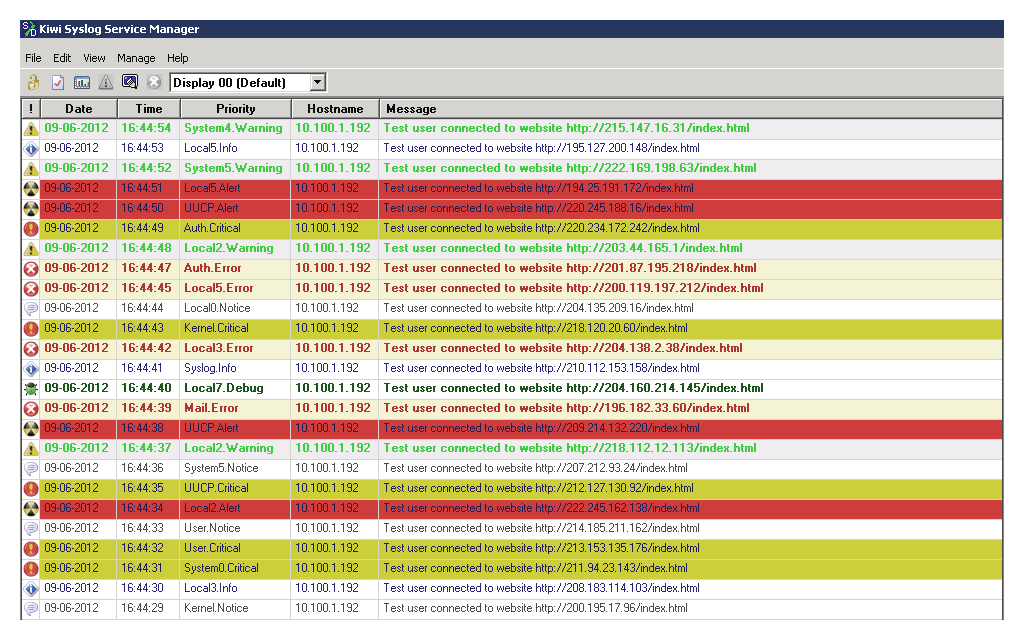
The key for taking advantage of syslog messages for network monitoring and troubleshooting is to have a good syslog server. A syslog server can centralize syslog messages from your syslog-capable devices and allow you to access, search, or filter the messages (and usually a lot more). For this, the syslog-capable devices need to be configured to send the syslog messages to a syslog server.
Syslog messages are used mainly by network devices with Linux and Unix operating systems. By default, syslog messages are sent via UDP (User Datagram Protocol), which is a connectionless protocol, so there’s no guarantee the message arrived successfully. However, some devices can also use a connection-oriented protocol—TCP (Transmission Control Protocol)—which helps ensure the message delivery.
Syslog messages have three main parts:
HEADER (identification information)
SD (structured data)
MSG (the actual message)
Header: The header of a syslog message includes identification information such as version, time stamp, hostname, IP address of the device, process ID, and message priority (PRI). Syslog message priority is a calculated value that helps classify syslog messages, determine the overall importance of the message, and assign an appropriate reaction, if needed.
Structed data: This part of a syslog message is designed to provide a well-defined and easily parseable data format. Since the message itself is in a free-text format, it can be challenging to extract relevant information from it. Structured data offers a way to provide additional valuable information about a syslog message (such as traffic counters or IP addresses) in a more friendly format for further data processing.
Message: This part of a syslog message includes the actual message in a free-text format and provides information about the event. Usually, a UNICODE character set encoded with UTF-8 is used in syslog messages.
PRI: The priority of a syslog message is calculated as a combination of two variables: facility and severity.
The facility code specifies the type of system that generated the message. It can have a numerical value between 0 and 23 based on 15 predefined values and eight values that can be defined locally:
| Number | Facility Description |
|---|---|
| 0 | Kernel Messages |
| 1 | User-Level Messages |
| 2 | Mail System |
| 3 | System Daemons |
| 4 | Security/Authorization Messages |
| 5 | Messages Generated by syslogd |
| 6 | Line Printer Subsystem |
| 7 | Network News Subsystem |
| 8 | UUCP Subsystem |
| 9 | Clock Daemon |
| 10 | Security/Authorization Messages |
| 11 | FTP Daemon |
| 12 | NTP Subsystem |
| 13 | Log Audit |
| 14 | Log Alert |
| 15 | Clock Daemon |
| 16 - 23 | Locally Used |
Severity: This variable specifies the importance of the message itself and can have a numerical value between zero and seven (from emergency to debug-level messages).
The priority of a syslog message is calculated as follows:
Priority = Facility * 8 + Severity
For example, an emergency kernel message would have a priority value of 0. The lower the priority value, the higher the importance of the message.
A good syslog server allows you to identify messages with high priority and adequately react to the situation, whether it means sending an email notification to a network administrator or running an external script.
There are eight severity levels used for categorizing syslog messages. The description of each severity level according to The Syslog Protocol RFC 5424 is as follows:
| Numerical Code | Severity |
|---|---|
| 0 | Emergency: system is unusable |
| 1 | Alert: action must be taken immediately |
| 2 | Critical: critical conditions |
| 3 | Error: error conditions |
| 4 | Warning: warning conditions |
| 5 | Notice: normal but significant condition |
| 6 | Informational: informational messages |
| 7 | Debug: debug-level messages |
It’s unlikely you’ll receive emergency messages, as these usually mean the system is down and it can’t send any messages. On the other side, debug messages are usually used during development and don’t typically impact your network operations, so you might want to get notified about these.
Like the priority level, a good syslog server should allow you to set up rules to react to syslog messages according to their severity levels.
Syslog messages are typically used by network and system administrators for early detection and troubleshooting of a possible issue for a network device. Syslog messages provide essential information about network device status and important events capable of having a negative impact on the standard operation of a network. Together with SNMP traps, syslog messages are a basic means of communication for network devices, such as routers, switches, firewalls, and servers. In a typical network, thousands of syslog messages and SNMP traps are generated every minute, which makes their usability for network monitoring without a centralized solution impossible. Both types of messages can be collected by a syslog server, which acts as a central place for all the logs network devices generate. A syslog server offers an easy way to access, search, and filter logs, and it’s a crucial part of log management.
A syslog message is a message in standardized format using System Logging Protocol (syslog) that network devices use to communicate. Network devices—such as routers, switches, firewalls, and servers—use syslog messages to send information about their status or important events, so they’re extremely important for network troubleshooting.
The key for taking advantage of syslog messages for network monitoring and troubleshooting is to have a good syslog server. A syslog server can centralize syslog messages from your syslog-capable devices and allow you to access, search, or filter the messages (and usually a lot more). For this, the syslog-capable devices need to be configured to send the syslog messages to a syslog server.
Syslog messages are used mainly by network devices with Linux and Unix operating systems. By default, syslog messages are sent via UDP (User Datagram Protocol), which is a connectionless protocol, so there’s no guarantee the message arrived successfully. However, some devices can also use a connection-oriented protocol—TCP (Transmission Control Protocol)—which helps ensure the message delivery.
Syslog messages have three main parts:
HEADER (identification information)
SD (structured data)
MSG (the actual message)
Header: The header of a syslog message includes identification information such as version, time stamp, hostname, IP address of the device, process ID, and message priority (PRI). Syslog message priority is a calculated value that helps classify syslog messages, determine the overall importance of the message, and assign an appropriate reaction, if needed.
Structed data: This part of a syslog message is designed to provide a well-defined and easily parseable data format. Since the message itself is in a free-text format, it can be challenging to extract relevant information from it. Structured data offers a way to provide additional valuable information about a syslog message (such as traffic counters or IP addresses) in a more friendly format for further data processing.
Message: This part of a syslog message includes the actual message in a free-text format and provides information about the event. Usually, a UNICODE character set encoded with UTF-8 is used in syslog messages.
PRI: The priority of a syslog message is calculated as a combination of two variables: facility and severity.
The facility code specifies the type of system that generated the message. It can have a numerical value between 0 and 23 based on 15 predefined values and eight values that can be defined locally:
| Number | Facility Description |
|---|---|
| 0 | Kernel Messages |
| 1 | User-Level Messages |
| 2 | Mail System |
| 3 | System Daemons |
| 4 | Security/Authorization Messages |
| 5 | Messages Generated by syslogd |
| 6 | Line Printer Subsystem |
| 7 | Network News Subsystem |
| 8 | UUCP Subsystem |
| 9 | Clock Daemon |
| 10 | Security/Authorization Messages |
| 11 | FTP Daemon |
| 12 | NTP Subsystem |
| 13 | Log Audit |
| 14 | Log Alert |
| 15 | Clock Daemon |
| 16 - 23 | Locally Used |
Severity: This variable specifies the importance of the message itself and can have a numerical value between zero and seven (from emergency to debug-level messages).
The priority of a syslog message is calculated as follows:
Priority = Facility * 8 + Severity
For example, an emergency kernel message would have a priority value of 0. The lower the priority value, the higher the importance of the message.
A good syslog server allows you to identify messages with high priority and adequately react to the situation, whether it means sending an email notification to a network administrator or running an external script.
There are eight severity levels used for categorizing syslog messages. The description of each severity level according to The Syslog Protocol RFC 5424 is as follows:
| Numerical Code | Severity |
|---|---|
| 0 | Emergency: system is unusable |
| 1 | Alert: action must be taken immediately |
| 2 | Critical: critical conditions |
| 3 | Error: error conditions |
| 4 | Warning: warning conditions |
| 5 | Notice: normal but significant condition |
| 6 | Informational: informational messages |
| 7 | Debug: debug-level messages |
It’s unlikely you’ll receive emergency messages, as these usually mean the system is down and it can’t send any messages. On the other side, debug messages are usually used during development and don’t typically impact your network operations, so you might want to get notified about these.
Like the priority level, a good syslog server should allow you to set up rules to react to syslog messages according to their severity levels.
Syslog messages are typically used by network and system administrators for early detection and troubleshooting of a possible issue for a network device. Syslog messages provide essential information about network device status and important events capable of having a negative impact on the standard operation of a network. Together with SNMP traps, syslog messages are a basic means of communication for network devices, such as routers, switches, firewalls, and servers. In a typical network, thousands of syslog messages and SNMP traps are generated every minute, which makes their usability for network monitoring without a centralized solution impossible. Both types of messages can be collected by a syslog server, which acts as a central place for all the logs network devices generate. A syslog server offers an easy way to access, search, and filter logs, and it’s a crucial part of log management.
Kiwi Syslog Server
Stay on top of your IT environment and improve security
Store and archive logs to assist with regulatory compliance
Automatically archive logs to save time