- Events
-
Partners
- Government
- Customer Portal
- Contact Us
- Contact Sales
-
English
SNMP traps are the most commonly used kind of SNMP message. Normal SNMP operations designate that device agents take passive roles, which means they’ll only send SNMP messages if the SNMP manager sends a request. However, if an agent detects certain emergency conditions or events, it’ll send a warning notification to the manager without a prior request for data. These emergency notifications are known as SNMP traps.
SNMP traps are unique because they’re the only notification method SNMP agents can initiate. This makes them valuable—if not necessary—assets for network monitoring. Traps are the most convenient way to get notifications regarding network events and can be set for conditions with varying degrees of severity. For instance, SNMP agents installed on printers can treat a low toner cartridge as a trap condition and will notify the SNMP manager when the printer detects supplies are beginning to run low.
On the other hand, some serious events and conditions may not result in trap messages. Fatal errors, for instance, cause devices to stop functioning. This causes the SNMP agents monitoring the devices to stop operating, preventing them from contacting the SNMP manager. The function of SNMP agents can be interrupted when a device’s network card breaks, but the next time the SNMP manager sweeps the network for responses, the emergency condition or event will be detected.
There are three primary elements to SNMP: a central manager, device agents, and management information bases (or MIBs). The majority of network devices come with preinstalled SNMP agents, which may need to be activated before SNMP can be employed across the network.
The central manager isn’t usually included in the operating system of many workstations. However, installing a network monitoring system on a workstation will likely make use of SNMP and will designate it as the SNMP manager for the various SNMP-agented devices across the network. This network management software will likely include an interface capable of interpreting MIB files and displaying the data they gather from device agents. Data displays may be easy-to-read user dashboards with graphic representations for quick insights about network-wide device performance.
Periodically, the SNMP central manager will poll all the device agents across the network with information requests. The device agents respond to the central manager’s requests by sending back an MIB-compliant file. The device agents retain their own copy of the MIB file, which they continue to update between poll requests, ensuring the information each device returns to the management system is accurate and up-to-date.
Network traffic naturally fluctuates over the course of the average day as end users perform their required tasks, which can include data transfers, downloads, and several other activities using network bandwidth. SNMP enables the network to gather information about a variety of device activity and performance metrics, including the number of bytes, errors, and packets sent and received by a router; the speed of the network connection between devices; and the number of hits received by a web server.
SNMP managers send protocol data units (PDUs) called SNMP GET requests to all the devices across the network with SNMP agents installed. Network admins can use SNMP GET requests to track practically any data metric. This is because the devices making data requests can access and share all the information SNMP monitors.
SNMP is the broad, overarching protocol networked devices use to manage each other, report data metrics, and share information, and SNMP traps are a method of reporting critical information about network and device activity.
Because SNMP is so widely used, it’s a universal standard for many networked devices. It’s the glue allowing disparate devices with different hardware and software specifications to communicate seamlessly.
The architecture of SNMP is rooted in a manager–agent relationship. Agents are installed on various networked devices—from servers and switches to desktops, routers, and other devices—and collect data about device health and performance, which can then be reported back to the SNMP manager. Network admins can leverage the analytics and insights provided by the SNMP agents to resolve critical issues or to make evidence-based decisions about network bottlenecks and capacity planning.
But even though the architecture of SNMP is relatively straightforward, the data hierarchy structure it uses can initially seem intimidating or confusing. Understanding the reasoning behind the hierarchy often makes the issue much clearer. Because SNMP is used across a broad range of devices, hardware types, and software applications, a degree of flexibility and extensibility is required when sharing data between devices and management systems. For this reason, SNMP doesn’t enforce strict formatting regulations regarding the fixed size of data exchange between devices. Instead, it uses a branched, tree-like hierarchy so data is continually available for SNMP management systems to collect.
The SNMP data tree includes multiple branched tables, which are called management information bases (MIBs). MIBs create groups based on device types and components. There is a unique identifying number and string associated with each MIB, and—like IP addresses and hostnames—they can be used interchangeably. MIBs also consist of one or more nodes, which refer to specific devices or component types across the network.
The advantage of this is the entire MIB doesn’t need to be sent each time the device agent sends a report to the central manager. SNMP trap messages include metadata like the time, value, and identifier. The last of these is an object identifier (OID), or a unique code assigned by the MIB structure indicating exactly where within the hierarchy’s branch structure the trap condition or event is located. Every attribute of the device being monitored by the SNMP agent will have a unique OID, allowing the SNMP central management system to determine the exact portion of the device—such as a switch, printer, or end-user workstation—the SNMP trap message is referring to.
To receive data from SNMP trap messages, the first step is to ensure the device agents have been activated and configured to allow traps. Once these have been activated, there are two primary ways for SNMP management systems to gather information from SNMP traps.
The first method is granular traps, which use OIDs to allow the SNMP central managers to distinguish between individual traps. Since each OID provides a unique address not only for the device but for the specific device attribute that caused the alert, it’s all the SNMP management system needs to locate information about the triggering condition within the MIB. This means traps will use minimal network bandwidth while ensuring admins are kept up-to-date on the status of device performance and health.
The other primary method of using traps to collect vital information is integrating the alert data into the actual file the device agent returns to the SNMP manager. This happens most frequently when numerous traps have the same OID. For the SNMP management system to be able to usefully parse the information contained in each of the traps, the data must be decoded using a standard key-value pair configuration. Known as “variable bindings,” these key-value pairs provide additional information about the trap to the central manager. Examples of variable bindings include “alert description,” “domain name,” and “urgency level,” each of which gives network admins extra insight into what caused the trap to trigger.
SNMP traps are one of the most efficient methods of receiving error warnings. Windows SNMP trap receivers are specialized applications capable of streamlining the process of tracking and responding to alert messages by capturing, logging, and displaying the various SNMP traps sent by device agents. If network admins are responsible for overseeing numerous devices, tracking and recording the large number of traps generated can be an unwieldy task.
However, SNMP trap receivers for Windows can make the job much easier for network admins by decoding traps as device agents send them and displaying this information in a user dashboard. This enables admins to quickly assess the alerts and notifications generated by devices across the network. SNMP trap receivers can also display metrics like the number of received traps per second and dropped packets per second. Many SNMP trap receivers also allow admins to configure their filters and notification triggers, so they only receive the necessary alerts.
SNMP trap receiver tools listen for the SNMP trap messages generated by network devices when alert contingencies are met. When a triggering event or condition occurs, the SNMP trap receiver logs the details of the trap message and other information such as the hostname, IP address, and trap type. These metrics can then be used when attempting to analyze the cause of the alert or to determine correlations between events and device performance.
Trap receiver software often includes intelligent alert functionality, allowing network admins to create and customize their notifications according to simple or complex trigger conditions, network topologies, and parent-child dependencies. SNMP trap receivers also allow you to monitor network availability, network fault, and device performance.
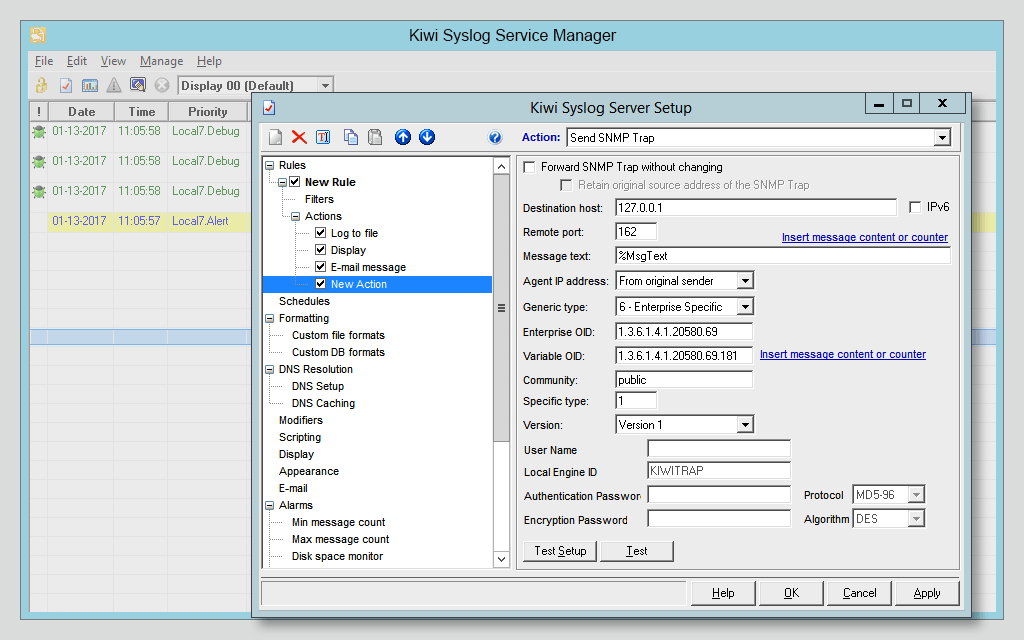
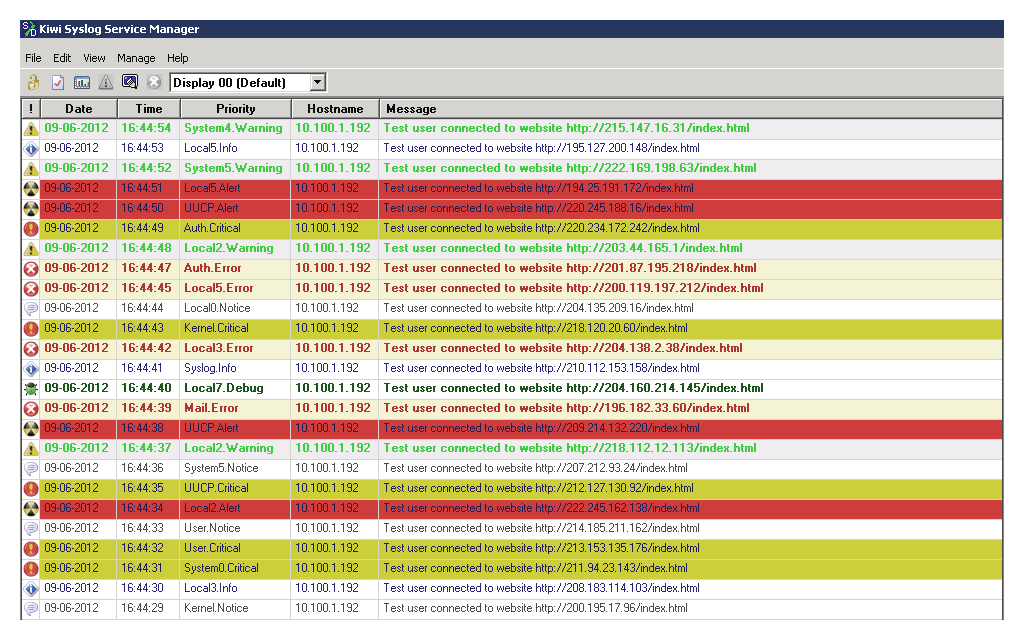
SolarWinds® Kiwi Syslog® Server allows you to manage a variety of log files, including SNMP traps, syslog messages, and Windows event logs. Since every device on the network typically creates hundreds of log files every minute, the task of manually organizing and analyzing them for performance anomalies can be time-consuming and inefficient.
However, Kiwi Syslog Server is built to do the heavy lifting. Its SNMP trap receiver can receive messages from any number of devices, which it then sorts and arranges by device function or message contents for added organization and easy searchability. Kiwi Syslog Server also allows you to set log retention policies and apply them, and it offers automatic archiving and cleanup functions.
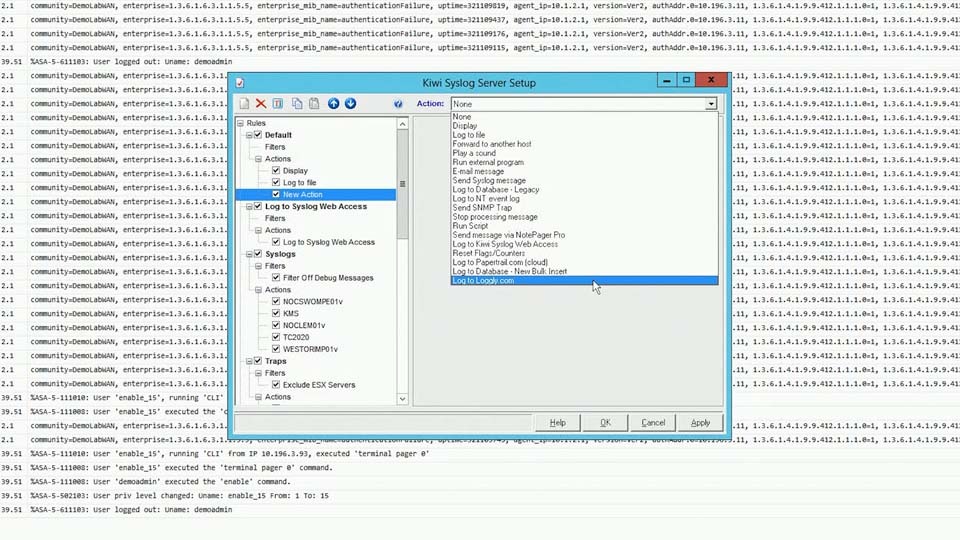
Kiwi offers several customization options like filters, which can enable you to more easily sort through stored SNMP traps and other log files for specific message types, content, send times, or frequency. You can also tailor the way Kiwi responds to certain conditions based on the wants and needs of specific departments and personnel. Additionally, users can configure other actions, such as automating scripts and executables to run when action conditions or events are triggered.
Kiwi Syslog Server features a set of robust, rule-based functions capable of dictating how an application organizes, processes, and responds to the SNMP trap messages it collects. These rules can be further customized using filters and actions, which can determine which trap messages trigger which responses. For example, this may include running scripts on traps containing specific words. Filters can help boost the efficiency of rules—and SNMP trap management overall—because if the rules don’t include filters, they can apply to every trap message the central manager receives.
SNMP traps are the most commonly used kind of SNMP message. Normal SNMP operations designate that device agents take passive roles, which means they’ll only send SNMP messages if the SNMP manager sends a request. However, if an agent detects certain emergency conditions or events, it’ll send a warning notification to the manager without a prior request for data. These emergency notifications are known as SNMP traps.
SNMP traps are unique because they’re the only notification method SNMP agents can initiate. This makes them valuable—if not necessary—assets for network monitoring. Traps are the most convenient way to get notifications regarding network events and can be set for conditions with varying degrees of severity. For instance, SNMP agents installed on printers can treat a low toner cartridge as a trap condition and will notify the SNMP manager when the printer detects supplies are beginning to run low.
On the other hand, some serious events and conditions may not result in trap messages. Fatal errors, for instance, cause devices to stop functioning. This causes the SNMP agents monitoring the devices to stop operating, preventing them from contacting the SNMP manager. The function of SNMP agents can be interrupted when a device’s network card breaks, but the next time the SNMP manager sweeps the network for responses, the emergency condition or event will be detected.
There are three primary elements to SNMP: a central manager, device agents, and management information bases (or MIBs). The majority of network devices come with preinstalled SNMP agents, which may need to be activated before SNMP can be employed across the network.
The central manager isn’t usually included in the operating system of many workstations. However, installing a network monitoring system on a workstation will likely make use of SNMP and will designate it as the SNMP manager for the various SNMP-agented devices across the network. This network management software will likely include an interface capable of interpreting MIB files and displaying the data they gather from device agents. Data displays may be easy-to-read user dashboards with graphic representations for quick insights about network-wide device performance.
Periodically, the SNMP central manager will poll all the device agents across the network with information requests. The device agents respond to the central manager’s requests by sending back an MIB-compliant file. The device agents retain their own copy of the MIB file, which they continue to update between poll requests, ensuring the information each device returns to the management system is accurate and up-to-date.
Network traffic naturally fluctuates over the course of the average day as end users perform their required tasks, which can include data transfers, downloads, and several other activities using network bandwidth. SNMP enables the network to gather information about a variety of device activity and performance metrics, including the number of bytes, errors, and packets sent and received by a router; the speed of the network connection between devices; and the number of hits received by a web server.
SNMP managers send protocol data units (PDUs) called SNMP GET requests to all the devices across the network with SNMP agents installed. Network admins can use SNMP GET requests to track practically any data metric. This is because the devices making data requests can access and share all the information SNMP monitors.
SNMP is the broad, overarching protocol networked devices use to manage each other, report data metrics, and share information, and SNMP traps are a method of reporting critical information about network and device activity.
Because SNMP is so widely used, it’s a universal standard for many networked devices. It’s the glue allowing disparate devices with different hardware and software specifications to communicate seamlessly.
The architecture of SNMP is rooted in a manager–agent relationship. Agents are installed on various networked devices—from servers and switches to desktops, routers, and other devices—and collect data about device health and performance, which can then be reported back to the SNMP manager. Network admins can leverage the analytics and insights provided by the SNMP agents to resolve critical issues or to make evidence-based decisions about network bottlenecks and capacity planning.
But even though the architecture of SNMP is relatively straightforward, the data hierarchy structure it uses can initially seem intimidating or confusing. Understanding the reasoning behind the hierarchy often makes the issue much clearer. Because SNMP is used across a broad range of devices, hardware types, and software applications, a degree of flexibility and extensibility is required when sharing data between devices and management systems. For this reason, SNMP doesn’t enforce strict formatting regulations regarding the fixed size of data exchange between devices. Instead, it uses a branched, tree-like hierarchy so data is continually available for SNMP management systems to collect.
The SNMP data tree includes multiple branched tables, which are called management information bases (MIBs). MIBs create groups based on device types and components. There is a unique identifying number and string associated with each MIB, and—like IP addresses and hostnames—they can be used interchangeably. MIBs also consist of one or more nodes, which refer to specific devices or component types across the network.
The advantage of this is the entire MIB doesn’t need to be sent each time the device agent sends a report to the central manager. SNMP trap messages include metadata like the time, value, and identifier. The last of these is an object identifier (OID), or a unique code assigned by the MIB structure indicating exactly where within the hierarchy’s branch structure the trap condition or event is located. Every attribute of the device being monitored by the SNMP agent will have a unique OID, allowing the SNMP central management system to determine the exact portion of the device—such as a switch, printer, or end-user workstation—the SNMP trap message is referring to.
Kiwi Syslog Server
Stay on top of your IT environment and improve security
Store and archive logs to assist with regulatory compliance
Automatically archive logs to save time