- Events
-
Partners
- Government
- Customer Portal
- Contact Us
- Contact Sales
-
English
Each device on your network can generate hundreds of logs per minute, and going through them manually, one-by-one is virtually impossible. You need a syslog viewer to collect them all in one place.
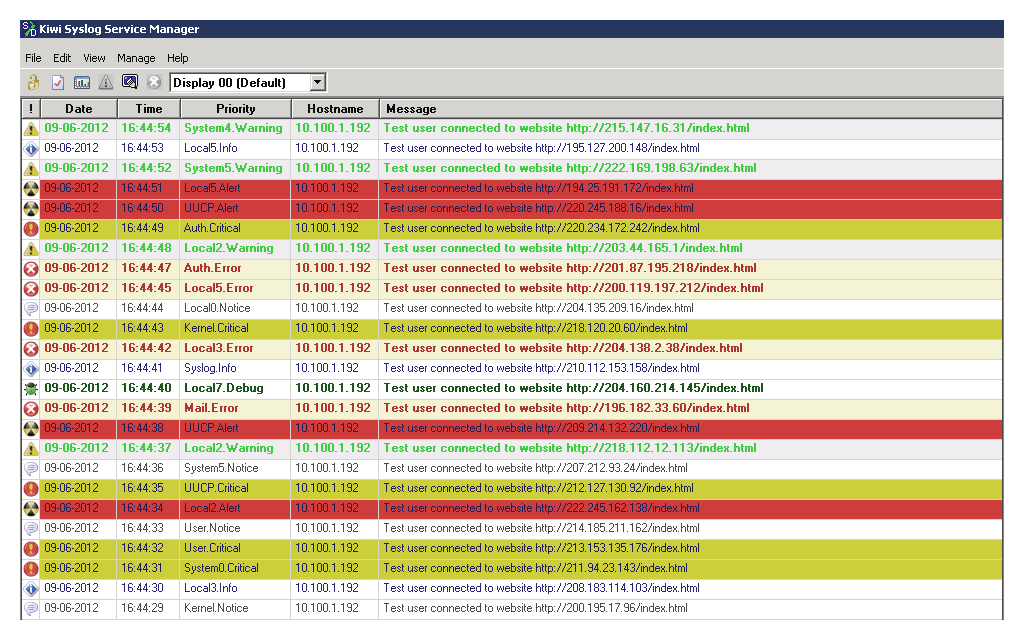
SolarWinds® Kiwi Syslog® Server is built to listen to syslog messages and SNMP traps from network devices and bring them together in a centralized, easy-to-use console. From here, you can open logs, view log files in up to 25 different display views, and search messages according to custom criteria.
Between the BYOD trend and the increasing popularity of remote work, today’s IT professionals are more mobile than ever. As such, you need a log viewer that moves with you and allows you to manage and monitor logs from any location.
Kiwi® Syslog Server is designed to allow you to view syslog data anywhere with safe web access. If you combine this log viewer with the free Kiwi Secure Tunnel, you can also receive, compress, and safely transport logs from your network’s devices to Kiwi Syslog Server.
Once you use a syslog viewer to open and consolidate log data, you’ll be faced with a lot of data. Searching through these logs for malicious activity can be like searching for a needle in a haystack.
This syslog file viewer helps break this information down. You can perform advanced message filtering by hostname, IP address, priority, or even time of day. Also, you can receive messages with a buffer of up to 10 million syslog messages and 1,000 email messages, so you don’t overload your inbox.
A log viewer is a tool to streamline, automate, and optimize log data monitoring and management for specific log files. Within a computing context, a log file is an automatically generated and time-stamped documentation of events in a system. Virtually all software applications and systems produce logs of some sort. There are many different examples of logs, such as access logs, audit logs, and transaction logs.
The point of a log file is to generate a detailed account of what’s happening behind the scenes, so if something goes wrong in your system, you can access a detailed list of the events that took place, so you can drill down on root causes. Most log files use the .log file extension, but some may use the .txt extension or another proprietary extension.
Volume and legibility are also a common problem with logs. Any and every network device can generate hundreds of logs every minute, and getting a handle on that much information can be daunting. These logs also likely come in varying formats, since they’re from varying devices. Sorting all this out would be time-consuming and labor-intensive.
Log viewers, which are designed to provide you with clear, user-friendly overviews of log files from a range of sources, can help you simplify your log management practices.
Every log viewer is different and exact protocols will vary according to the software, but enterprise-grade log viewers should perform the following key functions:
A log viewer brings log data together in one place, makes it easier to open and read these files, and offers features to help make log management easier.
The Windows event log viewer is a log of application and system messages stored by the Windows operating system, including errors, information messages, and warnings. You can use the event log viewer to diagnose system issues and predict future issues.
Each Windows event log contains the following information:
Even a properly functioning system will show various error messages and warnings as you sift through the logs, so it’s best to approach the event viewer conservatively. If you notice a problem in your system on your own, an event log viewer can be a helpful tool for digging into the issue. However, it’s just as easy to get lost in a sea of warnings and alerts, and some cyberattacks can use the event log viewer to trick you into believing something is wrong with your system. Use your best judgment.
On a Windows system, you can read a log file using an Event View or a text editor.
Event Viewer is a utility software designed to help Windows users troubleshoot a wide variety of issues. Each event has its own unique ID in the system, and Windows logs are divided into application, security, setup, system, and forwarded events to make it easier for you to find what you’re looking for. Since many log files use the .txt extension, you can also read log files using standard text editing software like Microsoft Word, Notepad, or Notepad ++.
However, basic text editors come with a range of performance limitations and lack the advanced features that can help you more easily read and understand log files at scale. For example, if you try to open a large log file in a text editor, you may get an error message (if the software doesn’t crash altogether). The file may also open incredibly slowly and contain so many lines as to be essentially unreadable and unnavigable. To really get those most out of your log files, you should read them using a dedicated log viewer tool.
The benefits of logging are wide-ranging and should be part of your best practices. Logging promotes preventative troubleshooting, reduces downtime, reduces the frequency of business interruptions, and more.
However, managing and monitoring syslog messages is notoriously challenging. In any network, it’s not uncommon for multiple devices to send event messages to the syslog server at the same time. When combined with the hundreds of messages generated by network devices every minute, organizing and analyzing these logs in real-time can get complex very quickly. Also, it can be hard to find the specific log file you need in the mass of data, especially when the files aren’t in the same format.
A log viewer solution can help make handling your network’s log data a lot easier. By aggregating your logs in one place and providing numerous ways to view, search, and filter log data, log viewers can simplify and streamline the entire process. This software can also help you locate the data you need quicker, simplify monitoring, identify root causes, and much more.
The best syslog viewer tools gather log messages and information from a wide range of networked devices, then consolidate and write those messages to a single data repository. To do so, syslog servers require a listener and a database to function effectively. A syslog listener allows syslog servers to receive log messages and collect data, while the database is the repository where the messages are written. Databases are especially important for larger networks.
Syslog viewers should allow you to search and filter log messages—from both operating systems and networked devices—from a single dashboard. You should also be able to access syslog messages through a secure web portal regardless of physical location.
The best syslog viewer tools include automated features that can be configured to send alerts when errors or issues requiring attention are detected in the log messages. The software should allow for different responses based on the contingency—this can include running scripts, changing the file the logs write to, or forwarding specific log messages. Automation should also extend to reporting, allowing key stakeholders to receive routine graphs and statistics of log data and network performance.
A good syslog viewer tool will provide log message buffering, which prevents systems and email inboxes from being overwhelmed when the network load is heavy. The best syslog server solutions will help you demonstrate compliance with data security standards like HIPAA, SOX, and others.
Logging is an essential practice, but managing the data your applications and systems generate can be challenging. SolarWinds Kiwi Syslog Server is built to be an affordable log viewer solution to help you centralize and simplify log management across network devices and servers.
This tool receives syslog messages, Windows event logs, and SNMP traps from your network’s routers, switches, and firewalls, and allows you to filter and view these messages according to your own criteria. Kiwi Syslog Server supports an unlimited number of devices and can handle up to two million messages per hour, while the web console provides up to 25 log display views.
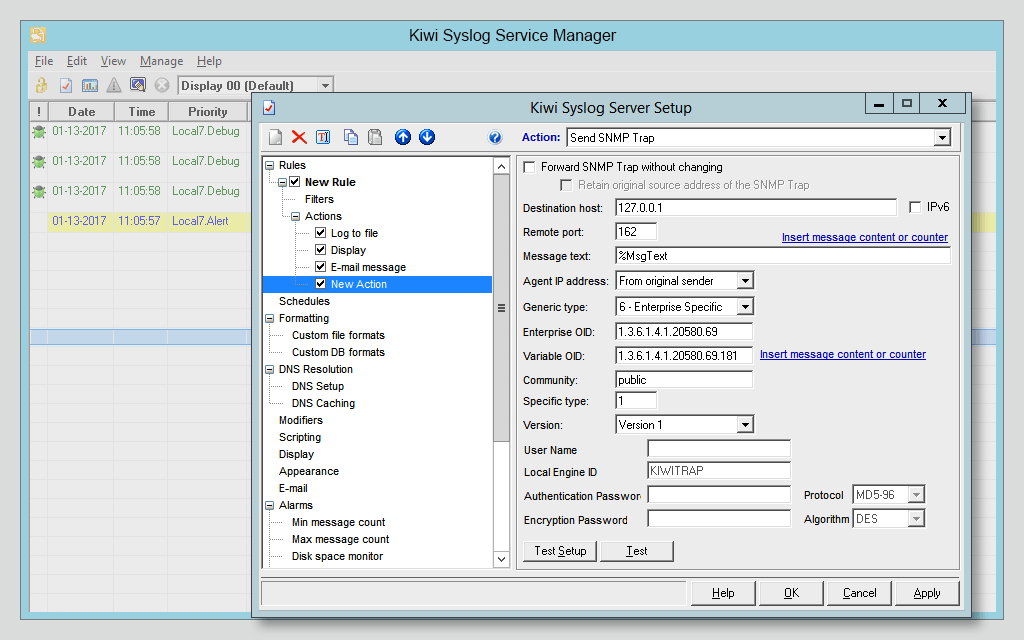
Kiwi Syslog Server’s alerting tools can also notify you when syslog messages meet predefined criteria and trigger automated actions to help you respond to these messages in record time. For auditing purposes, this log viewer can also help you more easily demonstrate compliance by logging messages to disk, files, and other ODBC-compliant databases.
With SolarWinds Kiwi Syslog Server, you can take control of log management across your network.
A log viewer is a tool to streamline, automate, and optimize log data monitoring and management for specific log files. Within a computing context, a log file is an automatically generated and time-stamped documentation of events in a system. Virtually all software applications and systems produce logs of some sort. There are many different examples of logs, such as access logs, audit logs, and transaction logs.
The point of a log file is to generate a detailed account of what’s happening behind the scenes, so if something goes wrong in your system, you can access a detailed list of the events that took place, so you can drill down on root causes. Most log files use the .log file extension, but some may use the .txt extension or another proprietary extension.
Volume and legibility are also a common problem with logs. Any and every network device can generate hundreds of logs every minute, and getting a handle on that much information can be daunting. These logs also likely come in varying formats, since they’re from varying devices. Sorting all this out would be time-consuming and labor-intensive.
Log viewers, which are designed to provide you with clear, user-friendly overviews of log files from a range of sources, can help you simplify your log management practices.
Every log viewer is different and exact protocols will vary according to the software, but enterprise-grade log viewers should perform the following key functions:
A log viewer brings log data together in one place, makes it easier to open and read these files, and offers features to help make log management easier.
The Windows event log viewer is a log of application and system messages stored by the Windows operating system, including errors, information messages, and warnings. You can use the event log viewer to diagnose system issues and predict future issues.
Each Windows event log contains the following information:
Even a properly functioning system will show various error messages and warnings as you sift through the logs, so it’s best to approach the event viewer conservatively. If you notice a problem in your system on your own, an event log viewer can be a helpful tool for digging into the issue. However, it’s just as easy to get lost in a sea of warnings and alerts, and some cyberattacks can use the event log viewer to trick you into believing something is wrong with your system. Use your best judgment.
On a Windows system, you can read a log file using an Event View or a text editor.
Event Viewer is a utility software designed to help Windows users troubleshoot a wide variety of issues. Each event has its own unique ID in the system, and Windows logs are divided into application, security, setup, system, and forwarded events to make it easier for you to find what you’re looking for. Since many log files use the .txt extension, you can also read log files using standard text editing software like Microsoft Word, Notepad, or Notepad ++.
However, basic text editors come with a range of performance limitations and lack the advanced features that can help you more easily read and understand log files at scale. For example, if you try to open a large log file in a text editor, you may get an error message (if the software doesn’t crash altogether). The file may also open incredibly slowly and contain so many lines as to be essentially unreadable and unnavigable. To really get those most out of your log files, you should read them using a dedicated log viewer tool.
The benefits of logging are wide-ranging and should be part of your best practices. Logging promotes preventative troubleshooting, reduces downtime, reduces the frequency of business interruptions, and more.
However, managing and monitoring syslog messages is notoriously challenging. In any network, it’s not uncommon for multiple devices to send event messages to the syslog server at the same time. When combined with the hundreds of messages generated by network devices every minute, organizing and analyzing these logs in real-time can get complex very quickly. Also, it can be hard to find the specific log file you need in the mass of data, especially when the files aren’t in the same format.
A log viewer solution can help make handling your network’s log data a lot easier. By aggregating your logs in one place and providing numerous ways to view, search, and filter log data, log viewers can simplify and streamline the entire process. This software can also help you locate the data you need quicker, simplify monitoring, identify root causes, and much more.
The best syslog viewer tools gather log messages and information from a wide range of networked devices, then consolidate and write those messages to a single data repository. To do so, syslog servers require a listener and a database to function effectively. A syslog listener allows syslog servers to receive log messages and collect data, while the database is the repository where the messages are written. Databases are especially important for larger networks.
Syslog viewers should allow you to search and filter log messages—from both operating systems and networked devices—from a single dashboard. You should also be able to access syslog messages through a secure web portal regardless of physical location.
The best syslog viewer tools include automated features that can be configured to send alerts when errors or issues requiring attention are detected in the log messages. The software should allow for different responses based on the contingency—this can include running scripts, changing the file the logs write to, or forwarding specific log messages. Automation should also extend to reporting, allowing key stakeholders to receive routine graphs and statistics of log data and network performance.
A good syslog viewer tool will provide log message buffering, which prevents systems and email inboxes from being overwhelmed when the network load is heavy. The best syslog server solutions will help you demonstrate compliance with data security standards like HIPAA, SOX, and others.
Logging is an essential practice, but managing the data your applications and systems generate can be challenging. SolarWinds Kiwi Syslog Server is built to be an affordable log viewer solution to help you centralize and simplify log management across network devices and servers.
This tool receives syslog messages, Windows event logs, and SNMP traps from your network’s routers, switches, and firewalls, and allows you to filter and view these messages according to your own criteria. Kiwi Syslog Server supports an unlimited number of devices and can handle up to two million messages per hour, while the web console provides up to 25 log display views.
Kiwi Syslog Server’s alerting tools can also notify you when syslog messages meet predefined criteria and trigger automated actions to help you respond to these messages in record time. For auditing purposes, this log viewer can also help you more easily demonstrate compliance by logging messages to disk, files, and other ODBC-compliant databases.
With SolarWinds Kiwi Syslog Server, you can take control of log management across your network.
Kiwi Syslog Server
Consolidate syslog messages and Windows events in one comprehensive tool.
Access log data from wherever you are with safe web access.
Use clean, legible, organized logs to help demonstrate regulatory compliance.