- Events
-
Partners
- Government
- Customer Portal
- Contact Us
- Contact Sales
-
English
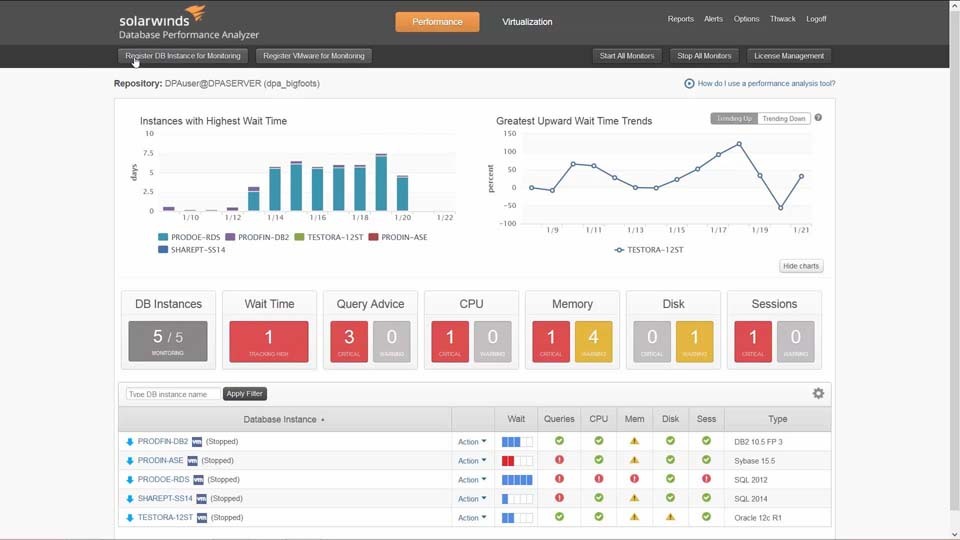
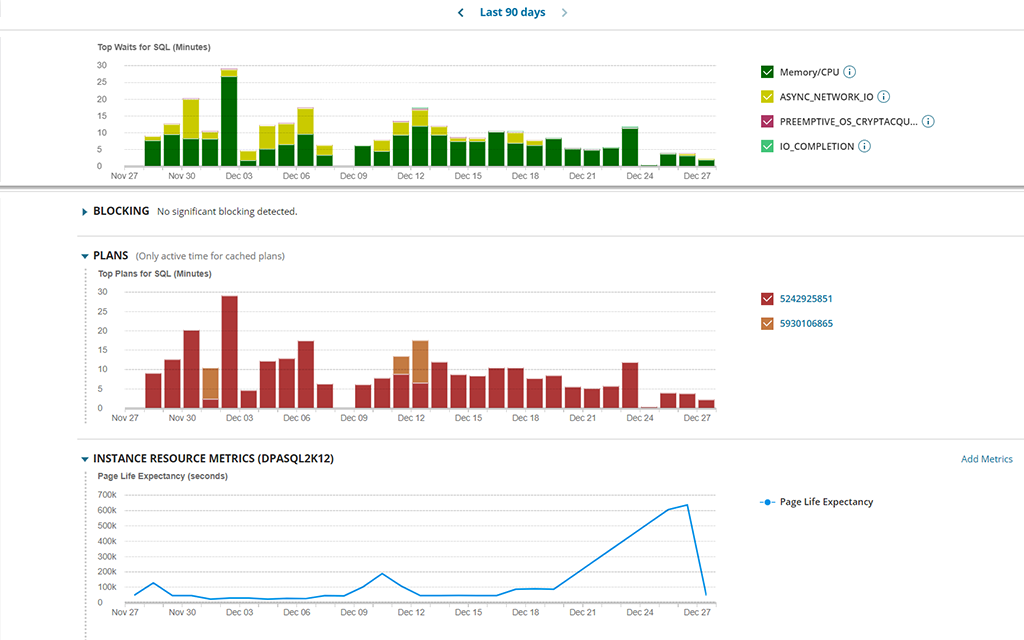
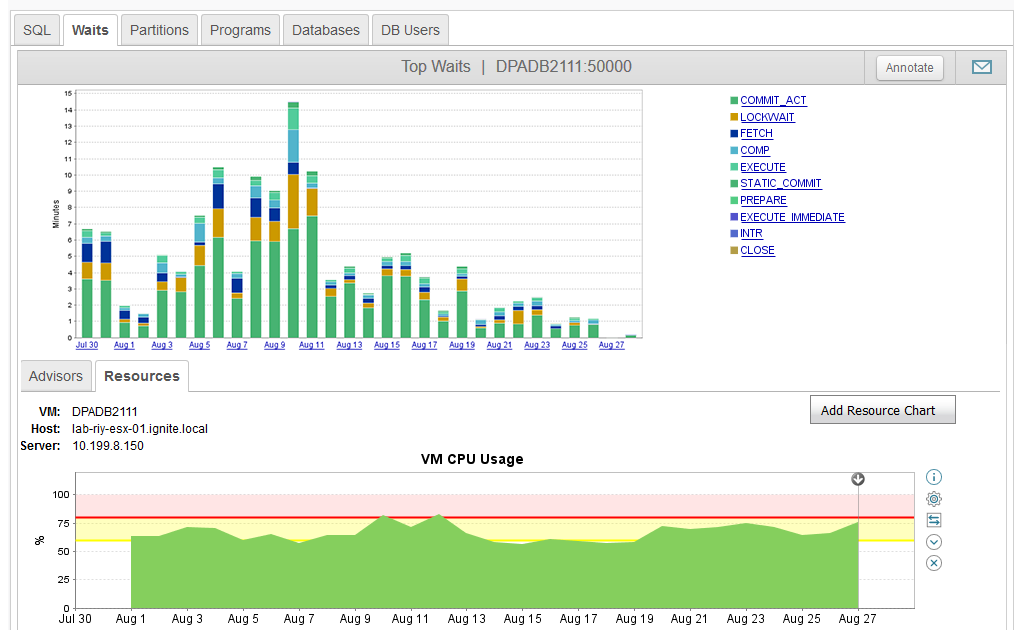
A key to understanding performance is to focus on improving the worst-performing SQL statements, the response time for those statements, and the specific steps within the relational database management system, known as Wait Events or Wait Types.
SolarWinds DPA includes wait-based analytics to help you quickly identify common problems, such as delays due to storage, network, table locks, and memory, as well as edge cases, such as waits due to cluster failover and synchronization of parallel threads.
SolarWinds Database Performance Analyzer is ready to help you analyze the performance of databases such as SQL Server and Oracle running on Amazon Web Services (AWS).
Using DPA, you can:
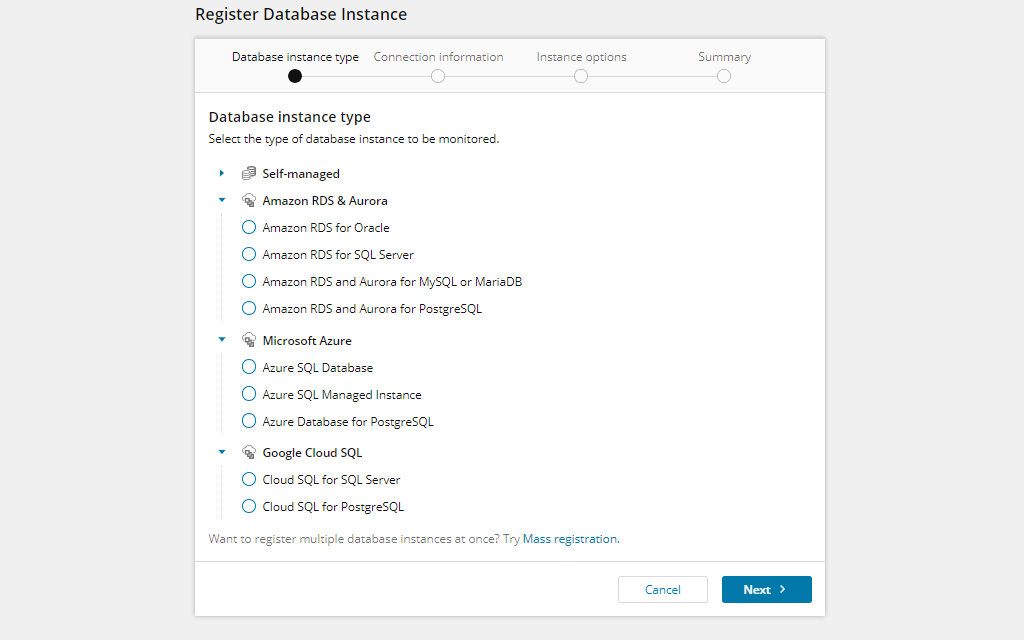
You can use a ready-to-go image including DPA and a pre-configured SQL Server historical repository. Just register your RDS or EC2 monitoring SQL Server, Oracle, DB2, or SAP ASE (Sybase) instances, and start monitoring with preconfigured DPA. Features include:
Amazon Elastic Compute Cloud (EC2) is part of the Amazon Web Services (AWS) cloud and is designed to help you develop and deploy databases and applications in computing environments without making substantial investments in hardware upfront.
EC2 instances are essentially virtual servers in Amazon EC2. With EC2, you can launch as few or as many virtual servers as you need. EC2 can act as a practically unlimited group of virtual machines. It also lets you manage storage and configure networking and security as needed. EC2 also helps you reduce your need to predict traffic ahead of time because you can handle spikes in popularity or changes in requirements by easily scaling up or down as needed.
Many businesses are looking to move their databases to Amazon EC2, whether because they want to build their databases in a VPC secure environment, they’re attracted to the high scalability offered by cloud platforms, or they like that Amazon EC2 can support applications with high performance requirements. However, these businesses need a way to easily access, view, and control those databases. An EC2 monitoring tool can help provide monitoring insights into your Amazon EC2 instances, including insight into critical databases within your EC2 environment.
While Amazon EC2 comes with a lot of built-in elasticity and resilience, it may still require significant monitoring to maintain optimal performance. Many use CloudWatch EC2 monitoring software by default, however, this tool may be insufficient for effectively monitoring EC2 at any scale since it’s designed to collect basic metrics related to CPU and EC2 memory monitoring and may not help provide deeper insights.
While the most basic EC2 monitoring tool can collect metrics to help you keep your virtual servers operating, a complete EC2 instances monitoring tool like SolarWinds Database Performance Analyzer can also provide in-depth insight into databases within EC2. DPA can help you maintain the same level of control as with an on-premises database while taking advantage of the benefits of a cloud platform by collecting and aggregating a wide range of metrics to help optimize database performance.
An EC2 monitoring tool works by collecting data about your Amazon EC2 environment to help you more easily troubleshoot and improve database performance for end users. By collecting and storing data over time, an EC2 instances monitoring tool can help you identify historical performance trends within your EC2 environment.
With an EC2 monitoring tool, you can quickly identify common EC2 problems, such as delays due to storage, network, table locks, and memory, as well as edge cases. You can also see the total wait time a database is creating for an application and gain comprehensive insights into the factors affecting performance within your Amazon EC2 environment, including SQL statements, database operations, server resources, wait times, storage system metrics, and more.
EC2 monitoring is critical for maintaining the availability of servers in your Amazon EC2 environment. Without server availability, your application and database performance can deteriorate rapidly, hurt end-user experience, and have a serious impact on your business productivity.
Without effective EC2 memory monitoring, you may encounter issues of resource starvation where servers become unavailable. When servers become unavailable, your databases and applications can also become unavailable to end users.
EC2 monitoring can also be important to your bottom line. Performance can have a direct impact on end users, from employees losing productivity due to slow-loading databases and applications to end users who are likely to leave a web application if pages load slowly. Continuously monitoring EC2 performance metrics—and racking periods of peak demand— can help you prevent serious drops in server performance.
When it comes to resource allocation, another big concern in EC2 memory monitoring is tracking capacity. Detecting capacity issues is an important reason to monitor AWS metrics, since capacity issues can have a significant impact on performance. By monitoring EC2 instances and data logs, you can more easily locate and troubleshoot capacity issues quickly for better performance.
An EC2 monitoring tool collects, aggregates, and analyzes key performance metrics for your EC2 environments, granting you visibility into your databases and applications and offering actionable insights to optimize performance.
Two key elements EC2 monitoring software should collect data on to help you address performance issues include:
To detect performance problems as they arise, an EC2 monitoring tool can also collect a variety of other key metrics, including:
Tools like SolarWinds DPA are designed to provide you with the best ability to improve performance by offering evidence-based recommendations on tuning, query blocks, and other metrics for quick and successful step-by-step troubleshooting.
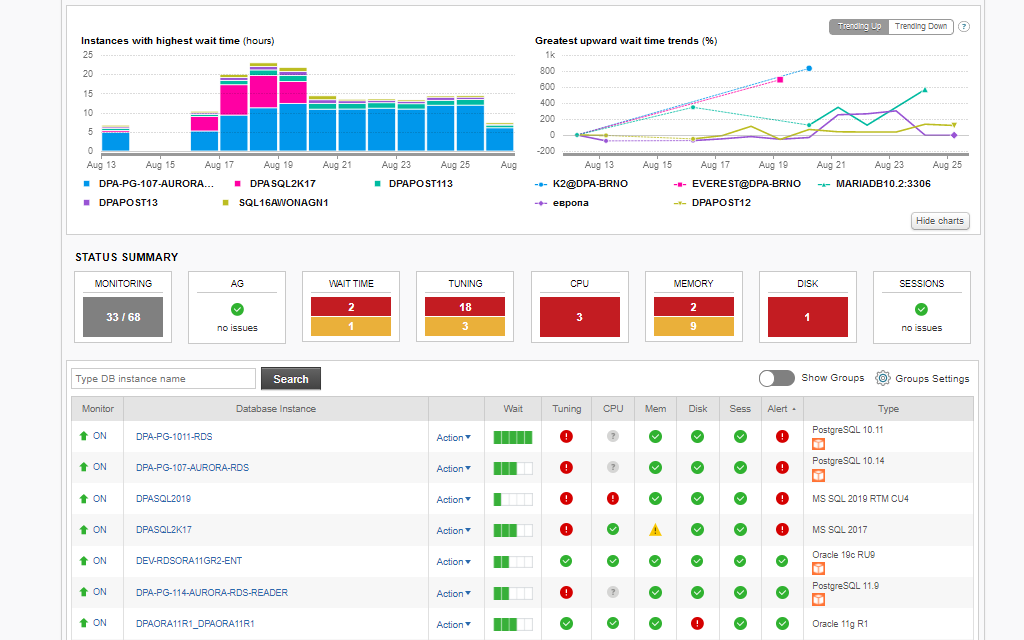
SolarWinds Database Performance Analyzer comes with an EC2 monitoring tool that uses multi-dimensional analysis to help you improve the performance of databases and applications deployed on Amazon EC2 instances. With the help of DPA, you can go beyond basic performance metric monitoring into active performance improvement.
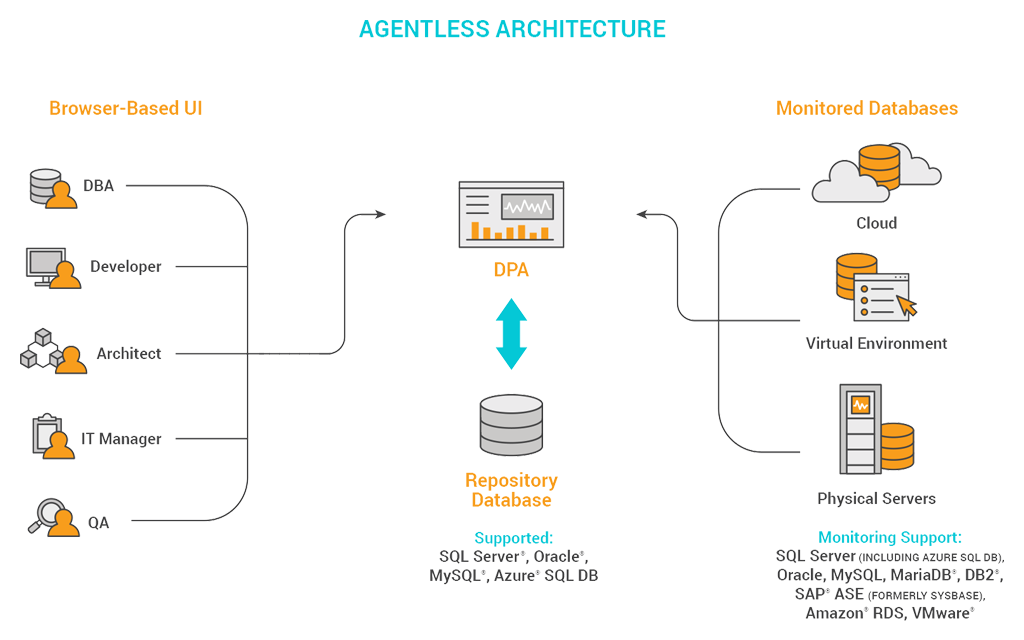
When you use DPA, you can analyze the performance of databases running on AWS and benefit from the integrated expert Table Tuning advice to help guide your performance optimization efforts. Additionally, the agentless architecture of DPA can give you flexibility and scalability across deployment options and platforms, whether that means deploying DPA on an EC2 instance or even a VM or physical server.
Amazon Elastic Compute Cloud (EC2) is part of the Amazon Web Services (AWS) cloud and is designed to help you develop and deploy databases and applications in computing environments without making substantial investments in hardware upfront.
EC2 instances are essentially virtual servers in Amazon EC2. With EC2, you can launch as few or as many virtual servers as you need. EC2 can act as a practically unlimited group of virtual machines. It also lets you manage storage and configure networking and security as needed. EC2 also helps you reduce your need to predict traffic ahead of time because you can handle spikes in popularity or changes in requirements by easily scaling up or down as needed.
Many businesses are looking to move their databases to Amazon EC2, whether because they want to build their databases in a VPC secure environment, they’re attracted to the high scalability offered by cloud platforms, or they like that Amazon EC2 can support applications with high performance requirements. However, these businesses need a way to easily access, view, and control those databases. An EC2 monitoring tool can help provide monitoring insights into your Amazon EC2 instances, including insight into critical databases within your EC2 environment.
While Amazon EC2 comes with a lot of built-in elasticity and resilience, it may still require significant monitoring to maintain optimal performance. Many use CloudWatch EC2 monitoring software by default, however, this tool may be insufficient for effectively monitoring EC2 at any scale since it’s designed to collect basic metrics related to CPU and EC2 memory monitoring and may not help provide deeper insights.
While the most basic EC2 monitoring tool can collect metrics to help you keep your virtual servers operating, a complete EC2 instances monitoring tool like SolarWinds Database Performance Analyzer can also provide in-depth insight into databases within EC2. DPA can help you maintain the same level of control as with an on-premises database while taking advantage of the benefits of a cloud platform by collecting and aggregating a wide range of metrics to help optimize database performance.
An EC2 monitoring tool works by collecting data about your Amazon EC2 environment to help you more easily troubleshoot and improve database performance for end users. By collecting and storing data over time, an EC2 instances monitoring tool can help you identify historical performance trends within your EC2 environment.
With an EC2 monitoring tool, you can quickly identify common EC2 problems, such as delays due to storage, network, table locks, and memory, as well as edge cases. You can also see the total wait time a database is creating for an application and gain comprehensive insights into the factors affecting performance within your Amazon EC2 environment, including SQL statements, database operations, server resources, wait times, storage system metrics, and more.
EC2 monitoring is critical for maintaining the availability of servers in your Amazon EC2 environment. Without server availability, your application and database performance can deteriorate rapidly, hurt end-user experience, and have a serious impact on your business productivity.
Without effective EC2 memory monitoring, you may encounter issues of resource starvation where servers become unavailable. When servers become unavailable, your databases and applications can also become unavailable to end users.
EC2 monitoring can also be important to your bottom line. Performance can have a direct impact on end users, from employees losing productivity due to slow-loading databases and applications to end users who are likely to leave a web application if pages load slowly. Continuously monitoring EC2 performance metrics—and racking periods of peak demand— can help you prevent serious drops in server performance.
When it comes to resource allocation, another big concern in EC2 memory monitoring is tracking capacity. Detecting capacity issues is an important reason to monitor AWS metrics, since capacity issues can have a significant impact on performance. By monitoring EC2 instances and data logs, you can more easily locate and troubleshoot capacity issues quickly for better performance.
An EC2 monitoring tool collects, aggregates, and analyzes key performance metrics for your EC2 environments, granting you visibility into your databases and applications and offering actionable insights to optimize performance.
Two key elements EC2 monitoring software should collect data on to help you address performance issues include:
To detect performance problems as they arise, an EC2 monitoring tool can also collect a variety of other key metrics, including:
Tools like SolarWinds DPA are designed to provide you with the best ability to improve performance by offering evidence-based recommendations on tuning, query blocks, and other metrics for quick and successful step-by-step troubleshooting.
SolarWinds Database Performance Analyzer comes with an EC2 monitoring tool that uses multi-dimensional analysis to help you improve the performance of databases and applications deployed on Amazon EC2 instances. With the help of DPA, you can go beyond basic performance metric monitoring into active performance improvement.
When you use DPA, you can analyze the performance of databases running on AWS and benefit from the integrated expert Table Tuning advice to help guide your performance optimization efforts. Additionally, the agentless architecture of DPA can give you flexibility and scalability across deployment options and platforms, whether that means deploying DPA on an EC2 instance or even a VM or physical server.
Database Performance Analyzer for AWS