- Events
-
Partners
- Government
- Customer Portal
- Contact Us
- Contact Sales
-
English
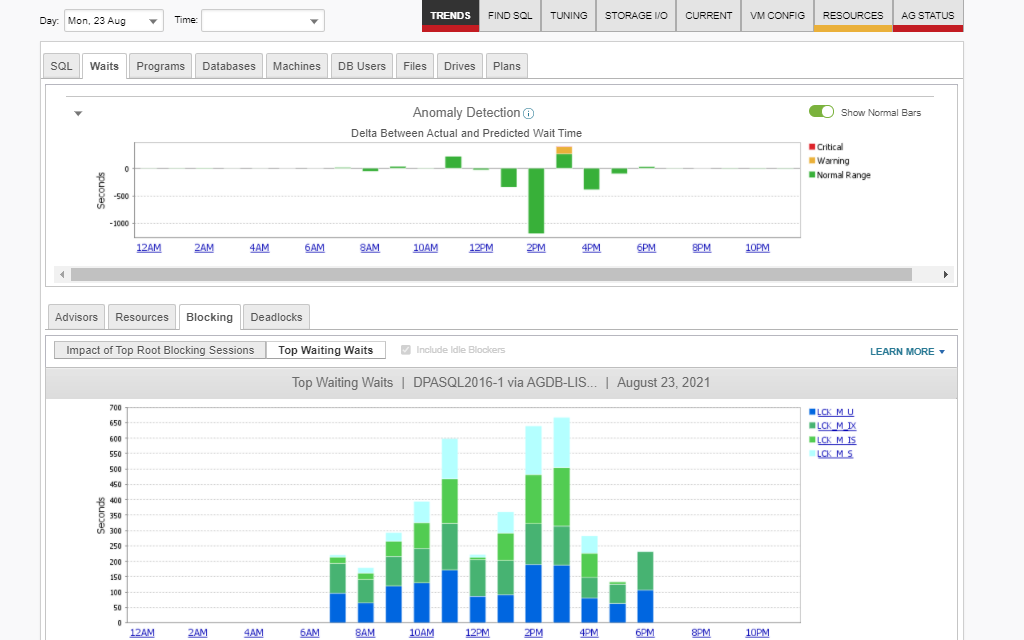
SolarWinds® Database Performance Analyzer (DPA) is built to collect blocking data in a feature called the Blocking Tab, which provides a high level of visibility into the root blocker (shown at the top of the tree) and its aggregated wait time. This allows database administrators to drill down into the top blocking data and see its impact on database response times. DPA can also reveal the top waiters, allowing DBAs to quickly pinpoint their top blockers and use this data to better optimize the queries reducing blocking the most.
DPA provides a Top Blocking Sessions Tab dashboard to help highlight the post-lock activity in your SQL Server preventing blocked sessions from completing their transactions and releasing locks. This capability can help database administrators reduce overall blocking wait time by making it easier to reoptimize the activity of the top blocker queries and decrease the time locks are held in a SQL Server blocking chain.
In large enterprises, it can be challenging for database administrators to identify queries, programs, users, and other elements waiting on blockers and slowing down transactions. DPA offers a quick and easy remedy to this problem. The intuitive dashboard in DPA can make it easier for database administrators to identify waiters, quickly drill down into the cause of long wait times and find their blockers. All of this can be done directly from the DPA dashboard in three to four clicks.
Sometimes blockers become idle, which means they’re blocking without performing any specific function. DPA is designed to track these blocker sessions backward in time to discover the last known queries running within the transaction before it went idle. Armed with this information, database administrators can more confidently collaborate with database developers to fix the application code causing idle blocking. Additionally, DPA can provide visibility into top blockers.
Database locking refers to a method of ensuring a database processes transactions or requests in a certain order. The SQL Server will put a lock on a resources or other sessions to make sure events occur in the right sequence. This helps avoid a race condition, a situation where a device tries to execute two actions at the same time even though they must unfold in a set order due to the nature of the device or system. This is critical for maintaining data integrity within the database.
To successfully complete a transaction, a relational database management system (RDBMS) must make sure the transaction passes the ACID Test. The ACID test is comprised of the following criteria:
Database locking comes into play during the “Isolation” portion of the ACID Test. To facilitate isolation, the database will lock certain objects (usually one or more rows of data) until associated transactions are completed. This prevents other processes from changing these objects until the lock is removed and helps prevent data loss.
Database blocking is closely related to database locking. Blocking is simply what occurs when locks have been placed on various objects within the database. For example, if the database receives a request against a locked object, the request will not be completed until the lock is lifted. The subsequent delay or stopping of the request is called a block.
Database blocking and locking are bound to occur if you work with Microsoft SQL Server or any other database on a regular basis. The key is to take preventative measures to make sure locking and blocking don’t completely take over your database and cause performance issues capable of negatively impacting end users.
Database locking works by allowing only one database session to make changes at a time. For example, suppose you executed the following SQL statement:
UPDATE some_table SET some_field = "some_value"
WHERE some_column = "XYZ";
According to this statement, all rows with the value “XYZ” for the column named “some_column” will lock. If another database user session (Session A) tries to make changes to the locked data (Session B), Session A will be placed in a “lock wait state” and won’t be able to move forward with any SQL transaction it’s performing. Some locks allow the stalled session to read other database sessions, and others are read-exclusive.
Locks are an integral part of database management—all databases today have some sort of locking function. From least to most granular, the six primary techniques for database locking are as follows:
Locking becomes an issue when the session holds a lock for an extended period before eventually releasing it—or when it never releases the lock. Long-term locks occur when sessions acquire locks and execute inefficient SQL statements before releasing them. The time it takes for the session to release the lock depends on the execution time of the inefficient SQL statement, which usually works itself out over time. However, the process can take a while.
If a session never releases the lock, the subsequent blocking will never work itself out, and database administrators will not regain access to the resources within the session for an indeterminate period. Database administrators typically terminate the session entirely to release the locks.
It’s essential for database administrators to know how to find blocking in SQL Server because blocking can cut DBAs off from business-critical resources and prevent them from managing their databases efficiently. However, blocking can be complex and time-consuming to troubleshoot. Here are five of the most common blocking causes:
Still, in a large enterprise with even larger databases, there are many more reasons why a session could be blocked. It would be incredibly challenging for a database administrator to get to the top of the blocking chain and uncover these reasons manually.
Standard SQL Server monitoring tools will display database locking and blocking waits, but they won’t identify the root blocker responsible for the blocking chain. Increased blocking equals slower apps, but how can a database administrator determine whether increased blocking is a sign of database inefficiency or a reason for slow app response times?
A database performance optimization tool like SolarWinds® Database Performance Analyzer (DPA) can help DBAs get to the bottom of a SQL Server blocking chain, resolve blocks quickly, and get back to business.
Finding blocking isn’t only important when blockers are actively affecting database performance. Since locks and blocks are necessary byproducts of working with any RDBMS, DBAs must do all they can to proactively monitor blocking issues or fix the code causing idle blockers. A key part of database management best practices is using software designed to help you find blockers even in their beginning stages.
SolarWinds Database Performance Analyzer is a comprehensive, enterprise-grade database management tool designed to help you find and solve blocking chain in SQL Server. DPA offers a high level of visibility into queries, programs, and other elements potentially waiting on blockers and slowing transactions to help make troubleshooting faster and more efficient.
You can find the root blockers within your database and the total wait they’ve caused by using the analysis features in DPA to quickly determine the root blockers and their cumulative impact on response times. By digging into the last active session with DPA, you can quickly identify the last query of an idle blocker and the total impact of a root blocker down the blocking chain, allowing you to focus your tuning efforts on the most important queries and reduce overall blocking time.
Database locking refers to a method of ensuring a database processes transactions or requests in a certain order. The SQL Server will put a lock on a resources or other sessions to make sure events occur in the right sequence. This helps avoid a race condition, a situation where a device tries to execute two actions at the same time even though they must unfold in a set order due to the nature of the device or system. This is critical for maintaining data integrity within the database.
To successfully complete a transaction, a relational database management system (RDBMS) must make sure the transaction passes the ACID Test. The ACID test is comprised of the following criteria:
Database locking comes into play during the “Isolation” portion of the ACID Test. To facilitate isolation, the database will lock certain objects (usually one or more rows of data) until associated transactions are completed. This prevents other processes from changing these objects until the lock is removed and helps prevent data loss.
Database blocking is closely related to database locking. Blocking is simply what occurs when locks have been placed on various objects within the database. For example, if the database receives a request against a locked object, the request will not be completed until the lock is lifted. The subsequent delay or stopping of the request is called a block.
Database blocking and locking are bound to occur if you work with Microsoft SQL Server or any other database on a regular basis. The key is to take preventative measures to make sure locking and blocking don’t completely take over your database and cause performance issues capable of negatively impacting end users.
Database locking works by allowing only one database session to make changes at a time. For example, suppose you executed the following SQL statement:
UPDATE some_table SET some_field = "some_value"
WHERE some_column = "XYZ";
According to this statement, all rows with the value “XYZ” for the column named “some_column” will lock. If another database user session (Session A) tries to make changes to the locked data (Session B), Session A will be placed in a “lock wait state” and won’t be able to move forward with any SQL transaction it’s performing. Some locks allow the stalled session to read other database sessions, and others are read-exclusive.
Locks are an integral part of database management—all databases today have some sort of locking function. From least to most granular, the six primary techniques for database locking are as follows:
Locking becomes an issue when the session holds a lock for an extended period before eventually releasing it—or when it never releases the lock. Long-term locks occur when sessions acquire locks and execute inefficient SQL statements before releasing them. The time it takes for the session to release the lock depends on the execution time of the inefficient SQL statement, which usually works itself out over time. However, the process can take a while.
If a session never releases the lock, the subsequent blocking will never work itself out, and database administrators will not regain access to the resources within the session for an indeterminate period. Database administrators typically terminate the session entirely to release the locks.
It’s essential for database administrators to know how to find blocking in SQL Server because blocking can cut DBAs off from business-critical resources and prevent them from managing their databases efficiently. However, blocking can be complex and time-consuming to troubleshoot. Here are five of the most common blocking causes:
Still, in a large enterprise with even larger databases, there are many more reasons why a session could be blocked. It would be incredibly challenging for a database administrator to get to the top of the blocking chain and uncover these reasons manually.
Standard SQL Server monitoring tools will display database locking and blocking waits, but they won’t identify the root blocker responsible for the blocking chain. Increased blocking equals slower apps, but how can a database administrator determine whether increased blocking is a sign of database inefficiency or a reason for slow app response times?
A database performance optimization tool like SolarWinds® Database Performance Analyzer (DPA) can help DBAs get to the bottom of a SQL Server blocking chain, resolve blocks quickly, and get back to business.
Finding blocking isn’t only important when blockers are actively affecting database performance. Since locks and blocks are necessary byproducts of working with any RDBMS, DBAs must do all they can to proactively monitor blocking issues or fix the code causing idle blockers. A key part of database management best practices is using software designed to help you find blockers even in their beginning stages.
SolarWinds Database Performance Analyzer is a comprehensive, enterprise-grade database management tool designed to help you find and solve blocking chain in SQL Server. DPA offers a high level of visibility into queries, programs, and other elements potentially waiting on blockers and slowing transactions to help make troubleshooting faster and more efficient.
You can find the root blockers within your database and the total wait they’ve caused by using the analysis features in DPA to quickly determine the root blockers and their cumulative impact on response times. By digging into the last active session with DPA, you can quickly identify the last query of an idle blocker and the total impact of a root blocker down the blocking chain, allowing you to focus your tuning efforts on the most important queries and reduce overall blocking time.
Database Performance Analyzer
Easily identify what’s being blocked and what’s doing the blocking within your SQL Server.
Eliminate performance bottlenecks by clearing up root blockers as quickly as possible.
Gain access to the data needed to optimize your database performance, indexes, and queries.