- Events
-
Partners
- Government
- Customer Portal
- Contact Us
- Contact Sales
-
English
SolarWinds® User Device Tracker (UDT) automates network tracking, keeping tabs on both users and devices. It also offers port management capabilities enabling the control of users and devices connecting to the network.
With the UDT network tracker, you can quickly find users and computers on your network in just a few clicks, gaining visibility into devices directly connected at the SD-WAN edge for better operations and performance analysis. The UDT network trackers also help you find rogue or lost devices on the network.
With SolarWinds User Device Tracker, you can more easily find the exact location of devices in your network and detailed load analysis data. All it takes is a simple search on a username, MAC address, IP address, or hostname for the UDT network tracker to find a device.
The software is also designed to periodically poll switches and routers for data about what is connected to them.
SolarWinds UDT is built to save both current and historical data about when and where a device has been connected to your network. You can also get notifications and reports about every connected device including extensive user login and device connection data to help with incident investigation.
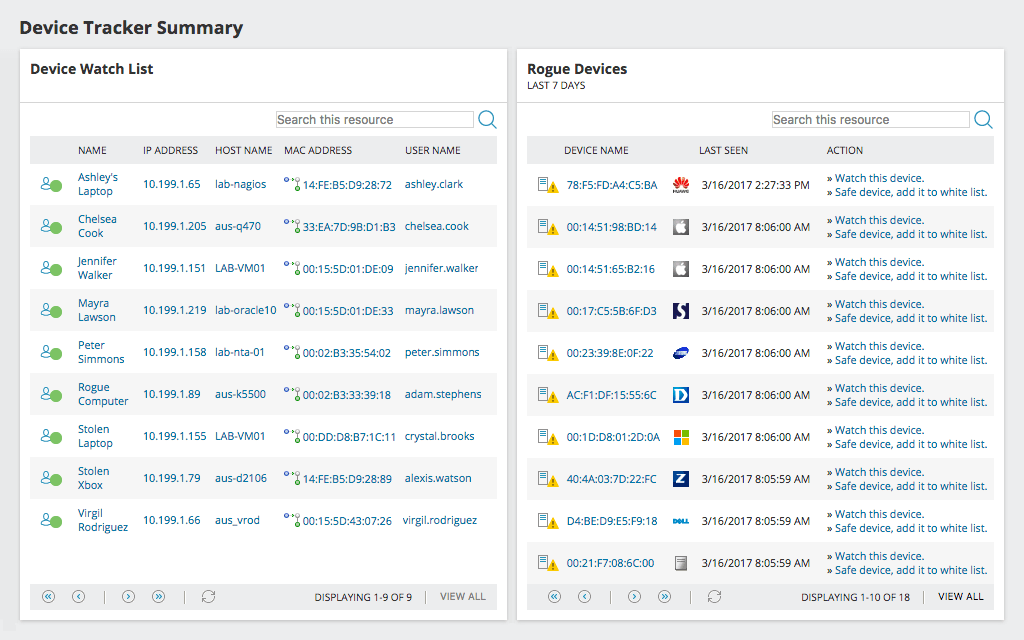
SolarWinds UDT empowers you to monitor the devices accessing your network, including enabling you to quickly detect any unapproved devices accessing the network. The network device tracker’s whitelisting feature makes it easy to identify which of the devices accessing your network are “safe,” based either on rules that define devices or because they are specifically on the whitelist, and which are “rogue.” Any device that isn’t on the whitelist will automatically appear in the Rogue Devices resource list and an alert will be generated to notify you about the potential danger.
SolarWinds User Device Tracker is more than just a network tracker. It also provides the tools needed to understand and present the information it collects. For those looking for something more specialized, UDT makes it easy to create customized network user and device reports in different formats using the SolarWinds Report Writer.
If you’d rather build a report using an existing template, UDT provides those as well. You can create user and device reports using 11 out-of-the-box reports as well as numerous community-generated templates.
In addition to offering powerful network tracking, SolarWinds UDT integrates seamlessly with SolarWinds® NetFlow Traffic Analyzer (NTA) so you can more easily monitor and manage network traffic.
By integrating UDT with NTA, you can more easily identify, locate, and block the devices and users who are hogging network bandwidth unnecessarily.
UDT’s additional possibilities don’t end there. With the SolarWinds® IP Control Bundle, you get all the advantages of UDT along with all the features of SolarWinds® IP Address Manager. That means improving visibility with IP and MAC address tracking, resolving IP conflicts more quickly, and increasing network reliability.
Network device tracking is the ability to locate all the users and endpoint devices on a network. It is a form of network tracking and monitoring that lets network administrators stay aware of the devices (both wired and wireless) connected to the network. These devices include everything from laptops and desktops to switches and routers.
Device tracking is one of the best ways to see what devices are on or are connecting to your network. Unfortunately, manually tracking devices can be extremely time-consuming to do accurately—especially if you have a large network. Even if you manage to discover all the devices accurately manually on your network, tracking their locations can be difficult without a network device tracking tool. Worse, without a tool, it will be difficult, if not impossible, to maintain accurate, usable records to be used to create reports and identify and resolve security or network issues if and when they arise.
A network tracking tool like SolarWinds® User Device Tracker (UDT) can help answer the question of how to identify devices on your network. The tool is built to automatically discover, map, and monitor network devices, switches, and ports, making it possible to quickly see exactly what devices are connected to what ports.
By definition, a network device tracker is a tool that aids in monitoring the moves, additions, and changes to network hardware infrastructure by automatically discovering, mapping, and monitoring switches, ports, and network devices connected to or attempting to connect to a network—along with the users behind those devices. A network tracker can also continue to track previously discovered devices, so you can find their locations with ease while also automatically discovering any new devices.
With a network device tracker, you can locate both wired and wireless endpoint devices on the network using a simple search by inputting the IP address, device vendor, username, hostname, or MAC address to see all the matching devices. Network admins can then use this visibility for everything from managing resource utilization and capacity planning to actively identify performance problems and faults for a quick resolution.
Put simply, a network device tracker, like UDT, works by discovering and identifying the devices connected to your network, then mapping and monitoring those devices to help keep your network secure and performing optimally. It’s designed to help you find the exact location of devices in your network and detailed load analysis data. The software periodically polls switches and routers for data about what’s connected to them. The tool also helps with everything from fault and performance problem detection to capacity planning. In fact, a network tracking tool can tell you the number of switches currently in use on your network in a given time frame. This information gives you a clearer view of how the ports on your switches are actually used. Network trackers also save both current and historical data about when and where a device has been connected to your network. Plus, a network device tracker ensures administrators always have up-to-date information about devices and users at their fingertips by delivering automated notifications and customizable reports for every connected device.
Some of the main benefits of network device tracking include:
Keeping your network secure. One of the biggest reasons people ask, “How can I see what devices are on my network?” is because they want to ensure that only authorized and known devices are connected. Unfortunately, a single unauthorized device can spell serious consequences for an organization, so it’s important for network administrators to be able to locate and address those devices fast.
That’s where a network device identifier, like SolarWinds UDT, comes in. The tool can help you identify and monitor devices new to your network. When these potentially unauthorized devices are detected, the device tracker can allow you to shut down the switch port associated with the device to limit the damage the rogue device could do.
Saving money. Tracking port utilization is one of the best ways to save money. A network tracking tool can help you track port utilization on each switch, so you can reclaim unused ports instead of purchasing additional hardware. This visibility can also help network admins plan for future needs by showing them which ports are nearing capacity.
Identifying performance problems. A device tracker can help you identify performance problems and faults by making it easier to diagnose the location within the physical layer where the problem originated, so you can put your efforts toward addressing the root of the problem right away.
Demonstrating compliance. Since network trackers maintain in-depth histories of Layer 2 and Layer 3 connections for monitored network switches and wireless access points, these tools can help save time and effort when demonstrating compliance.
SolarWinds User Device Tracker (UDT) is designed to automatically discover, map, and monitor switches, ports, and network devices, simplifying the network device tracking process for network admins and helping improve network security and performance.
UDT offers MAC address tracking as part of its network tracking, meaning you can search for devices using a MAC address, IP address, or hostname to determine where the device is currently connected to the network and where it was connected before. To determine the locations of devices, UDT regularly polls your network routers and switches to get information on what devices are connected to them. The tool then uses the information to create a database of both historical and current information about where devices have been connected.
To do this, UDT uses SNMP calls to your network framework to gather information on your monitored users, devices, and trends in real time. Because the network tracker makes calls in real time, you don’t need to install any agents or maintain remote software to use it. You can see the information on any web console through a supported browser.
If you want to start working with the SolarWinds UDT network device tracker, you first need to install the User Device Tracker. From there, you can use the tool’s Network Sonar Wizard to discover all the devices on your network. If you’re already using a SolarWinds network monitoring solution, you can skip this step.
Once your devices have been discovered, you can select the SolarWinds Platform nodes you want to monitor with UDT. If you want to track user logins, you can add an Active Directory Domain Controller at this stage.
The next step is setting up a whitelist of allowed devices. These are the devices you view as safe and the network tracker will not need to monitor. If any device is detected on your networ isn’t on the whitelist, it will be displayed on the Rogue Devices list. At this stage, you can also set up a watch list.
Finally, you can examine the Device Tracker Summary page, try locating devices by searching for everything from the username or IP address to their node name or node port, and set up alerts so you’re informed whenever certain devices are detected on your network.
Adding devices to the SolarWinds UDT network device tracker is simple.
If you already have another SolarWinds Platform network monitoring solution installed, like Network Performance Monitor, and you’ve already created a database of nodes you want to be monitored, you don’t need to do anything else to add devices to UDT. You can simply click on Add SolarWinds Platform nodes to UDT.
If you’ve never created a database of network devices on the SolarWinds Platform, you’ll need to use the Discovery Wizard to discover the devices on your network. From there you can follow the straightforward steps in the wizard to add nodes to UDT for monitoring.
Network device tracking is the ability to locate all the users and endpoint devices on a network. It is a form of network tracking and monitoring that lets network administrators stay aware of the devices (both wired and wireless) connected to the network. These devices include everything from laptops and desktops to switches and routers.
Device tracking is one of the best ways to see what devices are on or are connecting to your network. Unfortunately, manually tracking devices can be extremely time-consuming to do accurately—especially if you have a large network. Even if you manage to discover all the devices accurately manually on your network, tracking their locations can be difficult without a network device tracking tool. Worse, without a tool, it will be difficult, if not impossible, to maintain accurate, usable records to be used to create reports and identify and resolve security or network issues if and when they arise.
A network tracking tool like SolarWinds® User Device Tracker (UDT) can help answer the question of how to identify devices on your network. The tool is built to automatically discover, map, and monitor network devices, switches, and ports, making it possible to quickly see exactly what devices are connected to what ports.
By definition, a network device tracker is a tool that aids in monitoring the moves, additions, and changes to network hardware infrastructure by automatically discovering, mapping, and monitoring switches, ports, and network devices connected to or attempting to connect to a network—along with the users behind those devices. A network tracker can also continue to track previously discovered devices, so you can find their locations with ease while also automatically discovering any new devices.
With a network device tracker, you can locate both wired and wireless endpoint devices on the network using a simple search by inputting the IP address, device vendor, username, hostname, or MAC address to see all the matching devices. Network admins can then use this visibility for everything from managing resource utilization and capacity planning to actively identify performance problems and faults for a quick resolution.
Put simply, a network device tracker, like UDT, works by discovering and identifying the devices connected to your network, then mapping and monitoring those devices to help keep your network secure and performing optimally. It’s designed to help you find the exact location of devices in your network and detailed load analysis data. The software periodically polls switches and routers for data about what’s connected to them. The tool also helps with everything from fault and performance problem detection to capacity planning. In fact, a network tracking tool can tell you the number of switches currently in use on your network in a given time frame. This information gives you a clearer view of how the ports on your switches are actually used. Network trackers also save both current and historical data about when and where a device has been connected to your network. Plus, a network device tracker ensures administrators always have up-to-date information about devices and users at their fingertips by delivering automated notifications and customizable reports for every connected device.
Some of the main benefits of network device tracking include:
Keeping your network secure. One of the biggest reasons people ask, “How can I see what devices are on my network?” is because they want to ensure that only authorized and known devices are connected. Unfortunately, a single unauthorized device can spell serious consequences for an organization, so it’s important for network administrators to be able to locate and address those devices fast.
That’s where a network device identifier, like SolarWinds UDT, comes in. The tool can help you identify and monitor devices new to your network. When these potentially unauthorized devices are detected, the device tracker can allow you to shut down the switch port associated with the device to limit the damage the rogue device could do.
Saving money. Tracking port utilization is one of the best ways to save money. A network tracking tool can help you track port utilization on each switch, so you can reclaim unused ports instead of purchasing additional hardware. This visibility can also help network admins plan for future needs by showing them which ports are nearing capacity.
Identifying performance problems. A device tracker can help you identify performance problems and faults by making it easier to diagnose the location within the physical layer where the problem originated, so you can put your efforts toward addressing the root of the problem right away.
Demonstrating compliance. Since network trackers maintain in-depth histories of Layer 2 and Layer 3 connections for monitored network switches and wireless access points, these tools can help save time and effort when demonstrating compliance.
SolarWinds User Device Tracker (UDT) is designed to automatically discover, map, and monitor switches, ports, and network devices, simplifying the network device tracking process for network admins and helping improve network security and performance.
UDT offers MAC address tracking as part of its network tracking, meaning you can search for devices using a MAC address, IP address, or hostname to determine where the device is currently connected to the network and where it was connected before. To determine the locations of devices, UDT regularly polls your network routers and switches to get information on what devices are connected to them. The tool then uses the information to create a database of both historical and current information about where devices have been connected.
To do this, UDT uses SNMP calls to your network framework to gather information on your monitored users, devices, and trends in real time. Because the network tracker makes calls in real time, you don’t need to install any agents or maintain remote software to use it. You can see the information on any web console through a supported browser.
If you want to start working with the SolarWinds UDT network device tracker, you first need to install the User Device Tracker. From there, you can use the tool’s Network Sonar Wizard to discover all the devices on your network. If you’re already using a SolarWinds network monitoring solution, you can skip this step.
Once your devices have been discovered, you can select the SolarWinds Platform nodes you want to monitor with UDT. If you want to track user logins, you can add an Active Directory Domain Controller at this stage.
The next step is setting up a whitelist of allowed devices. These are the devices you view as safe and the network tracker will not need to monitor. If any device is detected on your networ isn’t on the whitelist, it will be displayed on the Rogue Devices list. At this stage, you can also set up a watch list.
Finally, you can examine the Device Tracker Summary page, try locating devices by searching for everything from the username or IP address to their node name or node port, and set up alerts so you’re informed whenever certain devices are detected on your network.
Adding devices to the SolarWinds UDT network device tracker is simple.
If you already have another SolarWinds Platform network monitoring solution installed, like Network Performance Monitor, and you’ve already created a database of nodes you want to be monitored, you don’t need to do anything else to add devices to UDT. You can simply click on Add SolarWinds Platform nodes to UDT.
If you’ve never created a database of network devices on the SolarWinds Platform, you’ll need to use the Discovery Wizard to discover the devices on your network. From there you can follow the straightforward steps in the wizard to add nodes to UDT for monitoring.
User Device Tracker
Track endpoint devices by IP or MAC address, username, or hostname.
Map and monitor wireless access points and switches for performance and errors.
Know how switches and ports are being used, and which switches are nearing capacity.