- Events
-
Partners
- Government
- Customer Portal
- Contact Us
- Contact Sales
-
English

Network device tracking is the ability to locate the network’s users and endpoint devices, including desktop computers, smart phones, laptops, tablets, and printers. Network device tracking can be conducted using robust network device tracking systems to help streamline and automate the device tracking process for greater efficiency.
Network device tracking is a form of network monitoring. As an IT administrator, it’s your responsibility to ensure your company’s network is running at peak performance and safe from cyberattackers. Network device tracking systems can automate device tracking and switch port management, so you can understand network capacity and remain in control of who and what is connecting to your network.
Network device tracking systems keep critical device data organized. Tracking and storing device data via a unified digital console can provide administrators with a bird’s-eye view of their IT infrastructure from anywhere, at any time. A complete network device tracking system is designed to integrate with other network management products, like IP address managers and network configuration managers, to help provide a comprehensive IT administration dashboard that can elevate your ability to maintain top-of-the line network performance.
Network device tracking highlights data past and present. Identifying who and what is connected to your network now is equally as important as understanding who and what was connected to it in the past. Network user tracking software can reveal your current IT landscape while also providing historical data. This means you can more easily and quickly identify key data like the date and time users or devices entered a network, the connection type, and the specific node port, SSD, or access point used.

Implementing a network device tracking tool is crucial for the sustained success of any IT department. These tools can not only help streamline network tracking, giving you more time to spend on other top-priority tasks, they can also boost performance by helping you keep your network safe and secure.
Here’s how network device tracking tools can help you:
Quickly locate network devices. Manually tracking devices can take hours of precious time out of your day. Network device tracking systems allow IT administrators to immediately locate network devices on their LAN and wireless network and retrieve switch name, port, port description, VLAN, VRF data, and vendor information, all from a single console.
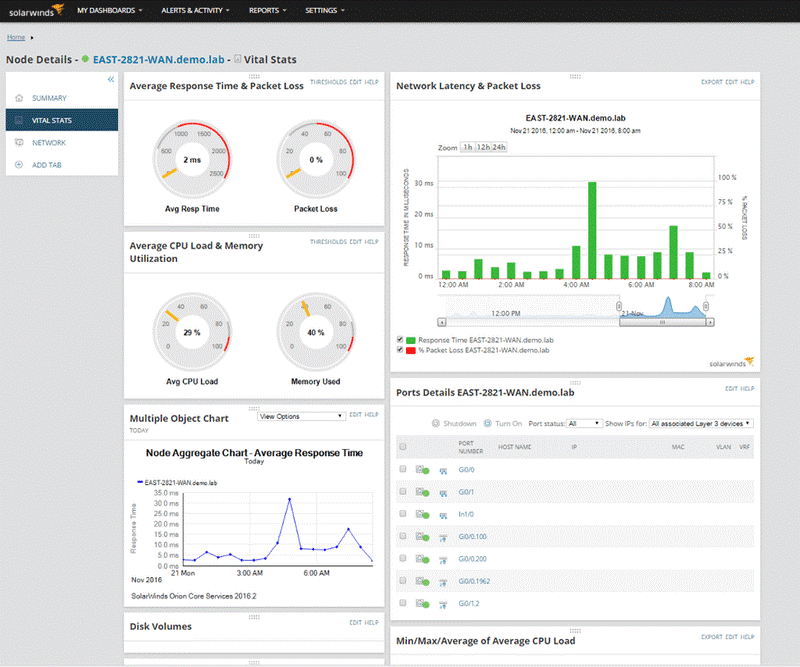
Map and monitor WAPs, switches, and ports. Network device identifier maps can monitor wireless access points and switches for performance and errors. These systems help you gain knowledge of port status and usage, response time, packet loss, CPU load, memory utilization, and more.
Manage switch and switch port capacity. It’s important to know how switches and ports are being used and which switches are nearing capacity. A network device tracking tool can identify switches operating at near capacity and where you can reclaim unused ports. Comprehensive tracking platforms can take this one step further with out-of-the-box reports providing current utilization metrics to help you more easily forecast capacity requirements.
Detect rogue devices and users. Network device tracking software can even alert you as soon as suspicious devices connect to your network. This can allow you to jump into action and stop security threats in their tracks. Some tools can allow you to create a device watch list, in which devices are listed by MAC address, IP address, or hostname. You can receive an alert as soon as a listed device connects to the network.

Before you can hit the ground running with a network device tracking software, you have to make sure it’s equipped with all the necessary features. An effective device tracking solution should include the following:
User identification. Understanding who is connecting to your network is a critical component of maintaining your network’s overall security. Device tracking solutions should be able to acquire user details via Active Directory, including user name and contact information. It’s important that these user details can be revealed alongside all endpoint logins, specifically endpoint name and most recent login time.
Automated switch port discovery. Your network device tracking solution should begin monitoring devices immediately. This saves you from manually tracking devices on your operating network. However, the tool’s job isn’t done once it locates all existing devices. To be effective, a robust network device tracking tool should be equipped to conduct regular, pre-scheduled scans that automatically discover new devices to help ensure your understanding of what’s on the network is always as up to date as possible.
Advanced alerting. Your ability to stop an attack before your network infrastructure is compromised often depends on how quickly you’re alerted to suspicious activity. Device tracking software must do more than identify threats by having the ability to immediately alert you to them in real time.
Remote capabilities. There’s little time to waste once you’ve been alerted to suspicious activity or a compromised device. Remote capabilities can allow you to remotely shut down a compromised network device port with point-and-click simplicity. As soon as the issue is resolved, you can leverage the same system to get the port back up and running. Without these capabilities, shutting down the port to mitigate security risks or prevent network problems can be challenging.

While comprehensive network device tracking software can boast many features, its core responsibility is to locate devices and users on the network. This is often accomplished using discovery features. Once the tracker has discovered and added devices using device discovery technology, it can begin adding ports. The two-step process helps ensure IT administrators are set up to hit the ground running.
Finding a computer or user. Harvesting and housing all this network data in one central location can make it easier to quickly track down a specific endpoint device on LAN and wireless networks. All you need to do is search by IP address, username, hostname, or MAC address. Once you’ve located the device, you can instantly receive switch name, port, port description, VLAN, VRF data, and vendor information from a single device tracking console.
Receiving an alert. Network device tracking software is designed to alert IT administrators of suspicious devices entering the network. For this to happen, you must first provide a device whitelist. The whitelist contains all devices deemed “safe.” Devices not on this list are considered “rogue.” You can receive an alert as soon as these rogue devices connect to the network.

There are many options to consider when it comes to choosing a network device tracking tool and often depend on the size of your company and the level of sophistication and support you hope to gain from your network device tracking solution.
Here are some of the top features to look for if you’re seeking a network device tracking tool to help you boost performance and keep your network safe:
Quick installation. The point of network device tracking software is to drive efficiency. Look for a tool designed to allow you to install, configure, and begin using within an hour or less.
Unified dashboards. Intuitive dashboards help bring data to life by providing a highly visual overview of your network infrastructure. Dashboards integrated with other network monitoring software are especially useful, as these platforms can also provide information about IP-related data and endpoint details all in one view.
Built-in reporting. Reporting is a must for those seeking to demonstrate compliance with industry regulations and C-suite expectations alike. Look for a comprehensive user tracking software and device tracking system with out-of-the-box and community-generated templates, which can allow you to deliver detailed reports on switch load to justify the purchase of new equipment that will streamline operations, more easily identify opportunities to reclaim unused ports, and more.
Endpoint analysis. The ability to view a summary of endpoints based on vendor can further help streamline your network device tracking activities. Look for a tool with endpoint vendor charts featuring numerical data keys to help you more easily understand what equipment by vendor is connected to your network.

SolarWinds® User Device Tracker (UDT) is a network device tracking software built to help you locate and track users and devices on your network. The tool can:
Locate network devices with ease. SolarWinds UDT allows you to locate both the current and previous switch or port of a specific MAC address, hostname, or IP.
Manage switch and switch port usage. UDT can also help identify which ports are available and which have reached their capacity limits. With this in-depth load analysis data in hand, you can make more informed decisions regarding port usage.
Monitor network capacity. SolarWinds UDT can report on the number of switches in use at any given time and provide deeper insight into the ways in which ports are used on a regular basis. UDT can also allow you to produce data-driven load analysis reports that detail capacity issues to help justify the purchase of new equipment.

In addition to being fast and highly effective at automatically discovering, mapping, and monitoring switches, ports, and network devices for enhanced capacity analysis, UDT is designed to offer:
Automated threat remediation responses. With UDT in hand, you can quickly respond to security threats anywhere, at any time of day. The network device locator can also send an alarm each time an IP or MAC address connects to your network and allows you to whitelist and add devices to watch lists with automatic alerts. When you add a computer to the watch list, you can then use the network device identifier to see when and where it connects to your network, whether the device has been on the network in the past, and its last known location once it’s been disconnected.
Remote port control. As soon as a rogue device has been detected or an issue arises, UDT can remotely shut down the port with click-of-a-button simplicity. This feature can help mitigate security risks and prevent network problems.
Multi-vendor device support: UDT comes equipped with multi-vendor device support compatible with many SNMP-managed switches and access points. This helps ensure devices within the network can be identified, monitored, and managed.
Support for Cisco Nexus and Palo Alto Networks. UDT supports Network Insight™ for Palo Alto devices, which allows you to identify which devices are connected to Palo Alto firewalls and provides detailed device tracking information. UDT even allows you to gather data from ports through Command Line Interface parsing for Cisco Nexus.
User Device Tracker
Network device locator can help track endpoint devices by IP or MAC address, username, or hostname.
Network device identifier maps can monitor wireless access points and switches for performance and errors.
Always know how switches and ports are being used, and which switches are nearing capacity.