- Events
-
Partners
- Government
- Customer Portal
- Contact Us
- Contact Sales
-
English
Device tracking and switch port management can help you maintain safety and network performance. SolarWinds® User Device Tracker (UDT) is built to automatically discover, map, and monitor switches, ports, and network devices.
With UDT network port scanning, you can quickly find devices and retrieve key details like username, port details, and connection history. You can also more effectively track endpoints with the ability to search by IP address, username, hostname, or MAC address.
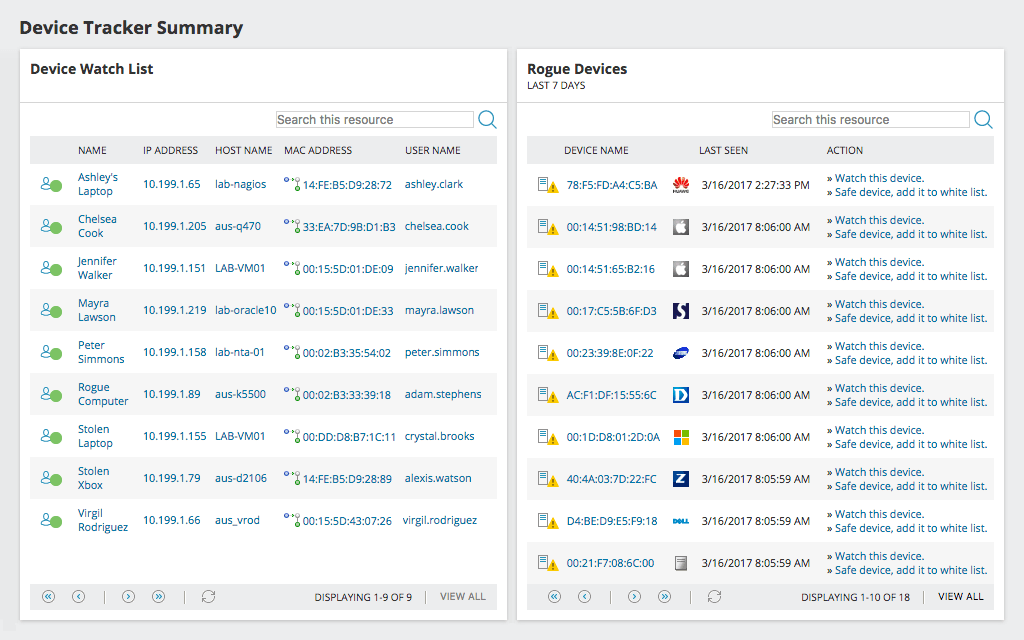
For even more control, SolarWinds UDT is built to help you more easily whitelist endpoints approved to access your network and create watch lists of devices or users you want to monitor further. When a device that is not on your whitelist or a device or user on your watch connects to the network, you can receive an automatic alert. Additionally, UDT provides click-of-a-button port shutdown, which can help you remotely shut down a potentially compromised port while you can investigate further.
With SolarWinds User Device Tracker, not only can you analyze port usage and capacity on your network, but you can also monitor your network’s users, devices, and ports. UDT makes it easier to find exactly where users and devices are connected in your network with regular polling of switches and routers for data to better inform you about connections.
UDT is built to automatically store current and historical information about where and when a user has connected to your network, so you can track a user’s connection trail through your organization. When it comes to capacity analysis and monitoring, UDT can provide built-in reporting to help you better understand switch port usage data and analyze capacity, including how many ports are used on switches currently and over time, so you can clearly understand just how the ports on your switches are being used.
Network port scanning through SolarWinds UDT is designed to help you control your network’s connectivity landscape with detailed precision. For instance, you can find the current location of a user. You can also locate network ports that aren’t in use and view individual ports per switch to see which ports are vacant.
For quick troubleshooting and easy breach mitigation, UDT lets you rapidly and effectively respond to events and possible security threats, namely by giving you visibility over what MAC addresses and hostnames connect to your network. For suspicious activity, UDT provides a connection trail, detailing where a specific user has been on the network as well as their last known location before disconnecting.
UDT also reduces latency issues and other IT roadblocks by discovering switches operating at or near full capacity, so that you can prevent those switches from overloading and slowing your business down.
Finding and importing existing network users and devices is an important capability for network port scanning software and can help you get started understanding port usage and capacity faster.
SolarWinds User Device Tracker takes a two-step approach to discovering and adding network devices by first adding network devices to monitor and then adding the ports to monitor on those devices.
Adding devices is simple thanks to the built-in Network Sonar Discovery Wizard. The Network Sonar Discovery Wizard is designed to recognize network devices already in your SolarWinds Platform database and prevents you from importing duplicate devices. Once your devices are discovered, you can use the DISCOVER MY PORTS option in Discovery Central to discover and add ports to UDT.
SolarWinds UDT goes beyond typical port scanning. With UDT, you can easily pinpoint what ports specific devices are using. You can also configure UDT to show you the collective usage percentage of all ports in your network for quick and easy capacity and operational checks.
Endpoint-to-endpoint security is key to protecting any sprawling network. UDT’s advanced port scanner helps admins pull up a running log of users’ connection histories by searching for their names. In addition, UDT offers a clear map of all the wireless devices linked to your network for an accurate picture of who and what is interacting with your communication system at any given moment.
Network port scanning involves sweeping insight into who and what is connected to your network and through which port. Not participating in this vital cybersecurity feature can easily leave your entire organization vulnerable and susceptible to breach. Leaving ports unmonitored is akin to leaving your front door unlocked and open for any passersby to enter through—you won’t know who stops by and what they do during their visit.
A network port scanner helps identify lists of active hosts and where they’re exchanging information. It can also help organizations locate where firewalls and other security foundations are placed and where they’re lacking to minimize unauthorized access. In port scanning, either transmission control protocol (TCP) or user datagram protocol (UDP) is used. TCP is often more secure than UDP because it does not proceed until the status of a final communication destination is confirmed. This allows data to arrive where it’s supposed to arrive accurately. On the other hand, UDP disregards destination status and sends a packet of data to any port—even to dead ends.
Port scanning gives administrators information about what services and applications are running, network services fortified with authentication features, what users and devices are connected, and general traffic volumes for each port. Overall, a network port scanner is a lighthouse shining visibility onto its endpoints to watch activity and prohibit entry to rogue actors.
A network port scanner is capable of transmitting requests to designated ports and receiving responses with real-time status information. They can determine whether ports are open, closed, or filtered. Open ports are fully functioning and easily accessible active endpoints. Closed ports are available but aren’t in current use. Filtered ports either don’t respond to scan requests or prompt error messages, signaling a firewall or security feature is in place.
Some quality network port scanning tools can go beyond simply checking if ports are open and closed. They can also log what devices are connected and where, which can help provide deeper insights into everything from device and port management to capacity planning.
Port scanning tools also allow you to find a switch or port where a particular entity is connected by filtering through MAC addresses, hostnames, IP addresses, usernames, vendors, and more. This can give you a better idea of what types of ports certain users tend to flock to, helping administrators better track and analyze traffic behavior.
There are a few different types of scans network port monitoring tools can use, including:
Port scanning not only helps you stay aware of which ports are open, but it also can help you identify and block unauthorized users fast. Some advanced network port scanning and device tracking tools let you create device whitelists to more quickly identify and alert you on the presence of rogue devices. If a compromised port is found, an advanced port scanner like SolarWinds User Device Tracker (UDT) lets you shut down the port remotely before the attached rogue device can access the rest of your network.
Cybercriminals also use advanced port scanners to find unmonitored ports they can sneak into, so if your organization is not conducting regular port sweeps, they’re already several steps ahead and may have already obtained sensitive data unnoticed. A reliable network port scanner like UDT helps track past and present connection information to spot and restrict unauthorized users.
Network port scanning and device tracking software are also important when it comes to planning for the future and avoiding unnecessary costs. These types of network software make it easy to identify ports operating near capacity and switches with unused ports. This information helps with planning for your future capacity needs, so you can make intelligent purchasing decisions.
UDT offers powerful switch port management along with automated user and device discovery and tracking designed to automatically discover, map, and monitor switch ports for you, helping you maintain control over exactly who and what connects to your network.
Automated scans support endpoint-level security otherwise impossible to achieve manually, especially for a large enterprise housing thousands of users and devices at once. By generating detailed reports about port and switch status through an IP port scanner like UDT, administrators can better recognize odd patterns and traffic flows within an organization. Plus, UDT lets you schedule regular scans for a consistent, up-to-date snapshot of your network.
The scanning solutions in UDT are designed to perform regular poll switches and routers to help you determine what devices and users are connected and where. The device whitelisting feature in this high-level network port scanner can also make it easier to help you identify rogue devices faster, with the ability to send an alert that can also trigger an action and allow you to remotely shut down the port while you investigate.
The larger your network, the harder it is to keep track of all endpoints and, ultimately, the more vulnerable it becomes. Integrated with SolarWinds NetFlow Traffic Analyzer (NTA), UDT makes it a breeze to locate and configure access blocks to keep unwanted visitors out of your LAN or wireless network. Also, UDT uses its IP port scanner to start monitoring endpoints and log activity immediately, so you don’t have to.
You can also set up a running whitelist or watch list to monitor for known adversaries. When one of these users attempts a breach, UDT deploys an alert and lets you remotely shut down an infiltrated port for immediate protection. Between automated scans, comprehensive activity and status reports, and advanced threat detection, UDT is one network port scanner your company can’t miss out on.
Network port scanning involves sweeping insight into who and what is connected to your network and through which port. Not participating in this vital cybersecurity feature can easily leave your entire organization vulnerable and susceptible to breach. Leaving ports unmonitored is akin to leaving your front door unlocked and open for any passersby to enter through—you won’t know who stops by and what they do during their visit.
A network port scanner helps identify lists of active hosts and where they’re exchanging information. It can also help organizations locate where firewalls and other security foundations are placed and where they’re lacking to minimize unauthorized access. In port scanning, either transmission control protocol (TCP) or user datagram protocol (UDP) is used. TCP is often more secure than UDP because it does not proceed until the status of a final communication destination is confirmed. This allows data to arrive where it’s supposed to arrive accurately. On the other hand, UDP disregards destination status and sends a packet of data to any port—even to dead ends.
Port scanning gives administrators information about what services and applications are running, network services fortified with authentication features, what users and devices are connected, and general traffic volumes for each port. Overall, a network port scanner is a lighthouse shining visibility onto its endpoints to watch activity and prohibit entry to rogue actors.
A network port scanner is capable of transmitting requests to designated ports and receiving responses with real-time status information. They can determine whether ports are open, closed, or filtered. Open ports are fully functioning and easily accessible active endpoints. Closed ports are available but aren’t in current use. Filtered ports either don’t respond to scan requests or prompt error messages, signaling a firewall or security feature is in place.
Some quality network port scanning tools can go beyond simply checking if ports are open and closed. They can also log what devices are connected and where, which can help provide deeper insights into everything from device and port management to capacity planning.
Port scanning tools also allow you to find a switch or port where a particular entity is connected by filtering through MAC addresses, hostnames, IP addresses, usernames, vendors, and more. This can give you a better idea of what types of ports certain users tend to flock to, helping administrators better track and analyze traffic behavior.
There are a few different types of scans network port monitoring tools can use, including:
Port scanning not only helps you stay aware of which ports are open, but it also can help you identify and block unauthorized users fast. Some advanced network port scanning and device tracking tools let you create device whitelists to more quickly identify and alert you on the presence of rogue devices. If a compromised port is found, an advanced port scanner like SolarWinds User Device Tracker (UDT) lets you shut down the port remotely before the attached rogue device can access the rest of your network.
Cybercriminals also use advanced port scanners to find unmonitored ports they can sneak into, so if your organization is not conducting regular port sweeps, they’re already several steps ahead and may have already obtained sensitive data unnoticed. A reliable network port scanner like UDT helps track past and present connection information to spot and restrict unauthorized users.
Network port scanning and device tracking software are also important when it comes to planning for the future and avoiding unnecessary costs. These types of network software make it easy to identify ports operating near capacity and switches with unused ports. This information helps with planning for your future capacity needs, so you can make intelligent purchasing decisions.
UDT offers powerful switch port management along with automated user and device discovery and tracking designed to automatically discover, map, and monitor switch ports for you, helping you maintain control over exactly who and what connects to your network.
Automated scans support endpoint-level security otherwise impossible to achieve manually, especially for a large enterprise housing thousands of users and devices at once. By generating detailed reports about port and switch status through an IP port scanner like UDT, administrators can better recognize odd patterns and traffic flows within an organization. Plus, UDT lets you schedule regular scans for a consistent, up-to-date snapshot of your network.
The scanning solutions in UDT are designed to perform regular poll switches and routers to help you determine what devices and users are connected and where. The device whitelisting feature in this high-level network port scanner can also make it easier to help you identify rogue devices faster, with the ability to send an alert that can also trigger an action and allow you to remotely shut down the port while you investigate.
The larger your network, the harder it is to keep track of all endpoints and, ultimately, the more vulnerable it becomes. Integrated with SolarWinds NetFlow Traffic Analyzer (NTA), UDT makes it a breeze to locate and configure access blocks to keep unwanted visitors out of your LAN or wireless network. Also, UDT uses its IP port scanner to start monitoring endpoints and log activity immediately, so you don’t have to.
You can also set up a running whitelist or watch list to monitor for known adversaries. When one of these users attempts a breach, UDT deploys an alert and lets you remotely shut down an infiltrated port for immediate protection. Between automated scans, comprehensive activity and status reports, and advanced threat detection, UDT is one network port scanner your company can’t miss out on.
User Device Tracker
Track endpoint devices by IP or MAC address, username, or hostname
Monitor wireless access points and switches for performance and errors
Know how switches and ports are being used, and which switches are nearing capacity