- Events
-
Partners
- Government
- Customer Portal
- Contact Us
- Contact Sales
-
English
Successful wireless network monitoring begins with discovering the devices on your wireless network. With SolarWinds® Network Performance Monitor (NPM), you can recognize wireless access points (APs) and controllers as wireless devices as soon as the network discovery process is completed. The integrated Wireless Poller and WLAN monitoring features in SolarWinds NPM can help you more easily keep track of wireless thin and autonomous APs and their associated clients.
With NPM, you can monitor wireless networks alongside your wired devices by using alerts, reports, and top 10 lists of your infrastructure, including wireless controllers and devices from Aruba, Cisco, Ruckus, Motorola, Meru Networks, and Meraki cloud-managed access points.
Wireless network monitoring can help you better ensure Wi-Fi performance and more easily troubleshoot slowdowns or outages.
SolarWinds Network Performance Monitor wireless network monitoring software is built to track Meraki cloud-managed access points and their corresponding client details including client names, signal strength, IP addresses, MAC addresses, and an Rx/Tx summary from your dashboard.
When you use NPM, you get access to over 15 out-of-the-box wireless network management reports designed to help you stay on top of wireless network performance. Those include reports on wireless availability, average and peak number of clients, and rogue access point detection points over varying time frames.
Monitoring your wireless network devices is more than being aware of what’s going on in your wireless network. It’s also designed to help you more easily resolve any issues in your wireless network.
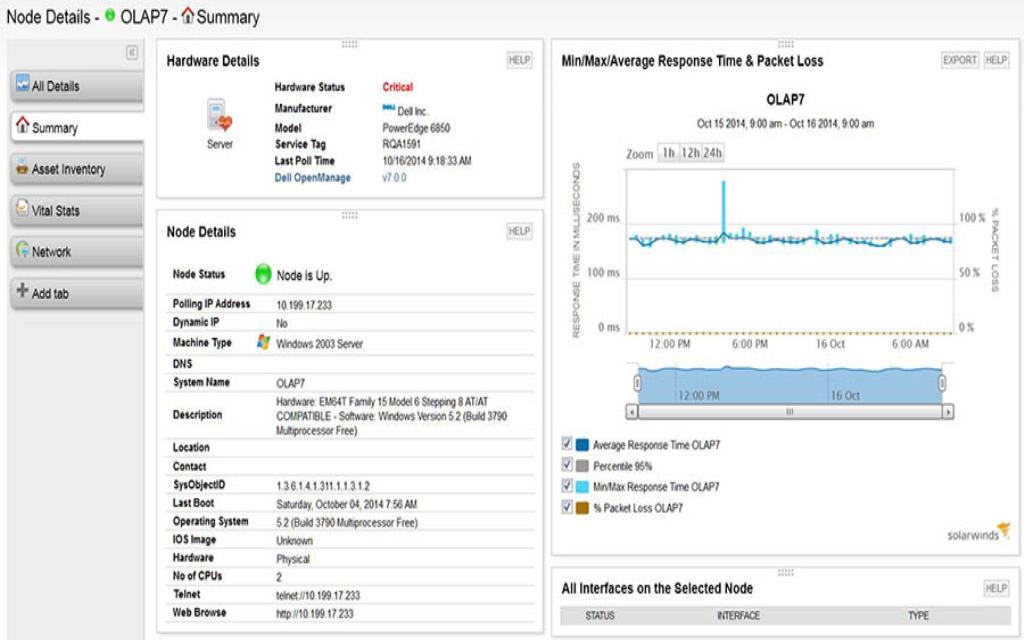
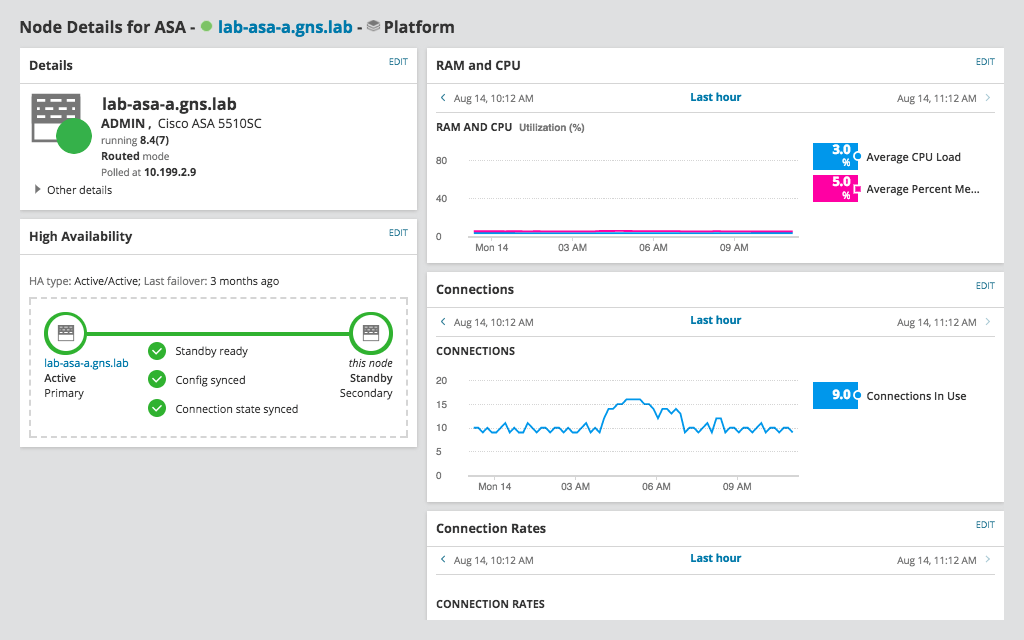
With SolarWinds Network Performance Monitor, you can get alerted when a wireless node enters critical status, and then you can use the dashboard to quickly drill down into the node and view device details, including current node status, device information, average response time, packet loss, and more, to identify the root cause of the problem, make more informed decisions when troubleshooting, and resolve issues before they can affect your networks and your business operations more easily.
Wireless network monitoring is the process of monitoring key aspects of an environment’s wireless network to have the insight you need to maintain network performance more easily. Using a wireless network monitor, you can collect and analyze wireless network health and performance data, including wireless coverage, signal strength, connected clients, and performance statistics for wireless access points.
Wireless network monitoring is typically a part of a broader network monitoring strategy, which involves tracking key metrics tied to a network’s performance to prevent downtime or slowdowns that can affect end users. While general network monitoring focuses on all aspects of your network (including wired elements), WLAN monitoring specifically focuses on the wireless elements, including access points, controllers, and more.
At a time when more and more organizations are embracing wireless network elements as part of a modern business strategy, it’s more important now than ever before to use a network monitoring solution specifically designed to offer wireless monitoring alongside wired network monitoring insights.
Wireless network monitoring can help you maintain optimal performance and availability across your entire network. To achieve this, wireless network monitoring involves consistently scanning and tracking wireless devices for availability and fault to proactively detect issues that can affect Wi-Fi performance.
Wireless network monitoring can help you by providing proactive visibility to help support faster root cause identification and troubleshooting. Using a wireless network monitor to continuously collect key metrics on wireless network performance by regularly polling wireless devices for packet loss, latency, packet metadata, TCP retransmits, and more can help you more easily drill down into details on each specific wireless node.
Effective wireless network monitoring can help you get the context and performance data you need to respond and resolve issues more quickly, from users having difficulty with frequent network service interruptions that interfere with their ability to work and can lead to a loss of productivity, to more tedious troubleshooting and problem resolution efforts that interfere with network functionality and business productivity. Without wireless network monitoring, it can also be more difficult to find rogue devices, posing serious risk to the organization.
Investing in a quality wireless network monitor can help you more easily maintain productivity and overall business function.
For example, monitoring wireless network can help you more easily identify root causes of performance issues. Using a cross-stack data correlation approach from a quality wireless network monitoring tool can help you identify the root causes of network issues more quickly and supports more targeted troubleshooting, which translates directly into saved time and boosted productivity.
Wireless network monitoring tools are designed to provide you with visibility into different elements of your network, analyze packet traffic, collect essential device metrics, and present this information in a useful way by discovering the devices on your network and then continuously tracking key metrics tied to their performance, alerting you if any issues arise. Wireless network monitoring tools can monitor wireless clients, APs, rogue APs, thin APs, and wireless controllers.
Once a wireless device is discovered, the tool can perform an automatic inventory search before adding the wireless interface to the dashboard and starting the polling process. If the tool detects an issue with any of the monitored wireless devices—including issues tied to availability or fault—it can send an automatic alert to the proper members of your team. From there, you can navigate to the tool’s dashboard and see both basic details and information on the metrics that triggered the alert, such as the AP name, SSID, IP address, device type, channels used, the number of clients currently connected for your access points and the client name, IP address, SSID, MAC address, time connected, data rate, Received Signal Strength Indication (RSSI), bytes received, and bytes transmitted for clients.
With SolarWinds Network Performance Monitor, wireless network monitoring is designed to be an extension of the tool’s overall network monitoring functionality. Once NPM discovers your wired network, you can begin the process of discovering and adding wireless devices to your database for monitoring. Whenever a new wireless device is added and detected, NPM performs an automatic inventory search before beginning the polling process to collect and analyze various key metrics tied to fault, availability, and overall performance.
The wireless network monitor in NPM is built to keep track of thin access points and their corresponding client summary to help you more easily identify, monitor, diagnose, and troubleshoot network issues even before users report them. This can give you an advantage when it comes to identifying problems before they can seriously impact productivity. NPM can also help you better visualize your networks by discovering your wired and wireless devices, which can give you insights into the relationships between devices and help you identify the root causes of problems for faster resolution.
Wireless network monitoring is the process of monitoring key aspects of an environment’s wireless network to have the insight you need to maintain network performance more easily. Using a wireless network monitor, you can collect and analyze wireless network health and performance data, including wireless coverage, signal strength, connected clients, and performance statistics for wireless access points.
Wireless network monitoring is typically a part of a broader network monitoring strategy, which involves tracking key metrics tied to a network’s performance to prevent downtime or slowdowns that can affect end users. While general network monitoring focuses on all aspects of your network (including wired elements), WLAN monitoring specifically focuses on the wireless elements, including access points, controllers, and more.
At a time when more and more organizations are embracing wireless network elements as part of a modern business strategy, it’s more important now than ever before to use a network monitoring solution specifically designed to offer wireless monitoring alongside wired network monitoring insights.
Wireless network monitoring can help you maintain optimal performance and availability across your entire network. To achieve this, wireless network monitoring involves consistently scanning and tracking wireless devices for availability and fault to proactively detect issues that can affect Wi-Fi performance.
Wireless network monitoring can help you by providing proactive visibility to help support faster root cause identification and troubleshooting. Using a wireless network monitor to continuously collect key metrics on wireless network performance by regularly polling wireless devices for packet loss, latency, packet metadata, TCP retransmits, and more can help you more easily drill down into details on each specific wireless node.
Effective wireless network monitoring can help you get the context and performance data you need to respond and resolve issues more quickly, from users having difficulty with frequent network service interruptions that interfere with their ability to work and can lead to a loss of productivity, to more tedious troubleshooting and problem resolution efforts that interfere with network functionality and business productivity. Without wireless network monitoring, it can also be more difficult to find rogue devices, posing serious risk to the organization.
Investing in a quality wireless network monitor can help you more easily maintain productivity and overall business function.
For example, monitoring wireless network can help you more easily identify root causes of performance issues. Using a cross-stack data correlation approach from a quality wireless network monitoring tool can help you identify the root causes of network issues more quickly and supports more targeted troubleshooting, which translates directly into saved time and boosted productivity.
Wireless network monitoring tools are designed to provide you with visibility into different elements of your network, analyze packet traffic, collect essential device metrics, and present this information in a useful way by discovering the devices on your network and then continuously tracking key metrics tied to their performance, alerting you if any issues arise. Wireless network monitoring tools can monitor wireless clients, APs, rogue APs, thin APs, and wireless controllers.
Once a wireless device is discovered, the tool can perform an automatic inventory search before adding the wireless interface to the dashboard and starting the polling process. If the tool detects an issue with any of the monitored wireless devices—including issues tied to availability or fault—it can send an automatic alert to the proper members of your team. From there, you can navigate to the tool’s dashboard and see both basic details and information on the metrics that triggered the alert, such as the AP name, SSID, IP address, device type, channels used, the number of clients currently connected for your access points and the client name, IP address, SSID, MAC address, time connected, data rate, Received Signal Strength Indication (RSSI), bytes received, and bytes transmitted for clients.
With SolarWinds Network Performance Monitor, wireless network monitoring is designed to be an extension of the tool’s overall network monitoring functionality. Once NPM discovers your wired network, you can begin the process of discovering and adding wireless devices to your database for monitoring. Whenever a new wireless device is added and detected, NPM performs an automatic inventory search before beginning the polling process to collect and analyze various key metrics tied to fault, availability, and overall performance.
The wireless network monitor in NPM is built to keep track of thin access points and their corresponding client summary to help you more easily identify, monitor, diagnose, and troubleshoot network issues even before users report them. This can give you an advantage when it comes to identifying problems before they can seriously impact productivity. NPM can also help you better visualize your networks by discovering your wired and wireless devices, which can give you insights into the relationships between devices and help you identify the root causes of problems for faster resolution.
Network Performance Monitor
Benefit from comprehensive fault monitoring for your wireless network.
Get to the root cause quicker with intelligent, dependency and topology-aware network alerts.
Hop-by-hop analysis of cloud or on-prem applications or services.