- Events
-
Partners
- Government
- Customer Portal
- Contact Us
- Contact Sales
-
English
NCM includes automated config backup capabilities to help ensure your network configuration archive is up-to-date and easily accessible. These features can also help facilitate faster disaster recovery for critical devices and applications that may experience downtime caused by bad configuration changes.
NCM maintains a database of the backed-up configurations, which can help you easily undo security misconfigurations by restoring switches and routers to the correct archived configurations.
Routers are integral to the efficient transmission of information across and between networks. When properly configured, they can also provide additional layers of security for a network by preventing malware from being transmitted between devices.
With NCM, you can help ensure proper security configuration management and quickly deploy any necessary changes to specifically targeted routers using the built-in, device-neutral configuration templates to avoid security misconfigurations with ease.
The term security misconfiguration refers to an improper application or server configuration that can make the networked environment vulnerable to cyberthreats.
Although the concept of security misconfigurations can apply at any level of an application stack, network security misconfigurations refer to improper configurations for network devices, particularly devices affecting your network security, like routers. It’s important to protect your network from security threats by using the correct configurations, protecting those configurations from unauthorized changes, and backing up configuration settings in case they’re needed for recovery.
Security misconfigurations can lead to unauthorized access, costly data breaches, and compliance breaches. Cyberthreats are increasingly common and financially damaging, and signature-based defenses aren’t always adequate for detecting today’s most sophisticated threats. IT professionals need to know ASAP what changes are made to critical assets, devices, or resources, in addition to when potentially malicious activity is detected.
The sheer number of devices, frameworks, and applications across the entire network can make it difficult and time-consuming for IT professionals to manually identify and fix misconfigurations. The process could involve taking a manual inventory of your devices and intermittently checking the current configurations of each one. One server has thousands of ports, configurations, and services, all of which need to be managed. This can feel impossible to do manually for individual devices, let alone for an entire network.
An easier and more effective approach for identifying security misconfigurations on your network can include implementing a robust security configuration management software solution.
A security configuration management solution can automatically update an inventory of devices, highlight changes made to configurations, and catch potentially insecure configurations. By using security configuration management tools to automate tracking and management processes, you can benefit from a smart alerting system that can let you know when a security misconfiguration has been detected and offers a recommended approach for resolving the issue.
In addition to using a security configuration management tool to monitor for misconfigurations, there are steps and best practices IT professionals can take to help make their networks more secure.
You should lock down device configurations to prevent unauthorized changes. When a user makes changes to a device, these changes are often not made with network security in mind and could create a potential security vulnerability. Without visibility and control, you may also be less likely to notice the change until it causes a problem down the line. Locking down device configurations can also allow you to better control what changes are made by authorized employees, because you can ensure they receive proper security configuration training to enable them to make informed decisions aligned with security best practices.
You should also back up your current, correct configurations. If your network experiences unauthorized changes or unexpected disaster, you can quickly revert devices to correct settings or apply previous configurations to a replacement device.
It’s also important to perform regular network audits for a complete overview of configurations and changes. By running automated configuration reports, you can see changes and view other policy and security information. You can also leverage audit tools to highlight exactly which settings have changed from their baselines, so you can act quickly to resolve problems.
One common source of security misconfigurations are default security settings. The security architectures of many applications don’t align with security best practices when left at their default settings, and one preliminary step IT professionals can take to reduce misconfigurations is to carefully define and deploy configurations based for each application, database, web server, or platform.
Security misconfigurations can also occur due to human error. If someone makes an unauthorized or improper change, it may go unnoticed. Many security misconfigurations caused by human error can be caught through automation and repeatable processes to help prevent improper configurations from slipping through the cracks.
Failing to implement regular or automatic software updates can also cause security misconfigurations. Software patches often include logs of the vulnerabilities they fix, which cyberattackers can use to identify potential vulnerabilities and better pinpoint their attacks, so keeping software, applications, and operating systems updated is essential to reducing network misconfigurations. Otherwise, you risk leaving sensitive or confidential data exposed.
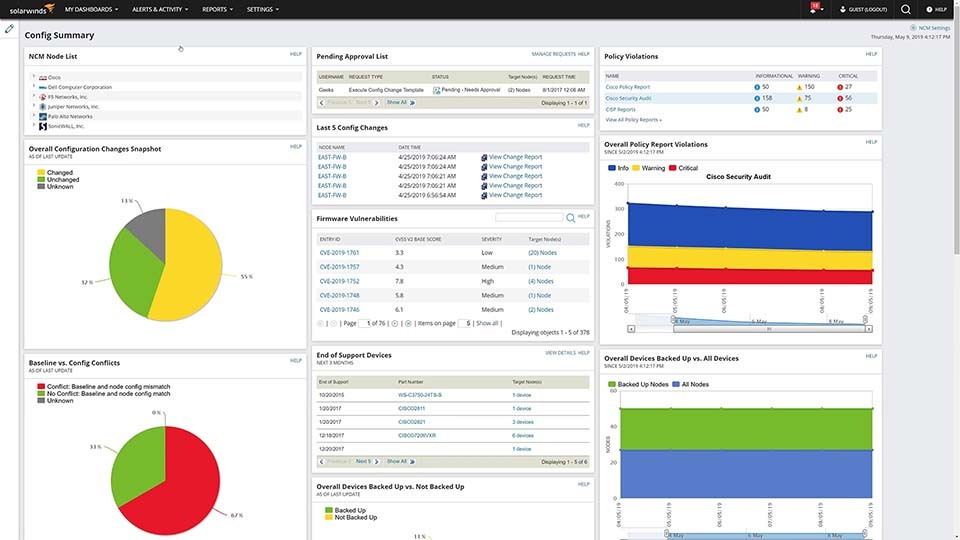
NCM is a comprehensive network security configuration management toolset designed to grant visibility into network operational issues and security misconfigurations, so users can resolve them quickly.
NCM can help you perform network audits to demonstrate security, compliance, and prevent downtime. When performing audits, NCM can integrate with the National Vulnerability Database to identify the latest network security issues and can then guide you through upgrading your devices to prevent security misconfigurations and other vulnerabilities.
With more than 50 built-in reporting templates, NCM helps make it easier to notify stakeholders and keep key players up to date on the state of the network, configuration changes, security misconfigurations, planning requirements, and more.
NCM can manage multi-vendor systems regardless of device brand and includes a suite of features specifically designed for Cisco equipment. For example, using NCM alongside Network Performance Monitor can grant you deeper Cisco ASA monitoring insights into the health and performance of your entire environment, including objects, contexts, and access control lists in a single pane of glass.
In addition to security misconfiguration management, NCM provides tools for managing and monitoring switches, and allows admins to similarly deploy wide-scale changes or automated routine changes to targeted devices.
The term security misconfiguration refers to an improper application or server configuration that can make the networked environment vulnerable to cyberthreats.
Although the concept of security misconfigurations can apply at any level of an application stack, network security misconfigurations refer to improper configurations for network devices, particularly devices affecting your network security, like routers. It’s important to protect your network from security threats by using the correct configurations, protecting those configurations from unauthorized changes, and backing up configuration settings in case they’re needed for recovery.
Security misconfigurations can lead to unauthorized access, costly data breaches, and compliance breaches. Cyberthreats are increasingly common and financially damaging, and signature-based defenses aren’t always adequate for detecting today’s most sophisticated threats. IT professionals need to know ASAP what changes are made to critical assets, devices, or resources, in addition to when potentially malicious activity is detected.
The sheer number of devices, frameworks, and applications across the entire network can make it difficult and time-consuming for IT professionals to manually identify and fix misconfigurations. The process could involve taking a manual inventory of your devices and intermittently checking the current configurations of each one. One server has thousands of ports, configurations, and services, all of which need to be managed. This can feel impossible to do manually for individual devices, let alone for an entire network.
An easier and more effective approach for identifying security misconfigurations on your network can include implementing a robust security configuration management software solution.
A security configuration management solution can automatically update an inventory of devices, highlight changes made to configurations, and catch potentially insecure configurations. By using security configuration management tools to automate tracking and management processes, you can benefit from a smart alerting system that can let you know when a security misconfiguration has been detected and offers a recommended approach for resolving the issue.
In addition to using a security configuration management tool to monitor for misconfigurations, there are steps and best practices IT professionals can take to help make their networks more secure.
You should lock down device configurations to prevent unauthorized changes. When a user makes changes to a device, these changes are often not made with network security in mind and could create a potential security vulnerability. Without visibility and control, you may also be less likely to notice the change until it causes a problem down the line. Locking down device configurations can also allow you to better control what changes are made by authorized employees, because you can ensure they receive proper security configuration training to enable them to make informed decisions aligned with security best practices.
You should also back up your current, correct configurations. If your network experiences unauthorized changes or unexpected disaster, you can quickly revert devices to correct settings or apply previous configurations to a replacement device.
It’s also important to perform regular network audits for a complete overview of configurations and changes. By running automated configuration reports, you can see changes and view other policy and security information. You can also leverage audit tools to highlight exactly which settings have changed from their baselines, so you can act quickly to resolve problems.
One common source of security misconfigurations are default security settings. The security architectures of many applications don’t align with security best practices when left at their default settings, and one preliminary step IT professionals can take to reduce misconfigurations is to carefully define and deploy configurations based for each application, database, web server, or platform.
Security misconfigurations can also occur due to human error. If someone makes an unauthorized or improper change, it may go unnoticed. Many security misconfigurations caused by human error can be caught through automation and repeatable processes to help prevent improper configurations from slipping through the cracks.
Failing to implement regular or automatic software updates can also cause security misconfigurations. Software patches often include logs of the vulnerabilities they fix, which cyberattackers can use to identify potential vulnerabilities and better pinpoint their attacks, so keeping software, applications, and operating systems updated is essential to reducing network misconfigurations. Otherwise, you risk leaving sensitive or confidential data exposed.
NCM is a comprehensive network security configuration management toolset designed to grant visibility into network operational issues and security misconfigurations, so users can resolve them quickly.
NCM can help you perform network audits to demonstrate security, compliance, and prevent downtime. When performing audits, NCM can integrate with the National Vulnerability Database to identify the latest network security issues and can then guide you through upgrading your devices to prevent security misconfigurations and other vulnerabilities.
With more than 50 built-in reporting templates, NCM helps make it easier to notify stakeholders and keep key players up to date on the state of the network, configuration changes, security misconfigurations, planning requirements, and more.
NCM can manage multi-vendor systems regardless of device brand and includes a suite of features specifically designed for Cisco equipment. For example, using NCM alongside Network Performance Monitor can grant you deeper Cisco ASA monitoring insights into the health and performance of your entire environment, including objects, contexts, and access control lists in a single pane of glass.
In addition to security misconfiguration management, NCM provides tools for managing and monitoring switches, and allows admins to similarly deploy wide-scale changes or automated routine changes to targeted devices.
Network Configuration Manager
Update, archive, and access configuration backups for network devices.
Perform network audits to demonstrate security.
More easily prevent security misconfigurations by using an automated tool.