- Events
-
Partners
- Government
- Customer Portal
- Contact Us
- Contact Sales
-
English
You can save time and labor by using a tool capable of automatically tracking device changes and helping you confirm they’re all authorized and successful.
Network Configuration Manager is built to simplify change detection by downloading and comparing configs to their prior, backed-up versions while monitoring syslog and SNMP messages for real-time notifications. In addition to detecting changes, NCM helps identify who made the change and provides a visual comparison highlighting the config changes.
No matter the size of your business, network device management can help you save money by enhancing your cybersecurity and reducing downtime. Unauthorized or failed config changes can lead to downtime, loss of productivity, or even security vulnerabilities, which can allow bad actors to access your network.
With Network Configuration Manager, you have the tools you need to optimize your network device management and easily restore devices to their last secure, functional configs.
Network device management is the process through which you manage and control network devices, from computers, servers, and mobile phones to virtual switches and machines. This includes implementation, operation, and maintenance of all the physical and virtual devices making up the network infrastructure.
Network device management involves installing device firmware and software, configuring devices to make sure they perform as expected, and implementing security measures and processes to enhance device and network security. Network device management can include initial device discovery, device configuration and status monitoring, and continued maintenance of the network inventory.
Network device management involves a variety of functions, all of which are intended to help you maintain the security and functioning of devices on a network.
Device Discovery: The first step of network device management is discovering all the devices on your network and creating an inventory of them. When performed manually, this is often a labor-intensive task, as it involves continuously updating device information whenever changes occur. However, with a network device manager, you can automate the process and more easily collect and organize device data in an inventory designed to update whenever device information changes.
Configuration Database: Another function of network device management is the creation and upkeep of a configuration management database to track configurations, updates, and end-of-life information for your devices. This can help you plan for device replacements and contract renewals.
Configuration Management and Backups: The key function of network device management is device configuration management. Managing regular configuration backups is critical for device management. Frequent configuration backups can allow you to more quickly recover from service interruptions and security risks caused by failed or unauthorized configuration changes.
Configuration Permissions: Network device management software can download and compare current configs to their previous versions. With quality network device management tools, you can even see who made the change and a visual representation of what changed. This can make it easier to see whether the config changes were authorized and intentional or whether they need to revert to a previous config using a backup.
Configuration Changes: Network device management is designed to help you more easily make and verify large-scale configuration changes. With the help of network device management software, it’s possible to make bulk config changes—even across an entire network—within minutes instead of days or even weeks.
Network device management is a must for all types and sizes of networks, from small business networks to those of large enterprises. It’s critical for buildings, offices, single or multiple server rooms, and individual or distributed locations. No matter the size of your business, a network device manager is critical for the continued functioning and growth of your network.
When network device management solutions are part of your network management efforts from the start, it can help your business and network grow seamlessly while avoiding costly errors or security issues related to complex device configurations or network architecture.
Instead of needing to constantly manage and update huge, unwieldy spreadsheets of device information, you can use network device management software to automatically create and update your network device inventory. If you foresee any growth for your business, it makes sense to invest in quality network device management software.
Managing multiple network devices without automation can be time-consuming and unreliable. If you’re still unsure about whether network device management makes sense for you, ask yourself these questions:
If you answer “Yes” to any of these questions, then having a network device management solution may make sense for you. A network device management tool can help you automatically back up configs, so you can quickly recover failed devices, keep track of config changes, and make bulk config changes.
Network device management can save you time and money while keeping your network devices running.
Configuration change detection is another key purpose of network device management. Trying to manually check configuration changes can be time-consuming, especially in networks with a variety of network admins, users, and operators, all of whom can make config changes. Without manually checking each change, you may have no way of knowing if the changes were authorized or successful.
Detecting changes is important for identifying whether a configuration change has created issues and for discovering whether unauthorized config changes have been made. These unauthorized changes can create significant and costly security risks if they allow bad actors to gain access to your network.
These elements of network device management help ensure faster troubleshooting when issues arise, as you can quickly see whether there’s been a configuration change and whether it might be at fault for a device performance issue. Faster troubleshooting can also help minimize downtime, which can translate directly into financial savings.
The main purpose of network device management tools is to manage device configs. This includes performing bulk configuration changes across a network with the help of scripting and templates. It also includes conducting frequent, automated config backups, so you can always restore devices to the most recent functional configuration if an unauthorized configuration change is made or if an intended configuration change fails.
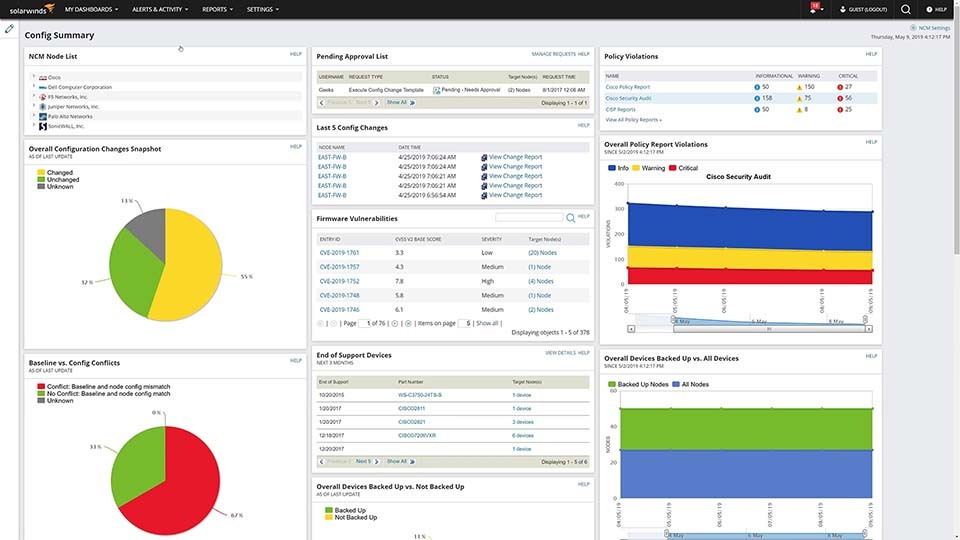
Network device management software can automatically detect changes, providing information on who made the configuration change and where. Since network device management tools automatically perform frequent configuration backups, they can easily compare current configurations to past versions and notify you of any detected changes in real time.
SolarWinds® Network Configuration Manager is designed to be more than just a powerful network device management solution. It includes a variety of options for automating backups, creating and maintaining inventories, helping you demonstrate compliance, and more.
The features in NCM features allow you to do the following:
Here are a few of the additional features included in Network Configuration Manager:
Because NCM is built on the SolarWinds Orion® Platform, it can be used alongside other SolarWinds tools for deeper insights across your network from a single, unified dashboard.
Network device management is the process through which you manage and control network devices, from computers, servers, and mobile phones to virtual switches and machines. This includes implementation, operation, and maintenance of all the physical and virtual devices making up the network infrastructure.
Network device management involves installing device firmware and software, configuring devices to make sure they perform as expected, and implementing security measures and processes to enhance device and network security. Network device management can include initial device discovery, device configuration and status monitoring, and continued maintenance of the network inventory.
Network device management involves a variety of functions, all of which are intended to help you maintain the security and functioning of devices on a network.
Device Discovery: The first step of network device management is discovering all the devices on your network and creating an inventory of them. When performed manually, this is often a labor-intensive task, as it involves continuously updating device information whenever changes occur. However, with a network device manager, you can automate the process and more easily collect and organize device data in an inventory designed to update whenever device information changes.
Configuration Database: Another function of network device management is the creation and upkeep of a configuration management database to track configurations, updates, and end-of-life information for your devices. This can help you plan for device replacements and contract renewals.
Configuration Management and Backups: The key function of network device management is device configuration management. Managing regular configuration backups is critical for device management. Frequent configuration backups can allow you to more quickly recover from service interruptions and security risks caused by failed or unauthorized configuration changes.
Configuration Permissions: Network device management software can download and compare current configs to their previous versions. With quality network device management tools, you can even see who made the change and a visual representation of what changed. This can make it easier to see whether the config changes were authorized and intentional or whether they need to revert to a previous config using a backup.
Configuration Changes: Network device management is designed to help you more easily make and verify large-scale configuration changes. With the help of network device management software, it’s possible to make bulk config changes—even across an entire network—within minutes instead of days or even weeks.
Network device management is a must for all types and sizes of networks, from small business networks to those of large enterprises. It’s critical for buildings, offices, single or multiple server rooms, and individual or distributed locations. No matter the size of your business, a network device manager is critical for the continued functioning and growth of your network.
When network device management solutions are part of your network management efforts from the start, it can help your business and network grow seamlessly while avoiding costly errors or security issues related to complex device configurations or network architecture.
Instead of needing to constantly manage and update huge, unwieldy spreadsheets of device information, you can use network device management software to automatically create and update your network device inventory. If you foresee any growth for your business, it makes sense to invest in quality network device management software.
Managing multiple network devices without automation can be time-consuming and unreliable. If you’re still unsure about whether network device management makes sense for you, ask yourself these questions:
If you answer “Yes” to any of these questions, then having a network device management solution may make sense for you. A network device management tool can help you automatically back up configs, so you can quickly recover failed devices, keep track of config changes, and make bulk config changes.
Network device management can save you time and money while keeping your network devices running.
Configuration change detection is another key purpose of network device management. Trying to manually check configuration changes can be time-consuming, especially in networks with a variety of network admins, users, and operators, all of whom can make config changes. Without manually checking each change, you may have no way of knowing if the changes were authorized or successful.
Detecting changes is important for identifying whether a configuration change has created issues and for discovering whether unauthorized config changes have been made. These unauthorized changes can create significant and costly security risks if they allow bad actors to gain access to your network.
These elements of network device management help ensure faster troubleshooting when issues arise, as you can quickly see whether there’s been a configuration change and whether it might be at fault for a device performance issue. Faster troubleshooting can also help minimize downtime, which can translate directly into financial savings.
The main purpose of network device management tools is to manage device configs. This includes performing bulk configuration changes across a network with the help of scripting and templates. It also includes conducting frequent, automated config backups, so you can always restore devices to the most recent functional configuration if an unauthorized configuration change is made or if an intended configuration change fails.
Network device management software can automatically detect changes, providing information on who made the configuration change and where. Since network device management tools automatically perform frequent configuration backups, they can easily compare current configurations to past versions and notify you of any detected changes in real time.
SolarWinds® Network Configuration Manager is designed to be more than just a powerful network device management solution. It includes a variety of options for automating backups, creating and maintaining inventories, helping you demonstrate compliance, and more.
The features in NCM features allow you to do the following:
Here are a few of the additional features included in Network Configuration Manager:
Because NCM is built on the SolarWinds Orion® Platform, it can be used alongside other SolarWinds tools for deeper insights across your network from a single, unified dashboard.
Network Configuration Manager
Save time with network device configuration automation.
Stay on top of config changes with real-time change detection and notification.
Easily audit network devices for regulatory and operational compliance.